
Specs are compiled from manufacturer listings and verified buyer reviews and can change over time — please confirm the key details on the product page before buying.
Two monitors on one desk usually means two wobbly bases fighting for the same square foot of space — and a sore neck from screens sitting too low. A good dual monitor stand lifts both screens into one clean footprint. Three specs decide it: monitor weight, screen size, and whether your desk can take a clamp. Below are eight stands, sorted by use case so you can pick in minutes.
I’m Mohammad Maruf — the founder and writer behind KitchPrep. This guide is built by comparing the manufacturers’ published specifications and the patterns across verified customer reviews, so you get each pick’s real strengths and trade-offs instead of marketing spin.
The VIVO STAND-V002 is the one most people should buy. It is the crowd favorite at 4.6 stars, and it is the stand we lean on as our top pick in this stand for 2 computer screens roundup.
Our Picks at a Glance

How To Choose The Best Stand for 2 Computer Screens
Most buyers hunt for the cheapest dual arm first, then return it a week later. Sixty seconds with your monitor’s manual saves that trip. Three numbers — weight, screen size, and VESA pattern — decide which stands can physically hold your setup.
Weight capacity per arm
Every dual monitor stand is rated by how much each arm can carry. A 24-inch monitor often weighs under 10 lbs. A 32-inch panel can push past 15 lbs. If your screen is heavier than the arm’s ceiling, the joint slides and tilts down under load. It never holds the angle you set.
Screen size and VESA pattern
Stands list a screen-size range, like 13 to 30 inches or 13 to 34 inches. That range tells you the arm spread and balance, not just a hard cap. Underneath, the mounting plate bolts to your monitor’s VESA pattern — the square four-hole layout on the back of the screen. Almost every modern screen uses 75x75mm or 100x100mm, so check yours before ordering.
Clamp, grommet, or freestanding
Clamp and grommet bases bolt through or onto the desk edge and free up the surface entirely. That means your keyboard and mouse get the whole desk back. Freestanding risers balance on a weighted foot. They suit glass desks, thin surfaces, or desks pushed flush against a wall.
Quick Comparison
| Model | Best For | Max Screen Size | Max Load Per Arm | Mounting Type | Amazon |
|---|---|---|---|---|---|
| VIVO STAND-V002★ Best Overall | Most dual-monitor desks | 30 inches | 22 lbs | C-clamp or grommet | Amazon |
| HUANUO Dual Monitor StandBest for Stacking | Stacking tall screens vertically | 34 inches | 44 lbs | Freestanding riser | Amazon |
| Mount-It! MI-4781Best Space Saver | Glass desks and wall-adjacent desks | 32 inches | 19.8 lbs | Freestanding base | Amazon |
| Amazon Basics Adjustable Dual Mount | Mixed-size monitor pairs | 32 inches | 22 lbs | C-clamp or grommet | Amazon |
| MOUNT PRO Stacked Vertical Mount | Side-by-side plus stacked layouts | 32 inches | 17.6 lbs | C-clamp or grommet | Amazon |
| Amazon Basics Gas Spring Dual Arm | Frequent height changes | 27 inches | 4.4–15.4 lbs | C-clamp or grommet | Amazon |
| Acer AMS002 Dual Monitor Arm | Wide screens and deep desk reach | 32 inches | 4.4–19.8 lbs | C-clamp or grommet | Amazon |
| ARES WING Stacked Vertical Arm | 49-inch ultrawides and USB charging | 49 inches | 44 lbs | C-clamp or grommet | Amazon |
In‑Depth Reviews
1. VIVO Dual Monitor Desk Mount, Holds 2 Computer Screens up to 30 inches
Our pick — over 4.5★ from 60,500+ verified ratings; the strongest balance of quality and price.
The workhorse that most dual-monitor desks actually need
This stand earns its spot on tilt: it runs a 90-degree maximum tilt, the widest angle on this list, ahead of the HUANUO’s 15 degrees. That means you can angle both panels deep toward your seat, so your screens face you instead of the wall. Each arm carries up to 22 lbs, and it fits screens from 13 to 30 inches. That covers the huge majority of 24-, 27- and 30-inch panels people pair together.
The C-clamp (a screw-tightened bracket that grips the desk edge) holds desks up to 3.25 inches thick. Prefer bolting through the surface? There is a grommet option too. Cable management clips run along the arms and the center pole, so your video and power cables travel with the arm instead of looping off the desk edge. Buyers bring up assembly more than anything else — the detachable VESA bracket plates mean you bolt the plate to the monitor first, then slide the whole screen onto the arm.
What wins people over is how quickly it comes together for the money. The steel build is genuinely solid — steadily rated above cheaper alternatives. Where it asks patience is fine alignment: the joints migrate slightly under load, so heavy panels can tilt down over time and the rotation joints spin a touch freely. If you run a pair of 30-inch panels near the 22 lb ceiling, weigh them first. A lighter pair of 24s or 27s sits rock steady.
What Buyers Praise
- 90-degree tilt lets you angle both screens deeper than the HUANUO’s 15-degree limit
- 22 lbs per arm handles two 27-inch panels comfortably
- Detachable VESA plates make mounting a two-piece job you can do alone
- Cable clips travel along both arms and the center pole
The Honest Caveats
- Joints drift under load, so heavy screens may need re-tightening over time
- Perfect alignment between the two screens takes patience to dial in
Buy it if: you want one sturdy arm holding two 24 to 30-inch screens with the widest tilt here and the easiest install.
Look elsewhere if: you plan to run a pair of 30-inch panels right at the 22 lb arm limit and want zero re-adjusting.
2. HUANUO Dual Monitor Stand for 13 to 34 Inch, Max Load 44 lbs
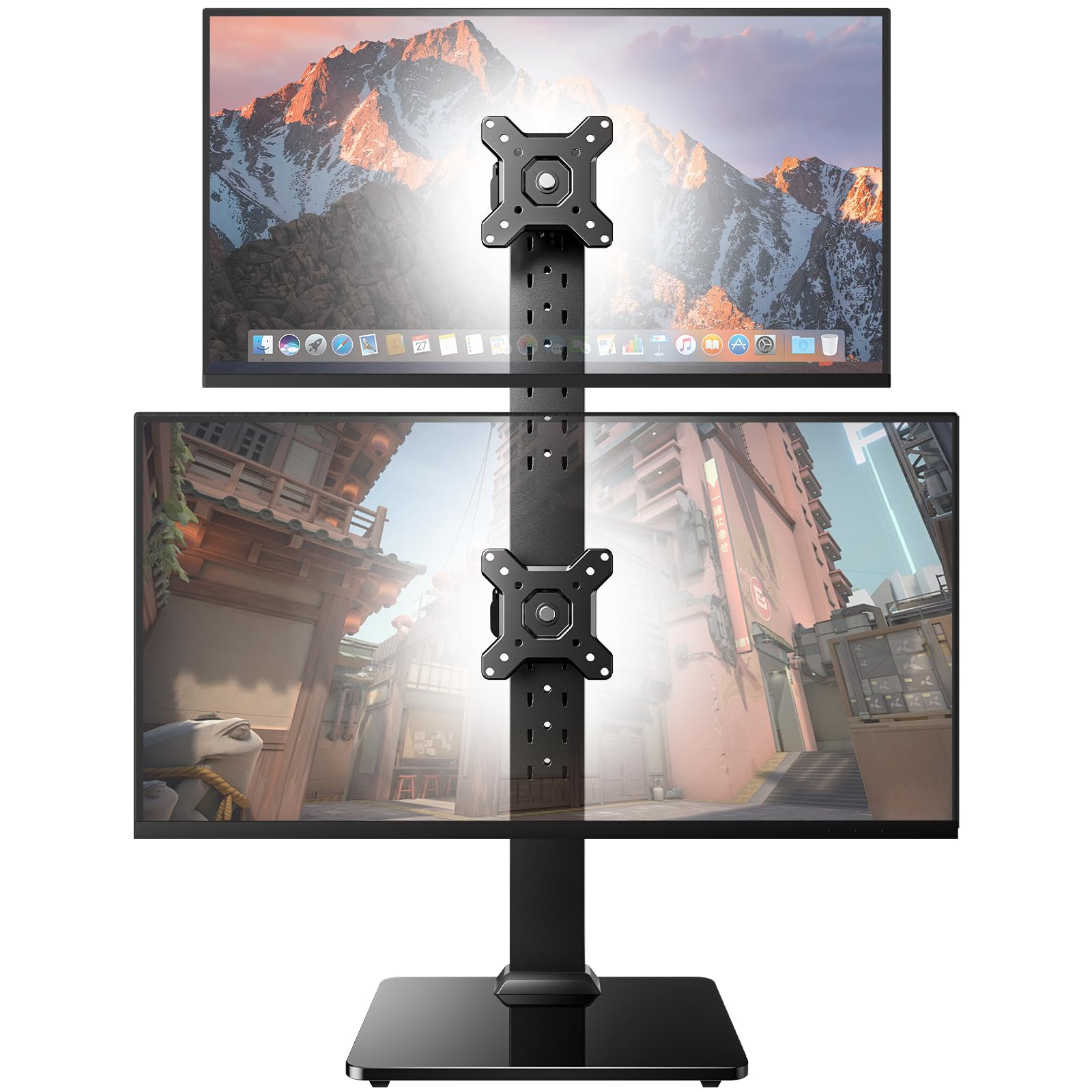
The freestanding riser that stacks tall screens without touching your desk edge
Here is the load leader. It carries up to 44 lbs per arm — double the VIVO’s 22 lbs — so a big center panel or a stacked screen above the other poses no problem. And it stands on a tempered glass base instead of clamping. That drops it onto glass desks or wall-hugging desks where a C-clamp simply cannot reach.
Height is where it earns its keep. The pole offers 13 height settings spanning roughly 9.5 to 32.3 inches. You can lift the stack above your eyeline, so the lower screen sits naturally and you stop craning your neck.
Owners single out the stability first: the big base feels planted and holds two 34-inch monitors without wobble, according to the shoppers who own it. One caveat is real: buyers report the included washers do not always fit properly, and screen angling can be fussy to hold once set. If you re-position the angle often, a clamped arm with more tilt travel — like the VIVO above — is more cooperative.
Where It Shines: 44 lbs per arm and 13 height settings make it the natural pick for stacking tall panels vertically or filling a wall-adjacent desk where a clamp is impossible.
The Trade-off: Only 15 degrees of tilt, so it holds a fixed viewing angle rather than swinging freely — fine for set-and-forget, less so for constant repositioning.
Choose this if you stack two big screens vertically or work at a glass or wall-side desk with no room for a clamp.
Think twice if you tilt your screens often, since the 15-degree limit will feel tight.
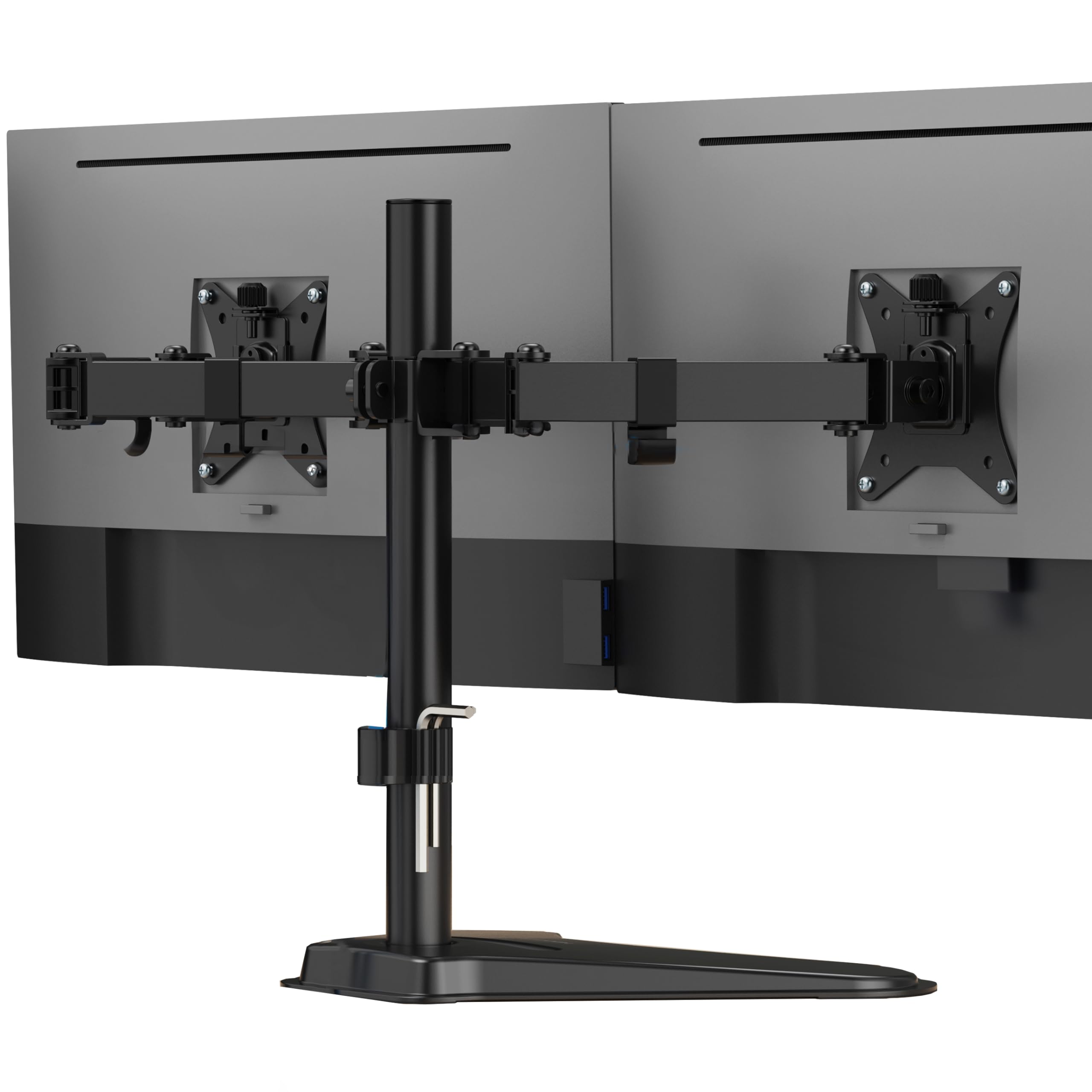
3. Mount-It! Dual Monitor Desk Stand Mount for 2 Screens VESA 75×75 & 100×100
A freestanding base that plays nice with glass tabletops and thin cubicle panels
Buyers rate this stand’s overall quality highest of the group, and its no-clamp base fits glass, thin, and wall-adjacent desks that reject every other pick. It holds two flat screens up to 32 inches and 19.8 lbs per arm. The 16.5-inch center pole lets both monitors climb vertically to a proper ergonomic height, which is the whole point of getting screens off their original bases. The clamp-free foot sits on desks against walls, glass tabletops, thin surfaces and shared workspaces where a C-clamp would crack or slip.
Each monitor tilts up or down to cut glare. It swivels left or right to share a screen with a colleague, and it rotates between portrait and landscape — handy if you code or read documents on one panel. Detachable VESA plates (the bolt-on plate that matches your monitor’s four-hole pattern) take the 75x75mm and 100x100mm patterns. Integrated cable routing guides your power and video wires down the pole and out of sight.
Buyers rate the overall quality highest, with the heavy-duty foot’s stability running right behind it. The stand holds two screens without the shake you would fear from a base that does not bolt down. The honest limit: a two-screen balancing act at the 32-inch cap needs a light hand. With the heaviest panels the stand can feel like it is working hard, and it wants matched screens rather than one big and one small.
Why It Works
- No clamp needed, so it fits glass, thin, and wall-adjacent desks
- 16.5-inch pole raises both screens to a comfortable height
- Tilt, swivel and rotation cover coding, reading, and sharing tasks
Where It Struggles
- At the 32-inch size cap heavier panels can feel like a balancing act
- Suits matched monitors better than a mismatched big-and-small pair
Reach for it when your desk cannot take a clamp and you want a tidy freestanding base for two same-size screens.
Skip it when you run a 32-inch next to a much smaller monitor, since matched pairs sit far more happily here.
4. Amazon Basics Adjustable Dual Monitor Desk Mount, Supports up to 32 inch

Two arms that dial independently, so an odd-sized pair can still line up
Two mismatched monitors usually wreck a dual setup — the pair sits crooked. This mount fixes that with independent per-arm tension: each arm adjusts its own tightness and carries up to 22 lbs. So a lighter panel on one side and a heavier one on the other can both be dialed to hold level, where a shared-tension arm would let the heavy side droop. It fits screens from 13 to 32 inches and takes the standard 75x75mm and 100x100mm VESA patterns.
Motion covers tilt from -45 to +90 degrees, swivel of ±90 degrees, and full 360-degree rotation. That extra 90-degree upward tilt range is unusual and useful if you like screens pitched steeply into your sightline. Clamp and grommet options both fit desks from 0.39 to 4.25 inches thick — the widest desk-thickness range on this list. The kit includes a 7.8 lb body of alloy steel plus screws and spacers so you pick the right screw depth for your monitor’s back.
Owners like that it holds two screens with no sag once the tension is set, and it mounts mixed Samsung curved and flat panels without drama. Two things to plan for: buyers find it heavy and best installed with a second pair of hands, and the arms travel less than you might expect if your desk sits flush against a wall — you lose the room to swing them back. Set your tension carefully and it holds steady.
what separates it: Independent per-arm tension plus a -45 to +90-degree tilt range makes it the smoothest choice for pairing two different monitor sizes or weights.
Plan Around: It is a 7.8 lb unit that goes together more easily with two people, and wall-flush desks give the arms little room to swing back.
This is your mount if you are pairing two differently sized monitors and want each arm tuned to its own screen.
Pass on it if your desk is pushed hard against a wall, where the arms cannot swing freely behind the screens.
5. Stacked Monitor Mount for Max 32″ Screens, Vertical Dual Monitor Stand

Built for the stack — one screen above the other, out of your desk’s way
A 31-inch center pole is what sets this mount apart: it gives you the vertical travel to sit one screen above the other instead of side-by-side. The upper screen rides above your eyeline and the lower one lands at a natural working height. It fits screens from 13 up to 32 inches and carries up to 17.6 lbs per arm. For design work or data analysis, a vertical stack frees the entire desk surface front and center.
Adjustment runs to 30 degrees of tilt, 90 degrees of swivel, and 180 degrees of rotation, so each panel can flip into portrait on its own. The base takes C-clamps for desks up to 3.15 inches thick or a grommet for desks up to 1.57 inches — two fitting options that catch most desks. Owners rate the build quality highest, calling it sturdy and more compact than two separate risers.
The recurring note is tilt travel: some find the 30-degree range limits how far the top screen can angle forward. So the fit favors a natural downward glance over an extreme overhead tilt. It handles matched or modestly different screens best. Owners mention one pairing of two small monitors plus a big center panel worked cleanly, while an uneven large-plus-small pair can fight the stacking geometry. If your goal is a tall, tidy vertical wall of two screens, few stands on this list are as purpose-built.
The Core Strength: A 31-inch pole and true stacking design let you build a vertical two-screen wall and reclaim the whole desk surface.
Know Before You Buy: The 30-degree tilt ceiling keeps the stack angled toward a natural downward glance, so extreme overhead tilting is not its thing.
Pick this one if you want two screens stacked vertically and every inch of your desk surface back.
skip it if you need to pitch the top screen far forward, where the limited tilt range will stop you short.
6. Amazon Basics Gas Spring Dual Monitor Arm Desk Mount, Fits 15–27 Inch

Gas springs that let you push each screen into place with one hand
Gas springs (pressurized cylinders inside the arm that help lift and hold the screen) let you raise a monitor with light pressure instead of a wrench and a wrestling match. That one-handed motion is the whole reason to buy this arm. Each arm carries 4.4 to 15.4 lbs and fits monitors from 15 to 27 inches. That range is lighter than the 22 lb arms above, and it suits typical 24- and 27-inch panels rather than the heavier 30- and 32-inch screens.
The trade-off with a gas spring is setup. The arms ship pre-set for heavier screens and arrive stiff on purpose to survive shipping. You turn the tension screw gradually until your monitor’s weight balances, so the screen floats where you leave it. Customers note the mounting itself is straightforward — the quick wins are holding two 24 to 27-inch monitors and clearing the desk completely. This mount weighs 7 lbs and takes the standard 75x75mm and 100x100mm patterns, clamped or grommeted to desks from 0.39 to 4 inches thick.
The honest catch: the mixed feedback here centers on nailing the balance and keeping the two screens level. Dial the tension too high and the screens fight you; too low and they drift. It is a balance-and-leave-it arm rather than a fiddle-with-it-daily one. If you plan to nudge your screens into a new position often, the gas springs reward the initial setup patience — but if you want pure set-and-forget stiffness, a standard hinge arm like the VIVO above holds its angle with less tuning.
Why Gas Springs Win: One-handed repositioning across a 4.4 to 15.4 lb per-arm range keeps two 24 to 27-inch screens moving smoothly all day.
The Fine Print: Arms ship stiff and pre-set for heavier panels, so expect to tune each tension screw before the screens sit level and stay there.
Best for desks where you raise, lower, or swing screens through the day and want gas-spring ease on two 24 to 27-inch panels.
Not the one if you run heavier 30-inch-plus screens or would rather set the angle once and never think about tension again.
7. Acer Dual Monitor Arm, Gas Spring VESA Mount Stand for 17-32″ Screens
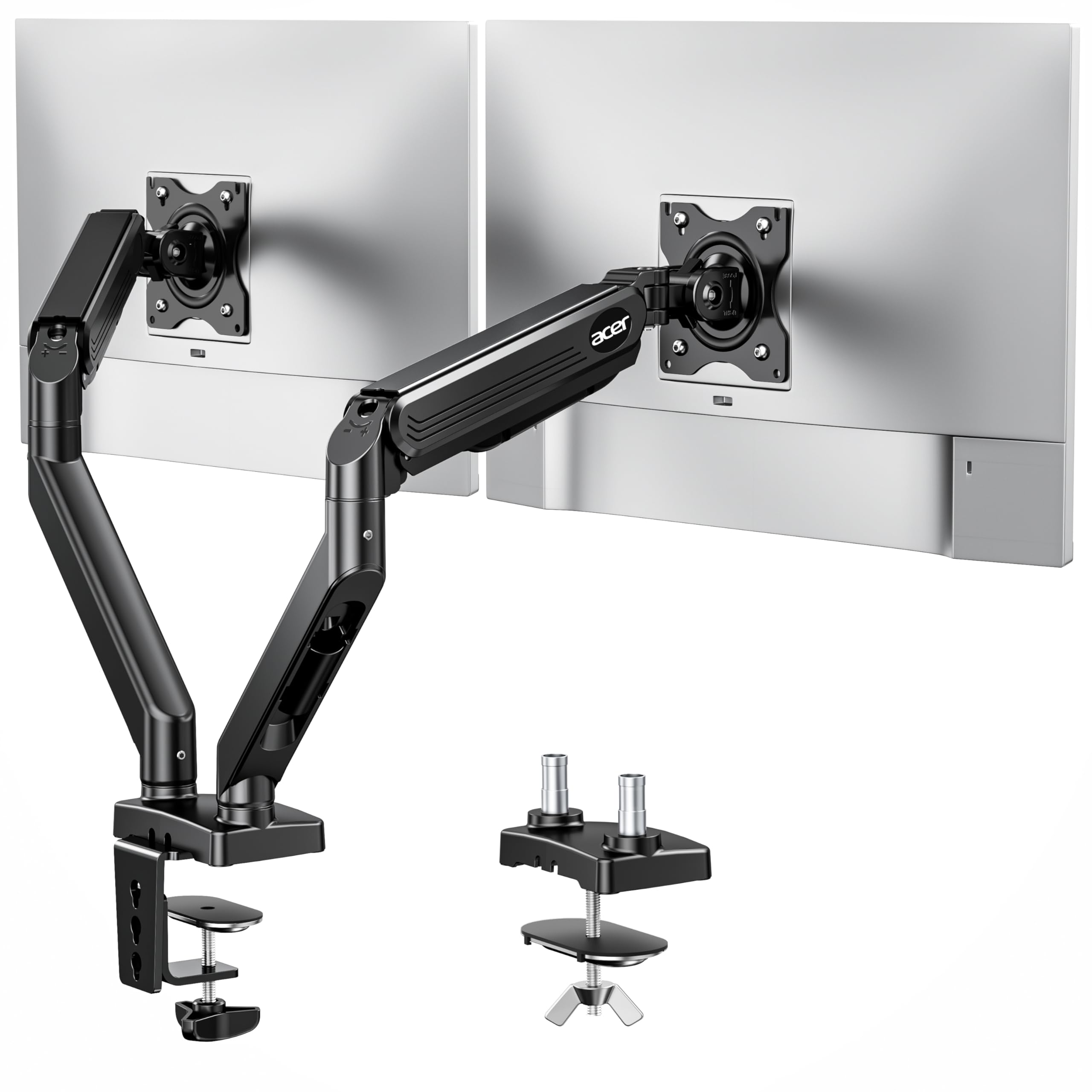
Reaches across a deep desk and holds a wide 32-inch panel with ease
On a deep desk with monitors far from the back edge, this arm’s 21.25-inch extension does what no other pick here can: it reaches the screens forward into view. That is 21.25 inches of arm travel and up to 18.1 inches of height adjustment, so you can pull screens over a deep desk or push them back out of the way. It fits 17 to 32-inch screens at 4.4 to 19.8 lbs per monitor and takes the common 75x75mm and 100x100mm VESA patterns. Motion spans 360-degree rotation, +90/-60-degree tilt, and ±90-degree swivel.
Gas springs do the lifting, so raising and lowering a heavy screen feels smooth rather than stiff. The arm is built from alloy steel and aluminum and, per the maker, has undergone over 20,000 durability tests to back the lifting mechanism. Clamp and grommet bases both require desk thicknesses between 0.59 and 3.15 inches, and it is not meant for glass or plastic surfaces. Multiple layout options — dual horizontal, horizontal plus vertical, dual vertical, or a cross arrangement — cover most desk setups.
Owners rate the quality and functionality highest: two 32-inch screens mount successfully on a sturdy, alloy-steel build. The mixed note is vertical travel once a screen is mounted — some buyers find they cannot raise or lower a screen after locking it in, which limits midday repositioning. For a fixed height that reaches far and holds a wide screen steady, it delivers.
Standout Strengths
- 21.25-inch extension and 18.1-inch height range reach across deep desks
- Holds two 32-inch screens at up to 19.8 lbs each
- Alloy steel and aluminum build with a stated 20,000-test durability history
Worth Knowing
- Limited vertical travel after mounting, so midday height changes are awkward
- Not intended for glass or plastic desk surfaces
Go with this if your desk is deep and you want a long reach plus a wide 32-inch screen held steady.
Look past it if you tweak screen height constantly, since mounted height is hard to shift afterward.
8. ARES WING Stacked Dual Vertical Monitor Arm with USB A/C for 17 to 49 Inch
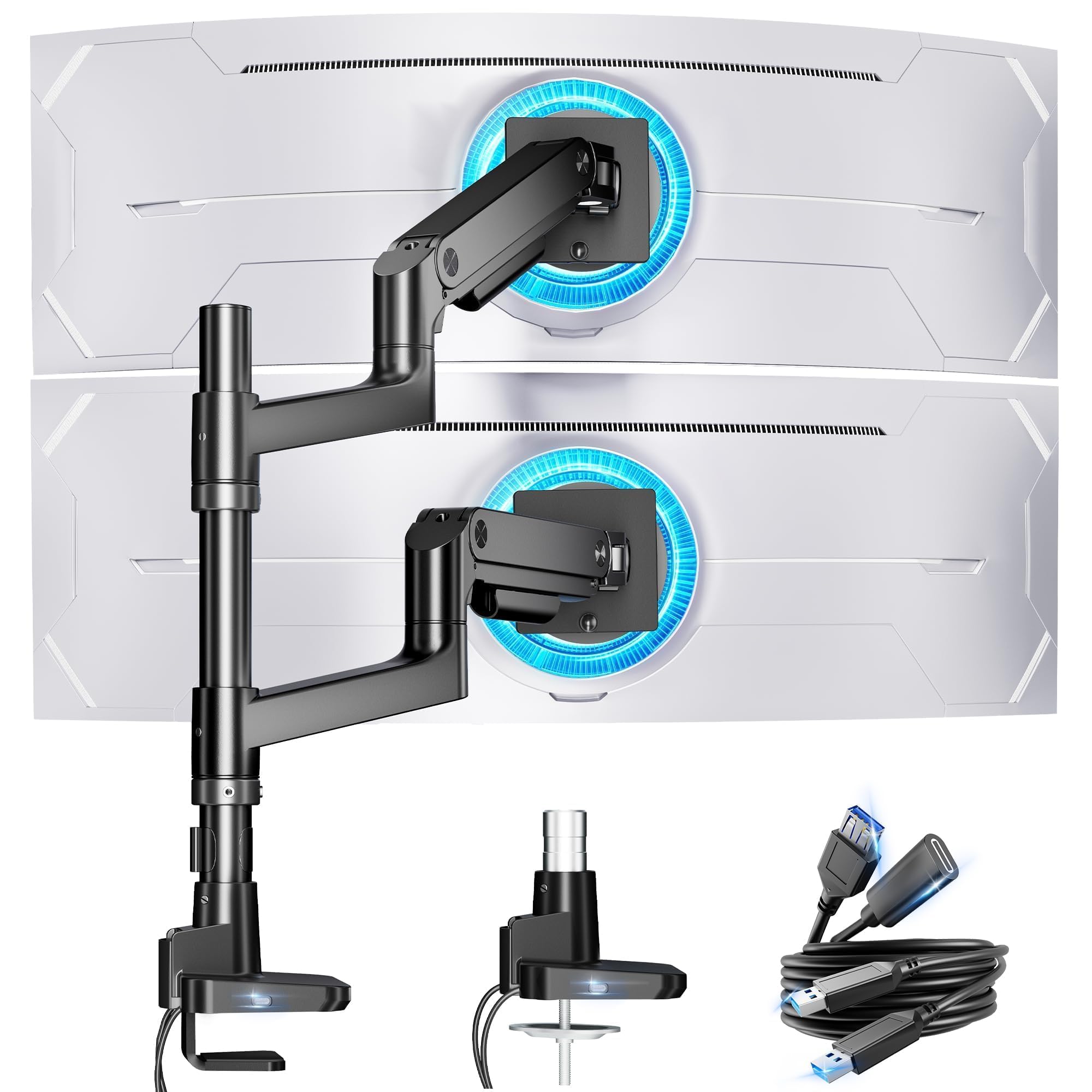
The heavy-lifter for a pair of 49-inch ultrawides, with USB charging built in
A 44 lbs-per-arm rating is what buys this stand its place: no other pick here carries that much, and it still fits monitors from 17 to 49 inches. That is aimed squarely at ultrawide setups like the Samsung Odyssey G9, along with LG and other 49-inch panels. Both arms run on industrial-grade gas springs, and per the maker the mechanism has been tested over 20,000 times for stability even at full extension. Its height reaches up to 27.9 inches and its arm extends up to 22.4 inches — more reach than the Acer above it.
Two USB ports set it apart. There is a USB-C port at 5V/2A and a USB-A port at 5V/2A on the mount, so you can charge a phone, watch, tablet, laptop, or headphones right from the arm without hunting for a wall outlet. Adjustability covers -50 to +20-degree tilt, ±90-degree swivel, and 360-degree rotation. The C-clamp fits desks 0.5 to 1.8 inches thick and the grommet mount fits 0.5 to 2 inches, with quick-release panels so you are not crawling under the desk to install.
The catch shows up on the biggest panels. Buyers who stacked two 45-inch LG curved ultrawides found the center pole too short to stack them vertically — the arms handled the weight fine, but the pole ran out of height. And pairing two Samsung G9 OLEDs, one owner reported the clamp did not hold the weight and the base had to be drilled into the desk instead. For more modest screens, or side-by-side 49-inch layouts, it holds up strongly; stacking two of the very largest curved panels is where you should measure twice.
What You Get for the Spend: A 44 lbs-per-arm shell for two 49-inch ultrawides plus USB-C and USB-A charging ports mounted right on the arm.
Where It Has Limits: The center pole cannot stack two 45-inch curved ultrawides vertically, and the heaviest panels may need a drilled mount rather than the clamp.
This is for you if you run big ultrawides — up to 49 inches — and want the arms to carry the weight with built-in USB charging.
Look elsewhere if you plan to stack two 45-inch curved screens on top of each other in a vertical wallet.
Understanding the Specs
Max Load Per Arm
The weight number tells you how much each arm can hold before the joint drifts and the screen tilts down on its own. Stands here span from 4.4 lbs at the low end up to 44 lbs at the top. Match your monitor’s actual weight to the arm’s ceiling with a little headroom. A 24-inch panel is usually light, but a 32- or 49-inch screen gets heavy fast. If your screens approach the ceiling, expect to re-tighten joints occasionally.
VESA Pattern and Screen Size
VESA is the square four-hole layout on the back of your monitor that the mounting plate bolts into. Most modern screens use 75x75mm or 100x100mm, and every stand on this list supports both. The screen-size range — from 13 to 30 inches up to 17 to 49 inches — tells you the arm spread and weight balance the stand was built around. Confirm both your VESA pattern and screen size before ordering to avoid a return.
FAQ
Will a dual monitor stand hold two different-sized monitors?
What is a VESA pattern and how do I check mine?
Can I use a dual monitor stand on a glass desk?
How much weight can a dual monitor arm actually hold?
What is the difference between gas spring and standard hinge arms?
Do I need a clamp or a grommet mount for my desk?
Can I stack two monitors vertically with these stands?
How much desk thickness does a clamp style stand support?
Is a freestanding dual monitor stand as stable as a clamped one?
Final Thoughts: The Verdict
For most people, the stand for 2 computer screens to buy is the VIVO STAND-V002. It handles two 24 to 30-inch screens at 22 lbs per arm, offers the widest tilt here at 90 degrees, and clamps to almost any desk edge. If you need to stack tall screens vertically or work at a glass desk, the HUANUO Dual Monitor Stand carries far more at 44 lbs per arm on a freestanding base. And for a pair of 49-inch ultrawides that need serious muscle plus USB charging, the ARES WING Stacked Vertical Arm is the one to reach for. Whichever you pick, confirm your monitor’s weight and VESA pattern first — those two numbers turn a smooth install into a same-day win.
{“@context”: “https://schema.org”, “@graph”: [{“@type”: “ItemList”, “name”: “8 Best Stand for 2 Computer Screens”, “url”: “https://kitchprep.com/best-stand-for-2-computer-screens/”, “numberOfItems”: 8, “itemListElement”: [{“@type”: “ListItem”, “position”: 1, “name”: “VIVO Dual Monitor Desk Mount, Holds 2 Computer Screens up to 30 inches”, “url”: “https://kitchprep.com/best-stand-for-2-computer-screens/#product-1”}, {“@type”: “ListItem”, “position”: 2, “name”: “HUANUO Dual Monitor Stand for 13 to 34 Inch, Max Load 44 lbs”, “url”: “https://kitchprep.com/best-stand-for-2-computer-screens/#product-2”}, {“@type”: “ListItem”, “position”: 3, “name”: “Mount-It! Dual Monitor Desk Stand Mount for 2 Screens VESA 75×75 & 100×100”, “url”: “https://kitchprep.com/best-stand-for-2-computer-screens/#product-3”}, {“@type”: “ListItem”, “position”: 4, “name”: “Amazon Basics Adjustable Dual Monitor Desk Mount, Supports up to 32 inch”, “url”: “https://kitchprep.com/best-stand-for-2-computer-screens/#product-4”}, {“@type”: “ListItem”, “position”: 5, “name”: “Stacked Monitor Mount for Max 32\” Screens, Vertical Dual Monitor Stand”, “url”: “https://kitchprep.com/best-stand-for-2-computer-screens/#product-5”}, {“@type”: “ListItem”, “position”: 6, “name”: “Amazon Basics Gas Spring Dual Monitor Arm Desk Mount, Fits 15–27 Inch”, “url”: “https://kitchprep.com/best-stand-for-2-computer-screens/#product-6”}, {“@type”: “ListItem”, “position”: 7, “name”: “Acer Dual Monitor Arm, Gas Spring VESA Mount Stand for 17-32\” Screens”, “url”: “https://kitchprep.com/best-stand-for-2-computer-screens/#product-7”}, {“@type”: “ListItem”, “position”: 8, “name”: “ARES WING Stacked Dual Vertical Monitor Arm with USB A/C for 17 to 49 Inch”, “url”: “https://kitchprep.com/best-stand-for-2-computer-screens/#product-8”}]}, {“@type”: “Product”, “position”: 1, “name”: “VIVO Dual Monitor Desk Mount, Holds 2 Computer Screens up to 30 inches”, “image”: “https://m.media-amazon.com/images/I/71MzRgGoXUL.jpg”, “brand”: {“@type”: “Brand”, “name”: “VIVO”}, “url”: “https://www.amazon.com/dp/B009S750LA/?tag=kpmaruf-20”, “offers”: {“@type”: “Offer”, “url”: “https://www.amazon.com/dp/B009S750LA/?tag=kpmaruf-20”}}, {“@type”: “Product”, “position”: 2, “name”: “HUANUO Dual Monitor Stand for 13 to 34 Inch, Max Load 44 lbs”, “image”: “https://m.media-amazon.com/images/I/71NoHNKErFL.jpg”, “brand”: {“@type”: “Brand”, “name”: “HUANUO”}, “url”: “https://www.amazon.com/dp/B0FDB8SSG6/?tag=kpmaruf-20”, “offers”: {“@type”: “Offer”, “url”: “https://www.amazon.com/dp/B0FDB8SSG6/?tag=kpmaruf-20”}}, {“@type”: “Product”, “position”: 3, “name”: “Mount-It! Dual Monitor Desk Stand Mount for 2 Screens VESA 75×75 & 100×100”, “image”: “https://m.media-amazon.com/images/I/71XI7kztiaL.jpg”, “brand”: {“@type”: “Brand”, “name”: “Mount-It!”}, “url”: “https://www.amazon.com/dp/B0CB774F3N/?tag=kpmaruf-20”, “offers”: {“@type”: “Offer”, “url”: “https://www.amazon.com/dp/B0CB774F3N/?tag=kpmaruf-20”}}, {“@type”: “Product”, “position”: 4, “name”: “Amazon Basics Adjustable Dual Monitor Desk Mount, Supports up to 32 inch”, “image”: “https://m.media-amazon.com/images/I/51FzAebzA8L.jpg”, “brand”: {“@type”: “Brand”, “name”: “Amazon”}, “url”: “https://www.amazon.com/dp/B0CQTPZNV8/?tag=kpmaruf-20”, “offers”: {“@type”: “Offer”, “url”: “https://www.amazon.com/dp/B0CQTPZNV8/?tag=kpmaruf-20”}}, {“@type”: “Product”, “position”: 5, “name”: “Stacked Monitor Mount for Max 32\” Screens, Vertical Dual Monitor Stand”, “image”: “https://m.media-amazon.com/images/I/51WAU+QpmPL.jpg”, “brand”: {“@type”: “Brand”, “name”: “Stacked”}, “url”: “https://www.amazon.com/dp/B0BG59PZRW/?tag=kpmaruf-20”, “offers”: {“@type”: “Offer”, “url”: “https://www.amazon.com/dp/B0BG59PZRW/?tag=kpmaruf-20”}}, {“@type”: “Product”, “position”: 6, “name”: “Amazon Basics Gas Spring Dual Monitor Arm Desk Mount, Fits 15–27 Inch”, “image”: “https://m.media-amazon.com/images/I/51rjLRmBqKL.jpg”, “brand”: {“@type”: “Brand”, “name”: “Amazon”}, “url”: “https://www.amazon.com/dp/B0CQXPGNCH/?tag=kpmaruf-20”, “offers”: {“@type”: “Offer”, “url”: “https://www.amazon.com/dp/B0CQXPGNCH/?tag=kpmaruf-20”}}, {“@type”: “Product”, “position”: 7, “name”: “Acer Dual Monitor Arm, Gas Spring VESA Mount Stand for 17-32\” Screens”, “image”: “https://m.media-amazon.com/images/I/71mGvVADdrL.jpg”, “brand”: {“@type”: “Brand”, “name”: “Acer”}, “url”: “https://www.amazon.com/dp/B0FKTF1KJ5/?tag=kpmaruf-20”, “offers”: {“@type”: “Offer”, “url”: “https://www.amazon.com/dp/B0FKTF1KJ5/?tag=kpmaruf-20”}}, {“@type”: “Product”, “position”: 8, “name”: “ARES WING Stacked Dual Vertical Monitor Arm with USB A/C for 17 to 49 Inch”, “image”: “https://m.media-amazon.com/images/I/71XgfR28-BL.jpg”, “brand”: {“@type”: “Brand”, “name”: “ARES”}, “url”: “https://www.amazon.com/dp/B0D2KH4V8H/?tag=kpmaruf-20”, “offers”: {“@type”: “Offer”, “url”: “https://www.amazon.com/dp/B0D2KH4V8H/?tag=kpmaruf-20”}}, {“@type”: “FAQPage”, “mainEntity”: [{“@type”: “Question”, “name”: “Will a dual monitor stand hold two different-sized monitors?”, “acceptedAnswer”: {“@type”: “Answer”, “text”: “Often yes, but the load balance matters. The Amazon Basics Adjustable Dual Mount gives each arm its own tension setting, which suits a mismatched pair like a 24-inch next to a 27-inch. Freestanding risers such as the Mount-It! and the HUANUO prefer closer-matched panels so the weight stays even across the base. Check each arm’s weight ceiling and confirm both screens fall within the listed screen-size range.”}}, {“@type”: “Question”, “name”: “What is a VESA pattern and how do I check mine?”, “acceptedAnswer”: {“@type”: “Answer”, “text”: “VESA is the square arrangement of four screw holes on the back of your monitor where the stand’s plate bolts on. The two common sizes are 75x75mm and 100x100mm, and every stand in this guide supports both. To check yours, look up your monitor model’s spec sheet or measure the distance between the four holes. If your ultrawide has no VESA holes, you will need a VESA adapter plate (a bracket that adds the four-hole pattern), as the ARES WING notes.”}}, {“@type”: “Question”, “name”: “Can I use a dual monitor stand on a glass desk?”, “acceptedAnswer”: {“@type”: “Answer”, “text”: “You want a freestanding base, not a clamp. The HUANUO and the Mount-It! both use weighted freestanding feet that sit on the surface, which suits glass tabletops and thin desks where a clamp cannot safely grip. Acer states its arm is not intended for glass or plastic surfaces because the clamp needs a solid edge. If your desk is glass, pick a riser with a broad base like the HUANUO’s tempered glass foot.”}}, {“@type”: “Question”, “name”: “How much weight can a dual monitor arm actually hold?”, “acceptedAnswer”: {“@type”: “Answer”, “text”: “It varies widely by model and is rated per arm. The lightest here handles 4.4 to 15.4 lbs per arm, while the heaviest carries up to 44 lbs per arm. Weigh your monitor — a 24-inch panel is typically light, but a 32-inch or a 49-inch ultrawide climbs quickly. Staying a few pounds under the ceiling keeps the joints from drifting and the screens from tilting down over time.”}}, {“@type”: “Question”, “name”: “What is the difference between gas spring and standard hinge arms?”, “acceptedAnswer”: {“@type”: “Answer”, “text”: “A gas spring uses an internal pressurized cylinder to help lift and hold the screen, so you can move it with one hand. The Amazon Basics Gas Spring Arm and the Acer arm both use gas springs; they ship stiff and pre-set for heavier screens, so you tune the tension screw to your monitor’s weight. Standard hinge arms use friction joints instead — stiffer to move but simpler to set and forget.”}}, {“@type”: “Question”, “name”: “Do I need a clamp or a grommet mount for my desk?”, “acceptedAnswer”: {“@type”: “Answer”, “text”: “A clamp grips the back edge of the desk from the top and bottom. A grommet mount bolts through an existing hole in the surface for a more permanent hold. Most clamped arms here offer both. Check your desk thickness against the spec: the Amazon Basics Adjustable Mount fits desks from 0.39 to 4.25 inches, and the VIVO takes up to 3.25 inches. Glass and plastic surfaces need a freestanding riser instead.”}}, {“@type”: “Question”, “name”: “Can I stack two monitors vertically with these stands?”, “acceptedAnswer”: {“@type”: “Answer”, “text”: “Yes, several are built for it. The MOUNT PRO Stacked Mount and the ARES WING both use a tall center pole to place one screen above the other, which frees desk surface. Watch the pole height: the ARES WING can stack smaller panels vertically, but its pole falls short for two 45-inch curved ultrawides. If you regularly stack big curved screens, measure the total stack height against the pole spec first.”}}, {“@type”: “Question”, “name”: “How much desk thickness does a clamp style stand support?”, “acceptedAnswer”: {“@type”: “Answer”, “text”: “It depends on the model, so match it to your desk before buying. The Amazon Basics Adjustable Mount covers the widest desk range here at 0.39 to 4.25 inches thick. The VIVO clamp takes up to 3.25 inches, and the Acer requires between 0.59 and 3.15 inches. The ARES WING’s clamp fits 0.5 to 1.8 inches, with its grommet option up to 2 inches. If your desk is unusually thick or thin, this number decides the fit.”}}, {“@type”: “Question”, “name”: “Is a freestanding dual monitor stand as stable as a clamped one?”, “acceptedAnswer”: {“@type”: “Answer”, “text”: “A quality freestanding base can be very steady. The HUANUO uses a tempered glass base that owners describe as large and planted, and the Mount-It! relies on a heavy-duty weighted foot that holds two screens without shake. The upside of freestanding is that it needs no desk edge, so it works on glass and wall-hugging desks. The trade-off is that the heaviest panels want closer-matched weights to keep the base balanced.”}}]}]}Related Guides
