
Specs are compiled from manufacturer listings and verified buyer reviews and can change over time — please confirm the key details on the product page before buying.
If you have ever stood outside your own bedroom at midnight, arms full of laundry, digging for a key that is not there, a keypad deadbolt solves that in one move. You punch in a code you set yourself and you are in. The catch is that most keypad locks are built for front doors, not bedrooms. They are too big, too loud, or they need a hub to do anything smart. This guide sorts the ones that actually work on an interior bedroom door from the ones that only look good in the photos.
I’m Mohammad Maruf — the founder and writer behind KitchPrep. This guide is built by comparing the manufacturers’ published specifications and the patterns across verified customer reviews, so you get each pick’s real strengths and trade-offs instead of marketing spin.
Here is what I checked on every lock: how many codes it stores, whether it auto-locks and on what timer, what happens when the battery dips, and whether it fits a standard bedroom door without a locksmith. Everything below is filtered down to the best bedroom door keypad lock for a real house with real doors.
Our Picks at a Glance

How To Choose The Best Bedroom Door Keypad Lock
A bedroom door is not a front door, and that single fact reshapes which specs you should actually care about. You are not defending against break-ins at 3 a.m. You are trying to stop the kids from walking into your room, keep a renter out of your closet, or save yourself from carrying a key to the room three feet from your bed. That changes the whole shopping list.
Count your people before you count the features
Every lock on this list stores a different number of codes. The Veise DK01-B holds 21 user passwords, which covers a normal family with room to spare. The TEEHO TE012W goes much further with up to 100 passcodes and 20 fingerprint users. The Ulecoce stores up to 512 fingerprints and passcodes combined. If you only ever have three people using the door, all of that headroom is wasted. If you are renting out rooms or running a home office from a spare bedroom, code capacity is the spec that decides your purchase.
Decide if you want app control or just a keypad
App control sounds great until you realize your bedroom door now depends on your phone having a working connection. The Yale Code is deliberately non-connected, which means every code you add or delete happens right on the lock in seconds, with no Wi-Fi drama. The TEEHO TE012W connects straight to 2.4GHz Wi-Fi with no hub. The Ulecoce uses Bluetooth, which works at close range but will not reach a code change from your office. The Philips 4200 Series pairs over Wi-Fi and Bluetooth. Pick based on where you will be when you need to let someone in, not on which sounds smartest.
Check your door’s thickness and backset first
Measure your door before you order, or you will regret it. Most of these locks fit doors between 1-3/8″ and 2″ thick and work with standard 2-3/8″ or 2-3/4″ backsets (the distance from the door edge to the center of the hole). But the Philips 1000 Series has a narrower published range of 1-3/8″ to 1-3/4″ and explicitly warns you to check the compatibility chart. The TEEHO TE012W also needs a 2-1/8″ or 1-1/2″ bore hole (the big hole drilled through the door for the lock body).
Quick Comparison
| Model | Best For | Code Capacity | Auto-Lock Timer | Weather Rating | Amazon |
|---|---|---|---|---|---|
| Veise DK01-B★ Best Overall | Whole-home entry with handle | 20 user + 1 master | 10–99s | IP54 | Amazon |
| TEEHO TE012WSmartest Pick | Smart home with fingerprint | 100 codes, 20 fingerprints | 10–180s | IP55 | Amazon |
| Ulecoce U68Best for Rentals | Busy rentals and shared homes | 512 fingerprints and codes | 5–60s | IP54 | Amazon |
| TEEHO TE019 | Budget smart entry | 100 passcodes | 10–180s | IP55 | Amazon |
| Veise VE018 | Knob-style keyless entry | 100+ codes, 20 fingerprints | 10–180s | — | Amazon |
| Kwikset SmartCode 260 | Simple, no-app reliability | 50 codes, 10 one-time | 30s to 10 min | — | Amazon |
| Philips 1000 Series | Fingerprint-first, no Wi-Fi | Unlimited one-time codes | 30–180s | — | Amazon |
| Yale Code | Bedroom and rental simplicity | 20 entry codes | 30s | Weather resistant | Amazon |
| Philips 4200 Series | Remote management and rentals | Permanent + one-time + recurring | 0–180s | — | Amazon |
In‑Depth Reviews
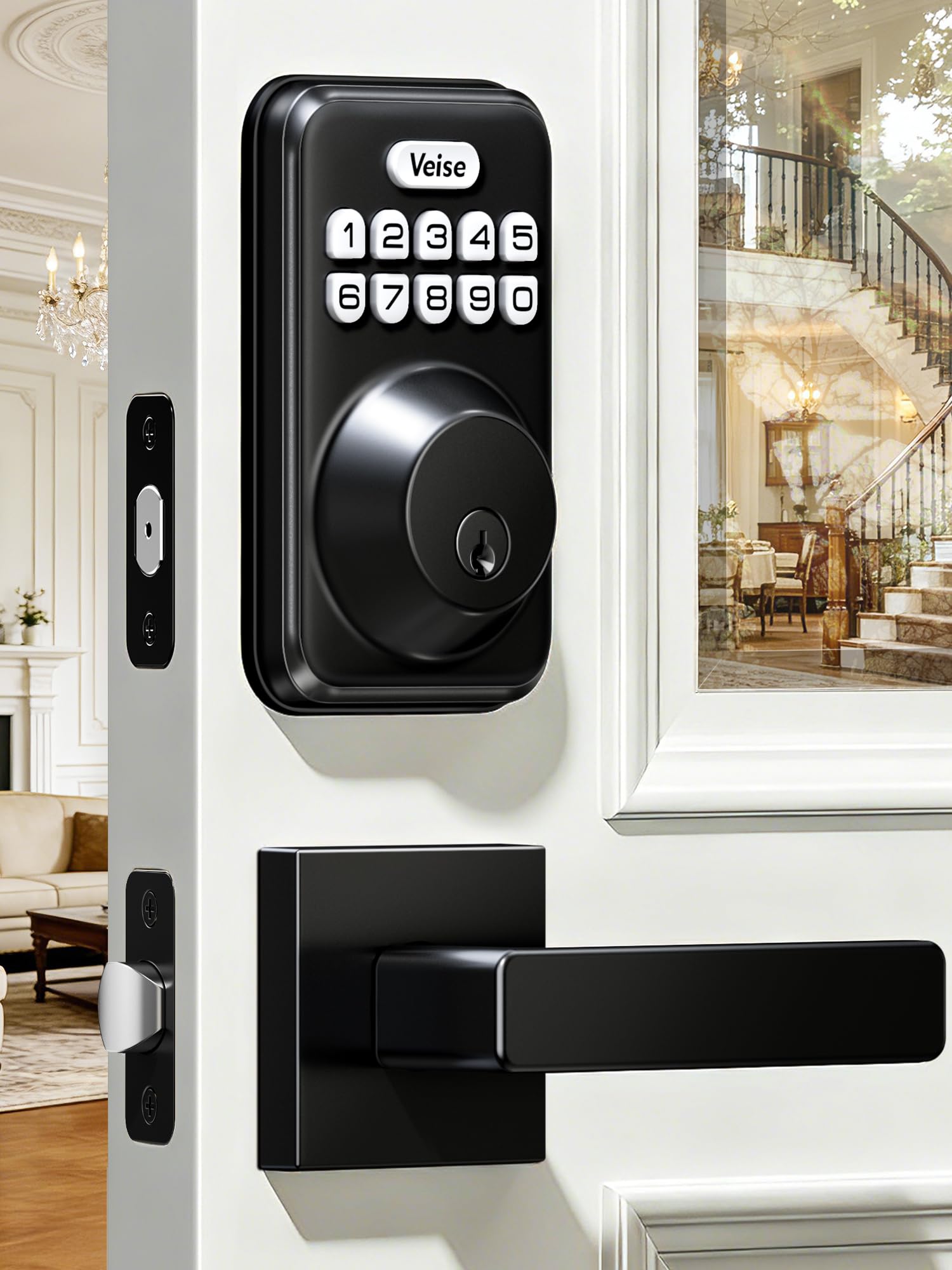
1. Veise DK01-B Keyless Entry Deadbolt Lock with Handle Set
Our pick — over 4.5★ from 150+ verified ratings; the strongest balance of quality and price.
A matte black deadbolt and lever handle sold as one matching set, so the door looks finished.
You get a matching set, not a mismatched knob. The DK01-B arrives as a complete matte black set — a keypad deadbolt up top and a matching lever handle below — so the door gets one clean look instead of a plastic keypad bolted above the old brass fixture. That matters more on a bedroom door than a front door, because you look at it every single day from inside the room.
The access setup is built for a house with people in it. One master code stays with you. Twenty user codes cover everyone else. Two backup keys hide in a drawer for the day the electronics go quiet. And the guest angle is genuinely clever: cleaners or a dog-sitter get a one-time code that works once and then self-destructs, so you never have to remember to delete it. Auto-lock can be flipped on with a delay you pick between 10 and 99 seconds, or you can just tap and hold any key for two seconds on your way out. There is also a thumb turn inside, which is the part that actually matters at bedtime.
Power comes from 4 AA batteries, and Veise publishes a one-year figure for normal use. That is a real number note next to the TEEHO TE012W, which runs on 8 AA cells — double the battery load for its Wi-Fi and fingerprint hardware. The trade-off is that the DK01-B gives up app control and fingerprints entirely. It is a non-connected keypad lock. If you want to check from work whether your bedroom door is locked, this is not that lock. As buyers report, “It was a breeze to install and so far, it’s working great. Had it installed for a month. I really like the auto lock feature. I don’t have to worry about checking the door at night. Easy to program too.”
What it gets right
- 20 user codes plus one master, with one-time guest codes that expire on their own
- Anti-peeping lets you type random digits around your real PIN so smudge marks reveal nothing
- Ten wrong codes locks the keypad for 3 minutes
- Aims at standard doors 1-3/8″ to 2″ thick with a screwdriver and about 15 minutes
Where it asks something of you
- No app, no Wi-Fi, no fingerprint — it is a keypad lock and nothing more
- The lever handle turns freely and does not lock; only the deadbolt secures the door
- Auto-lock’s shortest setting is 10 seconds, which is faster than some people want for a bedroom
Buy this if: you want a complete matching deadbolt-and-handle set, several family codes, and no dependence on a phone or a hub.
Keep looking if: you need to open up the door remotely or want a fingerprint reader — the DK01-B deliberately has neither.
2. TEEHO TE012W WiFi Fingerprint Smart Door Lock
App, fingerprint, passcode, key, or voice — five ways in, with no hub to buy first.
The headliner is that 100 passcodes and 20 fingerprint users live on a lock that talks straight to your 2.4GHz Wi-Fi without an extra bridge. For a bedroom door shared by a family, that means everyone gets their own code and you can see who came and went without installing anything in between. The KK Home App also supports Alexa and Google Assistant, so a voice command can lock the door while your hands are full.
Durability is where the spec sheet gets serious. This one carries BHMA Grade 3 certification and an IP55 weather rating, and it guards itself with a break-in alert plus a three-minute keypad lockout after ten wrong PIN attempts. Auto-lock is adjustable from 10 to 180 seconds right in the app, or you can lock up in two seconds with a touch on your way out. Setup runs 10 to 15 minutes with a screwdriver, and the latch works with 2-3/8″ or 2-3/4″ backsets and 2-1/8″ or 1-1/2″ bore holes.
Two honest reads before you commit. First, Wi-Fi and fingerprint hardware drink power, which is exactly why this one uses 8 AA batteries versus the 4 that the Veise DK01-B sips through. Second, the app itself — KK Home — gets mixed marks from owners; it works, but the polish is not there, and a few routines hiccup. As one buyer put it: “Easy install and setup with the app. Hopefully with using 8 AA batteries they will last a long time. I needed to replace an older lock that died and liked the fingerprint feature of this one, which was great to have at this price point.”
The real draw: 100 codes and 20 fingerprints with built-in Wi-Fi, Alexa and Google Assistant support, and no gateway required — a combination you usually pay more for.
The quiet downside: fingerprint reliability in cold weather and battery drain are the two things owners flag most, so this is a lock you plan to feed batteries.
The lock for you if: your household wants hands-free entry and you are willing to keep the app updated and batteries stocked.
Step back if: you want a set-and-forget lock with no Wi-Fi dependency — the non-connected picks below do that better.
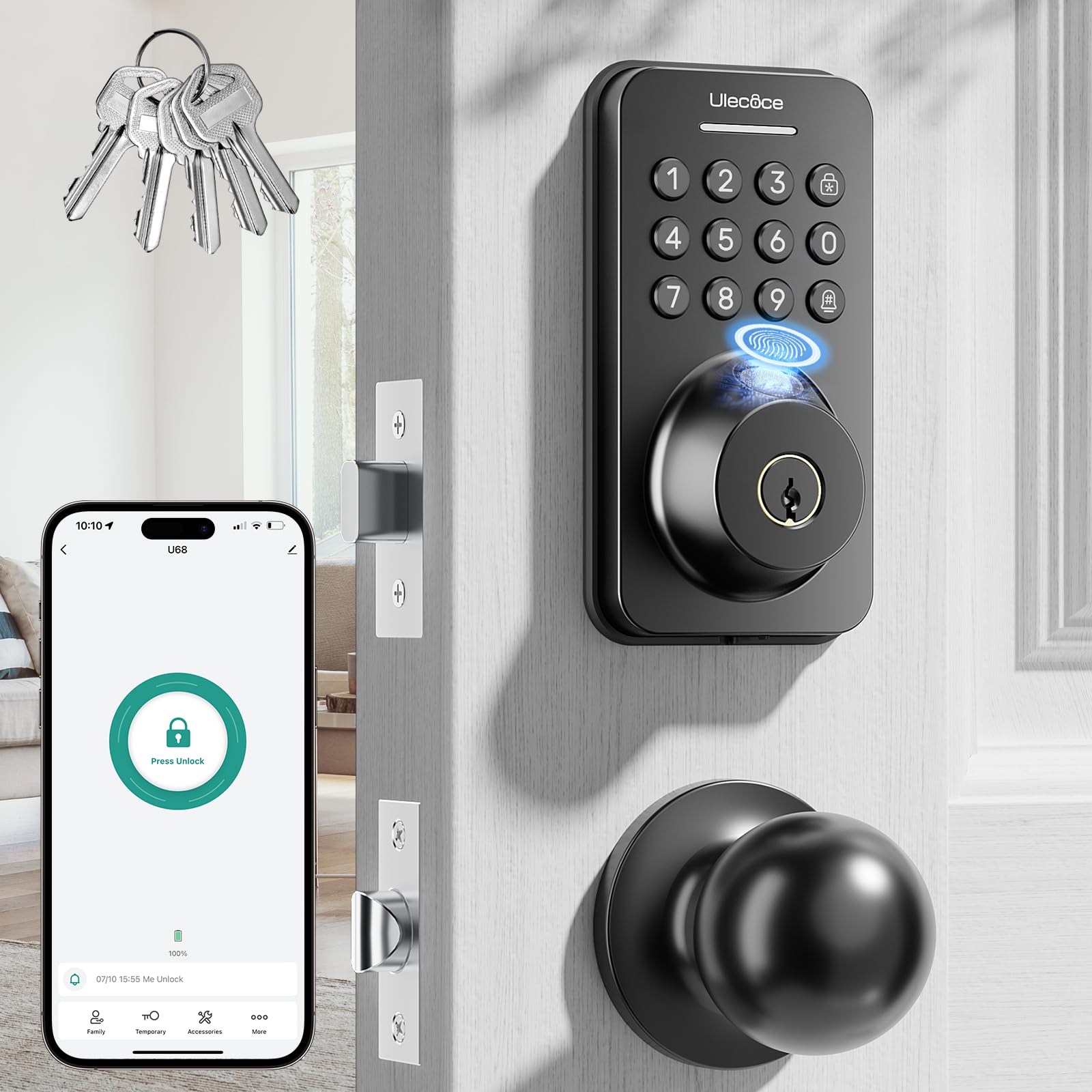
3. Ulecoce Fingerprint Keypad Deadbolt with Knob Set
A 0.3-second fingerprint sensor that opens the door with one thumb, hands full.
Where this lock separates itself is raw capacity. It stores up to 512 sets of fingerprints and keypad passcodes, which is roughly five times the headroom of the TEEHO TE012W and twenty-five times the Veise DK01-B’s 20 user slots. For anyone turning a spare bedroom into a rental, that headroom means you never recycle a code — you just delete the old tenant’s and add the new one. The fingerprint sensor reads in as little as 0.3 seconds with a claimed 99.99% recognition rate, and it uses a self-learning algorithm that sharpens with each use.
It also brings a rechargeable battery to the table, which is a meaningful difference from the AA-fed crowd here — you plug in rather than buy. Auto-lock is configurable from 5 to 60 seconds, there is a one-touch lock button on both the inside and outside, and the finish gets built-in anti-drill, anti-corrosion and scratch-resistance treatment to match the IP54 weather rating. Installation is standard screwdriver work on left- or right-handed doors, and it ships with 5 backup keys and a matching knob set in matte black.
Know this boundary: the app connects over Bluetooth (short-range wireless), not Wi-Fi. Owners doing short-term rentals report it is great for assigning permanent and temporary codes, but you have to be within Bluetooth range to make changes — so remote management from another city is not part of the deal unless you add the Ulecoce gateway, sold separately. If you are on-site managing a spare bedroom, that limitation never bites.
Reasons owners stick with it
- 512 fingerprints and codes is serious headroom for shared or rental doors
- Rechargeable battery means no steady AA spend
- Fingerprint reads in 0.3 seconds with a self-learning algorithm
- Auto-lock adjusts down to 5 seconds for tight security
Know before you buy
- App is Bluetooth-only — remote code changes from outside range are not possible
- Adding profiles for tenants takes a little more thought than a simple keypad lock
- The included instructions can feel thin; the install video in the listing helps
Made for: landlords, hosts, and anyone managing a door where the people using it keep changing.
Not for: someone who wants to hand out a code from the airport — that requires Wi-Fi, and this lock runs on Bluetooth.
4. TEEHO TE019 Smart Keypad Door Lock with Handle
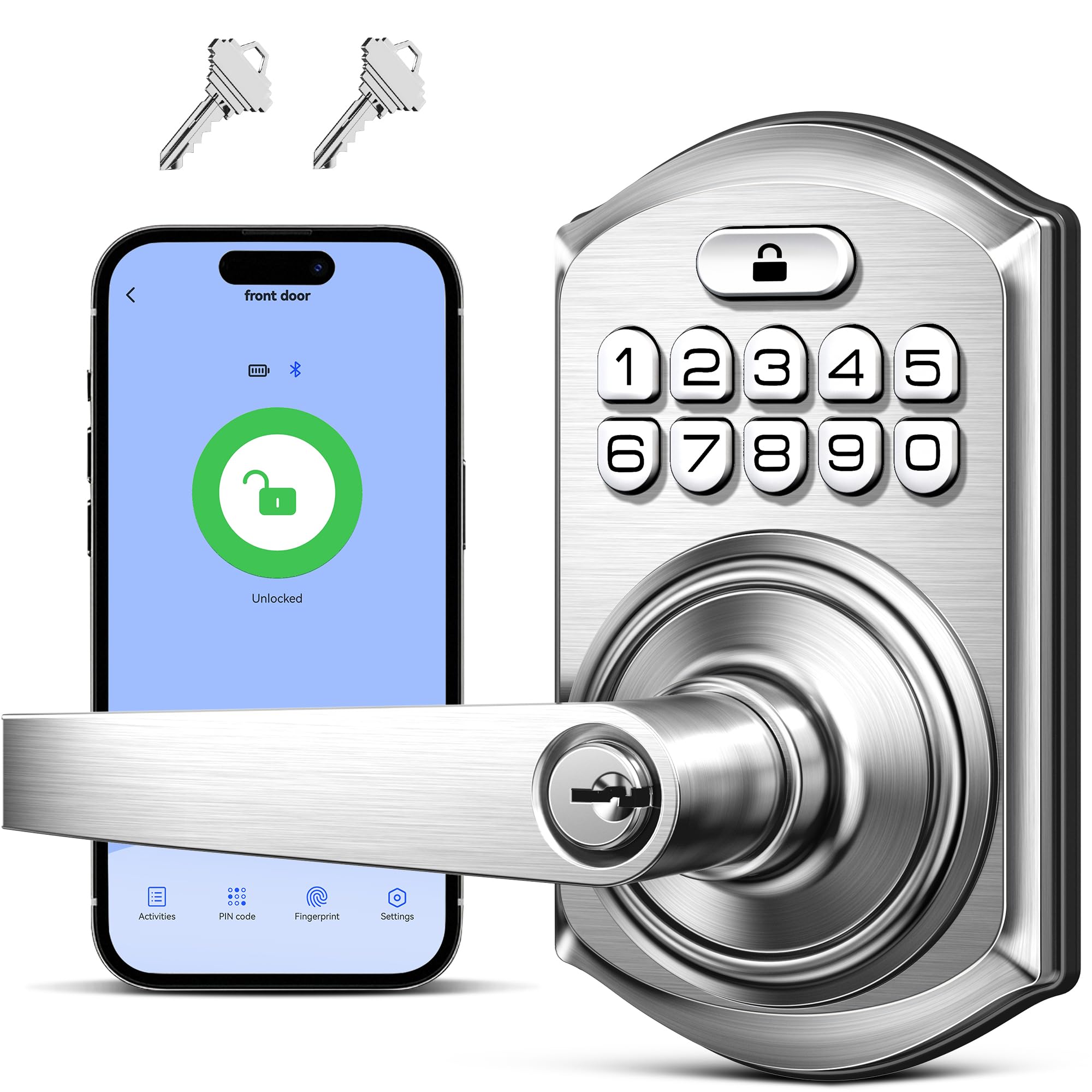
A Bluetooth keypad lock with 100 passcodes that runs a year on four AA batteries for the price of a plain deadbolt.
Set expectations right from the top: the TE019 handles locking cleanly, but the smart side leans on a TEEHO G1 Gateway that you buy separately if you want Alexa, Google Assistant, or remote control from your phone. On its own it is a Bluetooth-connected keypad lock with a 4-in-1 entry system — the KK Home App, 100 custom passcodes, and 2 backup keys. For a bedroom, Bluetooth is the one you actually need, because you will always be standing at the door to use it.
You get solid build quality for the money. Grade 3 certification (a standard durability rating), IP55 weatherproofing (resists dust and water spray), an aluminum alloy keypad and zinc alloy handle, and an adjustable latch that fits either 2-3/8″ or 2-3/4″ backsets on doors 1-3/8″ to 2″ thick. It hits the same 10-to-180-second auto-lock window as the TE012W, supports one-time and timed codes for guests and deliveries, and includes a privacy mode with an internal thumb turn for quick manual locking from inside — a small detail that matters a lot on a bedroom door.
The battery figure is a genuine bright spot. Four AA cells are rated for up to a year of normal use, compared with the 8 AA load that the TE012W carries for its extra Wi-Fi and fingerprint hardware. What you give up in return is exactly that fingerprint scanner and the built-in Wi-Fi. Instead you get more battery headroom and a lower outlay. If you need the fingerprint reader, the TE012W earns its keep. If you just want to punch a code and walk in, the TE019 is the smarter spend.
What buyers rave about: the app and code setup lands fast, and the keypad is quick to program without digging through menus.
What to accept: the smart features need the G1 Gateway, so if you want to control this from afar that cost is part of the package.
Perfect for: renters and homeowners who want app-controlled codes on a budget and are happy to add a gateway later.
Look elsewhere if: you need a fingerprint scanner or out-of-the-box remote open up — those come with the TE012W instead.
5. Veise VE018 Fingerprint Keypad Smart Door Knob Handle Lock
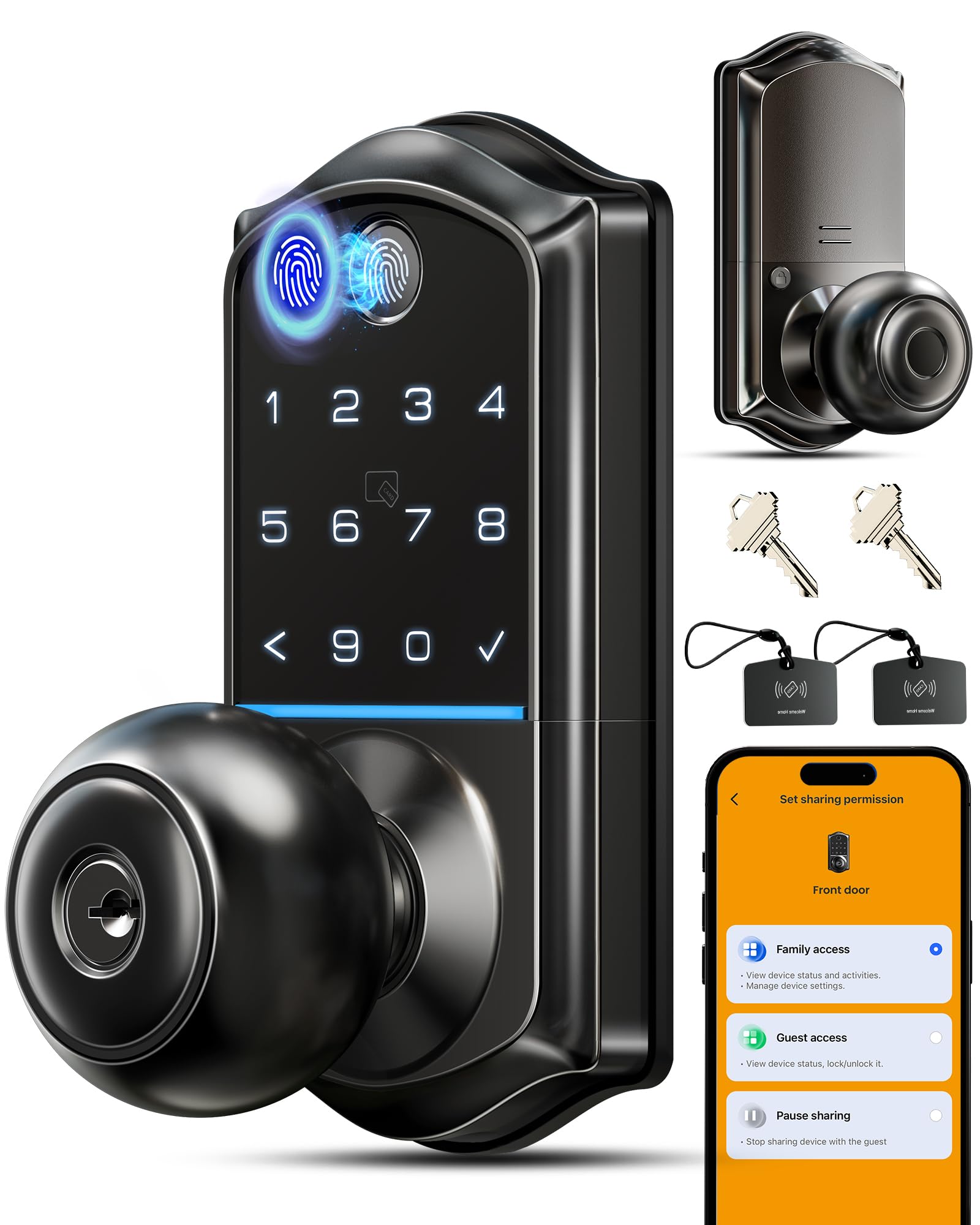
Eight separate ways through one bedroom door, including a key fob for the kids.
Pick the VE018 if you want a knob-style lock instead of a full deadbolt-and-handle set. It packs 8 open up methods: 0.2-second fingerprint, app, keypad, IC card (a tap card), mechanical keys, remote authorization, password sharing, and a fob. That is broader access than the DK01-B (keypad plus keys) or the TE019 (app, code, key) offers, and the IC card and fob are genuinely useful for kids who are too young to type or old enough to lose a phone.
The fingerprint sensor is the star. Veise publishes 0.2 seconds for recognition — a hair faster than the 0.3 seconds that the Ulecoce and both Philips models share — with 99%+ accuracy and up to 20 stored prints, all manageable from the app so you can rename, delete, or see which print opened the door. Battery life is the other headline: 4 AA/LR6 alkaline cells rated for up to 16 months, which is longer than the 12-month figure the DK01-B publishes and a big jump over the TE012W’s 8-cell workload. If yours does die, a Type-C emergency port takes a quick charge so you are not stuck outside.
Two things to weigh. This lock is Bluetooth by default — remote control runs through the Veise G1 Gateway, sold separately, the same way the TE019 needs its G1. And a few owners find the mechanical action stiffer than the electronics, needing a firm turn of the knob to set the latch, especially on older door frames. It is a fit issue, not a defect, and it fades once the mechanism wears in. Owners describe the app programming as straightforward once you get the hang of it, and Veise’s support team has a strong reputation for making things right.
The defining number: 16 months on 4 AA batteries, longer than any other AA-fed lock on this list — so a bedroom door rarely thinks about power.
The one to consider: if your door is old or misaligned, budget a few minutes to smooth the mechanical turn, and remember the app runs over Bluetooth.
Reach for this if: you want a knob-style lock with the widest choice of entry methods and the longest battery window here.
Think twice if: your heart is set on a full deadbolt-and-handle set — that is the DK01-B and the TE019’s territory.
6. Kwikset SmartCode 260 Keyless Entry Electronic Keypad Deadbolt

The only Grade 2 BHMA deadbolt here, with no Wi-Fi and no app to manage.
This spec changes the conversation: BHMA Grade 2 certification (a higher durability rating). Kwikset describes that as up to 2.5x stronger than Grade 3 BHMA lock sets, which is the grade carried by several locks on this list — the Veise DK01-B, the TEEHO TE012W, the Ulecoce, and the Veise VE018. On a bedroom door that depends on how long the lock actually survives being turned, tapped, and slammed for years. Grade 2 is the highest-grade deadbolt here.
Kwikset keeps everything else intentionally plain, and that is the point. Up to 50 user codes and 10 one-time codes are managed right on the keypad with no app involved — one programmer code lets you add, edit, or delete anyone. Auto-lock steps through 30 seconds, 1, 3, 5, or 10 minutes. And the SmartKey feature lets you re-key the whole lock to any KW1 key yourself in seconds, which is invaluable the moment you move into a rental and want the old tenant’s key to stop working.
The honest trade-off is that you get no app, no Wi-Fi, no fingerprint — you get a deadbolt and a keypad, plus a durable Grade 2 build and 12-month battery life on 4 AA cells. That is a real limitation if you want remote control, and it is a real strength if you want a lock that never drops a connection because it never had one. The Microban surface treatment is a Kwikset detail layered on top, and the intrusion alarm fires after 3 wrong codes and disables the keypad for a minute.
Why the price holds up
- Grade 2 BHMA certification — the highest grade on this list against several Grade 3 picks
- SmartKey re-keying lets you lock out old keys in seconds
- 50 user codes plus 10 one-time codes managed entirely on the keypad
- 12-month battery life on 4 AA cells, no Wi-Fi drain
What you accept
- No app or remote access at all — code changes require you at the door
- Battery cover can rattle on some doors; a thin strip of tape silences it
- Finish options may be limited compared with the plastic-bodied alternatives
The right buy if: you want a deadbolt built to outlast the rest and you never want to think about a Wi-Fi signal again.
Skip if: you need remote open up or fingerprint entry — the SmartCode 260 is deliberately not that.
7. Philips Fingerprint Keyless Entry Door Lock with Touchscreen

No Wi-Fi by design, so there is no pairing to drop and no app to open at midnight.
Philips built this one to skip the internet entirely, and that single choice shapes everything else. There is no Wi-Fi radio to drain batteries or drop its pairing, so the 1000 Series runs on 1.5V AA alkaline batteries with a documented beep alert when power dips below 20%. The trade-off is no app and no remote access — you manage codes at the door. For a bedroom, that is often exactly right.
The headline feature is the fingerprint sensor, which reads in 0.3 seconds with an accuracy rate Philips lists at up to 99.99%. Alongside it sits a touchscreen keypad that accepts unlimited one-time PIN codes for guests, deliveries, or a handyman, plus mechanical key backup with two keys in the box. Auto-lock is adjustable across 30 to 180 seconds and one-touch locking engages in two seconds by pressing any key. Setup runs on voice-guided programming in English, French, or Spanish, which spares you the paper manual entirely.
Two caveats worth knowing before you install. Auto-lock is off by default and you must enable it, and the lock does not detect whether the door is actually closed — if the door is open, the bolt still extends. Philips flags both plainly in the listing. The other note is a narrower fit range than most: the door thickness requirement tops out at 1-3/4″ rather than the 2″ ceiling that the TEEHO TE012W, TE019 and DK01-B share, so measure before ordering. Owners mention the install is genuinely simple, with one noting they installed it with their 10-year-old daughter in about 15 minutes.
The clever bit: unlimited one-time PIN codes plus a 0.3-second fingerprint reader, all with no Wi-Fi, no app, and no hub to buy.
Where it constrains you: auto-lock starts disabled and the lock cannot tell if the door is open, so you have to be a little disciplined about closing it first.
Ideal for: a bedroom you want keyless and fingerprint-accessible with zero online footprint and no ongoing battery anxiety.
Pass on it if: you want to open up from your phone or manage codes remotely — the 4200 Series is Philips’ answer to that.
8. Yale Code Keypad Deadbolt for Keyless Entry

All 20 codes are added and deleted on the keypad itself, with no app or account.
Yale keeps this one deliberately non-connected, and that is its entire personality. Adding or removing a code, setting auto-lock, and adjusting the sound all happen directly on the lock in seconds. Up to 20 entry codes live on the unit, and you can choose a code length anywhere from 4 to 8 digits. For a bedroom door you are sharing with family or housemates, that is plenty — and it means guests can get in without you ever touching a phone.
Installation is pure DIY. It replaces your existing deadbolt with no wiring and no professional help, and the raised push buttons give clear tactile feedback as you type, which is a small detail that pays off nightly in a dark bedroom. The satin nickel finish is brushed and low-profile, and the build is weather resistant with a backlit keypad. Auto-lock is fixed at 30 seconds, so this is not a lock for people who want a tunable timer.
Two things to note. A 30-second auto-lock is short enough that it can lock you out if you step out to grab laundry and pull the door shut behind you — a real risk in a hallway. And, as with most keypad-only deadbolts, that auto-lock is on your clock, not yours to extend. Owners describe the install and code entry as quick and intuitive, though some reports float between good battery life and heavier consumption, so keep spare AA cells around.
The core appeal: 20 codes, 4-to-8-digit flexibility, and one-button-raised keypad you can manage without an app or a Wi-Fi connection.
The one habit to build: 30-second auto-lock is fast, so get in the routine of keeping your code in muscle memory before you pull the door.
Pick this if: you want a bedroom lock you can install and program in an afternoon without downloading anything.
Not for you if: you want app control, adjustable auto-lock timing, or fingerprint entry.
9. Philips 4200 Series WiFi Keypad Deadbolt with Handle

A matching lever handle plus built-in 2.4GHz Wi-Fi, with no gateway to buy.
This is the pick that glues all the pieces together. It ships with a matching door lever as a complete front-door or bedroom-door set, and it connects directly to 2.4GHz Wi-Fi with no hub or bridge to buy. That means app control, remote locking, and access logs all work from the start — the one thing the TE019 and the VE018 both need an extra gateway to do. Keep it within 33 feet of your router, and the connection is solid.
The functional range is wide. You get permanent, one-time, periodic, and recurring PIN codes for family, guests, housekeepers, or short-term rentals. Fingerprint entry reads in 0.3 seconds. Auto-lock is adjustable from 0 to 180 seconds through the app, and the app shows your lock status at a glance, so you never leave for work wondering whether you locked up. It is compatible with both Alexa and Google Assistant, and it runs off standard 1.5V alkaline batteries with a low-battery alert — Philips rates battery life up to 6 months under daily use.
The honest hedges are worth naming. The 6-month battery figure is the shortest on this page, and customers note the lock is picky about battery quality — cheap cells can trigger a low-battery warning within a couple of weeks. Auto-lock is also disabled by default. And some installs run into the included strike plate being longer than a standard 2.24″ opening, which occasionally needs a restorer plate to sit flush. Set those aside and this is the most feature-complete, remotely manageable lock on the list.
What justifies the top-tier pick
- Built-in Wi-Fi with no hub — remote open up, code management, and access logs work immediately
- Comes with a matching handle set, so the door looks finished
- Four code types — permanent, one-time, periodic, and recurring — plus 0.3-second fingerprint entry
- Alexa and Google Assistant compatible for voice locking and status checks
Where it asks for patience
- 6-month battery rating is the shortest here, and cheap batteries trip the low-battery alert early
- Strike plate occasionally does not fit a standard opening without a restorer plate
- Auto-lock is off by default and needs to be enabled in the app
Made for: hosts and homeowners who want to open up a bedroom door from anywhere, manage codes remotely, and view access history in real time.
Think again if: you want maximum battery life or plan to use cheap batteries — this lock wants quality alkalines and a regular top-up.
Understanding the Specs
Code Capacity and Fingerprint Storage
This is how many separate access codes and fingerprint profiles the lock can hold at once. It matters because shared doors — family rooms, rentals, home offices — need room for each person to have their own entry, and you want headroom to add a cleaner or dog-sitter without deleting anyone. The Veise DK01-B holds 21 passwords; the TEEHO TE012W stores up to 100 codes and 20 fingerprints; the Ulecoce holds up to 512 fingerprints and codes combined. More capacity means less housekeeping — no reusing codes, no sharing one PIN. Fingerprint storage usually sits separately from passcodes, so check both numbers if you plan to use both methods.
Auto-Lock Timing and Passage Mode
Auto-lock means the door relocks itself after a set number of seconds — no need to remember to tap anything. Every lock here handles it differently. The Ulecoce lets you go as short as 5 seconds; the Veise DK01-B runs 10 to 99 seconds; the TEEHO TE012W, TE019 and VE018 all run 10 to 180 seconds; the Kwikset SmartCode 260 steps through 30 seconds, 1, 3, 5, or 10 minutes; the Philips 1000 Series runs 30 to 180 seconds; and the Yale Code and Philips 4200 Series run at 30 seconds and 0 to 180 seconds respectively. Some locks add passage mode (a setting that disables auto-lock for a while), handy when you’re moving boxes through a bedroom door.
FAQ
Will a keypad deadbolt fit a standard bedroom door?
Do I need Wi-Fi for a bedroom keypad lock to work?
How does auto-lock work on these locks?
What happens when the batteries run out?
Can I add separate codes for family members?
Is a keypad lock more secure than a traditional deadbolt?
Do I need a gateway for these smart locks?
Can I open up these locks with a fingerprint instead of a code?
How long does installation take on a bedroom door?
Are these locks weatherproof if I use them near a breezeway or garage door?
Can I tell who open up the door and when?
Final Thoughts: The Verdict
For most bedrooms, the win goes to the Veise DK01-B — 21 passwords, one-time guest codes, an IP54 build, and a complete matching handle set for a clean, key-free bedroom door. If you want a fingerprint reader and don’t mind keeping 8 AA batteries stocked, the TEEHO TE012W adds Wi-Fi, 100 passcodes, and 20 fingerprint slots without a hub. And for a lock that holds up to years of daily use with no app or network to worry about, the Grade 2-certified Kwikset SmartCode 260 is the deadbolt to trust. Any of these three makes a bedroom door simpler the moment you install it — pick the one whose access methods match how you actually live.
How We Picked
We do not accept paid placement. Every pick is matched to a real buyer and a real use-case; we do not hands-on test units.
Sources & Methodology
Specifications: manufacturer listings and product documentation. Review insights: verified customer reviews, as of September 2026. Pricing: not shown on this page (it changes often); check the current price via the retailer link.
As an Amazon Associate, KitchPrep earns from qualifying purchases. This does not affect which products we feature.
Related Guides
