
Specs are compiled from manufacturer listings and verified buyer reviews and can change over time — please confirm the key details on the product page before buying.
If your lower back aches by 3pm, the chair is usually the problem, not your posture. The right desk chair for a bad back does three things: it puts firm support in your lower back (not just a pillow), it lets you adjust seat height and depth so your feet rest flat, and it lets your back angle change through the day instead of locking you into one position. Get those three right and long workdays stop hurting.
I’m Mohammad Maruf — the founder and writer behind KitchPrep. This guide is built by comparing the manufacturers’ published specifications and the patterns across verified customer reviews, so you get each pick’s real strengths and trade-offs instead of marketing spin.
Below you will find adjustable lumbar chairs, reclining mesh chairs, and padded executive options sorted by who they actually fit. If you want the short answer, the MOLENTS mesh chair with BIFMA X5.1 certification is the strongest all-rounder here. Start there, then read the rest to see which desk chair for a bad back matches your desk, your height, and your back.
Our Picks at a Glance

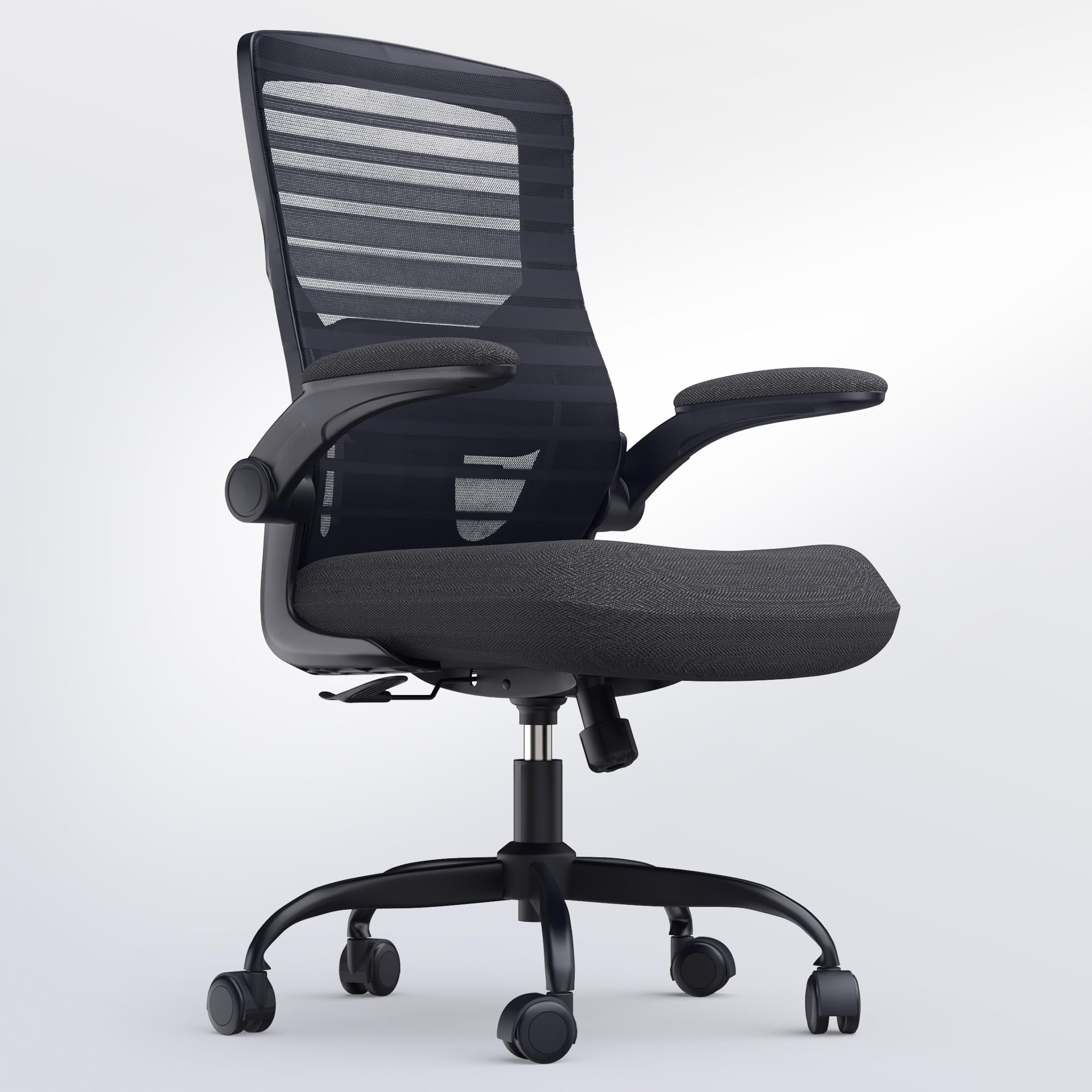
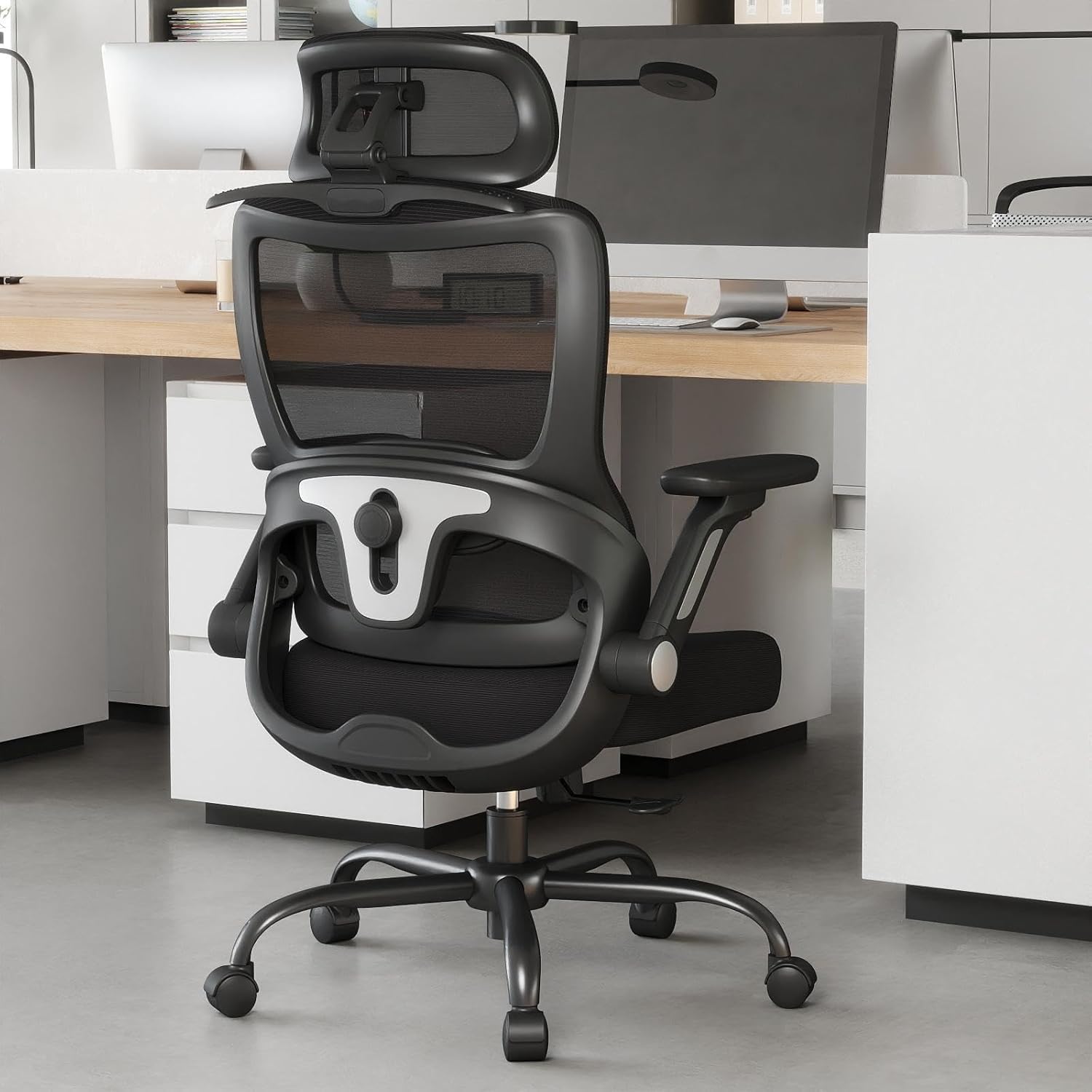
How To Choose The Best Desk Chair for a Bad Back
Buying for a bad back changes what you look for. On a regular chair, style and price lead the decision. Here, three specs decide whether you can sit for eight hours without shifting every ten minutes — and the two you cannot see in photos decide whether the chair survives year three.
Lumbar support has to move, not just exist
A fixed bump in the backrest only helps if it lands exactly where your lower back curves. Since everyone is a different height, the useful version is adjustable lumbar support — a pad you can slide up and down, and on the better chairs also push forward and back. Two-way adjustment moves it up and down; four-way adds forward and back. If your lumbar pad sits two inches too high, it jabs your ribs instead of supporting your spine, so adjustment range is the whole point.
Seat depth decides whether your back ever touches the backrest
Seat depth is the distance from the front edge of the cushion to the backrest. If your legs are short and the seat is deep, you slide forward to let your knees bend, and your lower back loses contact with the lumbar pad entirely. That is why sliding seat depth adjustment matters — it is a rare feature on cheaper chairs and the single best fix for shorter or taller users. Pair it with a seat height that puts your feet flat on the floor.
Recline range and tilt tension keep pressure moving
Sitting locked upright all day loads your spine in one spot. A backrest that reclines through a range — three to five lock positions is typical — lets you shift your weight and open up your hip angle. Tilt tension (the knob or lever that sets how hard the chair resists leaning back) should be firm enough that the chair does not flop backward when you lean. And check the base: a metal five-point base and a dual-frame or reinforced backrest are what keep a chair stable years in.
Quick Comparison
| Model | Best For | Lumbar Adjustment | Recline Range | Weight Capacity | Amazon |
|---|---|---|---|---|---|
| MOLENTS Ergonomic Office Chair★ Best Overall | All-round pick for daily desk work | 4-way (up/down, forward/back) | 90°–120°, three positions | — | Amazon |
| QLTPLUS Office Desk ChairBest Value | Solo assembly and tight desks | Adjustable sliding lumbar cushion | Adjustable tilt and rock | 350 lbs | Amazon |
| Keratee Ergonomic Office ChairTop Performer | Heavier users wanting a headrest | Dual-direction (2″ up/down, 1.2″ forward/back) | 90°–135°, three locks | 400 lbs | Amazon |
| ProtoArc EC200 | Height and leg-length fit | 2.36″ height + 0.8″ depth | 4 locks, 90°–130° | Under 220 lbs (recommended fit) | Amazon |
| SIHOO M57 | Long-term support on a budget | Height and depth adjustable | 90°–126° | 330 lbs | Amazon |
| GABRYLLY Ergonomic Chair with Footrest | Reclining breaks with legs up | 2-way (3″ vertical, 1.6″ horizontal) | 90°/110°/135° | 300 lbs | Amazon |
| La-Z-Boy High-Back Office Chair | Padded comfort for focused work | Automatic (AIR Lumbar Technology) | Recline with tilt-lock | 350 lbs | Amazon |
| SIHOO B300 Pro | Fine-tuning lumbar and seat depth | Spring-assisted 4-way, independent backrest height | Weight-sensing recline | — | Amazon |
| Sharper Image S600 | Padded seat with massage and heat | Active lumbar (moves with posture) | Single recline position | — | Amazon |
| LiberNovo Omni SE | Deep recline without a huge footprint | Manual lumbar adjustment | 5 positions, 105°–160° | — | Amazon |
| LiberNovo Omni PRO | Hot rooms and all-day recline | Bionic FlexFit backrest with spinal stretch | 5 positions, 105°–160° | — | Amazon |
In‑Depth Reviews
1. MOLENTS Ergonomic Office Chair with Adjustable Lumbar Support
Our pick — over 4.5★ from 350+ verified ratings; the strongest balance of quality and price.
The lumbar pad you can push in four directions — until it lands exactly on your ache.
Start here if you want one chair to do almost everything. The lumbar support slides up and down and also moves forward and back, which means you can chase your own curve instead of hoping a fixed bump lands in the right place. The armrests move three ways — up and down, in and out, and swivel — so your shoulders are not pulled forward while you type. The back tilts through three positions between 90° and 120° (90° is upright for typing, 120° is leaned back for calls). That is enough range to change your back angle several times a day, which is the habit that matters most when your back is unhappy.
What wins people over is the build quality, with the comfort of the seat and mesh right behind it. The whole chair is breathable mesh over shaped sponge, so it does not hold heat the way a padded seat does, and one owner who had an Aeron before this called it “good support” with a “solid” feel. Assembly runs about 15 minutes on the included tools — MOLENTS packs the base leg inside the seat, so open everything before you start hunting for a missing part. The other thing worth knowing: the tilt tension and height levers take a five-minute read of the manual, because they are not obvious at first touch.
Two honest notes. The armrest panels slide forward and back as well as rotate, and while that is great for positioning, they move when you pull the chair toward you. The mesh seat also limits cross-legged sitting — it is a work chair, not a couch. For anyone between 5’4″ and 6’0″ doing eight-hour desk days, though, this is the chair to beat: it is the top pick here at 4.7 stars across 300+ ratings, and the crowd favorite by a wide margin.
Where it earns the top spot
- Lumbar support adjusts four ways, so it fits a 5’4″ user and a 6’0″ user equally well
- Three-way armrests reduce shoulder strain during long typing sessions
- Breathable mesh seat and back keeps you cool and never holds heat
- BIFMA X5.1 certification (an independent durability standard for office chairs) and a 300 lb support rating
- Roughly 15-minute assembly with tools in the box
Where it asks something of you
- Sliding armrest panels shift position when you pull the chair
- Tilt and height controls need a quick manual read before they feel natural
- The mesh seat is not built for sitting cross-legged or sideways
Buy this if: you want one adjustable mesh chair for all-day desk work and your height sits between 5’4″ and 6’0″.
Look at the QLTPLUS instead if: you share a desk and need armrests that flip up and tuck away.
2. QLTPLUS Office Desk Chair for Long Hours
The padded seat that carries a 350 lb rating and still tucks under a tight desk.
Two features sell this one, and neither is glamorous. First, the molded foam cushion — a memory foam seat that spreads your weight instead of denting under your sit bones, which is the difference between comfortable and squirming on hour four. Second, the armrests flip up and out of the way, so the chair slides completely under the desk when you stop working. If your desk is small or your room is shared, that fold-away arm is the reason to pick this over anything with fixed arms.
The specs back it up. Weight capacity runs up to 350 lbs (how much the base, cylinder and frame are built to hold), the frame is nylon with a reinforced metal base, and it carries a 5-year warranty on top. Owners describe the lumbar cushion as adjustable and, in one case, as cupping the lower back — the contoured mesh back does the spine work and the pad does the pressure work. One reviewer, a 70-year-old with a bad back, put it together alone and used it daily for working from home, which tells you how manageable assembly is. The wrench with a handle and the visual instructions do a lot of that lifting.
The catch is the wheels. On low-pile carpet they roll fine, but on wood floors a few buyers found the stock casters sluggish and swapped them later — and if you are under 5’6″, your feet may float at the lowest seat setting. QLTPLUS will send a shorter gas cylinder on request, though it is fiddly to install. That is a small fix, not a flaw in the design.
Value read: a memory foam seat, a 350 lb rating, flip-up arms, and a 5-year warranty is a lot of chair for the money — and owners keep comparing it to chairs that cost two and three times as much.
Worth knowing: the upholstery shrugs off cat scratches and spills according to owners, and the look is standard office rather than modern.
Reach for this if: you want a padded, high-capacity chair for a cramped desk and you assemble things solo.
Consider the Keratee instead if: you want a headrest and a heavier-rated base without paying much more.
3. Keratee Ergonomic Office Chair with 4D Armrests
A 400 lb metal base and a headrest that tilts — built for bigger frames and longer sessions.
The Keratee answers a problem the lighter chairs here do not: support for heavier users. Its 5-point metal base and casters carry up to 400 lbs, and the seat is a genuinely large 20.5″ x 20.9″ with 3.9″ of high-density foam (thick enough that the cushion takes your shape instead of going flat). The headrest adjusts 3.9″ in height and tilts through 90° and 45°, so your neck is supported when you lean back to read rather than left hanging.
The lumbar pad moves about 2″ up and down and roughly 1.2″ forward and back, and the armrests are the most flexible of any chair at this range: they flip up 90°, slide 1.2″ forward and back, rise 2″ and rotate a full 360°. That last part matters if you type with your elbows out or play with a controller — you are not fighting the chair for arm position. Recline runs from 90° to 135° with locks at 90°, 115° and 135°, plus a rear clothes hook, which sounds minor until you have somewhere to hang a jacket.
Here is the trade-off. The seat is firm — deliberately so — and a shorter user found the thick cushion pushed their feet off the floor, so it suits average and taller builds best. A few owners also found assembly clearer once they gave up on the manual and looked at the parts, and one mentioned it took closer to 30–40 minutes solo. Comfort is what this chair gets praised for most, so the firmness is a preference, not a defect.
Tilt system: the recline lever eases through its three lock positions without a fight, and buyers describe the tilt as simple to adjust.
Headrest verdict: “the adjustable lumbar support hits exactly the right spot” is how one tall buyer summed up the fit — and the tilt-back headrest makes reading in the chair realistic.
Made for you if: you are taller or heavier and want a metal-based chair with the most flexible armrests in this group.
Think twice if: you are shorter than average — the 3.9″ foam seat can leave your feet searching for the floor.
4. ProtoArc EC200 Ergonomic Office Chair with Adjustable Seat Depth
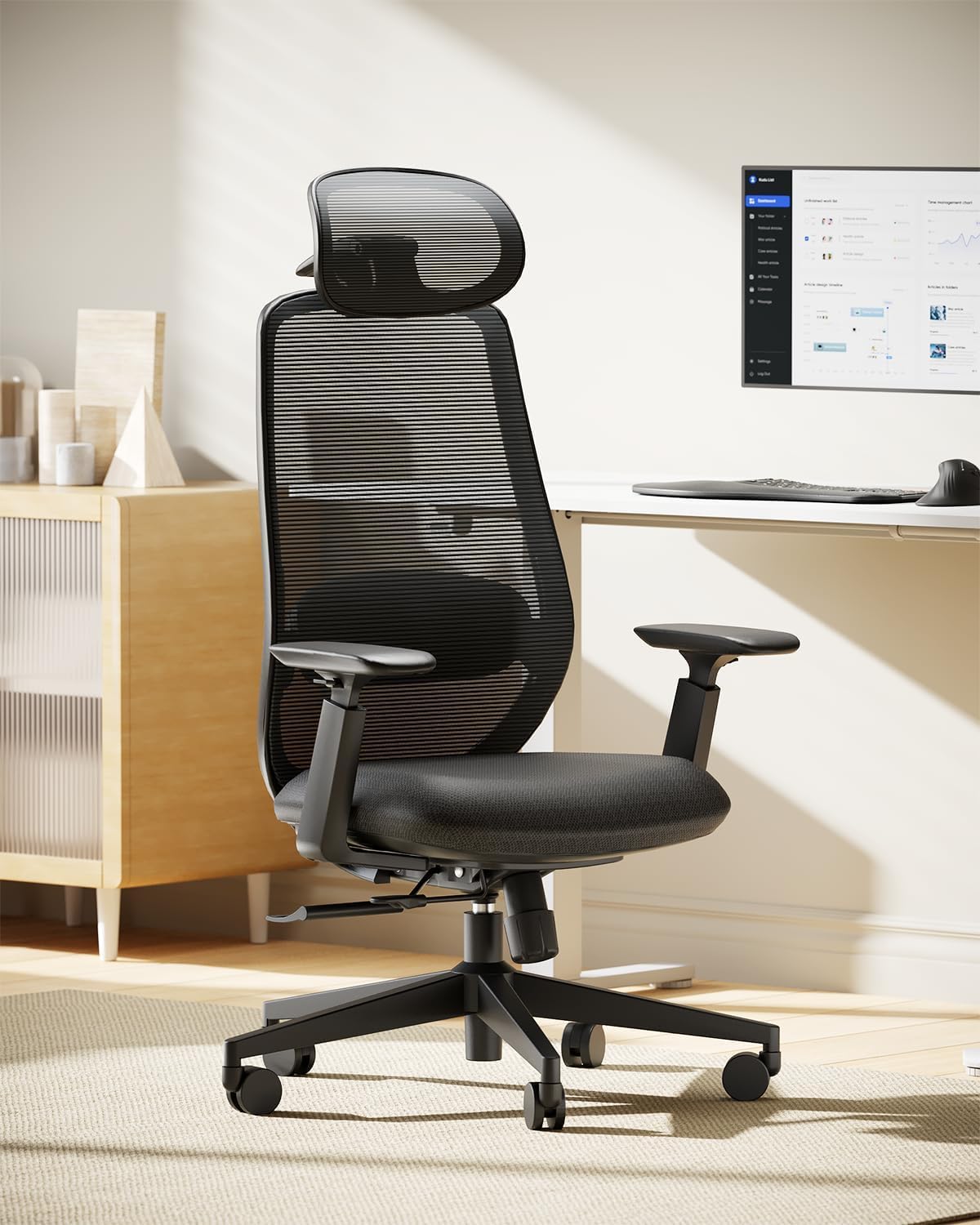
The rare under- chair that slides its seat forward so short legs stop dangling.
Seat depth is the spec nobody checks until their back hurts. The EC200 slides its seat through five positions with 1.97″ of travel, letting you shorten the seat so your back stays planted against the lumbar pad instead of sliding forward to let your knees bend. ProtoArc is upfront about who it fits: users from 5’4″ to 6’0″ and under 220 lbs, which is a real limit, not a marketing line. For that body range the chair is calibrated properly, and the lumbar pad moves 2.36″ in height and 0.8″ in depth to fill your lower back curve.
Three-point support is the design philosophy here — adjustable lumbar, a high-tension mesh back (tension meaning how firmly the mesh pushes back) and a 3D headrest that moves in three directions. Recline locks at four angles: 90° for work, 105° for reading, 120° for calls and 130° for relaxing, with a tension knob to fine-tune how easily it leans. The seat foam is rated 55D — a density number that tells you it resists collapsing over years, rather than sagging into a dip after a few months. It is also backed by BS EN 1335, BIFMA X5.1 and a TÜV-tested Class 4 gas lift, all independent durability standards.
The honest limitation: the lumbar support does not sit low enough for every back. Owners otherwise describe the chair as comfortable for eight-hour stretches with no neck or back pain, but the sizing runs tight at the top end — a 6’4″ buyer returned it, and the armrests can arrive slightly crooked. Below 6’0″ and 220 lbs, none of that applies.
What makes it different
- Sliding seat depth with five positions keeps your back on the lumbar pad at any leg length
- 4-stage recline with tension control covers work, reading, calls and relaxing
- 55D foam resists the sag that flattens cheaper cushions
The honest limits
- Built for 5’4″–6’0″ and under 220 lbs — taller users need a different chair
- Lumbar pad may sit too high for some backs
Your chair if: your height sits inside the stated 5’4″–6’0″ range and you want seat depth adjustment without a premium price.
Wrong chair if: you are over six feet — the EC200 is calibrated for smaller frames.
5. SIHOO M57 Ergonomic Office Chair

The split-back mesh chair thousands of desk workers have lived in for years.
If you want the chair with the deepest track record here, this is it. The M57 is the older, widely owned design in this list, and its split backrest (the back is divided so it flexes around your spine rather than pushing flat against it) plus a waterfall seat edge — a front edge that curves down so it does not cut into the backs of your thighs — are the two shapes doing the ergonomic work. Lumbar support adjusts in height and depth, recline goes from 90° to 126°, and the reinforced aluminum base and dual-frame backrest hold up to 330 lbs.
Comfort is what this chair is known for, with long sessions being the standard report rather than the exception. It assembles in about 15 minutes solo with gloves and clear instructions included, and the silent casters roll without marking floors. The safety story is also unusually well documented — SIHOO states each key part has been through over 100,000 safety tests and carries BIFMA and SGS certification. That is a maker claim rather than an independent lab result, but it sits alongside a 3-year warranty and 30-day returns.
Now the part nobody hides. On durability, owners split: some are still using theirs after four-plus years, while others have had armrests fail or the chair break within weeks. Where SIHOO earns genuine credit is service — one long-time owner had both armrests fail after the warranty had expired and SIHOO still shipped replacements free. The seat also runs narrow, which makes it a poor match for plus-size users, and if you are around 5’6″ your feet may float even at the lowest setting.
Track record: this is the most broadly owned chair in the group, and the comfort and back-support feedback has had years to settle rather than weeks.
Buy it for: the split back, the aluminum base, and a support team that answers within 24 hours.
Best for: smaller-to-average-built desk workers who want proven comfort and a service team that fixes problems after the sale.
Skip if: you need a wide seat or you are plus-size — the M57 runs narrow.
6. GABRYLLY Ergonomic Office Chair with Footrest
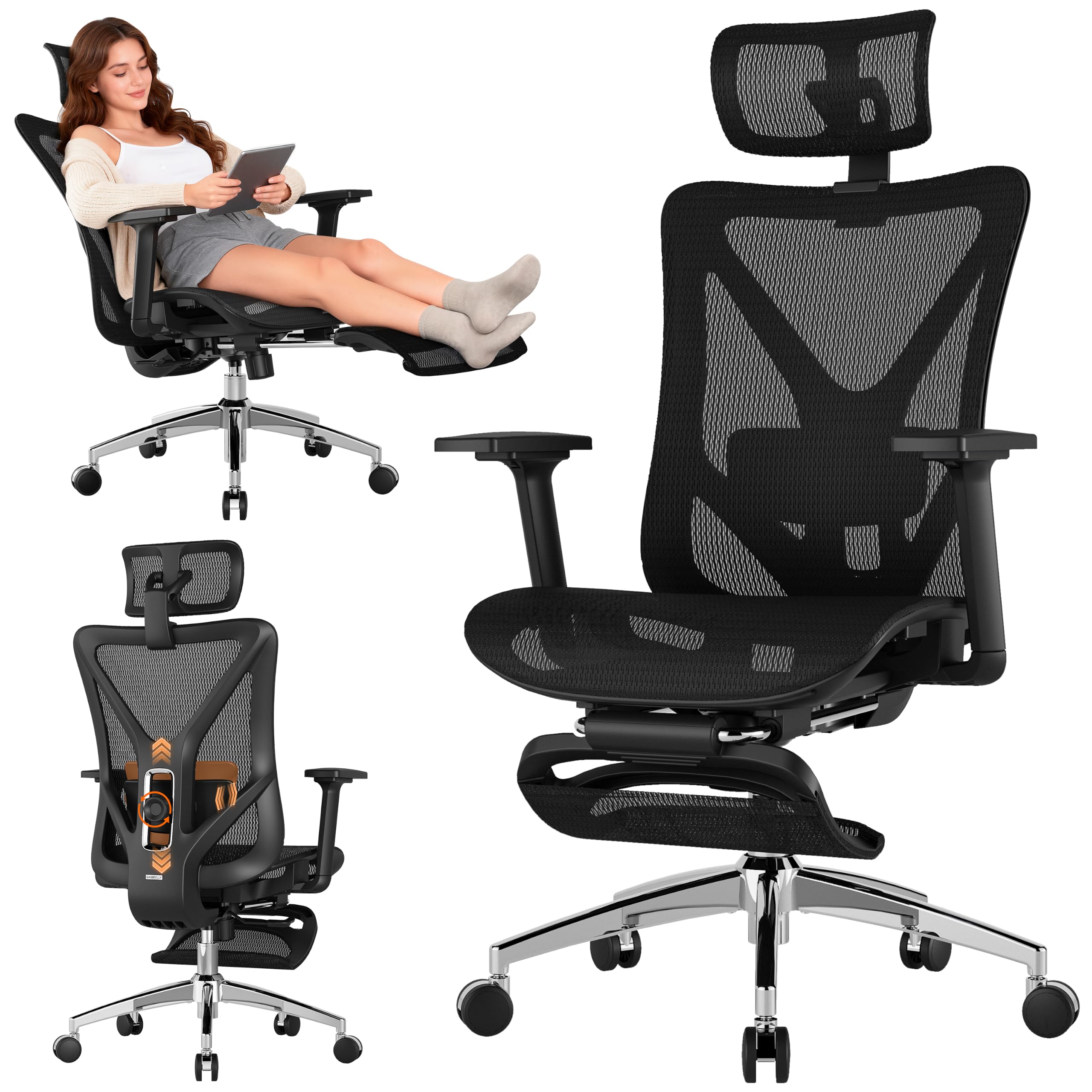
Recline to 135 degrees, pull out the leg rest, and turn your desk into a nap station.
This is the most size-accommodating chair on the list, and it is built for people who feel a bad back most when they cannot take the weight off. The retractable steel footrest extends to 18.1″, so you can stretch your legs out instead of letting them hang while you lean back. The back reclines to 135° with locks at 90°, 110° and 135°, and the 27.5″ large-diameter leg spread keeps the whole thing stable even when you are fully reclined with your legs up. GABRYLLY states it is designed for users between 5’3″ and 6’0″, and owners up to 6’2″ and 250 lbs report it fits well.
The lumbar pad adjusts on two axes — 3″ vertically and 1.6″ horizontally — and the 3D armrests move up and down, front and back, and in and out, which is the kind of range that stops your shoulders rounding after an hour. The headrest adjusts in three ways (height, angle and bracket position). All-mesh construction keeps air moving across your back and seat, and the chair is SGS and BIFMA tested to support up to 300 lbs. Assembly takes 15–25 minutes with the included Allen wrench and screw kit, and the chair is covered by a 3-year parts warranty.
The recurring gripe is the stock wheels, which drag on some floors — GABRYLLY’s support team has sent upgraded nylon casters to owners who asked, and that reportedly fixes it. A few people also found the hard plastic armrests wanted padding and the mesh seat a little scratchy on bare legs, both easy and personal fixes. None of that changes the core: the size fit and the clearance instructions are what this chair does best.
Space-saving detail: the footrest tucks away under the seat when not in use, so the chair still works at a normal desk during the workday.
Design honesty: the armrests adjust up/down and front/back but cannot fold fully back out of the way, which matters if you draw the chair right up to a shallow desk.
Pick this for: long workdays that need real recline breaks with your legs supported, especially if you are 5’3″ to 6’0″.
Look elsewhere if: you need armrests that fold completely flat to slide under a tight desk.
7. La-Z-Boy High-Back Ergonomic Office Chair
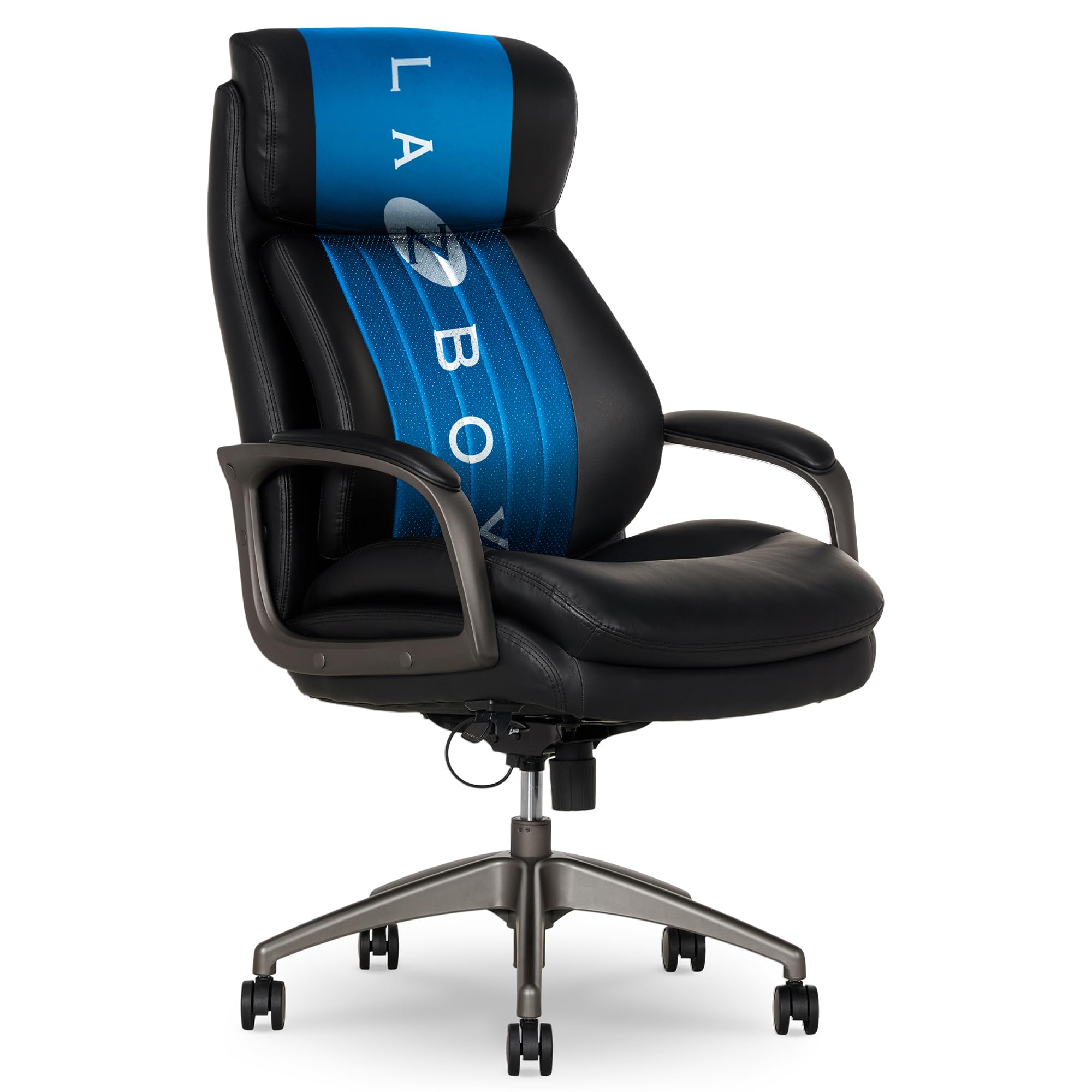
The padded, leather-feel option — for anyone who finds mesh too hard on a sore back.
Not everyone wants to sit on webbing. This La-Z-Boy is the plush alternative in the group: four layers of ComfortCore foam including a poly-fill top layer, wrapped in soft vegan leather that looks and feels warmer than mesh. The back is high enough to support your shoulders and neck, and the AIR Lumbar system is the standout idea — instead of a pad you adjust by hand, it moves automatically as you pivot and twist, keeping continuous contact with your lower back without you fiddling with a knob. It supports up to 350 lbs and rolls on dual-caster wheels that handle both carpet and hard floors.
Where owners are happiest is the working-day use case. One reviewer doing 60-hour work weeks at 230 lbs called it the best chair they had owned, specifically for preventing leg, back and glute soreness across long shifts. Another at 5’10” and 220 lbs reported no lower back soreness after four to five hours at the PC. Assembly is straightforward with step-by-step instructions, though La-Z-Boy recommends two people for it — and one piece of practical advice from owners: the reclining tension arrives set firm, and loosening it takes a fair amount of cranking.
The trade-off depends on your build. Owners note the seat depth is short and the backrest is not as adjustable as the mesh chairs here, so if you are taller you may find the cushioning stops short of reaching your thighs comfortably. One buyer of two of these found it uncomfortable for that reason. For average builds who want softness over firmness, it is a pleasure to sit in.
For the working day: this is a chair built for focused, upright work rather than lounging — La-Z-Boy’s own owners describe it that way, and say it will not fix an existing back injury.
On looks: the leather finish reads as an executive chair rather than a tech-office chair, and one owner called the quality “beyond its price range.”
Fits the profile if: you want padded, leather-feel comfort and automatic lumbar support with no knobs to adjust.
Better avoided if: you are tall and need a long seat depth or full backrest adjustability.
8. SIHOO B300 Pro Ergonomic Office Chair with Footrest
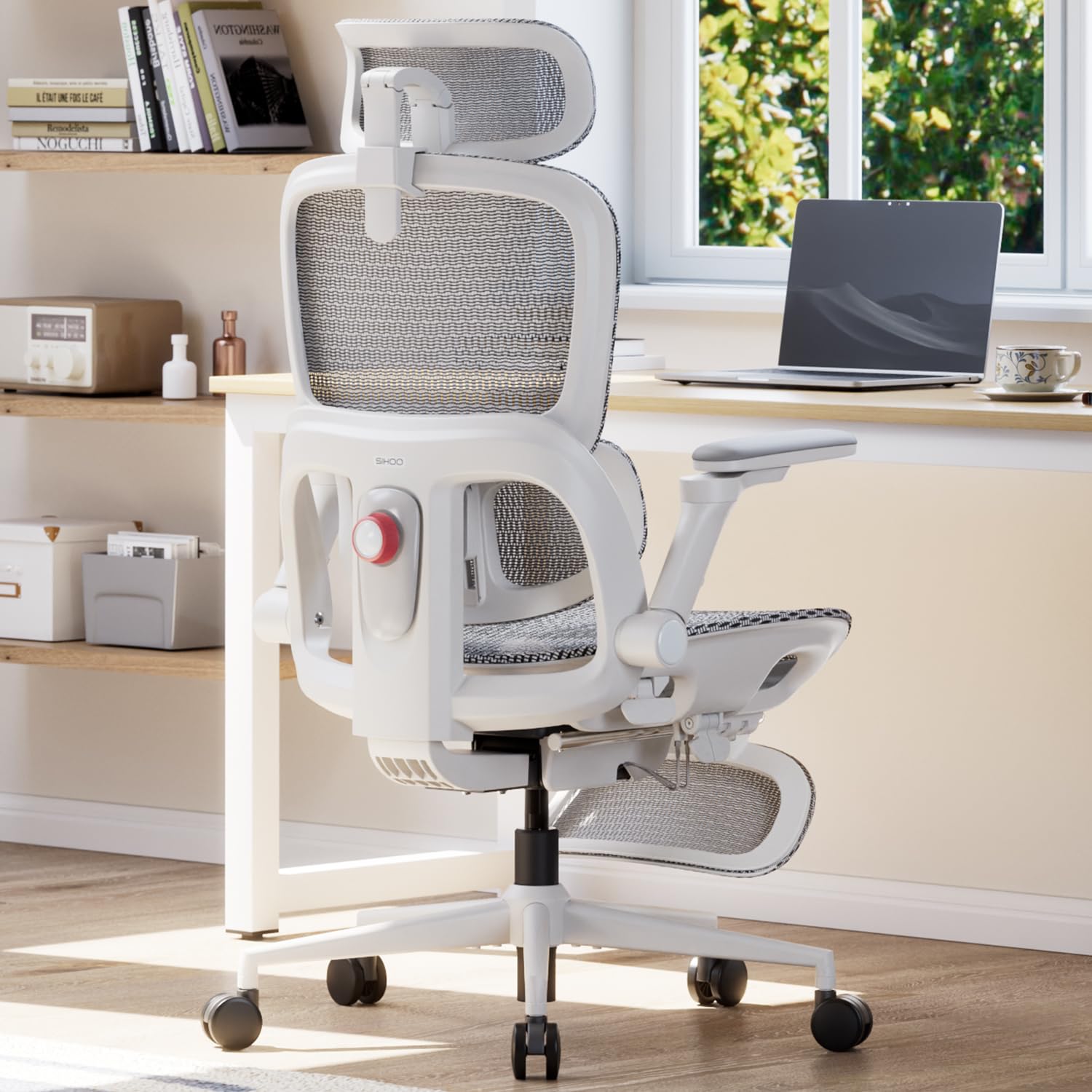
Two rare adjustments — a backrest that rises and a lumbar pad that glides forward.
Most chairs move the seat and leave the backrest fixed, forcing you to adapt. The B300 Pro flips that: the backrest itself adjusts in height, so you raise the lumbar support to wherever your lower back actually curves. On top of that, the spring-assisted four-way lumbar system slides forward independently and flexes to keep contact as you move. Lean in for focused work, sit upright for meetings, recline to reset — the support follows each shift instead of waiting for you to reset a knob. The seat depth also moves: it adjusts between 16.53″ and 18.5″, and the seat height runs from 18.42″ to 21.77″.
Full-body coverage is where this chair separates from everything cheaper. The reclining mechanism senses your weight and matches its own resistance, so there is no tension knob to tune — which is a big deal if you hate fiddling. The 6D armrests rotate, slide, lift and flip up to support typing or cross-legged sitting. The oversized 3D headrest cradles your neck, and the retractable footrest extends for when you want your legs up. All of it sits on full mesh for airflow, and it carries a 3-year warranty with 30-day returns and a stated BIFMA, SGS and TÜV test status.
Two things to factor in. The chair is heavy, so build it on the floor you intend to keep it on. And a couple of owners find the armrests move a little too freely, while the lumbar frame edge can press into your back if you push hard against it. Break-in takes a week or two if you have never used proper lumbar support before — that is the support doing its job, not a defect.
Why it costs more than the M57
- Height-adjustable backrest lets you place the lumbar pad exactly, regardless of your height
- Weight-sensing recline removes the tension knob entirely
- 6D armrests rotate, slide, lift and flip up — the most flexible in the group
What to expect going in
- Armrests flex and shift under pressure
- Lumbar frame edge can press in during hard leaning
- Heavy enough that it is worth building in its final spot
Best for: anyone who wants their lumbar pad to sit at a precise height and does not want to tune a tension knob ever again.
skip it if: you want armrests that stay firmly locked in place under your elbows.
9. Sharper Image S600 Active Lumbar Executive Chair
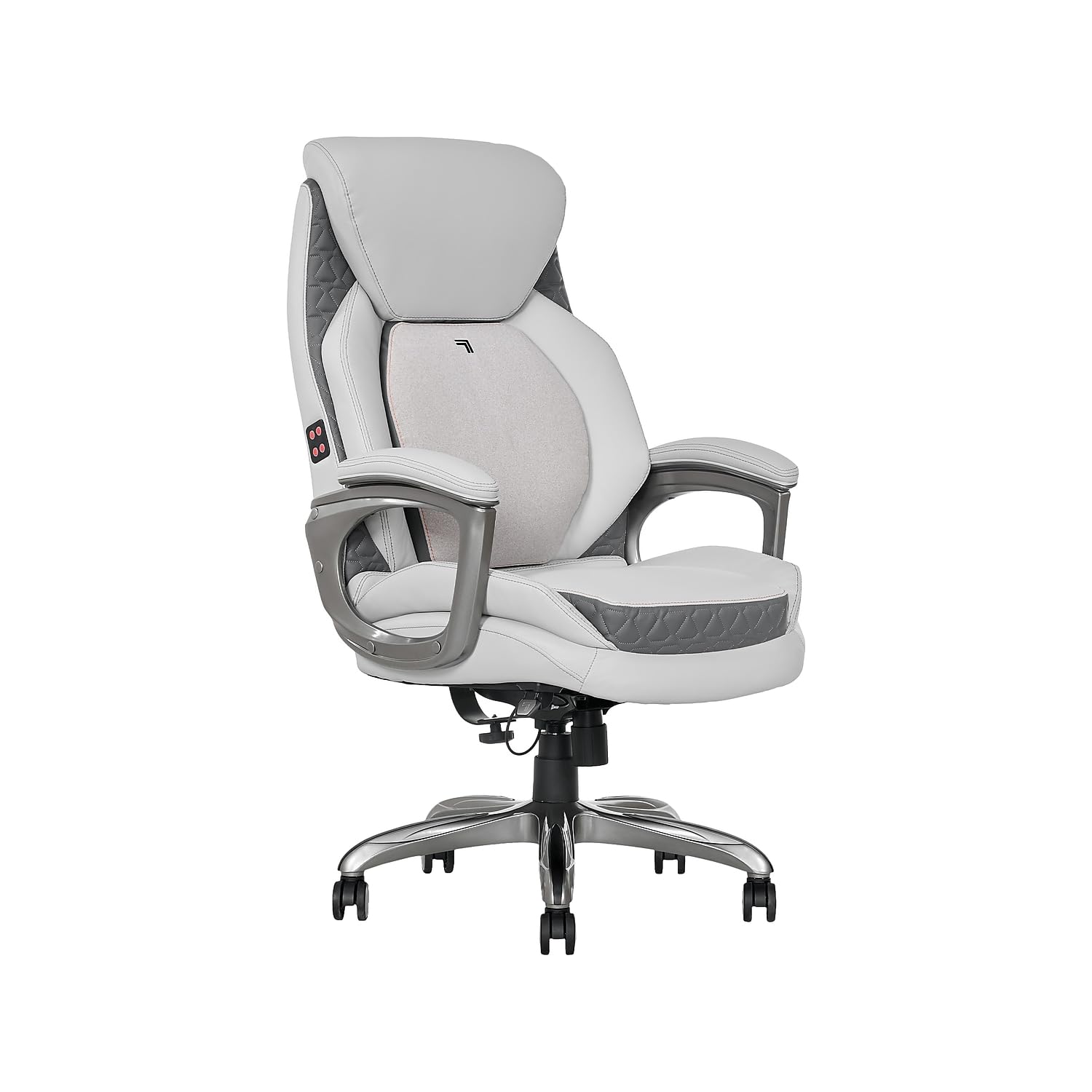
Bonded leather, a couch-soft seat, and massage with heat built into the backrest.
This is the chair for someone whose back pain is paired with a job that gives them no breaks. The active lumbar system moves with your posture, so your lower back keeps its support as you shift, and the backrest adds built-in massage and heat for the moments you want them. The seat is high-density foam under bonded leather — several owners describe it as couch-like rather than office-chair stiff, which is exactly what you want if firmer mesh chairs leave you sore. Padded armrests adjust from 26.75″ to 29.75″ for alignment, the seat swivels a full 360°, and the chairs sit at 45.25″ to 48.25″ high.
The comfort case is well supported. Owners repeatedly rank the lumbar support near the top of what makes the chair worth it, and the massage feature runs as a rotating motion that is effective without being noisy. Build quality holds up — parts arrive individually wrapped for a pristine finish, one owner expects the chair to last ten to twenty years, and the cream color apparently resists denim transfer. Assembly is easy with top-notch instructions, and the seat cushion is soft enough to feel better than a standard office chair on long shifts.
Two things to know before you buy. The massage and heat are vibration-based and need a wall outlet, so plan where the cord runs — running over it with the casters is a common annoyance. And the massage is the light, relaxing kind rather than a deep muscle workout. What the chair does best is a genuinely comfortable seat with lumbar support that follows you.
Comfort verdict: for extended work-from-home shifts, owners describe it as the most comfortable chair they have tried, with the active lumbar adjusting to posture rather than needing manual correction.
Power note: both massage and heat require a corded power source, not a battery.
Choose this if: you want a sofa-soft leather seat with built-in heat and massage and a lumbar support that moves with you.
Less ideal if: you want deep muscle massage or a wireless setup — this one runs on a cord.
10. LiberNovo Omni SE Dynamic Ergonomic Office Chair
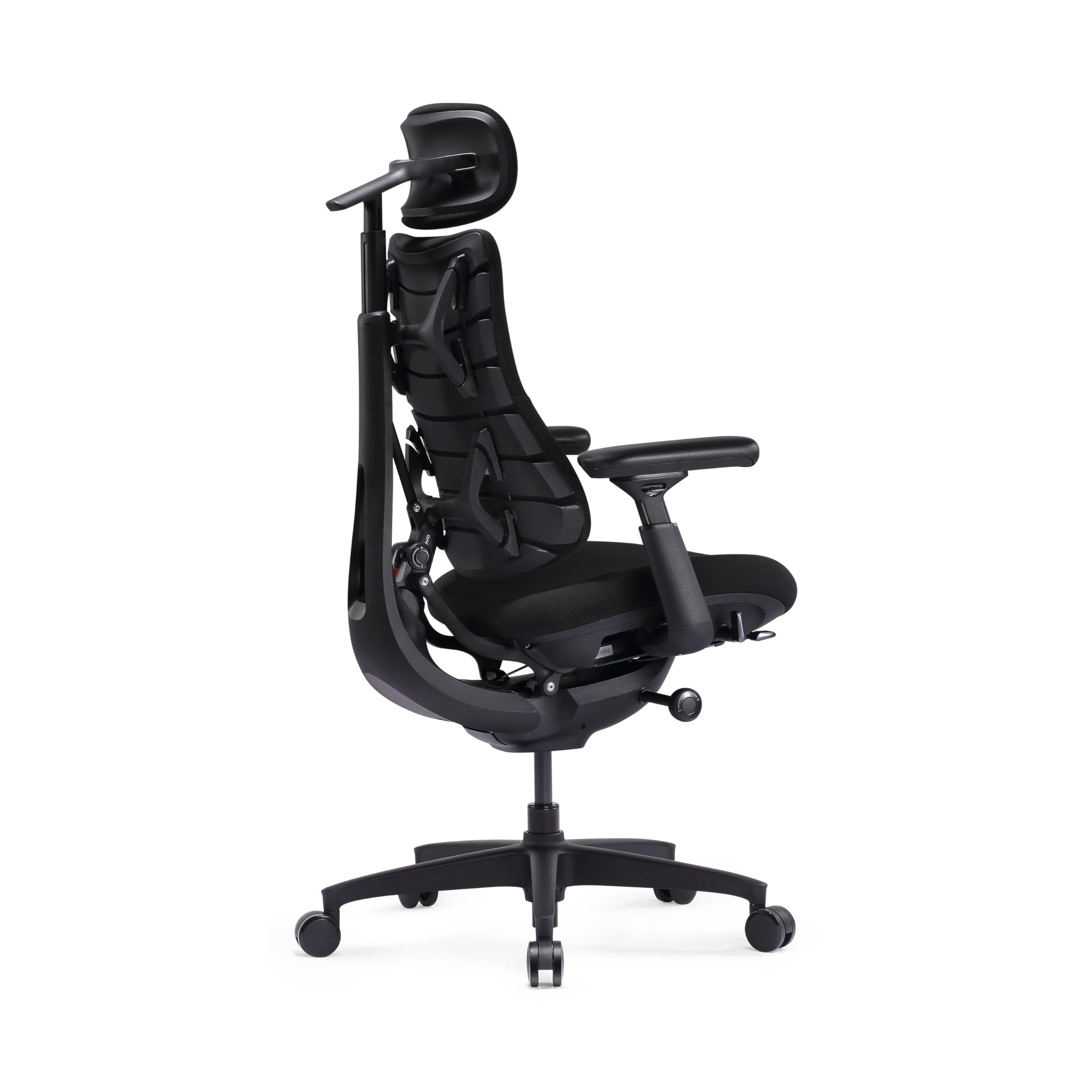
The high-end chair whose whole frame moves with you — headrest, backrest, seat and arms together.
Most chairs support you in one position and lose contact the moment you move. The Omni SE is built on the opposite idea: its headrest, backrest, seat and armrests are designed to move with your body as you shift, lean or recline, keeping support continuous. It gives you five recline positions from 105° (deep focus) to 160° (deep relaxation) and a differential tilt that keeps your head and backrest at different angles so your gaze stays steady on your screen when you recline. Combined with sliding armrests that travel up to 100mm, it is a different approach to the desk chair than anything budget-priced.
The rest of the fit is adjustable too. The backrest carries a manual lumbar adjustment you fine-tune by hand, and the seat uses a multi-density foam cushion that puts firmer foam where your sit bones land and softer foam elsewhere, so pressure spreads instead of pooling. It rolls on a swivel base, ships with an assembly guide and hardware kit, and comes in a sleek obsidian finish. Assembly runs as quick as 15 minutes with the included tool according to owners, and the height adjustment glides smoothly.
Where it asks for patience is assembly and the cushion. Some buyers found the build straightforward, others hit poor experiences — the parts must be aligned before you fully tighten the screws. The seat cushion is the other note: one 5’10”, 200 lb user found it thin enough to feel like bottoming out, and that user also found the lumbar adjustment pushes upward along the spine, which works at the lowest setting but takes getting used to. It is a premium chair that rewards a patient setup.
What owners love: once dialed in, it resolves back pain and stays comfortable for long sessions, with one buyer saying it is the chair that “finally” worked after trying others.
Setup warning: tighten screws only after the frame is aligned, or the assembly feels wrong.
Pick this if: you want deep recline, sliding armrests and a frame that keeps contact with your back through every position — and you have room for a premium chair.
Skip if: you want a thick, plush seat cushion or a chair that assembles without any fiddling.
11. LiberNovo Omni PRO Ergonomic Office Chair with Built-in Fan

A fan in the seat, a spine stretcher in the back, and a battery that runs 36 hours.
If you run hot and your back hates a warm seat, this is the only chair here that solves both. An integrated ventilation system blows air through the seat, so your lower back and thighs do not build up heat during long sessions. It runs on a 3000mAh battery (a rechargeable pack, roughly the capacity of a mid-size phone battery) rated up to 36 hours with ventilation on, and the battery is removable and rechargeable — buyers report a single charge lasting a week on low. Two fan speeds let you dial it from a steady breeze to something stronger, and the fans stay quiet enough not to interrupt concentration.
Everything the Omni SE does, the PRO does with more. The frame is aerospace-grade panels with high-density resilient foam, hydrophilic memory foam and reinforced aluminum alloy, and it tips the scale at 55.8 pounds. Headrest, backrest and armrests move in sync with a differential tilt to keep your body supported and your gaze on your screen. Recline gives you five positions from 105° to 160°, and there is a built-in spinal stretch — recline back and the chair helps release tension through your spine. Combine that with the recline and footrest and you have five separate ways to take pressure off your back during the day.
The trade-offs are real, so know them upfront. Assembly takes about 30–40 minutes and you should leave screws loose until everything is aligned. The footrest ships as a separate package in some bundles, which has led to delivery confusion — though LiberNovo sorted it out for the buyers who hit it. The adjustments also need an initial tuning session before they feel right. Get past those, though, and this is a genuinely different class of chair: 6-year frame warranty and 2-year electronics warranty back it up.
Standout features
- Seat ventilation with two fan speeds keeps your back cool during long sitting sessions
- 3000mAh battery runs up to 36 hours with the fan on and is removable for recharging
- 5 recline positions from 105° to 160°, plus a built-in spinal stretch function
- 6-year frame warranty and 2-year electronics warranty
What to plan for
- Assembly takes 30–40 minutes and requires aligning parts before tightening
- The footrest can arrive in a separate package from the chair
- Many adjustments need a tuning session before they feel right
Worth it for: hot rooms, heavy desk days, and anyone who wants the coolest possible seat with the deepest recline and the most seating positions here.
Know before you buy: expect a 30–40 minute build and a tuning session before the chair feels perfect.
Understanding the Specs
Lumbar Support Adjustment Range
Lumbar support is the pad that presses into the hollow of your lower back, and its adjustment range (measured in inches) is the spec that decides whether it helps or hurts. A two-way adjustment moves up, down, or both; a four-way adjustment adds forward and back so the pad can also push into your curve. Most adjustable chairs here offer roughly 2″ of vertical travel and up to about 1.6″ of depth travel, which is enough to hit the right spot for a range of heights. If your pad sits too high it jabs your ribs; too low and it does nothing. Pick a chair whose lumbar range clearly exceeds your own spine curve.
Recline Range and Lock Positions
Recline range is the total angle your backrest can tip back, measured in degrees from vertical. A chair that only locks at 90° keeps you locked in one position, which loads your spine all day; three to five lock positions from around 90° up to 130° or 160° let you shift weight and change your back angle. Higher maximums (140°–160°) suit chairs designed for nap breaks with a footrest, while a chair with three locks at 90°, 110° and 135° covers the typical workday fine. Tilt tension is separate — that is the resistance to leaning back, and it should be firm enough that the chair does not fling you backward.
Weight Capacity and Base Material
Weight capacity is how much total load the base, gas lift and frame are rated to hold, and it also tells you how heavily built the chair is. A chair rated to 350 or 400 lbs uses a reinforced metal base and heavier components, which last longer under any user than a lighter-rated chair. Matching your body weight with headroom (a chair rated well above your weight) reduces the creaking, wobble and premature failure that comes with being at the edge of a capacity limit.
Seat Depth and Height
Seat depth is the front-to-back length of the cushion, and height is how high the seat sits off the floor. A seat that is too deep forces you to slide forward, which pulls your lower back away from the lumbar pad; too shallow and your thighs hang off the edge. Sliding seat depth adjustment — a rare feature on cheaper chairs — lets you dial the depth to your leg length. Then set the seat height so your feet rest flat on the floor, which is what lets your back relax into the lumbar support properly.
FAQ
What should I look for in a desk chair if my lower back hurts after sitting?
How much lumbar adjustment do I actually need?
Is mesh or foam better for a bad back?
How long do these chairs take to assemble?
Will a chair with a headrest work for my height?
How much weight can these chairs really hold?
Does a footrest actually help back pain on long shifts?
Are reclining chairs with massage and heat worth it for a bad back?
How long should an ergonomic chair last?
What is the difference between a chair and a chair for a bad back?
Final Thoughts: The Verdict
For most people shopping for the desk chair for a bad back, the MOLENTS Ergonomic Office Chair is the strongest choice because its four-way lumbar adjustment, 90°–120° recline and BIFMA X5.1 certification cover all three things a bad back needs — support that moves, a backrest that tilts, and a build that lasts. It is the pick to start with.
If you want the best value with a plush molded cushion and armrests that flip up, the QLTPLUS Office Desk Chair gives you a 350 lb rating and a 5-year warranty. For heavier frames and taller users, the Keratee Ergonomic Office Chair‘s 400 lb metal base and full-armrest adjustability is the safer fit. And if you want the coolest seat with the deepest recline and the most positions, the LiberNovo Omni PRO with its seat fan and spinal stretch is the one to reach for. One last nudge: if your back pain is worst during long stretches, prioritize lumbar adjustment range and test the recline before you decide — the chairs that let you change position throughout the day are the ones owners keep for years.
How We Picked
We do not accept paid placement. Every pick is matched to a real buyer and a real use-case; we do not hands-on test units.
Sources & Methodology
Specifications: manufacturer listings and product documentation. Review insights: verified customer reviews, as of September 2026. Pricing: not shown on this page (it changes often); check the current price via the retailer link.
As an Amazon Associate, KitchPrep earns from qualifying purchases. This does not affect which products we feature.
Related Guides
