
Specs are compiled from manufacturer listings and verified buyer reviews and can change over time — please confirm the key details on the product page before buying.
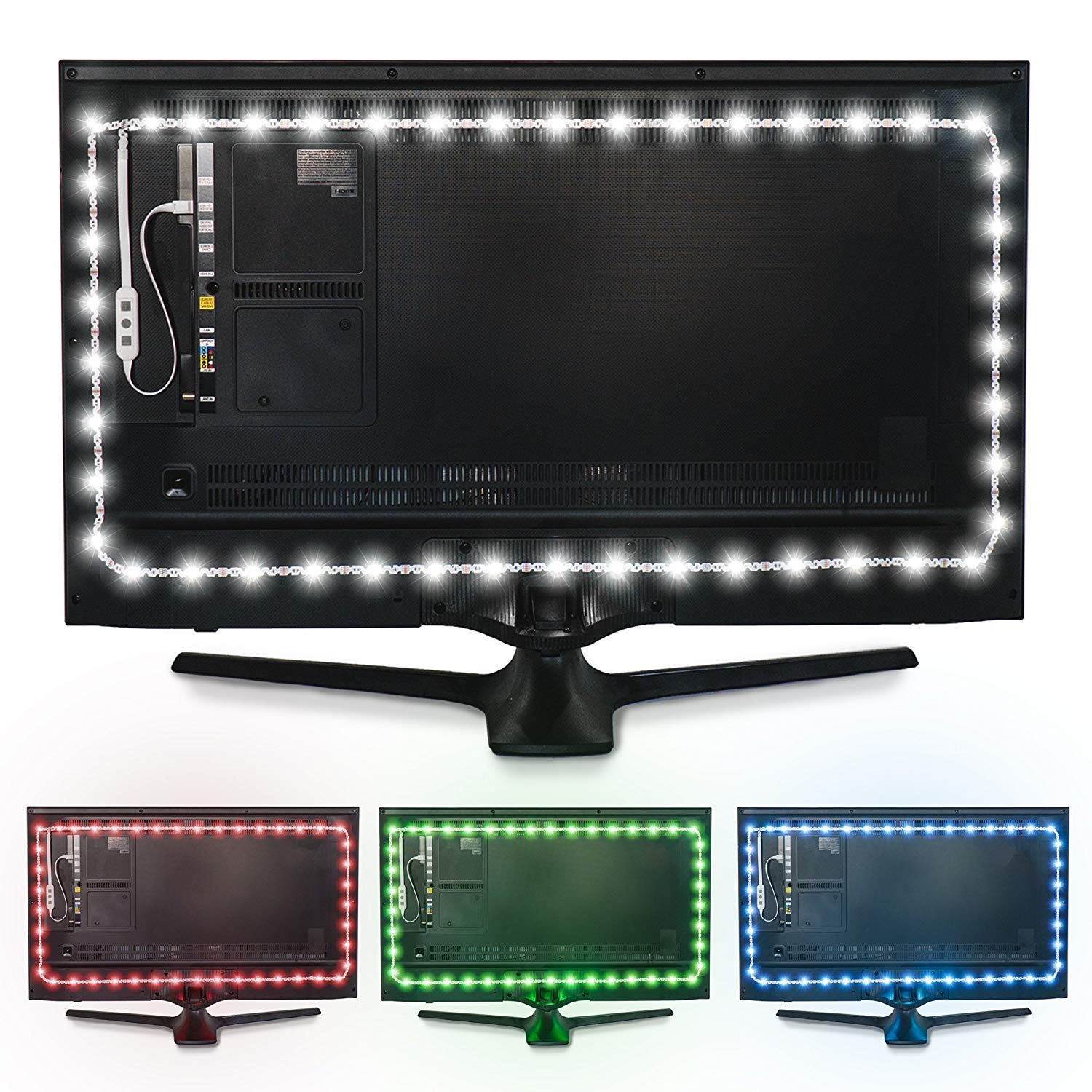
If your eyes ache after a long night of gaming or movie-watching, the fix is usually not a new monitor — it is light placed behind it. A strip or bar stuck to the back of your screen adds a soft glow that fills the dark gap between the bright panel and your dark wall, so your eyes stop jerking between the two. The best pick here is the Luminoodle Color Bias Lighting, whose 6500K true-white glow is the most eye-friendly option for most desks.
I’m Mohammad Maruf — the founder and writer behind KitchPrep. This guide is built by comparing the manufacturers’ published specifications and the patterns across verified customer reviews, so you get each pick’s real strengths and trade-offs instead of marketing spin.
Some kits are color strips that sync to music, others are rigid bars that throw a steady wash. We break down lengths, control options, and power needs. This guide covers the best behind monitor lighting for eye comfort, gaming setups, and colorful ambient glow.
Our Picks at a Glance


How To Choose The Best Behind Monitor Lighting
To pick the best behind monitor lighting, you need to answer three questions: what color you want, how long the strip must be, and whether it plugs into your screen or the wall. Here is what matters before you buy.
White versus color — pick by the job
If your goal is to stop your eyes hurting during long sessions, a white light rated at 6500K is the classic choice. That number describes a cool, daylight-like white, and it is the tone most bias-lighting setups use to soften the contrast between screen and wall. Color-changing kits are the better pick when you want atmosphere — a red wash while you play, or a slow rainbow fade on a shelf. Some buyers run one strip for focus and a separate bar for mood.
Match the strip length to your screen
A strip that is too short will only cover the top and sides, leaving the bottom corners dark — and that uneven ring is exactly what causes the eye strain you were trying to fix. Longer isn’t automatically better either, because a long run of LEDs needs more power. Measure your screen’s edges and check the listed length before you buy.
Power and control — USB or wall
Most of these kits run on USB, which means the strip turns on and off with your screen when you plug it into the monitor or TV USB port. That is the setup most people want. The trade-off is cable reach: on some TVs the USB port is awkwardly placed, and you may need a short extension cable. For control, a physical remote never loses connection, while app control adds colors and schedules but needs Bluetooth or Wi-Fi to cooperate.
Quick Comparison
| Model | Best For | Length | Control | Power | Amazon |
|---|---|---|---|---|---|
| Luminoodle Color Bias Lighting★ Best Overall | Eye comfort | 6.6 ft | Remote | USB | Amazon |
| RGB LED Strip Lights 10ft Pre-cutBest Layout | Low profile installs | 10 ft | App / RF remote | USB | Amazon |
| veltel RGB Light BarCompact Pick | Small ambient accents | Tabletop bar | IR remote / button | USB | Amazon |
| HOUHUI USB RGB Strip 2-Pack | Two-screen setups | 6.56 ft x2 | Remote | USB | Amazon |
| PAUTIX COB RGB Strip | Even, spot-free glow | 4.92 ft | App / RF remote | USB | Amazon |
| KANTUTOE Under Monitor Light Bar | Desk ambient glow | 2 bars | App / remote | USB | Amazon |
| JUSJUBR 2PC RGB Under Monitor Light | Mood lighting | 2 bars | Remote | USB | Amazon |
| Govee Gaming Light G1 | Screen sync gaming | 27-34 in screens | App / DreamView | Wall adapter | Amazon |
In‑Depth Reviews
1. Luminoodle Color Bias Lighting
Our pick — 4.5★ from 12,000+ verified ratings; the strongest balance of quality and price.
The daylight-white strip that turns a blinding screen into a comfortable one.
For anyone whose eyes burn after two hours of gaming in a dark room, this is the one to reach for. The Luminoodle runs 15 light sources along a 78-inch strip, which fits monitors in the 24-inch to 29-inch range. Its defining trait is a 6500K color temperature — a cool, daylight-style white that keeps the wall behind your screen lit instead of pitch black. That single choice is what most people buy this for.
The whole kit weighs just 3.2 ounces and sticks on with 3M adhesive, so there is no drilling and nothing heavy hanging off your screen. You also get 15 colors, 10 brightness levels, and 1 fade mode through the wireless remote, so it doubles as mood lighting when you are not working. It pulls power straight from a USB port, which means it switches on with your monitor or TV and off when you shut down.
The honest part: this is a three-side kit on many TVs, and on a 55-inch screen the side runs fall short of the corners, leaving a dark patch that can defeat the purpose. One buyer’s real words sum it up — “On 55″ TV, side lights don’t reach full length, looks incomplete, causes eye strain.” The seller offers a longer replacement strip for that case. Also worth knowing, brightness and color are not adjustable on the base model, so if you want fine control, look at the app-driven picks in this list.
What earns the top spot
- 6500K white temperature delivers the eye-friendly bias glow this category is built around.
- Setup is genuinely tool-free — 3M adhesive backing and no wiring between units.
- 15 colors, 10 brightness steps, and a fade mode via the wireless remote.
- 2-ounce body adds no meaningful weight to a monitor arm.
Where it asks patience
- On larger screens the side runs can fall short of the bottom corners, leaving dark gaps.
- Brightness and color are fixed on the base model, so no fine-tuning for dim rooms.
- Adhesive sometimes lifts when you peel the backing — a slow pull avoids it.
- Some curved TVs need a short USB extension cable to reach the port.
Reach for this if: you watch or game at night and want a clean, daylight-white glow that softens the screen-to-room jump without color cycling.
Look elsewhere if: your display is bigger than 55 inches — you will want a longer run or an app-controlled strip that reaches every corner.
2. RGB LED Strip Lights 10ft/6 Pre-cut 1.64ft for 43-65 Inch TV Backlight
Ten feet of trim-to-fit color, ready to wrap a big screen corner to corner.
If you own a 43-to-65-inch TV and want the whole frame glowing, this HOUHUI kit solves the exact problem that trips up shorter strips. It ships as ten feet of 5050 LED strip (a common flexible light strip type) chopped into six pre-cut 1.64-foot sections — so you get pieces sized to run along the top, bottom, and each side rather than one long length that runs out of steam partway. You join them with the included connector cables and stick each section down with the self-adhesive tape.
Control flexibility is where it outshines the pick above. You have three ways in: the “duoCo Strip” app over Bluetooth, a 24-key RF remote, and a three-button controller on the strip itself. That third option matters when the remote wanders off under a couch cushion. It also handles 16 million static colors and 28 dynamic modes, and the mic on the power cable lets it pulse to music beats.
The catch here is longevity. One owner’s long-term note is worth repeating: “Lasted Apr 2024–Oct 2025; now only 25% work.” That is a failure story, not a universal one — many setups run for months without issues — but it tells you these thin strip sections are not built for a decade. The connectors are also very thin, so treat them gently during install. Set your expectation at a fun, affordable setup rather than a lifetime fixture.
Standout strengths
- Six pre-cut sections cover all four sides of larger 43-65 inch screens.
- Triple control — app, RF remote, and an on-strip button — so you are never locked out.
- 16 million colors and 28 dynamic modes for serious variety.
- Music sync via a mic on the power cable reacts to sound in the room.
Worth knowing before you buy
- Connector sections are thin and flimsy, so avoid tugging during installation.
- No warm-white channel and no fine color adjustment — colors are fixed presets.
- Not the brightest option; better for soft night glow than washing a wall.
- The LED sections are not built for many years of daily use.
The right call for: a big-screen owner who wants full-perimeter color without splicing strip by hand.
Skip it for: a monitor desk setup — this is tuned for television backlighting, not a 27-inch display.
3. velted RGB Light Bar Music Sync RGB IC LED Lights Bars
A bare, aluminum bar you can drop behind a shelf — no tape, no sticky mess.
Not everyone wants to stick something to a screen. This velted bar sits on a removable base, so you can stand it behind a monitor, tuck it in a shelf, or lay it beside a desk without touching a single adhesive strip. That removable base is the real selling point for anyone in a rental or a desk setup they re-arrange often.
It runs on USB, works with a PC, monitor, game console, or TV, and ships ready to go with no complex settings. You get eight dynamic modes through IC technology — the kind that produces blended, flowing effects rather than one solid block of color. Two ways to control it too: an infrared (IR) remote and a button right on the bar itself, so the remote going missing doesn’t leave you stuck.
Two things worth knowing, both from how it’s designed. First, no white light is included — this bar is color only, so it will not do the 6500K eye-comfort trick. Second, if you point the bar at yourself it throws a hard beam; turned to face the wall, it becomes a soft ambient glow. Honestly, it’s a mood piece, not a bias-lighting solution for a large TV.
Where it shines: tabletop flexibility and a durable build make it an easy add to a shelf, monitor riser, or behind an aquarium where a strip would not fit.
Know before you buy: the IR remote needs a clear line of sight to the bar, and there is no white light — this is a color-only accent, so it isn’t a true bias-lighting upgrade.
Pick this if: you want a small, sturdy ambient bar you can move around at will.
Pass if: eye-comfort bias lighting for a monitor or TV is your actual goal.
4. USB RGB LED Strip Lights Kit 2-Packs 6.56Ft IP65 Waterproof with Remote

Two full strips, two cables, two remotes — one for each screen at your desk.
This is the pick for a dual-monitor setup, or a desk where you want a strip on the monitor and another behind a shelf. You get two separate 6.56-foot runs, each with 60 SMD 5050 LEDs, 16 colors, and 4 dynamic modes. Each strip comes with its own USB cable and its own 24-key remote, so you can give each one its own color and change them independently.
The IP65 rating is the standout spec here. IP65 means the strip itself is sealed against dust and low-pressure water spray, so it handles a kitchen or workshop placement that would worry a plain strip. Just note that the controller and USB plug are not sealed, so keep those away from moisture — this is splash protection, not waterproofing you can submerge.
The clear trade-off is the included adhesive, which buyers regularly find inadequate. It holds fine on a flat, clean surface, but it will let go at bends and corners and on textured plastic. Plan to pick up some extra tape or mounting clips before you start, and the setup goes smoothly.
What you get for the money
- Two complete strips, each with its own cable and remote, so screens stay independent.
- IP65 sealed strip handles dusty or lightly damp spots other strips cannot.
- 60 SMD 5050 LEDs per strip with dimming for a soft, even throw.
- 24-key infrared remote bundles colors, brightness, and 4 dynamic modes into one control.
Where it stumbles
- Adhesive struggles at bends and textured surfaces; expect to add your own tape.
- The controller and USB plug are not waterproof despite the sealed strip.
- The remote needs line of sight to the receiver to work.
- The LED sections are not built to last for years of heavy daily use.
Buy it if: you run two screens and want each one to have its own color without buying two kits.
Think twice if: you plan to mount against a curved plastic back where the stock tape will not hold.
5. PAUTIX 5V USB COB RGB LED Strip Light
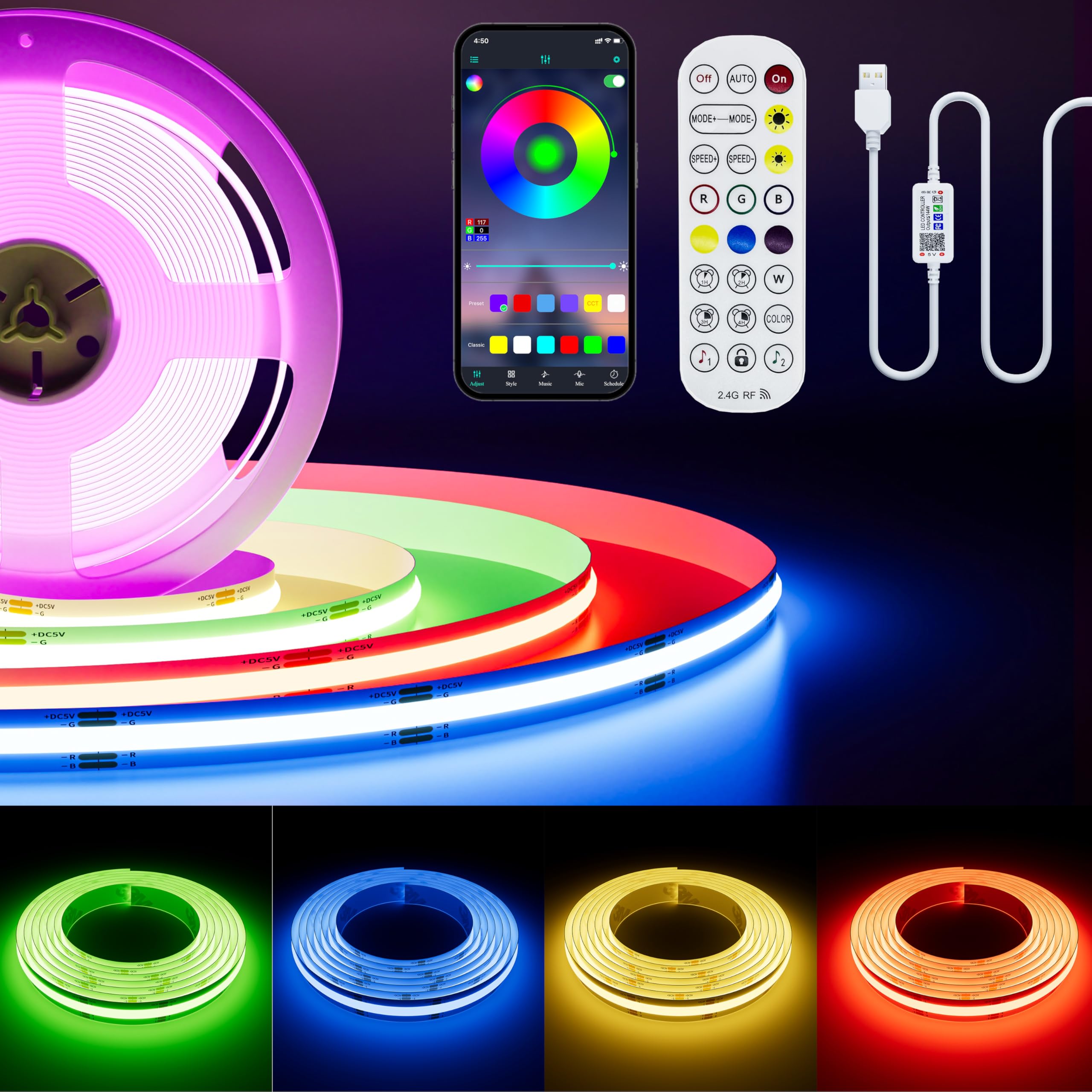
The one where you never spot a single light bead — a continuous line of color.
Standard LED strips give you a dotted look — you can make out each bead along the run. This PAUTIX strip uses COB construction, which means 816 LEDs squeezed into every meter and 1224 LEDs in total across the 4.92-foot length, packed so tightly the light reads as one smooth, uninterrupted line. That is what wins people over here; there are no visible dots or gaps in the glow behind your screen.
The strip is 10mm wide (about the width of a pencil eraser) and pairs with a 10mm 4-pin RGB COB connector if you want to extend it. You control it two ways: an RF remote that works without needing to point at anything, and a Bluetooth app that handles color, brightness, and auto-rotate. A memory function restores your last settings after every power cycle, so your favorite color comes back without setup.
At 4.92 feet, this is a shorter run than the two-screen kits — great for a small monitor or a light box, tight for a big television. The maker claims a 50,000-hour lifespan, and buyers report it holding up after months of daily use in club rigs and guitar pedalboards. Note that it is only IP30 rated (not sealed against water), so keep it away from damp spots.
Its one defining win: 816 LEDs per meter and 1224 total mean a genuinely spot-free line of color — the contrast with dotted strips is the reason to choose this.
Ideal for: a small monitor, light box, or shelf where a smooth, uninterrupted glow matters more than reaching every corner.
Not for: a big TV or a damp kitchen — 4.92 feet is short and the strip is only IP30 rated.
6. KANTUTOE Under Monitor Light Bar (2 PC)
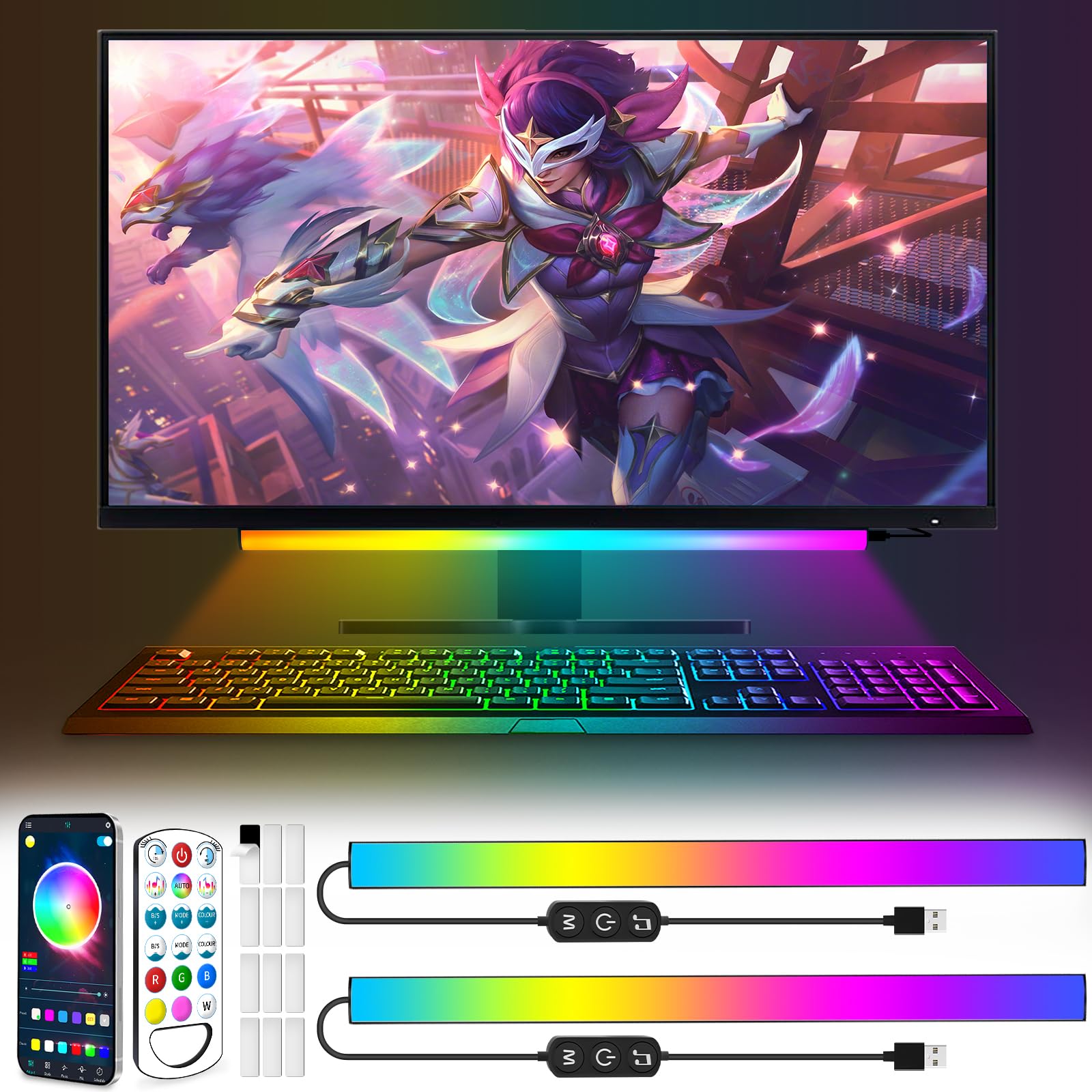
Two slim aluminum bars that click onto magnetic pads — then off again for cleaning.
This KANTUTOE pair takes a different approach from every strip above: instead of one long run, you get two triangular aluminum bars with diffusers (covers that spread the light evenly). That shape is what makes it a strong pick for under-monitor lighting — mounted along the bottom of a screen or a desk edge, it lays down a soft, even wash without the harsh hotspot you get from a raw strip.
Mounting uses strong magnetic tape, so unlike every adhesive strip here, you can pull the bars off and stick them back on without re-taping. That is a genuine convenience if you clean your desk often or re-mount seasonally. The lighting range is deep too — 16 million colors, jump and fade modes, a dreamy rainbow effect, and adjustable brightness, controlled by either a 40-key remote or a phone app over Bluetooth.
The recurring gripe is the mounting. The stock tape holding the magnetic pads can let go and drop the bar, and some users report frequency interference with other lights that needs a quick unplug to reset. A note on safety too: the flashing modes mean this is not the pick for anyone with photo-sensitive conditions. In its intended role as USB bias lighting though, it does the job cleanly.
What buyers like
- Magnetic mounts mean the bars lift off and reattach without re-taping.
- Diffused aluminum bars give an even glow with no visible LED dots.
- 16 million colors with rainbow and fade effects, plus adjustable speed and brightness.
- Two ways to control — app over Bluetooth or the included 40-key remote.
What to weigh
- The stock magnetic mounting tape can weaken and let a bar fall.
- Occasional frequency interference with nearby lights requires an unplug to reset.
- Music sync and flashing modes are unsuitable for anyone with a photo-sensitive condition.
- Bars are best as back-wall bias light, not as a front desk lamp.
Perfect for: a desk setup where you want soft ambient glow you can lift off and reposition at will.
Consider the strips above if: you need to cover a large TV frame — two bars cannot reach all four sides.
7. JUSJUBR 2PC RGB Under Monitor Light

Two matte aluminum bars with a staggering 353 dynamic modes to cycle through.
Where the KANTUTOE pair gives you effects, this JUSJUBR kit gives you sheer volume. Each of the two bars packs 353 dynamic modes and 12 static colors, so the amount of variety is the headline. You control it through a wireless remote with separate buttons for mode, brightness, and speed, and one remote can drive multiple lights at once. An inline switch on the cable also gives you a hard on/off without hunting for the remote.
Physically it is built to disappear. The bars wear black aluminum cases with good heat dissipation, and a 57.5-inch cord with included wire clips keeps extra cable tidy. A memory function holds your last setting even after you unplug, so your preferred mode comes back automatically. The typical mounting — tape pads on the back of the screen, bars facing the wall — throws a soft halo instead of a sharp beam.
The honest weak point is the remote. Some owners mention the buttons can be finicky, occasionally triggering the wrong color, and one owner reports it interferes with another brand’s light strip in the same room. The rotational color gradients also stutter because there are not enough LEDs for a smooth sweep; solid colors are where this kit performs at its best. It is a mood bar, not a bias-lighting kit.
Why it earns a spot: the sheer choice of modes, the tidy black aluminum build, and the memory function make it an easy plug-and-play mood light for a gaming desk.
The caveat to plan around: the remote is the weak link — mismatched buttons and occasional interference mean you may rely on the inline cable switch for daily on/off.
Best for: someone who wants constant color variety and a discreet, matte-black fixture on the back of the screen.
Wrong pick if: you need a rock-solid remote or smooth rotational gradients — the LED count limits the sweeps.
8. Govee Gaming Light for Monitor G1

The one that reads your screen and matches its glow to whatever is happening on it.
This is a different kind of product from everything above — it does not just sit behind your screen glowing, it watches the screen. Govee’s VibraMatch technology reads pixel points on your display and pushes matching color out the back in real time. Fires, explosions, lightning — the wall behind your monitor lights up in step. For a 27-to-34-inch curved gaming screen, that is what this is built around.
Hardware-wise it is the most substantial pick here: 108 high-density LED beads spread the light evenly, the strip wraps all four sides of your screen, and it pulls 18 watts from a wall adapter rather than a USB port. You get 123 preset scene modes and 11 music modes through the Govee Home app, and it also ties into Govee DreamView (a feature that syncs multiple Govee lights together) for syncing with other Govee lights, plus Razer Chroma compatibility (works with Razer’s lighting system).
The honest trade-offs are worth calling out. The kit is designed for 27-34 inch screens, so it will not wrap a large television. The desktop app can lag noticeably on a lower-spec PC when you run several synced lights at once, and the setup for dynamic sync is not spelled out clearly — expect to hunt down a how-to video. It also runs on 2.4GHz Wi-Fi, which you should keep in mind if your network is picky.
Where it leads the pack
- VibraMatch reads screen pixels and matches color live during games and movies.
- 108 RGBIC LEDs wrap all four sides of 27-34 inch curved screens for even coverage.
- 123 preset scenes and 11 music modes give you near-endless looks.
- DreamView and Razer Chroma tie it into a wider lighting setup.
What to plan for
- The desktop app can lag on a lower-spec PC when several lights sync at once.
- Dynamic sync setup is not clearly documented — budget time for a tutorial.
- Cable management on the four-sided strip takes patience.
- Requires a 2.4GHz Wi-Fi band to connect.
Made for: a gamer on a 27-34 inch screen who wants the glow to react to the action, not just sit static.
Not the one if: you want a simple always-on bias glow — this is a powered, app-managed system that earns its keep through sync.
Understanding the Specs
Color temperature and bias lighting
Color temperature is measured in Kelvin, and the higher the number, the cooler and more daylight-like the white appears. A 6500K rating is the classic bias-lighting tone — it matches the kind of white a well-lit room has, which is why it reduces the eye strain you get when a bright screen sits against a pitch-dark wall. Color-only bars that skip white entirely are for mood, not for eye comfort, so decide which job you actually want first. If your goal is fewer headaches after long sessions, prioritize a kit that lists a Kelvin figure.
LED density and how the glow looks
Density is the count of light beads per meter of strip, and it is the number that decides whether you see dots or a smooth line. A standard strip shows individual points of light; a high-density COB strip packs hundreds of emitters per meter so the output reads as one continuous band. When you mount the strip facing a wall, higher density means a cleaner, more even halo instead of a dotted one. Length matters alongside density — a short high-density strip gives the smoothest light but cannot reach every corner of a large screen.
FAQ
Will a 6.6 ft LED strip cover all four sides of my TV?
Does behind monitor lighting actually reduce eye strain?
Do these lights turn on and off with my monitor?
Whats the difference between a light bar and a strip for behind a screen?
Can these LED strips be cut to fit my screen?
Do the adhesive strips hold well on the back of a curved monitor?
What does 6500K mean on a bias lighting strip?
Are the brighter high-density LED strips worth it over basic strips?
Final Thoughts: The Verdict
If eye comfort is your goal, it is hard to argue with the Luminoodle Color Bias Lighting — a 6500K true-white strip (a daylight-balanced white light) that does the classic bias-lighting job with the simplest possible install, and it has the owner base to back that up. For a large television frame, grab the RGB LED Strip Lights 10ft, whose six pre-cut sections cover every side a short strip misses. And if you want the glow to react to the action on a 27-to-34-inch gaming screen, the Govee Gaming Light G1 is the one to reach for. Whichever you choose, start by deciding if you want quiet eye comfort or reactive color.
How We Picked
We do not accept paid placement. Every pick is matched to a real buyer and a real use-case; we do not hands-on test units.
Sources & Methodology
Specifications: manufacturer listings and product documentation. Review insights: verified customer reviews, as of September 2026. Pricing: not shown on this page (it changes often); check the current price via the retailer link.
As an Amazon Associate, KitchPrep earns from qualifying purchases. This does not affect which products we feature.
Related Guides
