
Specs are compiled from manufacturer listings and verified buyer reviews and can change over time — please confirm the key details on the product page before buying.
You want a door that opens to a code instead of a key, and you do not want to be locked out when the batteries run down. That is the whole game with a battery powered keypad lock: it runs on ordinary batteries with no wiring, it lets you hand out codes instead of copies of a key, and it should keep working for months between battery swaps. Every lock here clears that bar. The differences come down to whether it talks to your phone over Wi-Fi, how many codes it stores, how it handles a dead battery, and how it stands up to rain on a front door.
I’m Mohammad Maruf — the founder and writer behind KitchPrep. This guide is built by comparing the manufacturers’ published specifications and the patterns across verified customer reviews, so you get each pick’s real strengths and trade-offs instead of marketing spin.
A code-based deadbolt solves the lost-key problem and the late-night lock-check in one move. The trick is matching the lock to your door thickness and your Wi-Fi habit. Read on for the best battery powered keypad lock picks worth your money.
Our Picks at a Glance
How To Choose The Best Battery Powered Keypad Lock
The mistake most first-time buyers make is shopping on looks alone. A keypad deadbolt is a mechanical device that has to match the holes already drilled in your door, survive the weather on the outside face, and still have juice left when you get home at night. Get those three right and the rest is personal taste.
Start with your door, not the lock
Most keypad deadbolts install into the same holes a standard deadbolt uses, so the swap is a screwdriver job. The numbers to check before you buy are your door’s thickness and backset — the distance from the edge of the door to the center of the hole. Locks here are built around ranges like 1-3/8″ to 2″ thick, and the 2-1/8″ cross bore. If your door is thicker than that, an adapter kit gets you there. Measuring takes two minutes; a return trip takes an afternoon.
Decide if you want Wi-Fi at all
A Wi-Fi lock lets you open up the door from your phone, see a log of who came in and when, and hand out codes without standing at the door. That convenience costs battery — a connected lock is talking to your router all day.
A lock with no wireless radio at all is the opposite trade: you program codes by hand at the keypad, but the batteries tend to last considerably longer and there is nothing to reconnect after a power cut.
Understand what the security grades mean
BHMA and ANSI grades are a durability and strength rating for the lock hardware. Grade 2 sits above Grade 3, which is why a Grade 2 lock is described as stronger than a Grade 3 set. For a front door that gets used many times a day, the grade matters more than any app feature.
Plan for a dead battery before it happens
Every lock here has a way back in when the cells run flat. Some include a physical key as a guaranteed backup, some add a USB-C or Type-C port you can feed from a power bank, and some flash a red warning on the keypad well before you are shut out. A lock with two of those three is a lock you will never be stranded by.
Quick Comparison
| Model | Best For | Power Source | Entry Methods | Weather & Build Rating | Amazon |
|---|---|---|---|---|---|
| Tapo DL110★ Best Overall | Fingerprint plus app control | Rechargeable battery pack | 6 ways including fingerprint | BHMA Grade 2 | Amazon |
| Veise DK01-BBest With Handle | Front door with handle set | 4 AA batteries | Code, 2 keys, one-time codes | IP54, ANSI Grade 3 | Amazon |
| TEEHO TE001KBest for Rentals | Rentals and side doors | 4 AA batteries | Code, one-time codes, 2 keys | IP54, ANSI Grade 3 | Amazon |
| Tapo DL100 | App control without the price jump | 4 AA batteries | Keypad, Wi-Fi, Bluetooth, voice, 2 keys | IP54, BHMA Grade 3 | Amazon |
| Veise VE027 | Busy households wanting every entry option | 8 AA batteries | 7 ways including fingerprint and cards | IP65, ANSI & BHMA Grade 3 | Amazon |
| Kwikset SmartCode 260 | Simple no-internet keypad entry | 4 AA batteries | Keypad codes, 2 keys | BHMA Grade 2 | Amazon |
| Wyze Lock Bolt v2 | Fingerprint speed on a budget | 8 AA batteries | Fingerprint, app, code, keys | BHMA2, IP53 | Amazon |
| Schlage Camelot | Rentals and garages with no Wi-Fi | Battery powered, no wiring | Push button keypad, key backup | Certified security, 3-year electronics | Amazon |
| Yale Assure YRD226NR619 | Touchscreen entry that upgrades later | 4 AA batteries | Touchscreen keypad, backup key | Fits doors 1-¾” to 2-¼” thick | Amazon |
In‑Depth Reviews
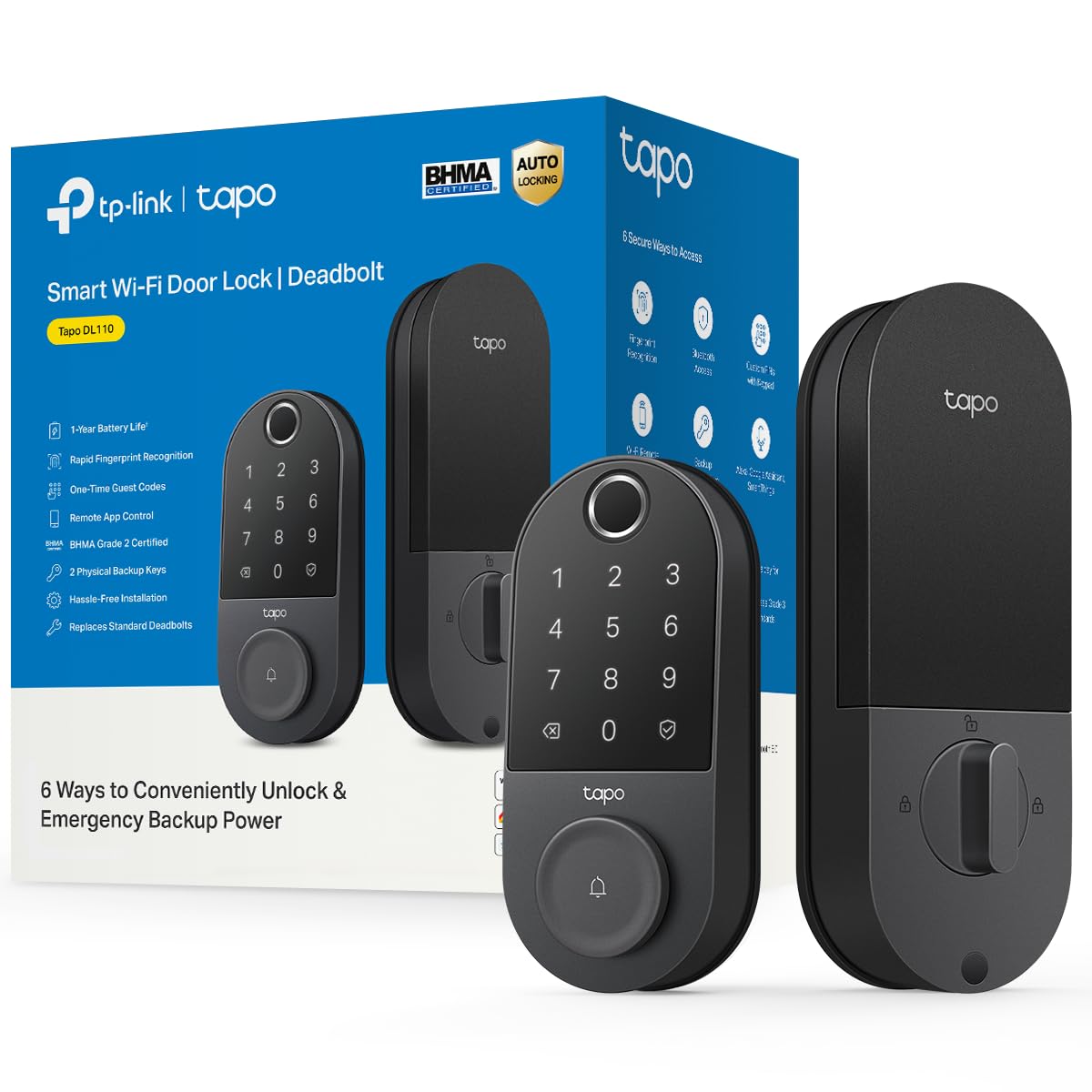
1. Tapo Smart Wi-Fi Door Lock, Deadbolt, Fingerprint Recognition, DL110
Our pick — over 4.5★ from 800+ verified ratings; the strongest balance of quality and price.
A fingerprint deadbolt that opens in 0.42 seconds and stores up to 100 prints.
If you want to walk up with full hands and just touch the door, this is the one. The DL110 opens six different ways — a fingerprint, a passcode on the touchscreen keypad, Wi-Fi through the Tapo app, close-range Bluetooth, your smart home assistant, or the two backup keys in the box. The fingerprint sensor reads in 0.42 seconds and stores up to 100 prints, enough for a big family plus regular visitors. It runs on a removable battery pack you recharge over USB-C rather than disposable cells, and the pack is rated for a full year of continuous operation.
The reliability story is what owners keep coming back to. Owners praise the build quality most, with the tool-free setup a close second. Buyers report a battery at 60% after roughly a year of daily use, which lines up with the one-year rating. Remote access actually works without extra hardware: you control the lock from your phone over Wi-Fi, and it folds into the same app as Tapo’s cameras and mesh Wi-Fi gear if you already run that ecosystem. Resident profiles carry permanent codes, and guests get one-time or scheduled codes that work for a set window.
The catch is that the keypad is invisible until you touch it, so first-time guests sometimes stand there puzzled. Fingerprint enrollment also has a fussy streak — the sensor is quick to read but slow to learn, and some owners needed a reset and a pairing-mode retry during setup. The other item worth knowing: at 5.91 x 2.69 x 1.29 inches, this is a 63% more gap than the Veise DK01-B handle set at 3.62 x 7.2 x 11.81 inches, which matters if your door frame is tight.
What owners rave about
- Six ways in, including a 0.42-second fingerprint reader that holds up to 100 prints.
- Rechargeable USB-C battery pack rated for a year, and it holds a good charge.
- Runs on Wi-Fi with no extra bridge, and slots into the Tapo app alongside cameras.
- BHMA Grade 2 hardware — a sturdier grade than the Grade 3 sets on this list.
Worth knowing before you buy
- The keypad stays dark until you press it, which trips up first-time visitors.
- Fingerprint enrollment can take a few tries; some units needed a reset to pair.
- Automations are limited without an API or Matter support.
Reach for this if: you want every entry option on one lock and you are already comfortable living in a phone app.
Look elsewhere if: you want a dead-simple keypad with no app footprint at all.
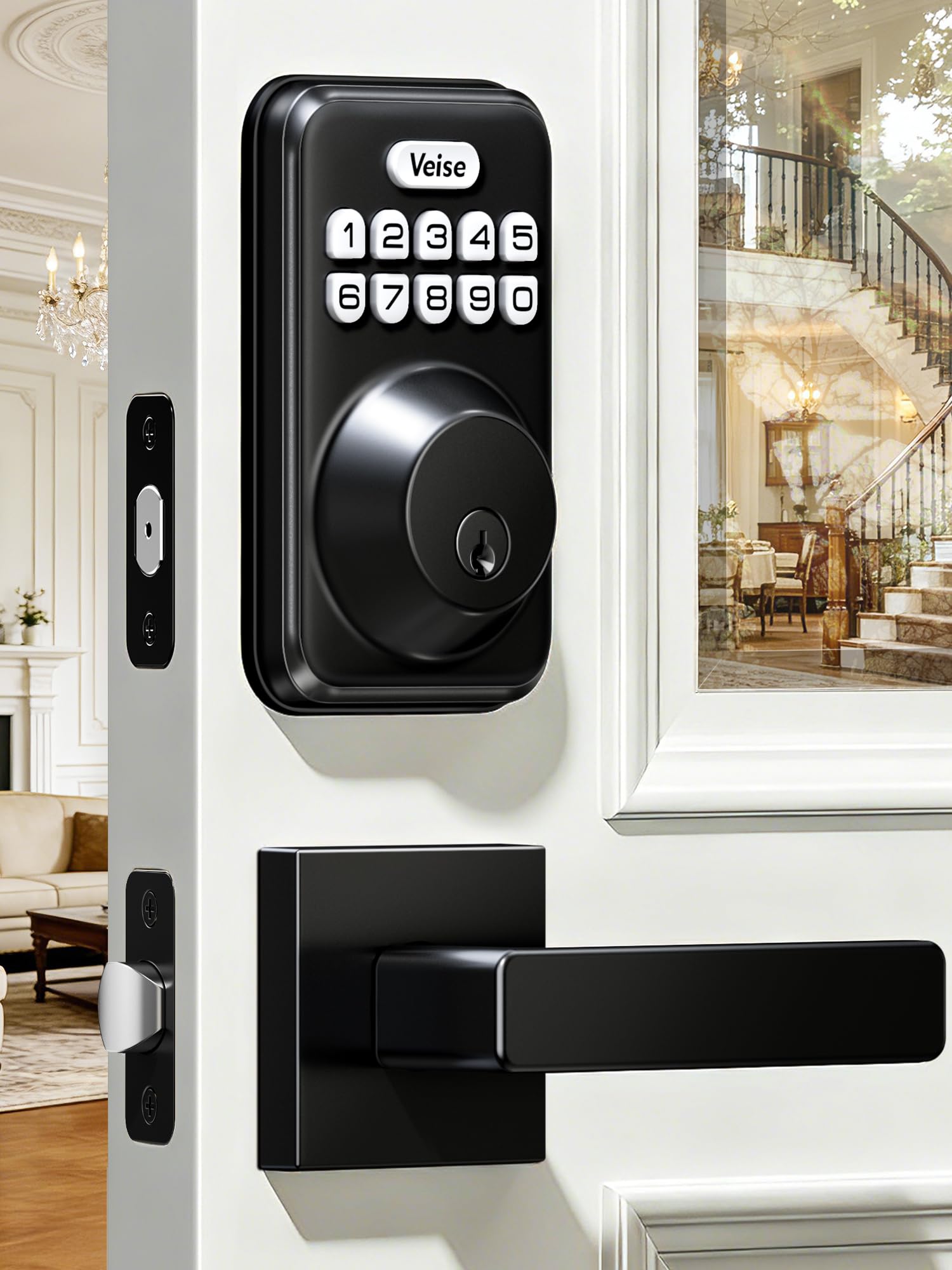
2. Veise DK01-B Keyless Entry Deadbolt Lock with Handle Set, Matte Black
One box, one look — a keypad deadbolt and matching lever handle that dress up the whole door.
Most keypad locks leave you matching hardware yourself. This one arrives as a set: the keypad deadbolt plus a lever handle in matte black, so the front door gets a single cohesive finish. It is built for a house, not a lab — front door, back door, garage entry, even a home office exterior door. Entry runs four ways: a master code, up to 20 user codes, two physical keys, and one-time guest codes that self-destruct after a single use. Cleaners get a burn-after-use code, kids get a permanent slot, and you keep the master.
Auto-lock is the feature people warm to fastest — flip it on and set a delay anywhere from 10 to 99 seconds, or tap and hold any key for 2 seconds to lock instantly from the outside. Two more touches that matter in daily life: a backlit keypad that lights when you touch it, so you are not squinting at your own code after a late dinner, and a red blinking top button that warns you early when the battery is running low. Four AA cells run it for about a year, which suits elderly parents who would rather not think about the front door at all.
As owners mention after having it installed for a month, it holds up. Programming is straightforward, the auto-lock removes the nightly door-check, and the finish looks better than the category usually manages. The recurring gripe is the non-keyed handle: it turns freely and does not lock on its own, so the deadbolt is doing all the security work. If you grab the handle expecting resistance, you will be surprised.
The best part: you get a matching handle set and the full code system in one purchase, with IP54 weatherproofing and ANSI Grade 3 hardware rated for temperatures from -30°F to 158°F. The one-time codes are genuinely one-time, which is a genuine upgrade over hiding a key under a mat.
What trips people up: the lever handle is a passage handle, not a locking one — the deadbolt is the only locking component, and the battery cover on this class of lock can rattle slightly against the door.
Suits you if: you want the whole door hardware refreshed in one order and plan to hand out codes to a shifting cast of visitors.
Pick something else if: your heart is set on a handle that locks independently of the deadbolt.
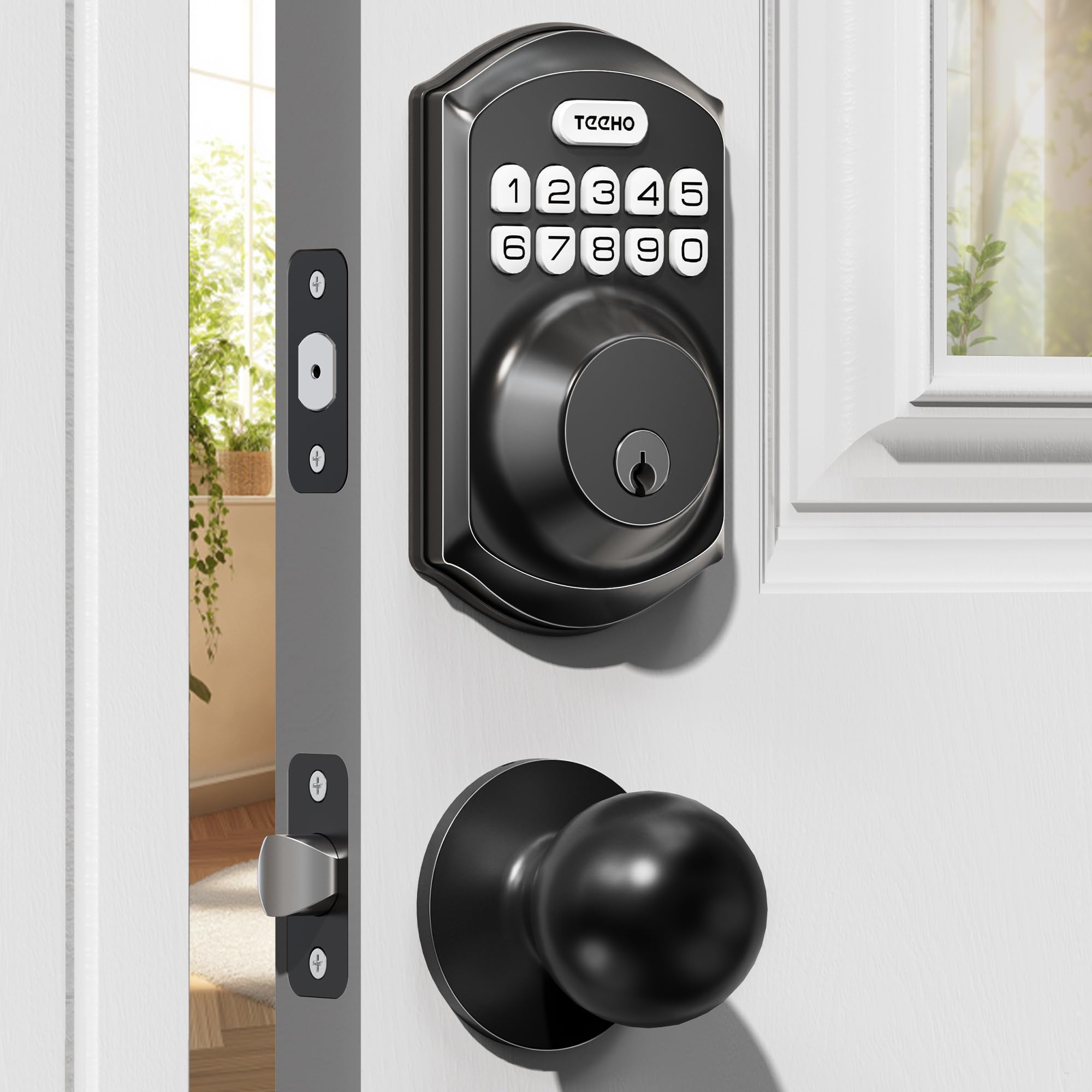
3. TEEHO TE001K Keyless Entry Door Lock with Knob for Front Door, Matte Black
A knob-and-keypad set that landlords can re-code between tenants without ever cutting a new key.
This is the pick for anyone managing a door other people walk through — a rental, an Airbnb, a storage room, an office. You get two passage knobs plus the keypad deadbolt in one box, and up to 20 user PIN codes to hand out. One-time codes for visitors, cleaners, or deliveries delete themselves the moment they are used, so you are not chasing a cleaner to revoke access. Two physical backup keys round it out, and the whole thing installs in 10 to 15 minutes with a screwdriver on doors that run 1-3/8″ to 2″ thick with a 2-1/8″ bore hole.
Security touches are where this one pulls ahead of its price class. The anti-peep feature lets you type random digits before and after your real code so smudge marks on the keys never hint at the sequence. Get the code wrong 10 times and the keypad shuts down for 3 minutes to shut out guessers. You also get mute mode for silent entry, vacation mode for total lockout, and a backlit keypad for late arrivals. It is ANSI Grade 3 certified with an alloy and stainless steel lock cylinder, IP54 weather-resistant for rain and cold.
Battery management is handled cleanly: four AA cells (not included) run it for up to a year, and once the charge drops below 15%, the keypad flashes red and a low-battery indicator warns you in advance. The trade-off is that this is a purely local lock — there is no Wi-Fi and no app — so you change codes by hand at the keypad. A minority of heavy-use doors eventually demand fresh batteries more often than the annual rating suggests, which is worth keeping in mind if your door swings many times a day.
Why rental owners like it: a 2-year warranty, lifetime customer service, left- or right-handed door support, and code changes that take seconds instead of a locksmith visit.
Be aware: on some doors the latch has needed a shim or an extra nudge to sit flush, and this model gives you no remote access at all.
Grab this if: you rotate tenants, guests, or cleaners through one door and want codes you can kill the second someone leaves.
Skip the upgrade if: you need to open up the door from your phone while away.
4. Tapo Smart Wi-Fi Deadbolt Door Lock, Keyless Tactile Buttons, DL100

The connected deadbolt that gets you app control without paying the top-tier price.
Where the DL110 above leans on a fingerprint reader, this one builds its case on a solid, no-frills keypad deadbolt that happens to be smart. You open up with the keyless keypad, over Bluetooth when you are nearby, or remotely over Wi-Fi through the Tapo app, plus voice commands with PIN verification and two backup keys. The tactile buttons are backlit for nighttime use, and you can hide your passcode inside random digits for added security. It stores up to 200 customizable codes, so the family group, the dog walker, and the contractor can all have their own slot.
The numbers that decide it: it runs on four AA batteries, rated at up to 200 days in Wi-Fi mode or 300 days in Bluetooth mode, with a USB-C port for emergency power if the cells go flat. It carries BHMA Grade 3 certification and an IP54 weatherproof rating against rain, dust, and dirt, and it installs on standard 2-1/8″ and 1-1/2″ lock holes with no drilling. Smart-home integration covers Alexa, Google Home, and Samsung SmartThings, and the app shows real-time alerts, door status, individual revocable codes, and timestamped activity.
The honest trade-offs show up in two places. First, battery life is the recurring sore spot: the 200-day Wi-Fi rating is optimistic for anyone leaving the connection on around the clock, and some owners found themselves swapping cells on a monthly-ish rhythm rather than a seasons-long one. Second, the interior is plastic against a metal exterior, and a handful of doors needed the inner bevel ground down for the lock to sit flush. Neither is a dealbreaker for a sub-Grade-2 lock at this level, but they are worth knowing.
What wins people over is the day-one value — Grade 3 deadbolt, app control, temp codes, auto-lock, and no subscription — all in a package that slots neatly into TP-Link’s ecosystem. If you already run Tapo cameras or their mesh Wi-Fi, this lock simply appears in the app you already use.
Choose this if: you want remote lock/open up and a code system but do not need fingerprint entry or top-shelf battery life.
Think twice if: the door gets clicked open dozens of times a day and you would rather not babysit the batteries.
5. Veise VE027 WiFi Smart Lock Fingerprint Keyless Entry Deadbolt Matte Black

Seven ways in and eight AAs deep — this one is built for a house full of people coming and going all day.
If your front door sees constant traffic, the VE027 answers with sheer number of entry options: the KK Home app, fingerprints, PIN codes, voice, an authorized admin, cards, keys, and auto-lock. It connects straight to 2.4GHz Wi-Fi with no gateway to buy, and Its fingerprint reader claims 99.8% accuracy and a 0.2-second open up, storing 20+ prints managed in the app. Eight AA cells deliver double signal strength, up to 95% more stable connectivity, and 98% longer battery life than standard 4-battery Wi-Fi locks, plus real-time battery alerts, a backup Type-C power port, and a physical key.
Code management is generous: 100+ codes created or deleted remotely, spanning four types — permanent, recurring, scheduled, and unlimited one-time. Anti-peep code entry lets you pad your real code with random digits, and the lock disables for 3 minutes after 10 wrong attempts. Access logs, user info, and passwords are encrypted and stored locally on the lock chip, so nothing rides out on the cloud. The build is rated IP65 weatherproof with ANSI and BHMA Grade 3 durability, and the auto-lock window runs from 10 to 180 seconds with a one-touch lock option.
Owners rate functionality highest by a wide margin, with the fast install close behind. The recurring complaint is smaller but real: there is no door-closed sensor, so the lock will happily report itself locked even if the door is standing open. One other honest note — the app does not surface an alarm if the handle is turned while locked, which is a minor gap for a lock with this many features.
For the household of many hands: fingerprint, keypad, cards, voice, app, and keys mean nobody in the house is ever without an entry option, and the local encryption keeps credentials off the cloud.
Fit note: with eight AA cells to load, plan on a stocking-up step — batteries are not included.
Built for: busy households that want every open up method under the sun and long stretches between battery changes.
Look elsewhere if: you want the lock to flag an open door as an alert rather than a silent state.
6. Kwikset SmartCode 260 Keyless Entry Electronic Keypad Deadbolt Door Lock in Satin Nickel

The deliberate no-internet keypad for anyone who would rather skip the app than feed another battery hog.
Some buyers want a keypad deadbolt that simply locks and open up, with no Wi-Fi radio sipping power in the background. The SmartCode 260 delivers exactly that. You set codes at the keypad, up to 50 user codes plus 10 one-time codes and 1 programming code for editing them later. Auto-lock can be dialed to 30 seconds, 1 minute, 3 minutes, 5 minutes, or 10 minutes, so the door looks itself after you when your hands are full. Four AA alkaline batteries (not included) hold it for at least 12 months.
Security, Durability, and Finish are all Grade 2 BHMA certified, rated up to 2.5x stronger than Grade 3 BHMA lock sets. Tamper protection is aggressive: three wrong code entries triggers an alarm and disables the keypad for a full minute. The finish on the satin nickel unit is built to stay satin-nickel looking, and installation runs on a plain screwdriver with BILT’s 3D animated instructions holding your hand through the fit.
Where owners diverge is durability. Most report it working without complaint for months, some say the battery lasted 4+ months and kept going, and a handful report the lock stopped fully opening after about a month — a minority outcome when you are looking at a large group of buyers, but worth naming. One fit note that keeps showing up: the battery cover does not press tight and can rattle when the door closes. If your door thumps shut hard, you will hear it.
The trade you are making: no Wi-Fi, no app, no notifications — and in return, a battery that stays fresh far longer and a lock with nothing to reconnect after a power blink.
What to check on your door: standard bore holes and a 3.3-pound lock body are the numbers; anything thinner than a standard door and you will want a spacer or thinner hardware.
Perfect for: a garage door, a rental, or a secondary entry where the code is the whole feature set.
Wrong fit if: you want to see who came in and when from your phone.
7. Wyze Auto-Lock Bolt v2, Fingerprint Keyless Entry Smart Lock, AI Learning Scanner

A fingerprint lock that learns your thumb print a little better every time you touch it.
Wyze built the Bolt v2 around a 0.5-second fingerprint scanner behind a scratch and smudge-resistant tempered glass face. The scanner uses AI to learn from every touch, so reads get sharper over time rather than degrading. Beyond the fingerprint, you can open up from the Wyze app, tap a code on the keypad, or fall back on the bundled physical keys. If a Wyze Video Doorbell lives at the same door, you can open up straight from the live feed. The lock is aluminum and glass, with BHMA2 durability and an IP53 ingress rating.
Power is handled with unusual generosity: eight AA batteries are included in the box and rated for up to 8 months of use, and if you push past that, a USB-C port lets you feed the lock from any common power bank to get the door open before you swap cells. Setup is quick — the Wyze app auto-detects the lock and walks you through a template-guided install in about 10 minutes. Auto-lock kicks in on its own, and you can tune the delay to suit your routine rather than taking whatever default the lock ships with.
The mixed spot is fingerprint recognition itself: it is the aspect that draws the most divided feedback, and a small share of owners find the scanner hit-or-miss — one customer even had trouble enrolling an elderly relative, which points to dry or thin skin rather than the lock. The tempered glass, by contrast, is what people consistently appreciate for staying clean and readable. For most hands, the reader is quick and accurate; it is simply less forgiving than a keypad for the occasional dry-finger morning.
What most buyers come away focusing on is how reliably the lock handles daily life and how much flexibility they get for the money — phone open up, temporary access for guests or contractors, and the Wyze ecosystem all bundled into one app.
What works for owners
- 0.5-second fingerprint scanner with AI learning that improves over time.
- Eight AA batteries included and rated for up to 8 months.
- USB-C port accepts a power bank for emergency entry if the cells die.
- Auto-lock and remote phone open up sit in the Wyze app you may already use.
What to weigh
- Fingerprint reads vary by hand — dry or thin skin can stubbornly resist enrollment.
- IP53 is lighter weather protection than IP54, so a fully exposed door in heavy rain will test it.
Where it wins: fast fingerprint entry and long battery life at a lower entry point than most connected deadbolts.
Where it falls short: if the scanner cannot read your fingers, this lock will not carry you the way a keypad-first model would.
8. Schlage Electronic Keypad Deadbolt Lock, Camelot Trim, Matte Black

Pure battery-powered keypad security — no Wi-Fi, no app, no wiring, and a physical key when you need it.
This is the pick for anyone who wants a keypad deadbolt that does not want to talk to the internet. It installs with a Phillips screwdriver on existing standard pre-drilled doors and needs no wiring at all — the entire lock is battery powered. Codes replace keys entirely, so you can issue access to pet sitters, plumbers, and tenants, then change the codes whenever someone leaves without ever rekeying the lock. The Camelot trim in matte black suits a traditional front door and ages well.
Battery life is where this one earns its keep on paper — the electronics are rated to go long stretches between battery changes, and owners routinely report not having to think about cells for extended periods. The 3-year limited electronics warranty and lifetime mechanical and finish warranty back it up, and the lock carries certified security built on top of the same mechanical bones Schlage has shipped on standard pre-drilled doors for years. No wiring, no hub, no pairing — low-maintenance.
Reliability is the split here. This model’s average sits at 4.2 stars over 940+ ratings, and the mixed feedback clusters around the same two areas: keypads that stop responding to codes (which tech support has walked owners through resetting, usually a keypad reset rather than a battery issue), and locking mechanisms that fail to fully extend. Most customers note years of quiet service, including owners who brought these to rental properties. A minority hit a bad unit, and Schlage’s support line has historically resolved the fixable cases. If your unit fails outright, the key backup keeps you inside while it gets sorted.
The upside: quiet reliability with no Wi-Fi to reconnect, no app to learn, and codes you can change between tenants in seconds. The physical key backup means a dead battery is never a lockout.
The speed bump: the reset process for adding or deleting PINs requires the original code, so keep it in a safe place — lose it and you will need to factory reset.
Right call for: landlords, garage doors, and any door that needs a code but no app.
Not the right pick if: you want to see an activity log or hand out one-time codes remotely.
9. Yale Assure Deadbolt Lock with Touchscreen, Satin Nickel, YRD226NR619

A touchscreen deadbolt that starts as a keypad lock and can become a smart lock whenever you are ready.
Yale built this one to be a clean, code-only deadbolt for now — and a smart lock later, if you choose. The keypad is a capacitive touchscreen rather than push buttons, so there is no smudge trail to read. You program it with entry codes, auto-lock fires on its own after every exit, and four AA batteries are included in the box with the standard strike and mounting hardware. The Satin Nickel finish and 3-pound lock body give it a heft that reads more commercial than residential, and it installs on standard pre-drilled doors with no wiring.
Door fit is the number to check: the Assure line is guaranteed to fit standard doors that run 1-¾” to 2-¼” thick, and doors under 1-⅜” require a thin door kit. Auto-lock timing is adjustable across a wide window so you can have it self-lock quickly or hold off, and the touchscreen wakes on contact so a code typed in the dark still works. If you ever want Wi-Fi, a Yale Access Upgrade Kit (sold separately) lets your phone act as the key without swapping the whole lock.
The trade-offs people name most are auto-lock consistency and price. The auto-lock feature draws the most mixed feedback — some reviewers point out the door not opening all the way when the bolt self-engages, usually traced to a door that is not perfectly aligned in its frame. Install is manageable but the instructions get dinged for being thin, and some buyers needed a second set of hands for the bolt hole. The value question also splits the crowd — you are paying for the Yale name and the upgrade path, and the Wi-Fi module that open up the smart-lock half is not included.
What keeps satisfied owners loyal is the touchscreen experience — it is preferred over push-button locks in the same class, and the polished brass and satin nickel finishes are what draw return buyers who end up ordering a second unit for another door.
Reach for this: if you want a quality touchscreen keypad deadbolt today and the option to add phone control later without replacing the hardware.
Consider alternatives if: you need Wi-Fi from the start — the module is a separate purchase.
Understanding the Specs
Battery type and runtime
A battery powered keypad lock is only battery powered because there is no wire running to a doorbell transformer or a mains outlet. That means runtime depends on what the lock is doing behind the keypad. A standalone keypad deadbolt with no wireless radio can coast on four AA cells for a year or more. Add Wi-Fi and the cells have to power a radio that checks in with your router constantly, which is why connected models rate in the 200-to-300-day range, and why a lock that uses eight cells instead of four usually gets more mileage before you swap. Fingerprint readers and backlit keypads add small drains too, but the wireless radio is the big one.
Emergency entry when the battery dies
Every lock here has a plan for a flat battery, and the good ones have more than one. A physical key is the simplest: the lock includes a mechanical keyway with the backup keys in the box, so a dead battery only stops code entry, not all entry. USB-C or Type-C ports on the outside of the lock are the modern version — press a power bank against the port and the lock bootstraps enough juice to open the door. A low-battery alert warns you beforehand, whether as a red flashing button on the keypad or a push notification in the app. A lock with a key backup and a USB-C port is effectively unfailable.
BHMA and ANSI grades explained
BHMA and ANSI grades measure how much abuse a lock hardware set can take. Grade 1 is the strongest, Grade 2 sits below it, and Grade 3 is the consumer minimum. That is why a Grade 2 lock like the Kwikset SmartCode 260 is described as up to 2.5x stronger than a Grade 3 set, and why Grade 3 locks like the TEEHO and Veise units are built for everyday residential doors rather than constant traffic. The grade measures the mechanical strength of the bolt, strike, and cylinder — not the app, not the fingerprint reader, and not the Wi-Fi range. Match the grade to your door traffic and the lock will outlast whatever phone you carry today.
Weather rating and door fit
An IP rating (Ingress Protection) tells you how well the lock keeps dust and water out of its working parts. IP53 handles light rain and dust; IP54 adds splash protection; IP65 is the strongest here and shrugs off jetting water. On a fully exposed front door that takes driving rain, higher is safer. Door fit is the other spec to lock down before you buy: standard locks want a 2-1/8″ cross bore, and most models fit doors between 1-3/8″ and 2″ thick. The Yale Assure is the outlier here, built for doors 1-¾” to 2-¼” thick, with a thin door kit sold separately for doors under 1-⅜”.
FAQ
Will a battery powered keypad lock work on my existing deadbolt holes?
How do I get in if the batteries die?
Do battery powered keypad locks need Wi-Fi or a hub?
How long do the batteries actually last?
Can I give a temporary code to a cleaner or house guest?
Is a fingerprint lock better than a keypad lock?
Are these locks weatherproof enough for an uncovered front door?
What is anti-peep code entry and does it actually help?
Do I need to rekey the lock if I change tenants?
Will these locks work with Alexa or Google Assistant?
What door thickness does a keypad deadbolt fit?
Are keypad deadbolts as secure as a traditional key lock?
Final Thoughts: The Verdict
If you want the best all-around battery powered keypad lock in this group, reach for the Tapo DL110. It is the one pick that nails every entry method — 0.42-second fingerprint, keypad, Wi-Fi, Bluetooth, voice, and keys — on a rechargeable USB-C battery rated for a full year, backed by BHMA Grade 2 hardware. The build quality is solid and owners keep it charged without drama.
If the door is what you care about as much as the lock, the Veise DK01-B delivers a matching matte black handle set and one-time guest codes for cleaning staff or kids — no Wi-Fi, no fuss, no rekeying.
And if you want a fingerprint lock on a budget, the Wyze Bolt v2 pairs a 0.5-second AI-learning scanner with eight AA batteries included and a USB-C power-bank port for emergency entry — the most generous power setup in this guide.
One real head-to-head to keep in mind: the Tapo DL110 holds the highest average here, but the schlage camelot has more reviews doing the talking — its larger review base is earned by years on residential doors — and both are the right lock depending on whether fingerprint speed or a plain, no-internet keypad matters more to you.
How We Picked
We do not accept paid placement. Every pick is matched to a real buyer and a real use-case; we do not hands-on test units.
Sources & Methodology
Specifications: manufacturer listings and product documentation. Review insights: verified customer reviews, as of September 2026. Pricing: not shown on this page (it changes often); check the current price via the retailer link.
As an Amazon Associate, KitchPrep earns from qualifying purchases. This does not affect which products we feature.
Related Guides
