
Specs are compiled from manufacturer listings and verified buyer reviews and can change over time — please confirm the key details on the product page before buying.
The best battery powered door lock is the one that still opens when both your hands are full and your phone is in the other room. Batteries are the whole ballgame here. A lock that eats a set of batteries every few months becomes a chore you resent, so this guide focuses on how long each one actually runs, how you get in when it dies, and how fast it recognizes you at the door.
I’m Mohammad Maruf — the founder and writer behind KitchPrep. This guide is built by comparing the manufacturers’ published specifications and the patterns across verified customer reviews, so you get each pick’s real strengths and trade-offs instead of marketing spin.
You do not need to be a tech person to pick well here. The trick is matching the open up method to how you actually live — fingerprints for one person, keypads for guests, palm or app access for both. Below are nine solid picks compared on the specs that matter for battery powered door locks.
Our Picks at a Glance

How To Choose The Best Battery Powered Door Locks
A battery lock lives or dies by two things: how long it runs between battery swaps, and how you get in when it runs out. Everything else — app design, colors, code limits — matters less than those two. So start there, then match the entry method to your household.
Battery type and runtime
Some locks use a removable, rechargeable pack, others take standard AA alkaline cells, and a few run dual batteries. Rechargeable packs mean you plug in a cable and reuse the same cell. Alkaline locks mean you keep spares in a drawer. Figure out which habit you would rather live with, because a lock with a low-battery alert and a backup charge port saves you from the worst-case lockout.
Biometric versus keypad entry
Fingerprint and palm vein sensors still work when you have nothing in your pockets — that is the appeal. Keypads let you hand a guest a code without giving them a key. Many locks do both, plus a physical key as a fallback, which is the safest combination if you want a phone-free backup.
Fit and door compatibility
Most deadbolts here replace your existing one with just a screwdriver, and many are built to fit standard American doors without drilling. Some fit tighter bores if you remove a spacer. Check your door thickness and current deadbolt before ordering so installation stays a one-tool job.
Quick Comparison
| Model | Best For | Entry Methods | Battery | Connectivity | Amazon |
|---|---|---|---|---|---|
| Tapo DL110★ Best Overall | Best all-rounder | Fingerprint, keypad, Wi-Fi, Bluetooth, keys | 1-year rechargeable | Bluetooth, Wi-Fi | Amazon |
| Yamiry Smart DeadboltBest Value | Easy DIY install | Fingerprint, keypad, key fob, keys, app | Good battery life | Bluetooth, Wi-Fi | Amazon |
| Yale CodeSimplest Setup | No-app simplicity | Keypad only | Battery-operated | Not connected | Amazon |
| Veise VE06-L | Rental properties | App, codes, IC cards, e-key, keys | Battery-operated | Bluetooth, Alexa/Google (gateway) | Amazon |
| Veise VE012W | Built-in Wi-Fi value | Fingerprint, PIN, app, keys, voice | 8 AA alkaline | Wi-Fi | Amazon |
| eufy Smart Lock C220 | eufy ecosystem homes | Fingerprint, keypad, app, keys, voice | 8 months (8 AA) | Bluetooth, Wi-Fi | Amazon |
| Kwikset SmartCode 260 | Long battery, no app | Keypad only | 12 months (4 AA) | Not connected | Amazon |
| Wyze Palm Lock | Contactless palm entry | Palm vein, keypad, app, keys, voice | 6 months + 2-week backup | Wi-Fi | Amazon |
| Philips 4200 Series | Handle set included | Fingerprint, keypad, app, voice, keys | 6 months (alkaline only) | Bluetooth, Wi-Fi | Amazon |
In‑Depth Reviews
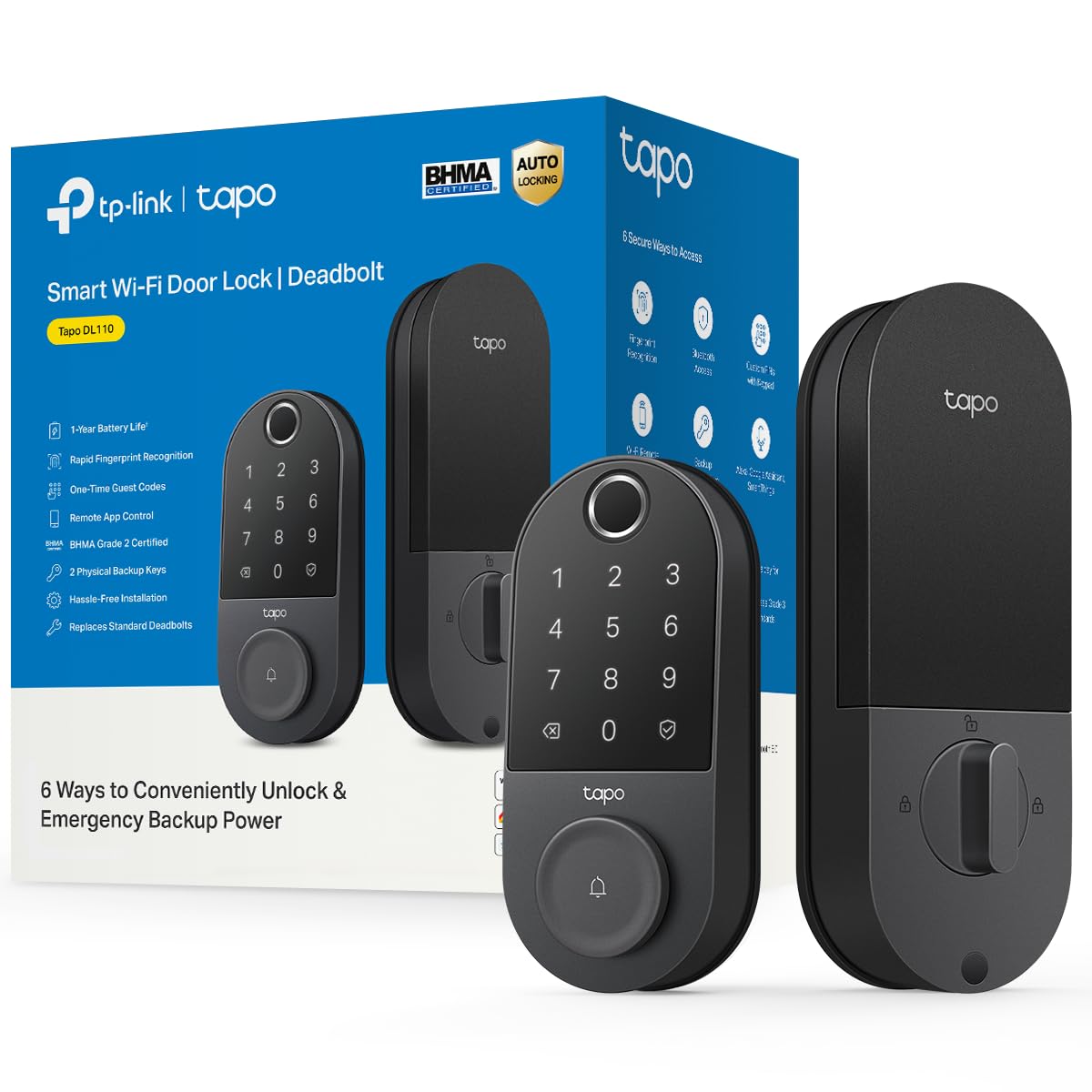
1. Tapo Smart Wi-Fi Door Lock, Deadbolt, Fingerprint Recognition, DL110
Our pick — over 4.5★ from 800+ verified ratings; the strongest balance of quality and price.
The lock that remembers your thumb and forgets your keyring.
If you want one lock that covers every way you might walk through the door, this is the one. The Tapo DL110 gives you six ways in — fingerprint, custom keypad codes, Wi-Fi control, close-range Bluetooth, your smart home assistant, or the two included backup keys. The fingerprint sensor is the headline: it open up in 0.42 seconds and holds up to 100 different prints, so a whole household can register without you hunting for an app setting.
Battery anxiety is the big reason people pick a smart lock and then regret it, and this is where the DL110 pulls ahead. It runs on a removable, rechargeable pack with roughly a year of operation, and it recharges over USB-C rather than making you buy alkalines. It carries a BHMA Grade 2 rating, the durability standard that sits above the Grade 3 locks in this guide. At 2.09 kg it is about twice the weight of the Yamiry Smart Deadbolt at 1.05 kg, and that heavier mechanism is part of why the lock feels substantial in your hand rather than hollow.
What owners keep circling back to is the quality of the build. The easy 15-minute install and the straightforward app come up constantly, along with the fast, accurate fingerprint read and the ability to hand the pet-sitter or the kids a scheduled code while you are still at the office. As buyers sum it up: “Easy 15-min install; keyless entry, scheduled pet-sitter/kid codes, remote open up, event log, fingerprint, battery at 60% after ~1yr, app shows battery level.” The honest catch is the fingerprint setup itself — a few owners find the initial registration finicky and note there are limited auto-lock delay presets. Neither stops the lock from working; they just mean you should read the setup screen once instead of tapping through it.
What earns its keep
- Rechargeable pack rated for roughly a year — no alkaline habit to keep up
- 0.42-second fingerprint reads with up to 100 prints stored
- BHMA Grade 2 rating and a hefty 2.09 kg build
- USB-C charging when it eventually needs topping up
What to plan around
- Fingerprint setup is reported as fiddly on the first try
- Limited choices for the auto-lock delay presets
- The keypad stays hidden until you touch it — new guests need telling
Grab this if: you want every entry method in one lock and a rechargeable battery you never buy again.
Think twice if: you need hair-trigger fingerprint enrollment, or your household runs entirely on physical keys.
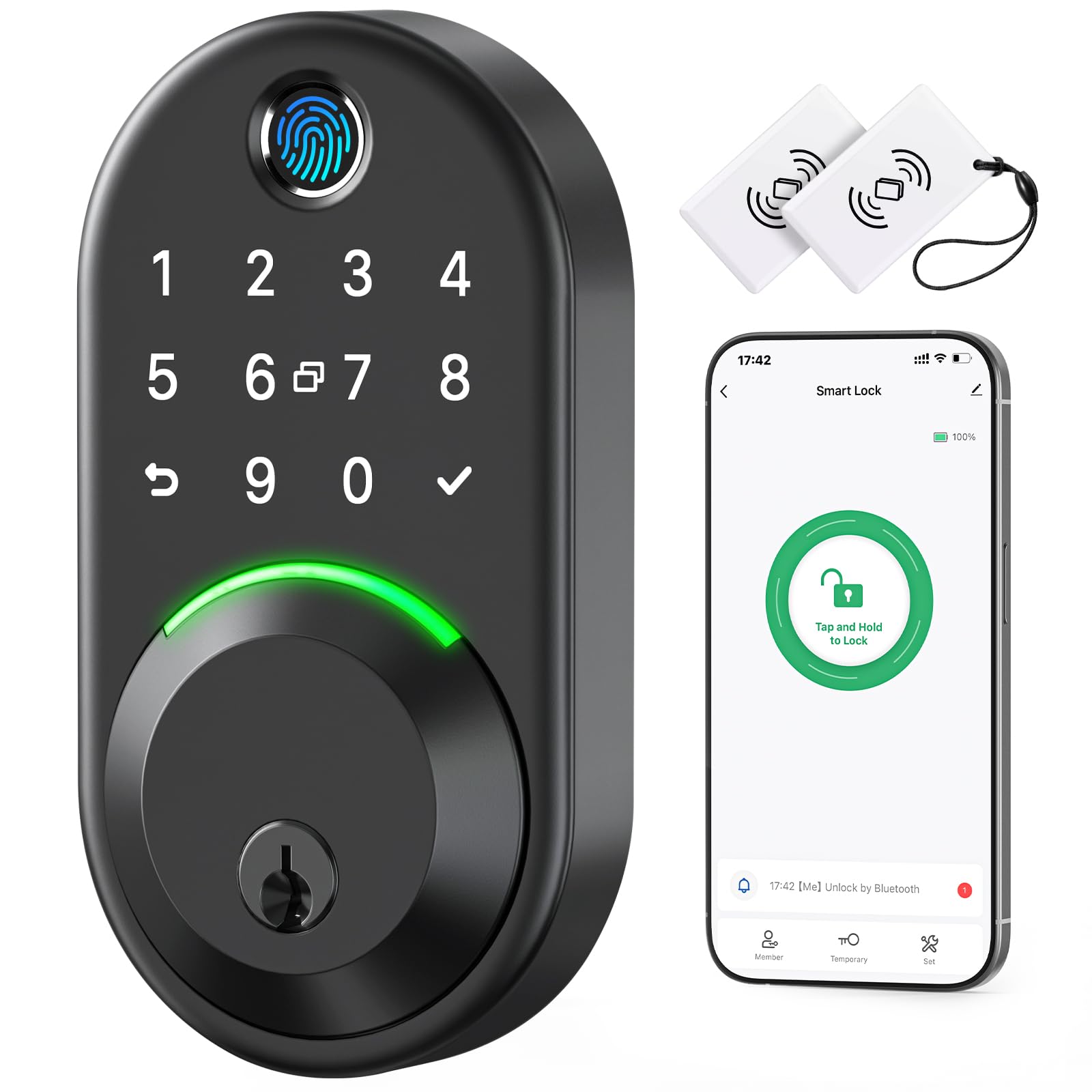
2. Yamiry Smart Deadbolt Lock with Keypad, Fingerprint Keyless Entry Door Lock
The lightweight deadbolt that installs with nothing but a screwdriver.
This is the pick for anyone who does not want to touch their door with a drill. The Yamiry installs in minutes with a screwdriver and no drilling, and it fits most standard American wood front doors. It also tips the scale at 1.05 kg versus the Tapo DL110 at 2.09 kg, so if you have ever fumbled a heavier lock plate into place with the door half open, this one is noticeably easier to line up and hold while you tighten the screws.
The fingerprint system here leans on an AI chip, holding 2 fixed prints plus 3 self-learning ones that the lock sharpens over time. You get five ways in — app, passcode, key fob, fingerprint, or a physical key — and four ways to lock, including a long-press on the “√” button. The rotatable knob on the inside flips between locked and open up in about a second, which is handy for a quick bedtime check without waking anyone.
Outdoor gear takes a beating, and this one is rated IP66, meaning it is built to shrug off weather and dust — a real consideration for a front door that faces rain and street grit. It is also rated to work from -30°C to 70°C (-22°F to 158°F). The catch worth knowing: full remote control needs the Wi-Fi gateway, which is sold separately, so from the start you are working within Bluetooth range via the NICE DIGI app. Owners like it — “The fingerprint open up is fast and convenient, and I love not having to carry keys around.”
The everyday win: keyless entry without a drill, a screwdriver-only install that most people finish in one sitting, and an IP66 rating that suits a door exposed to the elements.
Worth knowing before you buy: the remote-control features sit behind a sold-separately Wi-Fi gateway, so plan for that add-on if you want to lock up from anywhere.
Reach for this if: you want the simplest possible install and strong weather resistance.
Look elsewhere if: you expect to control the lock from your phone at work without buying an extra hub.
3. Yale Code Keypad Deadbolt for Keyless Front Door Entry, Satin Nickel
No app, no Wi-Fi, no fuss — just a keypad that works.
Some people want a smart lock that stays off the internet entirely, and the Yale Code is built exactly for them. It is a non-connected keypad deadbolt — no app, no Wi-Fi, no Bluetooth — so every function, from adding and deleting codes to setting Auto-Lock and adjusting the sound, happens right there on the lock in seconds. That is also why its battery lasts: with no radios constantly hunting for a signal, there is simply less draining it.
You can store up to 20 entry codes, which is plenty for family, housemates, and the neighbor with the spare. Installation is a DIY swap of your existing deadbolt, and because it is battery-operated, there is no wiring. The dimensions come in compact at 2.5 x 0.88 x 5.12 inches. The raised push buttons are a deliberate touch — they are easy to find and press by feel, which several owners specifically call out as an improvement over flat keypads.
Where this one gets mixed signals is battery consumption. Some buyers report long life, but there are also notes of excessive battery drain, so treat the battery as the one thing to watch. If you want zero app drama and a name you recognize, it delivers that. “Easy to install, simple to operate,” writes one happy buyer. “No Bluetooth no internet, hope for a long battery life.” If you want a lock that does not need your phone to open your own door, this is the one.
The right fit for: anyone who wants keyless entry without an app, a hub, or an internet connection.
Not the pick for: households that want remote open up or access logs — those needs point you at a Wi-Fi lock instead.
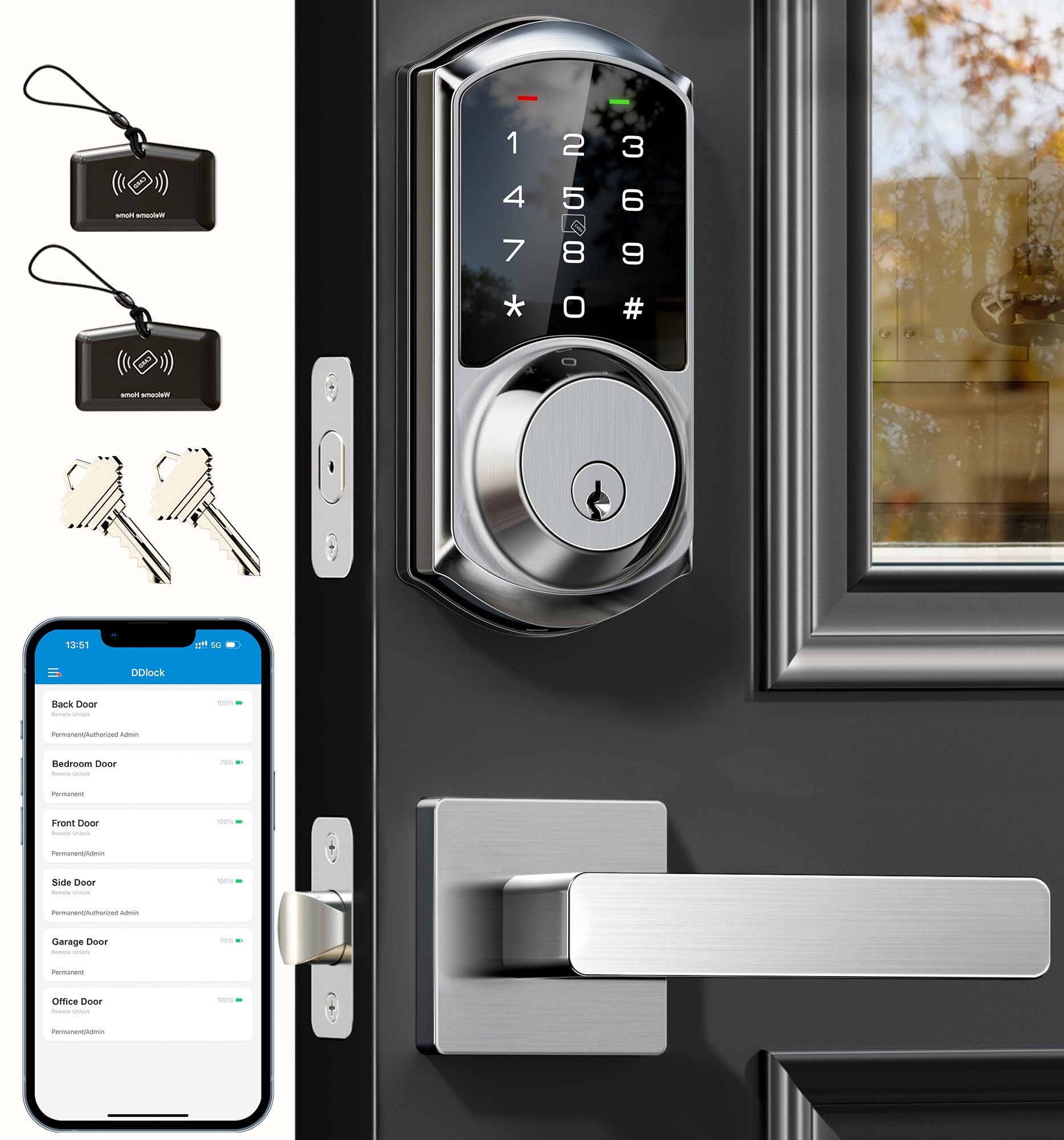
4. Veise VE06-L Smart Deadbolt Lock with 2 Lever Handle Set, Satin Nickel
Built for landlords who change the code every time a tenant moves out.
If you manage rental properties, this lock is the one that will save you the most hassle. It open up via app, codes, IC cards (with a 1,000+ card capacity), e-key, key, or Apple Watch — and its auto-lock window is adjustable from 5 to 900 seconds, which is a wider range than most of the competition gives you. It stores 250+ codes, and you can create permanent, scheduled, recurring, or one-time codes, plus erase codes remotely. That remote capability is exactly what you want when a tenant leaves and you need to kill their access without driving over.
Build quality is where this one earns its keep. The body is solid zinc alloy — a metal chosen for weight and wear rather than plastic — and it is rated IP54 (resistant to dust and splashing water) and certified to BHMA/ANSI Grade 3. All the lock data, including access records and user info, is encrypted locally with AES and stored on the lock’s chip. The included lever handle set means a full door refresh without hunting for extra hardware.
The recurring friction here is the instructions, not the lock — owners consistently report the setup guide is confusing and that calling the support line is what actually gets them programming in minutes. As one buyer puts it: “Great product but terrible instructions,” adding that the rep “enabled lock programming in minutes.” Budget a phone call into your install and you will be fine. For anyone juggling multiple tenants, that small upfront hassle pays off in code management every month.
Where it wins big: the 5-to-900-second auto-lock window and a 250+ code library make turnover between tenants simple.
The one snag: the paper instructions fall short, so plan on using the support line during setup.
Best for: landlords and property managers who need to add and revoke access constantly.
skip it if: you want a single deadbolt for personal use and would rather not deal with an IC card system.
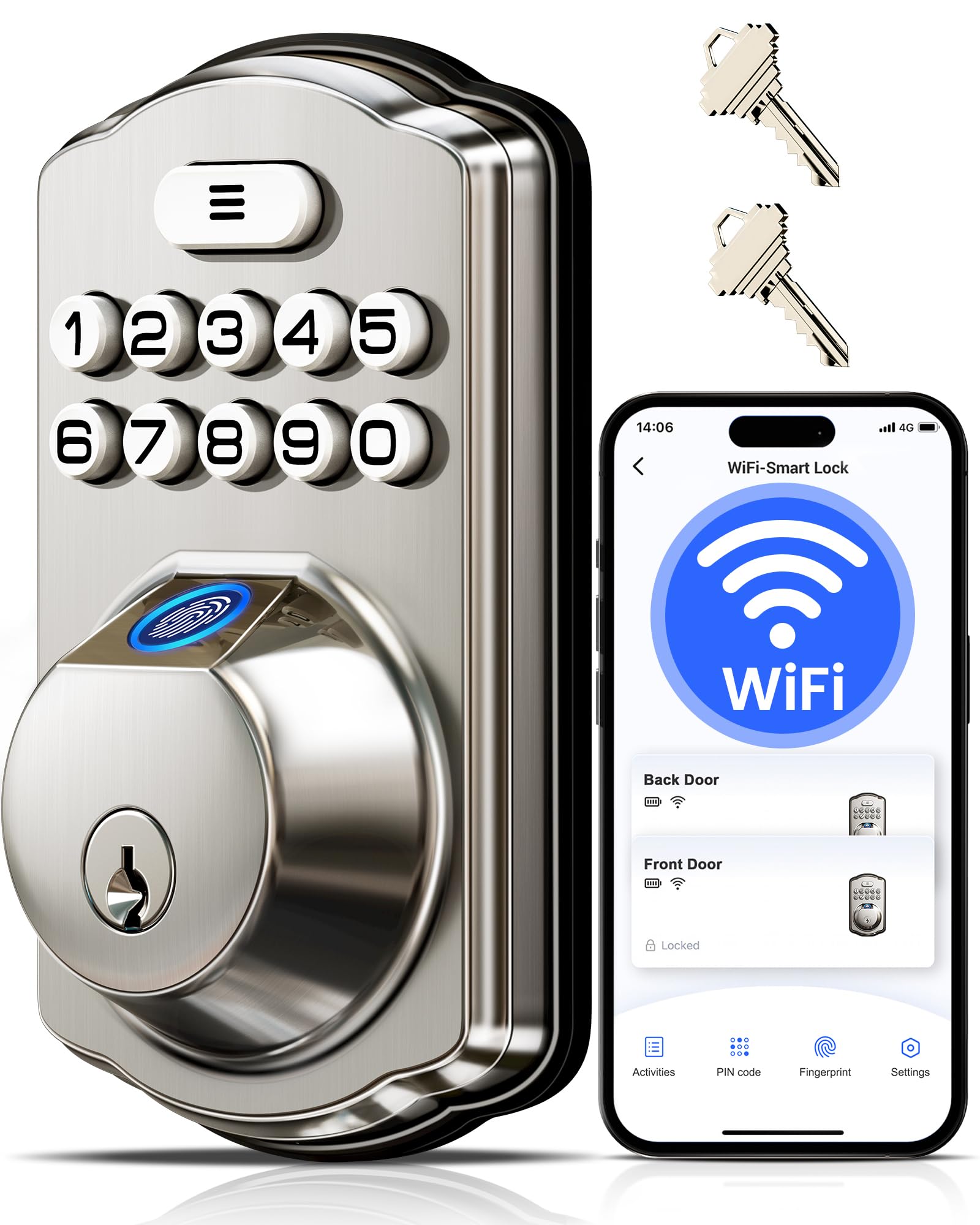
5. Veise VE012W WiFi Fingerprint Smart Lock for Front Door, Satin Nickel
Wi-Fi built right in, so there is no hub to buy or power.
Plenty of smart locks make you buy a separate bridge to get them online. This one skips that entirely — the 2.4GHz Wi-Fi is built in, so you can remotely lock, open up, check status, and hand out access from anywhere without extra hardware. That alone makes it one of the simpler Wi-Fi picks for someone who just wants the door on the network without a second gadget to configure.
The fingerprint reader here uses an AI self-learning chip that recognizes prints in 0.2 seconds with a stated 99.99% recognition rate, and it sharpens accuracy the more you use it. It runs on 8 AA/LR6 alkaline batteries (not included), and Veise claims up to 98% longer battery life than other Wi-Fi locks — note as a manufacturer claim. It is BHMA/ANSI Grade 3 certified, uses a solid zinc alloy cylinder, and is rated IP55 for weather resistance. There is an anti-peep option, too: you can punch in random extra digits before or after your real PIN to throw off anyone watching.
Owners love the speed and the fit for their money. The honest caveats are Wi-Fi and app depth — the app is basic and the Wi-Fi runs on the 2.4GHz band only, so it will not connect to a 5GHz network. Wet fingers may also need a second try. If you want responsive fingerprint entry and remote control without a hub, this delivers both.
Why people pick it
- Built-in Wi-Fi — no hub purchase or setup required
- 0.2-second fingerprint reads with a self-learning chip
- Accommodates 20 fingerprints and 100 custom PIN codes
- Runs on 8 AA alkaline cells with low-battery alerts
What to weigh
- Wi-Fi is 2.4GHz only, so a 5GHz network will not work
- The app is on the basic side for power users
- Wet or damp fingers can take a retry to register
Worth it if: you want Wi-Fi control from the start and fast fingerprint entry without buying a gateway.
Look past it if: your home network is 5GHz-only or you need a deep, feature-heavy app.
6. eufy Security Smart Lock C220, Fingerprint Keyless Entry Door Lock
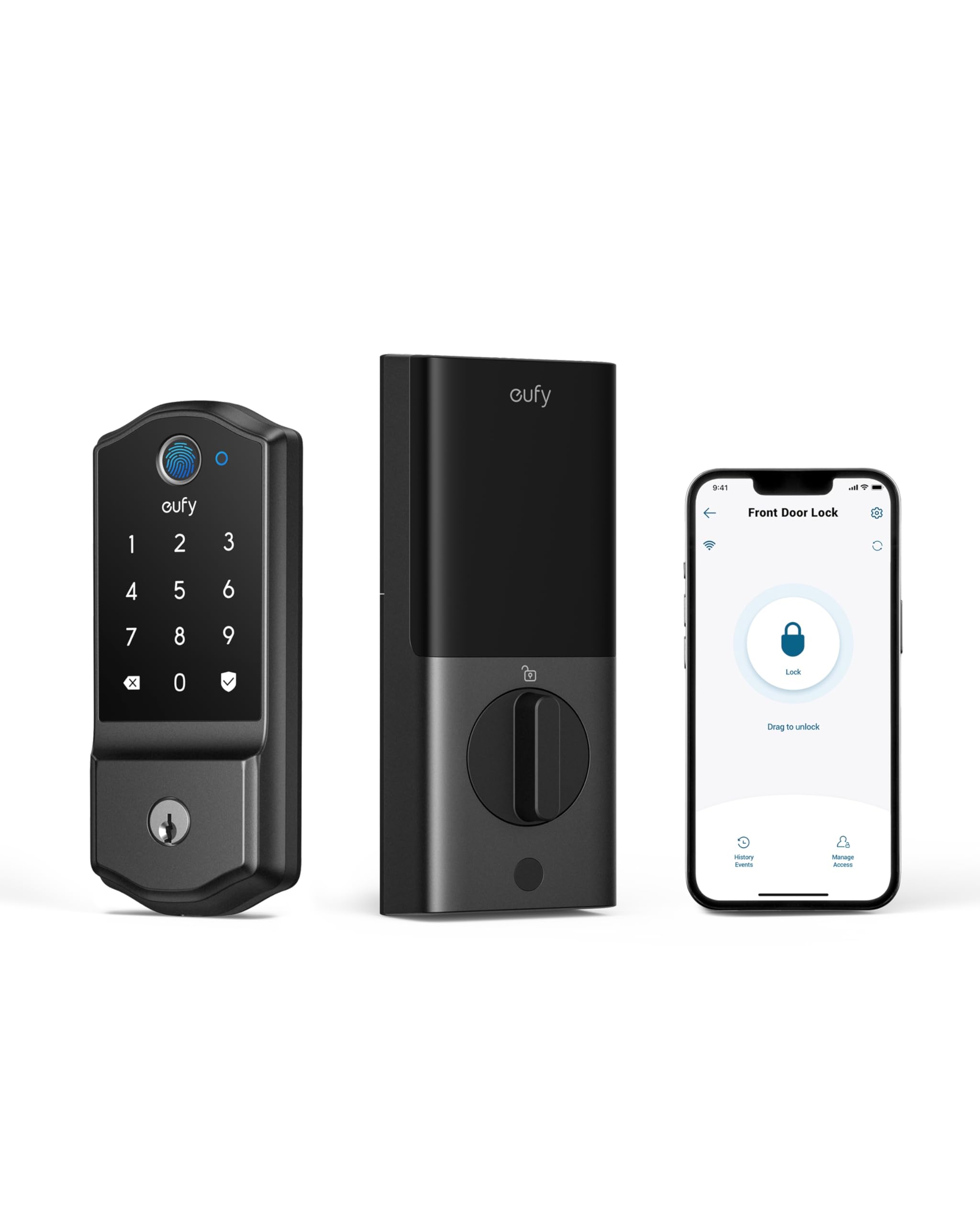
The deadbolt that plays nicely if you already run eufy cameras.
Already have eufy doorbells or cameras? This lock folds right into that routine, letting you control the door alongside your other devices from the single eufy Security app. That tight integration is the whole reason to pick it over a standalone lock — everything lives in one place instead of juggling three apps.
The fingerprint reader open up in under a second on a touch, with a self-learning AI that gets more precise the more you use it, so you are not stuck re-scanning your thumb at the door. It runs on 8 AA batteries for around 8 months — Veise notes that can vary with use frequency — and the built-in Wi-Fi means no bridge is needed for remote control. The keypad buttons are built to last rather than wear down. It is compatible with most standard deadbolts, fits bores under 54mm by removing a spacer, and is a 15-minute install without drilling.
This one is rated to survive, too: BHMA Grade 3 certified after being locked and open up more than 100,000 times, with an alarm that sounds on an unusual opening attempt, IP53 water resistance, and an operating range from -22°F to 158°F (-30°C to 70°C). The common gripe is that locking it still wants a fingerprint rather than a dedicated lock button — worth knowing if you want the simplest possible exit. If you are building around eufy gear, this is the natural fit.
What stands out: the sub-1-second fingerprint open up and the “set it once and forget it” 8-month battery cycle.
The honest note: there is no separate lock button, so locking usually means using the fingerprint or the app.
Great match for: homes already using eufy doorbells or cameras that want one app for everything.
Not for you if: you want a one-press lock button on the outside and prefer to keep your devices brand-agnostic.
7. Kwikset SmartCode 260 Keyless Entry Electronic Keypad Deadbolt, Matte Black Contemporary

A year between battery swaps, and no app to babysit it.
If the idea of another connected device in your life sounds exhausting, the Kwikset SmartCode 260 is the answer — a keypad-only deadbolt that runs roughly 12 months on 4 AA alkaline batteries. There is no Wi-Fi or Bluetooth radio constantly searching for a signal, which is a big part of why it stretches a set of batteries so far. You get the keyless convenience without the phone.
It is BHMA Grade 2 certified for security, durability, and finish — a rating Kwikset describes as up to 2.5x stronger than Grade 3. The SmartKey feature lets you re-key the lock yourself in seconds to any KW1 key, so you never have to call someone out after losing a key. You can program up to 50 user codes, 10 one-time codes, and 1 programming code, and the auto-lock can be set to 30 seconds, 1 minute, 3 minutes, 5 minutes, or 10 minutes.
Safety extras are plentiful: auto-lock, an intrusion alarm that sounds and disables the keypad for a minute after 3 wrong code attempts, and a Vacation Mode that shuts the keypad off entirely while you are away. The main thing to watch is the battery cover, which some owners note fits loosely and can rattle when the door closes. Otherwise, this is a hands-off lock for people who want dependable entry without the smart-home overhead.
Where it shines: a full 12 months of battery life and a BHMA Grade 2 rating that out-specs the Grade 3 locks around it.
Minor niggle: the battery cover can be loose enough to rattle, and you will want tighter for a quiet door.
Pick this if: you want a long-lasting, app-free keypad lock and value a high durability rating.
Not ideal if: you want remote access, fingerprint entry, or smart-home control.
8. Wyze Palm Lock, Smart Door Lock with Palm Vein Recognition

Hover a hand and the door opens — no fingerprint, no touch.
The Wyze Palm Lock is the pick for anyone whose hands are always full. It reads the vein pattern beneath your palm and open up on a hover, so you are not fumbling for a key or pressing a sensor with a wet finger. It uses millimeter wave radar — the presence-sensing tech also used in driver-assist systems — to distinguish an actual person from passing movement, which wakes the lock only when someone is really there. That saves battery compared to locks that scan constantly.
The power setup is the standout. A 6-month main battery is backed by a 2-week secondary battery, so when the primary runs down the backup takes over while you charge the main. If both ever drain, there is an integrated USB-C port for an emergency top-up from any power bank. Beyond palm entry, you get an illuminated keypad for up to 50 unique or one-time guest codes, voice control through Alexa or Google Assistant, and a manual key under a damping cover if you want the old-school option.
Auto-lock here is smarter than most: a built-in gyroscope reads the door’s angle and movement, then locks once the door actually closes rather than on a fixed timer. It is IP53 weather-resistant and BHMA Grade 3 certified. One owner notes the always-scanning mode can sip the battery if a screen door blocks the sensor — switching to Super Battery Saver mode fixes it — but with the backup battery and USB-C fallback, you are never locked out while you sort it.
What makes it different
- Palm vein recognition open up on a hover — nothing to touch
- Dual battery with a 2-week backup plus USB-C emergency charging
- Gyroscope-based auto-lock that locks only once the door truly closes
- Up to 50 guest codes and a manual key as a fallback
What to watch
- Default always-scanning can drain faster if a screen door blocks the sensor
- You will want the Super Battery Saver mode in busy or obscured entryways
Right for you if: your hands are always full and you want the fastest hands-free entry possible.
Consider something simpler if: you prefer a plain keypad and do not want to think about battery modes.
9. Philips WiFi Keypad Deadbolt with Handle, Built-in WiFi, APP Remote Control

A whole front-door upgrade in one box, handle and all.
If your door still has a mismatched old handle and you want everything to match, this Philips arrives as a complete set — deadbolt plus a matching lever handle — so there is no separate hardware run. It connects straight to your home’s 2.4GHz Wi-Fi with no hub or bridge, letting you lock, open up, check status, and view access history from the Philips Home Access app. Just keep it within about 33 ft of your router and clear of walls and metal for a steady signal.
Entry is quick: the fingerprint reader open up in 0.3 seconds, and you can store multiple prints for the family. Auto-lock can be set anywhere from 0 to 180 seconds through the app, though it is off by default and you need to switch it on yourself. The keypad supports permanent, one-time, periodic, and recurring PIN codes, which is ideal for guests, housekeepers, or short-term rentals. It is also Alexa and Google Assistant compatible for hands-free locking.
Battery life is where you should pay attention: it delivers up to 6 months with a low-battery alert, and this lock specifically wants standard 1.5V alkaline batteries — no rechargeables or high-power lithium cells, which can damage it. That is a real limitation if you prefer rechargeable batteries everywhere else in the house. Owners are largely happy with the hardware, with one summary noting the locksmith was “impressed by quality.” Just make sure you budget for the right batteries.
Best feature here: a matching handle set and a built-in 0.3-second fingerprint reader make it a one-box door upgrade.
Heads-up: it insists on standard 1.5V alkaline batteries only, so rechargeable cells are off the table for this lock.
Buy this if: you want a coordinated handle and lock set with fast fingerprint and app control.
Pass if: you refuse to give up rechargeable batteries — the manual explicitly rules them out.
Understanding the Specs
Battery type and runtime
The spec on the box tells you what kind of battery and how long it should last. A renewable lithium-ion pack means you charge and reuse the same cell, while alkaline models take standard AA batteries you replace. Runtime depends on the radio inside it — a lock with no Wi-Fi usually lasts longer because it has nothing constantly searching for a connection. Look for a low-battery alert so you have warning well before you are standing at a dead door.
Entry methods and biometrics
Fingerprint and palm vein sensors open up without a key, and several locks store more than one print per person so accuracy improves over time. Palm vein recognition reads the vein pattern under your hand and works on a hover, which suits full hands. Alongside biometrics, keypads let you share a code with a guest without giving them a key, and a physical key remains the ultimate fallback if the battery dies. Choose the mix that matches how the people in your home actually come and go.
FAQ
How long do battery powered door locks usually last on one set of batteries?
What happens if my smart lock battery dies while I am locked out?
Do these battery door locks need a Wi-Fi hub or bridge to work remotely?
Will these locks fit my existing deadbolt holes without drilling?
Is a fingerprint lock more secure than a keypad lock?
Can I use rechargeable batteries in a smart door lock?
How many entry codes can I store for guests and family?
What is a low-battery alert and which locks have one?
Do these locks work with Alexa and Google Assistant?
Final Thoughts: The Verdict
For most people, the battery powered door locks winner is the Tapo DL110 because it covers six ways in, runs a rechargeable pack for about a year, and pairs that with a BHMA Grade 2 build — a combination the crowd clearly loves at 4.6 stars and 800+ ratings. If you want hands-free entry, grab the Wyze Palm Lock with its hover-to-open palm reader and backup battery. And if you manage rentals and need to swap codes between tenants, the Veise VE06-L is the one to reach for.
How We Picked
We do not accept paid placement. Every pick is matched to a real buyer and a real use-case; we do not hands-on test units.
Sources & Methodology
Specifications: manufacturer listings and product documentation. Review insights: verified customer reviews, as of September 2026. Pricing: not shown on this page (it changes often); check the current price via the retailer link.
As an Amazon Associate, KitchPrep earns from qualifying purchases. This does not affect which products we feature.
Related Guides
