
Specs are compiled from manufacturer listings and verified buyer reviews and can change over time — please confirm the key details on the product page before buying.
If you are buying your first embroidery machine, the one thing that decides whether you stay happy is hoop size. Every machine on this list stitches a clean design, but the hoop sets the ceiling on what you can actually make. A 4″ x 4″ field covers monograms, names, and small logos. A wider field lets you finish a full chest logo or a tote bag panel in one pass. That single difference matters more than brand names or stitch counts.
I’m Mohammad Maruf — the founder and writer behind KitchPrep. This guide is built by comparing the manufacturers’ published specifications and the patterns across verified customer reviews, so you get each pick’s real strengths and trade-offs instead of marketing spin.
Your first embroidery machine should match the size of what you actually want to stitch. The picks below are ranked by how well they serve a first-time buyer, from compact starter units to large-field models built for small business work. Here is the best basic embroidery machine for your first project.
Our Picks at a Glance


How To Choose The Best Basic Embroidery Machine
A basic embroidery machine is a machine that stitches thread into fabric to form a design, and it does nothing else. Most beginner models cannot sew a straight seam. That single fact catches more first-time buyers than anything else on this page, so settle it before you shop.
Hoop size decides your project list
The hoop is the frame that holds the fabric flat while the needle moves. A 4″ x 4″ hoop, which measures roughly ten centimeters square, fits monograms, names on a shirt pocket, and small patches. A 7.9″ x 11″ hoop covers a full chest logo or a towel border in one hooping. Buy for the projects you actually plan to make, not the biggest field you can afford.
How designs get onto the machine
Your machine needs a path to receive design files. A USB port lets you load files from a stick, which works with no network at all. Wi-Fi or built-in wireless LAN lets the machine receive files from a computer or an app without moving a stick around. Some models lean on a phone app as the main route, so check that requirement before buying.
The extras you must buy either way
Thread, stabilizer, and spare bobbins are not optional. Stabilizer is a backing material that keeps fabric from stretching under the needle, and every beginner needs it. Plan for cutting tools, embroidery thread, and a spare needle set too, because most machines ship with only a starter supply.
Quick Comparison
| Model | Best For | Max Embroidery Area | Built-In Designs | Design Transfer | Amazon |
|---|---|---|---|---|---|
| Brother PE535★ Best Overall | First-time buyers | 4″ x 4″ | 80 | USB port | Amazon |
| Brother PE545App Controlled | Wireless transfer | 4″ x 4″ | 135 | Wireless LAN and USB | Amazon |
| EverSewn Sparrow X2Two-In-One | Sewing plus embroidery | Two hoops included | 100+ | Smart device app | Amazon |
| SINGER SE9180 | Big-screen sewing combo | 170 x 100 mm hoop | 150 | mySewnet Wi-Fi | Amazon |
| Poolin EOC05 | Wide beginner field | 4″ x 9.25″ | — | Wi-Fi and USB | Amazon |
| SINGER Legacy SE300 | Sewing plus embroidery | 10¼” x 6″ and 4″ x 4″ | 200 | USB stick | Amazon |
| Poolin EOC06 | Large-field home work | 11″ x 7.9″ | 200 | Wi-Fi and USB | Amazon |
| Janome MC400E | Monogramming | 7.9″ x 7.9″ | 160 | USB | Amazon |
| Janome MC500E LE | High-speed production | 7.9″ x 11″ | 160 | USB | Amazon |
In‑Depth Reviews
1. Brother PE535 Embroidery Machine, 80 Built-in Designs, 4″ x 4″ Hoop Area, Large 3.2″ LCD Touchscreen, USB Port, 9 Font Styles
Our pick — 4.5★ from 1,500+ verified ratings; the strongest balance of quality and price.
The 4″ x 4″ beginner machine that runs without a phone app or network
The PE535 is the one to buy if you want a first embroidery machine that does not demand a phone app or a network connection to run. It holds 80 built-in designs, so you can stitch a holiday motif or a kid’s shirt pattern the day it arrives. There are 9 built-in fonts — 6 English and 3 Japanese — for lettering names onto gifts without extra software.
The 4″ x 4″ embroidery field is the beginner standard, and Brother includes a hoop in the box. Design files arrive through the USB port, which lets you load your own artwork straight into the machine’s built-in memory. A 3.2″ LCD color touchscreen lets you preview a design before the needle moves, so you catch a wrong size before wasting thread. At 15 pounds it sits on a table or craft cart without complaint, and it runs on standard 120-volt corded power.
What wins people over is the owner base — a steady stream of reviews from buyers who started on this machine and kept stitching. The recurring gripe is the 4″ x 4″ frame, which blocks larger patterns, so measure your dream project before you commit. The touchscreen also takes a firm second tap now and then, which most owners stop noticing within a week.
Where it delivers
- 80 built-in designs mean you can start stitching the day it ships
- USB upload puts your own artwork in the machine’s memory
- 9 fonts across two languages cover most monogram and name work
Worth knowing first
- The 4″ x 4″ field caps you at small patterns only
- Occasional double-tap needed on the 3.2″ touchscreen
Made for: the buyer who wants the safest first machine with the largest owner base behind it.
Think twice if: your wish list includes anything wider than a 4″ x 4″ frame allows.
2. Brother Skitch Single-Needle Embroidery Machine Bluetooth
Twice the built-in designs and a bigger screen than the PE535
The PE545 does everything the PE535 does and then adds wireless LAN, which lets you send design files from your computer through the Design Database Transfer software without touching a USB stick.
The screen jumps to 3.7 inches, which is 0.5 inches larger than the PE535’s display. Drag-and-drop positioning means you nudge the design on screen instead of re-hooping the fabric, and built-in tutorial videos play right on that screen when you get stuck. The 4″ x 4″ embroidery field matches the beginner standard, and a hoop ships in the box. At 14.1 pounds it stays portable, and the accessory pouch includes needles, pre-wound bobbins, spool caps, a seam ripper, and scissors.
Most owners call it an effective starter machine and describe it as genuinely fun to use, with several noting it made the jump from hobby to small side business. The honest trade-off is durability at the needle end: some buyers report the needle mechanism freezing and needles breaking, especially on heavier fabrics. Ease of use lands in mixed territory too, because threading still takes practice. Get past that first week and the wireless workflow is the reason to choose this over the cheaper PE535.
Why it beats the PE535
- 135 built-in designs versus the PE535’s 80
- Wireless LAN transfer from your PC, no USB stick needed
- 3.7″ screen with drag-and-drop positioning
Where it asks patience
- Needle mechanism can freeze on heavier fabric
- Still capped at a 4″ x 4″ field
The upgrade pick: same beginner comfort as the PE535, but with wireless file transfer and a wider design library.
Skip the stretch: if you only ever stitch small monograms and never want to send files from a computer, the cheaper model does the same job.
3. EverSewn Sparrow X2 Sewing & Embroidery Machine, White
A combo unit with 120-plus sewing stitches and 100-plus embroidery designs
Buy the Sparrow X2 if you want to sew a project together and decorate it without clearing a second machine onto the table. The sewing side carries over 120 different stitch patterns, a thread cutter, a one-step buttonhole, speed control, and an advanced auto threader. The embroidery side ships with two hoops, a large one and a small one, plus over 100 designs, and it reads the common EXP, PES, and DST file types.
Here is where it splits from every Brother on this list: you control the embroidery from a smart device rather than a built-in touchscreen, and the app works with Apple or Android. Wi-Fi is not required, which helps in a basement craft room with weak signal. At 20 pounds the machine stays put on a table, and the warranty covers one year of electrical and one year of labor.
The scratch here is the learning curve, and it is steep enough that the sewing performance is what keeps people going. Connecting reliably takes patience — one buyer’s first unit refused to stay linked to the app, though the replacement ran cleanly. A longtime embroiderer had a worse run, with designs shifting and thread changes throwing the pattern off, while another owner calls it the most finicky machine they have used. Poorly digitized files also misalign, so design quality matters here. Treat the app link as the part you must be willing to troubleshoot.
Best single-machine setup: 120-plus sewing stitches and 100-plus embroidery designs in one 20-pound unit, with no network required.
The trade-off to accept: the app-based control and steep learning curve mean it rewards a patient hobbyist, not a shopper who wants to press start on day one.
Who it suits: the crafter who wants one machine to sew a shirt and then stitch a design onto it.
Who should pass: anyone who wants lettering without learning an app first.
4. SINGER® SE9180 Sewing and Embroidery Machine with Accessory Kit

A 7″ color touchscreen, the largest display in this group
The SE9180 leads with a 7-inch color touchscreen, and that is the biggest display in this group of machines. The screen sits over a library of 250 sewing stitches that expand into 401 stitch applications, plus 150 embroidery designs and 10 fonts. A 170 x 100 mm hoop ships in the box, which is wider than the standard 4″ x 4″ frame.
Speed runs to 800 stitches per minute in sewing mode and 450 per minute in embroidery mode, and you can fine-tune that pace with a control slider. An automatic needle threader, a built-in thread cutter, and a top drop-in bobbin handle the tedious steps. mySewnet Wi-Fi connectivity sends designs over the air and pushes progress notifications to your phone while a design stitches. The whole thing weighs 15.5 pounds.
The mixed reports center on reliability rather than features. Thread and needle breaks show up in owner accounts, along with bobbin tangles and misalignment after re-threading, and a stretch of buyers describe stitching that will not run past a straight line cleanly. A no-pedal start and stop button and the big screen are the parts people praise most often, and the machine clearly suits light backup duty. If your heart is set on this combination, buy from a source with a straightforward return window.
The headline feature: a 7-inch color touchscreen paired with 401 stitch applications and 150 embroidery designs is a lot of screen real estate for a hobby machine.
The careful part: reliability complaints run through the owner reports, so treat this as a machine to buy with an easy return path.
Best for: a sewer who wants a large, readable display and Wi-Fi design transfer on the same unit that embroiders.
Look past it if: you want the longest track record of trouble-free stitching in this price band.
5. Poolin EOC05 Embroidery Machine for Beginners, 4″ x 9.25″ Embroidery Area

A beginner machine with a nine-inch-wide field for full chest logos
The EOC05 earns its spot on one number: it stitches a 4″ x 9.25″ area, more than twice as wide as the 4″ x 4″ field on every Brother pick in this guide. That means a chest logo, a hoodie front, or a tote bag panel fits in one hooping. It is embroidery-only, so it will not sew a seam — the design is deliberately focused on learning embroidery rather than doing two jobs.
You control the EOC05 through a 7-inch color touchscreen running the Institch OS2 control system, which keeps the menus short and the steps visible. Wi-Fi transfer lets you send designs over the air, and a USB stick works as a backup route. The starter kit is unusually complete for an entry machine: a 4″ x 9.25″ hoop, a 4″ x 4″ hoop, six rolls of thread, 30 pieces of stabilizer, 25 rolls of bobbins, nine needles, a thread stand, and a tool kit. It weighs 22 pounds.
What earns the machine its following is the support behind it. Owners across several skill levels describe setup as beginner-friendly, praise the preinstalled designs and small-business reliability, and point to consistent stitch quality on pillows, aprons, and tags. Custom artwork still needs separate software, which is worth knowing before you count on built-in editing alone.
what separates it
- 4″ x 9.25″ hoop handles full chest logos in one pass
- Starter kit with 6 thread rolls, stabilizer, and 25 bobbin rolls
- Wi-Fi and USB both available for file transfer
The honest limits
- Embroidery only, no sewing function at all
- Custom designs need separate software beyond the built-in editing
The pick for: a beginner who already knows they want to stitch logos and names larger than four inches wide.
Not the pick for: anyone who also needs to sew seams and hems on the same machine.
6. SINGER® Legacy SE300 Computerized Sewing & Embroidery Machine

A dual-purpose machine for the sewist who wants both jobs covered
The Legacy SE300 packs 250 built-in sewing stitches and 200 embroidery designs into one 20.5-pound unit, along with 6 font options for lettering. Two embroidery hoops ship with it — a 10¼” x 6″ frame and a 4″ x 4″ frame — which gives you a wider embroidery field than the standard starter frame. An LCD touchscreen displays the stitch selection, length, and width as you adjust them.
The machine self-adjusts stitch length, width, balance, pressure, and tension based on what you select, which trims setup time considerably. A built-in needle threader saves your eyes, and a transparent top-drop bobbin lets you watch the thread level without unthreading. An independent bobbin winding motor means you can fill a bobbin without pulling the thread off the needle. Design files travel via the included USB stick, and 10 presser feet come in the accessory kit.
Where this machine gets complicated is long-run reliability. Thread durability comes up repeatedly in owner accounts, with breaks and clogged thread paths showing up, and a stretch of buyers find the embroidery performance stopping mid-project. The automatic threading device draws its own complaints, with some owners calling it confusing enough to consider a return. Setup is straightforward and designs come out clean when things run right — the gamble is whether your unit stays that way.
The appeal: 250 sewing stitches and 200 embroidery designs on one machine, with self-adjusting tension doing the fiddly setup work.
The caution: thread breaks and mid-project stops run through the owner reports, so budget for the possibility that your unit needs attention.
Worth a look if: you want a wide 10¼” x 6″ embroidery hoop and a full sewing library from a single machine.
Keep shopping if: dependable embroidery on the first try matters more than owning one machine for two jobs.
7. Poolin EOC06 Large Hoop Embroidery Machine, 11 x 7.9 in Embroidery Area
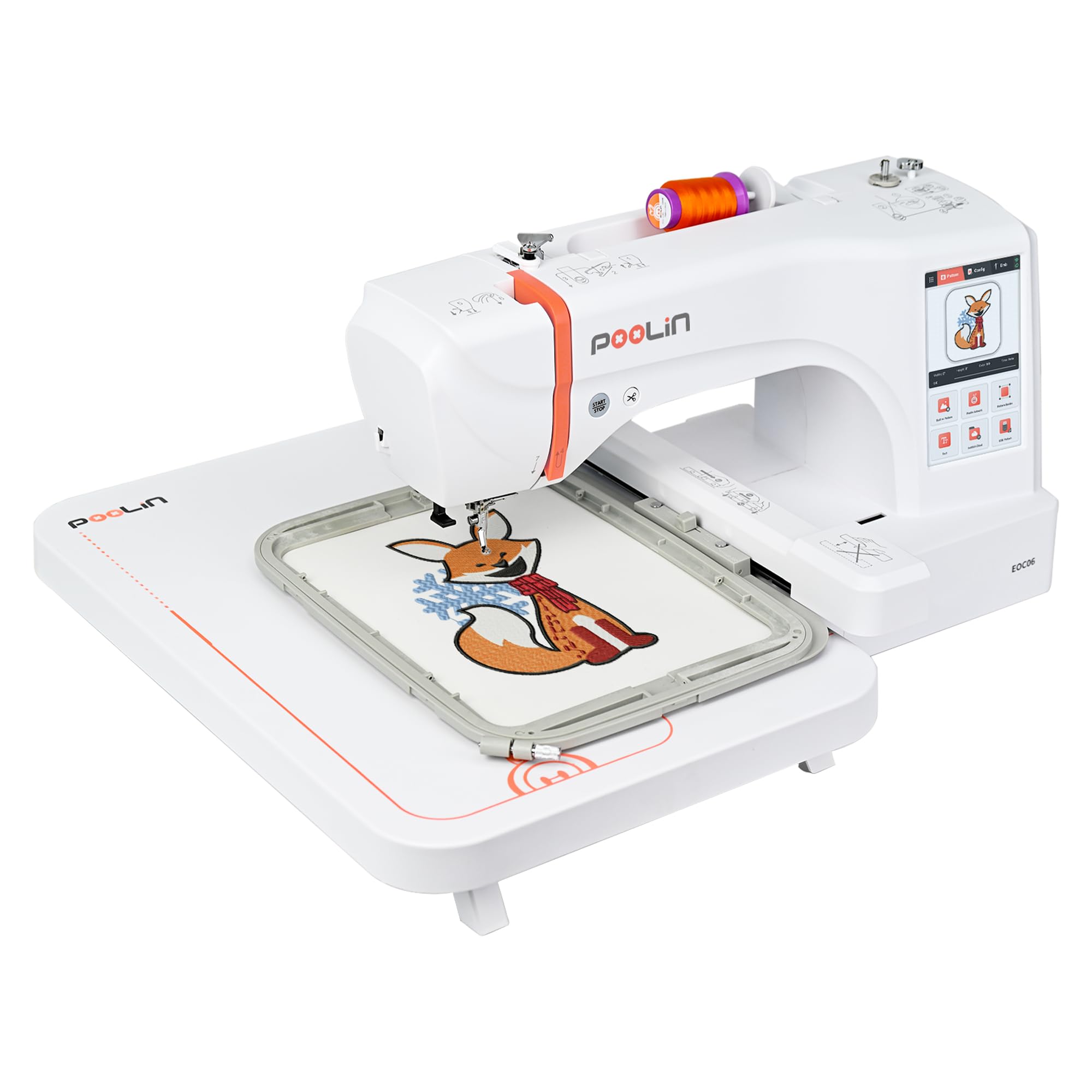
The largest hoop field here, and it arrives with four frames
If you want the widest stitching field on this page, the EOC06 delivers an 11″ x 7.9″ area — nothing else here matches it. Four hoops come with it — two 5.5″ x 5.5″ frames, one 7.9″ x 7.9″ frame, and one 7.9″ x 11″ frame — so you can hoop a sweatshirt back, a pillowcase, or a table runner without buying anything extra. That big work area is the single reason to start here rather than with a compact beginner machine.
The InStitch i3 system runs a 7-inch color touchscreen where you drag, edit, and combine patterns the way you would on a phone. There are 200 built-in patterns, 8 fonts, and 10 languages loaded on board. Transfers go over USB or wireless LAN, and files export in DST or DSB format from the InStitch Doodle digitizing software. An automatic needle threader, bobbin winding, and automatic thread trimming after each color change save the most tedious steps. It weighs 35 pounds, so pick a permanent table.
What makes this machine stand out is the support behind it — Facebook and WhatsApp help, plus free replacement parts. Support answers via Facebook and WhatsApp, and engineers have walked buyers through problems and shipped free replacement parts. Quality is the strongest theme in the feedback, with one owner reporting a design of more than 50,000 stitches completed without trouble. A couple of rough edges remain: the bundled software feels clunky, and one buyer’s missing hoop clip never got resolved.
Why buyers choose it
- 11″ x 7.9″ field covers clothing, bedding, and towels
- 4 hoops included, from 5.5″ square up to 7.9″ x 11″
- 200 built-in patterns, 8 fonts, and 10 languages on the machine
Minor snags
- Digitizing software feels dated and uses DST or DSB files
- 35 pounds means it needs a dedicated spot
Built for: the home crafter who wants one machine that can handle clothing, bedding, and gifts without a hoop upgrade.
Size check first: this is a 35-pound machine with a big footprint, so measure your table before ordering.
8. Janome Memory Craft C400E Computerized Embroidery Machine – MC400E Monogram Machine with 160 Built in Designs, 4 Hoops, and 6 Monogramming Fonts, Digital Embroidery Unit for Home, Beginners

The monogram machine that keeps its place when the thread snaps
The feature that earns the C400E its place here is Auto Return. When a thread breaks mid-design, the machine picks up exactly where it left off instead of restarting the pattern. That alone saves real thread and fabric on long monogram runs. The maximum embroidery area is 7.9″ x 7.9″, with 4 hoops included, and the machine holds 160 built-in designs plus 6 monogram fonts.
On-screen editing lets you rotate, resize, mirror, and combine patterns before the first stitch, and automatic thread tension control keeps the result even. An LCD color touchscreen handles the navigating, and a soft machine cover ships in the box along with bobbins, spool holders in three sizes, and a special bobbin holder for embroidery. It weighs 25 pounds.
One quirk worth memorizing before you start: the USB drive only reads JEF files, so PES and other formats need converting first. Owners also split on the manual, with some finding it thin and learning from video tutorials instead. Thread breakage was a common early frustration that cleared up for one buyer after swapping the bobbin case — and then the machine stitched beautifully. Once running, owners describe precision that improves with practice and a machine they would buy again.
Standout capability: Auto Return after a thread break resumes the exact stitch point inside a 7.9″ x 7.9″ field, which matters on dense monogram work.
Set-up note: the USB path is locked to JEF files, so plan to convert other formats before you load them.
Ideal for: the buyer who wants clean monogramming on towels and robes with a wide 7.9″ x 7.9″ frame.
Not ideal if: you want a plug-and-play USB workflow with no file conversion involved.
9. Janome Memory Craft 500e LE Embroidery Machine

The speed pick, and the one that trims its own jump threads
Speed is the reason to look at the 500e LE. It stitches from 400 to 860 stitches per minute, which is faster than the 450 per minute the SE9180 manages in embroidery mode, and you can slow the pace while a design runs. The maximum embroidery area reaches 7.9″ x 11″, so hoodie backs and quilt blocks fit in one hooping. It holds 160 built-in designs and 6 fonts for 2 and 3 letter monogramming.
Two features separate it from a hobby machine. Automatic thread cutting between patterns and words means no jump stitches to clip by hand when a design finishes. A bobbin thread sensor warns you before the bobbin runs dry mid-design. On-screen editing covers enlarge and reduce, rotate, flip, drag and drop, arc, combine, copy and paste, grouping, and corner layout. Design files transfer over USB, and a USB drive with 30 exclusive large designs comes with the unit. It weighs 18.7 pounds, which is light for a machine with this field size.
The honest picture is uneven. Owners describe beautiful stitches right from the start and easy threading, though the needle threader takes learning and the manual is short on detail. The preloaded patterns and fonts land as average, and the automatic thread cutter is the feature people single out as the reason to buy. A hard caution surfaces at the business end: one buyer who purchased the machine three times for a commercial operation reports each unit breaking down after a few months, with no technician available to repair it. For home use the picture reads far better.
Where it leads: 860 SPM with automatic thread cutting between words means less clipping and faster turnaround on multi-color designs.
Who should pause: buyers planning daily commercial volume should weigh the repair reports before committing.
The one for: a home embroiderer who wants a wide 7.9″ x 11″ field and does not want to clip jump stitches by hand.
Prudent to skip if: you need a machine that runs commercial volumes day in and day out.
Understanding the Specs
Embroidery Area and Hoop Size
The embroidery area is how much fabric the needle can reach in a single hooping, written as two measurements in inches. A 4″ x 4″ area is the beginner norm and covers monograms, names, and small logos. Wider areas such as 4″ x 9.25″ or 11″ x 7.9″ let you finish a full chest logo or a pillowcase panel without re-hooping. Always pick the machine by the largest design you plan to stitch, not by the biggest number on the spec sheet.
Built-In Designs and Fonts
Built-in designs are patterns already stored on the machine, so you can stitch the same day it arrives with no downloads and no computer. Fonts are lettering sets for names and monograms, and the count usually splits between English and other languages. A larger built-in library helps a beginner start fast, but it never replaces the need for custom design software when you want your own artwork.
Design Transfer Methods
A USB port lets you carry design files on a stick and load them with no network involved. Wireless LAN or Wi-Fi sends files from a computer or a phone app without moving a stick around. Some machines depend on a single mobile app as the main route, which means the app becomes part of the machine. Choose the transfer method that fits where you actually work.
Stitch Speed and Stabilizer
Stitch speed is measured in stitches per minute, or SPM, and it sets how long a design takes to run. Faster speeds help on long monogram runs and multi-color work. Stabilizer is the backing material that holds fabric firm under the needle, and it is sold separately from nearly every machine on this list. Skipping it is the fastest way to get a puckered result.
FAQ
Can a basic embroidery machine also sew regular seams?
What size design can a 4 x 4 hoop actually stitch?
Do I need stabilizer for every embroidery project?
How do I get my own design onto the machine?
How long does a starter embroidery machine usually last?
What file formats do these machines read?
Is a combo sewing and embroidery machine better than embroidery only?
Do I need Wi-Fi or a phone app to use these machines?
What thread and needles should a beginner buy first?
Why does thread keep breaking on my embroidery machine?
Final Thoughts: The Verdict
The best basic embroidery machine for a true beginner is the Brother PE535. It carries the largest and steadiest owner base in this group, holds 80 built-in designs and 9 fonts, and runs without any phone app or network connection. Buy it, add stabilizer and embroidery thread, and start stitching. If you want wireless file transfer and a bigger 3.7″ screen, step up to the Brother PE545. And if your ambition reaches a full chest logo or a pillowcase panel, the Poolin EOC06 with its 11″ x 7.9″ field is the one to reach for.
My one piece of advice: go with the PE535 if you are staring down your first machine and want company. Its 80 built-in designs, 9 fonts, and USB-only workflow keep it the safest beginner buy on this page.
How We Picked
We do not accept paid placement. Every pick is matched to a real buyer and a real use-case; we do not hands-on test units.
Sources & Methodology
Specifications: manufacturer listings and product documentation. Review insights: verified customer reviews, as of September 2026. Pricing: not shown on this page (it changes often); check the current price via the retailer link.
As an Amazon Associate, KitchPrep earns from qualifying purchases. This does not affect which products we feature.
Related Guides
