
Specs are compiled from manufacturer listings and verified buyer reviews and can change over time — please confirm the key details on the product page before buying.
You want a home that calls for help even when you are not there to make the call. That is the point of an automatic security alarm: sensors watch doors, windows and hallways, and the system alerts your phone or a monitoring center the moment something moves. This guide sorts through nine real systems and explains which fits which home, what you need to buy, and where the gotchas sit.
I’m Mohammad Maruf — the founder and writer behind KitchPrep. This guide is built by comparing the manufacturers’ published specifications and the patterns across verified customer reviews, so you get each pick’s real strengths and trade-offs instead of marketing spin.
Every kit below was judged on coverage, how it alerts you, and what happens when the power or Wi-Fi drops. The best automatic security alarms alert your phone in seconds, even when you are nowhere near the house.
Our Picks at a Glance

How To Choose The Best Automatic Security Alarms
Your automatic security alarm is only as strong as its weakest part — often a sensor that won’t stick straight, or a connection that dies when the power does. Before you compare kits, decide three things: how many entry points you need to cover, if you want to self-monitor or pay for dispatch, and how the system reaches you when your home internet is offline.
Count your doors and windows before you count sensors
Most 11-piece and 14-piece kits are built around two to four bedrooms. Walk your home and count every ground-floor door and window, because that is where a break-in actually starts. A kit with 8 contact sensors covers a solid midsize house; a 24-piece kit is for people who want a sensor on nearly every opening, plus motion coverage in hallways. Extra sensors can almost always be added later on the expandable systems, so you rarely have to guess perfectly on day one.
Backup power and backup signal are two different things
A backup battery keeps the alarm screaming during a blackout, but it does nothing if your Wi-Fi is already down. That is why 4G and GSM models matter: they use a cellular SIM card to call or text you even when your internet and power are both out. A hardwired internet cable into the base station is the quiet hero here — it holds a connection through brick walls and floors where Wi-Fi often struggles.
Free monitoring versus paid dispatch
Self-monitoring through a phone app is genuinely free on most of these kits, and it works well if you check your phone often. Paid professional monitoring hands the job to a call center that can dispatch police, fire or medical help — useful when you are asleep, driving, or simply do not look at notifications. Several systems let you turn that plan on or off month to month, so you are never locked into a long contract.
Quick Comparison
| Model | Best For | Pieces Included | Connectivity | Monitoring Type | Amazon |
|---|---|---|---|---|---|
| Ring Alarm 14-Piece Kit★ Best Overall | 2-4 bedroom homes, Alexa households | 14 pieces (2 keypads, 8 contact, 2 motion, base, extender) | Wi-Fi with optional cellular backup | Free self-monitor or optional Ring Protect plan | Amazon |
| Ring Alarm Pro 14-Piece KitNo-Contract Pick | Whole-home protection plus mesh Wi-Fi | 14 pieces with built-in eero Wi-Fi 6 router | Wi-Fi 6 up to 900 Mbps, covers 1,500 sq ft | Free self-monitor or Ring Home subscription | Amazon |
| SimpliSafe 11 Piece Gen 3Smash-Safe Pick | Smaller homes, setup-averse buyers | 11 pieces (6 entry, 2 motion, camera, keypad, base) | Wireless, Wi-Fi required | Optional 24/7 monitoring, no contract | Amazon |
| AGSHOME Security Alarm System | Off-grid homes, renters avoiding contracts | 99 wireless + 7 wired zones | GSM 850/900/1800/1900MHz | Free GSM auto-dial and SMS alerts | Amazon |
| 15-Piece WiFi Home Security System | Budget-conscious first-time buyers | 15 pieces (10 contact, 1 motion, keypad, 2 remotes, base) | 2.4GHz Wi-Fi only | Free app self-monitoring, no fees | Amazon |
| 24pcs Wireless DIY Burglar Alarm | Shops, offices, and multi-room coverage | 24 pieces with siren and remotes | 4G and Wi-Fi | Free self-monitoring, no monthly fee | Amazon |
| XUK WiFi Wireless Alarm System | Multi-storey homes, up to 100 sensors | 24 pieces including 4.3-inch touchscreen hub | 2G/4G plus 2.4GHz Wi-Fi | Free app self-monitoring | Amazon |
| OSI Alarm System Gen 2 (4G) | Scalable setups up to 160 sensors | 11 pieces plus 7-inch touchscreen panel | 4G, Wi-Fi, hardwired sensor inputs | Free self-monitor or /month pro monitoring | Amazon |
| Arlo Home Security System SS1501 | Renters and small apartments | Keypad hub plus 5 x 8-in-1 sensors | Wi-Fi with Arlo SecureLink | App self-monitoring, paid plans for pro monitoring | Amazon |
In‑Depth Reviews
1. Ring Alarm 14-Piece Kit
Our pick — over 4.5★ from 6,000+ verified ratings; the strongest balance of quality and price.
The 14-piece kit that arms a whole midsize house without calling a single installer.
If you want one box that covers a two-to-four bedroom home, this is the kit most buyers end up with. It arrives with one base station, two keypads, eight contact sensors for your doors and windows, two motion detectors for hallways and rooms, and one range extender to stretch the signal into a far corner. Against the SimpliSafe 11-piece kit, its eight contact sensors beat six entry sensors, so more openings are covered from the start.
Setup is the part people rave about. A hardwired internet cable lets the base station connect through a brick wall and a floor without a hiccup, which is exactly why one buyer reports it “just worked from the start” after dreading the install. The keypads arm and disarm, the ring app pushes instant alerts straight to your phone, and everything talks to Alexa if you want to arm the system with your voice.
The real strength is the subscription option. You can self-monitor for free through the app, or add a Ring Protect plan and the system keeps running when your Wi-Fi drops, with 24/7 professional monitoring calling for police, fire or medical help. Buyers report the cellular backup held through 20+ hour outages, when a Wi-Fi-only system goes dark. The honest catch sits on the setup screen: each piece often has to be added to the network one at a time, which makes the first evening slower than the video suggests, and the second keypad cannot be swapped for extra sensors inside the same kit.
Where it wins
- Eight contact sensors and two motion detectors cover a midsize house from the start
- Works through brick and floors when you use the wired connection
- Cellular backup keeps monitoring alive during a Wi-Fi outage
- Free self-monitoring, or add 24/7 dispatch on a flexible plan
What to expect
- Each sensor typically pairs to the network individually, so setup drags
- Full remote arming and cellular backup need a paid Ring Protect plan
- The two keypads are fixed in the box — no swapping one for extra sensors
Go for it if: you have two to four bedrooms, want Alexa voice control, and like the freedom to start free and add dispatch later.
Think twice if: you refuse any subscription — remote arming and the backup-cellular features stay locked behind a Ring Protect plan.
2. Ring Alarm Pro 14-Piece Kit
An alarm that doubles as the router feeding every other device in your house.
This is the Ring kit with a brain that does two jobs at once. The Alarm Pro base station has a built-in eero Wi-Fi 6 router inside it, so the same box guarding your doors is also pushing internet at up to 900 mbps across roughly 1,500 square feet. The 14 pieces mirror the standard Ring kit — one base, two keypads, eight contact sensors, two motion detectors, and an alarm range extender — but you are buying the networking too.
What buyers love is the integration. The system pairs with Ring cameras, video doorbells, Z-Wave locks and lighting, and the app sends real-time notifications with optional pro monitoring layered on top. It scales to cover more rooms as you add Alarm Sensors and eero extenders, and it plays nicely with Alexa for voice arming. The built-in mesh router is the genuine upgrade over the standard 14-piece Ring kit above, which has the alarm side but not the networking.
The head-scratcher arrived for early adopters who made Alarm Pro their network gateway: their whole mesh network dropped every minute and video calls fell apart, until a later software update let you keep Alarm Pro off gateway duty. It is fixed now, and the system auto-switches to LTE on an outage, but it is worth knowing the router role is optional rather than mandatory. There is also one recurring reality — the base station itself sits exposed on a shelf or table, and a pet rabbit chewing the power cord has been on the review pages, so tuck the cord out of reach.
The router upside: if you were going to buy a mesh router anyway, the eero Wi-Fi 6 hardware folded into this base station is the real reason to spend more here than on the plain Ring kit.
Worth a beat of caution: treat it as an alarm first and a router second, since the networking role is the newer, bug-pronounced part of the package.
Pick this one if: you want whole-home protection and need a Wi-Fi 6 mesh router anyway — two jobs, one plug.
Leave it for later if: your current router is fine, because the standard Ring Alarm 14-Piece kit does the security job for less complexity.
3. SimpliSafe 11 Piece Wireless Home Security System Gen 3
Plug in the base, place the camera, and you are protecting in one sitting.
SimpliSafe built this kit for people who do not want a project. The 11 pieces include one base station, one indoor wireless camera, one keypad, two motion sensors and six entry sensors — enough for a smaller home with doors, a garage and a shed to watch. The 95dB siren is loud enough to matter, and the wireless indoor camera lets a monitoring agent both see and speak to an intruder through two-way audio during an alarm.
Installation is where this system earns its keep. You plug in the base, place the sensors, and arm everything from the app — no wiring, no drilling. The motion sensors reach about 35 feet with a 90-degree field of view, and SimpliSafe says they get along with pets under 60 pounds, so a cat wandering the hallway at night generally will not trip the alarm. The backlit keypad lights up when you need it and goes dark when you do not, a small touch that keeps a hallway clean.
Two honest notes. First, the whole system leans on your home Wi-Fi, and the entry sensors have limited range back to the base station, so a sensor on a far shed can drop offline. Second, a weak battery in a sensor can look exactly like a connectivity problem — it often just needs a fresh cell. Self-monitoring is free, and professional monitoring is optional with no contract, so you can decide later if you want a call center in the loop.
what separates it: the indoor camera plus two-way audio means monitoring agents can actually talk to someone in your home, which the sensor-only kits here cannot do.
The setup you should plan for: keep entry sensors within reach of the base station, and swap sensor batteries the moment one shows disconnected, since a dead cell mimics a range problem.
Best fit: a one or two bedroom home, a garage, and a shed you want watched without touching a wire.
Look elsewhere if: your entry points are spread far apart — the short range from sensors to base station can knock a distant sensor offline.
4. OSI Alarm System Gen 2 (4G)

The DIY system that gives you a real touchscreen panel instead of a plastic keypad.
OSI keeps the kit lean at 11 pieces but plays a longer game on growth. Inside the box: a control panel with a 7-inch screen, two motion sensors, five contact sensors, one wireless strobe siren, and two remote controllers. That screen is an HD 1024 x 600px anti-fingerprint display, and it runs a setup wizard that walks you through configuration step by step, so you are not left guessing which menu hides the sensor pairing.
The number that matters most here is room to grow. This system accepts up to 160 sensors, six controllers, six doorbells and six keypads — more headroom than the kits that cap around 20 sensors, and enough for a house you plan to add onto over years. It also has a 24-hour backup battery, so a blackout does not leave the panel blind. You can self-monitor for free through the Smart Life app, or switch on 24/7 professional monitoring with dispatch and phone confirmation on a plan you can cancel anytime.
What wins people over is the flexibility to mix Wi-Fi and hardwired sensors on the same panel, plus the multiple access levels — one administrator account and five limited user accounts, which is handy for renters, guests, or an Airbnb. A retired security regional manager and a former pro installer both rated its value above far pricier systems. The recurring gripe is smaller than it looks: the plug-in siren blocks two outlets on a wall socket, and the app’s history can pile up without a quick way to clear it.
Why it holds up
- Scales to 160 sensors, 6 controllers, 6 doorbells and 6 keypads
- Setup wizard guides first-time buyers through configuration
- Mixes Wi-Fi and hardwired sensor inputs on one panel
- 24-hour backup battery keeps the panel alive through blackouts
The fine print
- The plug-in siren takes up two outlets on the wall
- Door sensors only chime rather than announce a specific door by name
- The app has no simple delete option for old history entries
Choose this if: you are buying once and adding sensors for years, or you manage a small apartment or business with multiple users.
Overkill if: you have a tiny flat — the 11-piece count covers it, but the 160-sensor headroom is wasted on you.
5. 24pcs Wireless DIY Home Burglar Alarm System
Enough sensors to blanket a shop or a sprawling house in one buy.
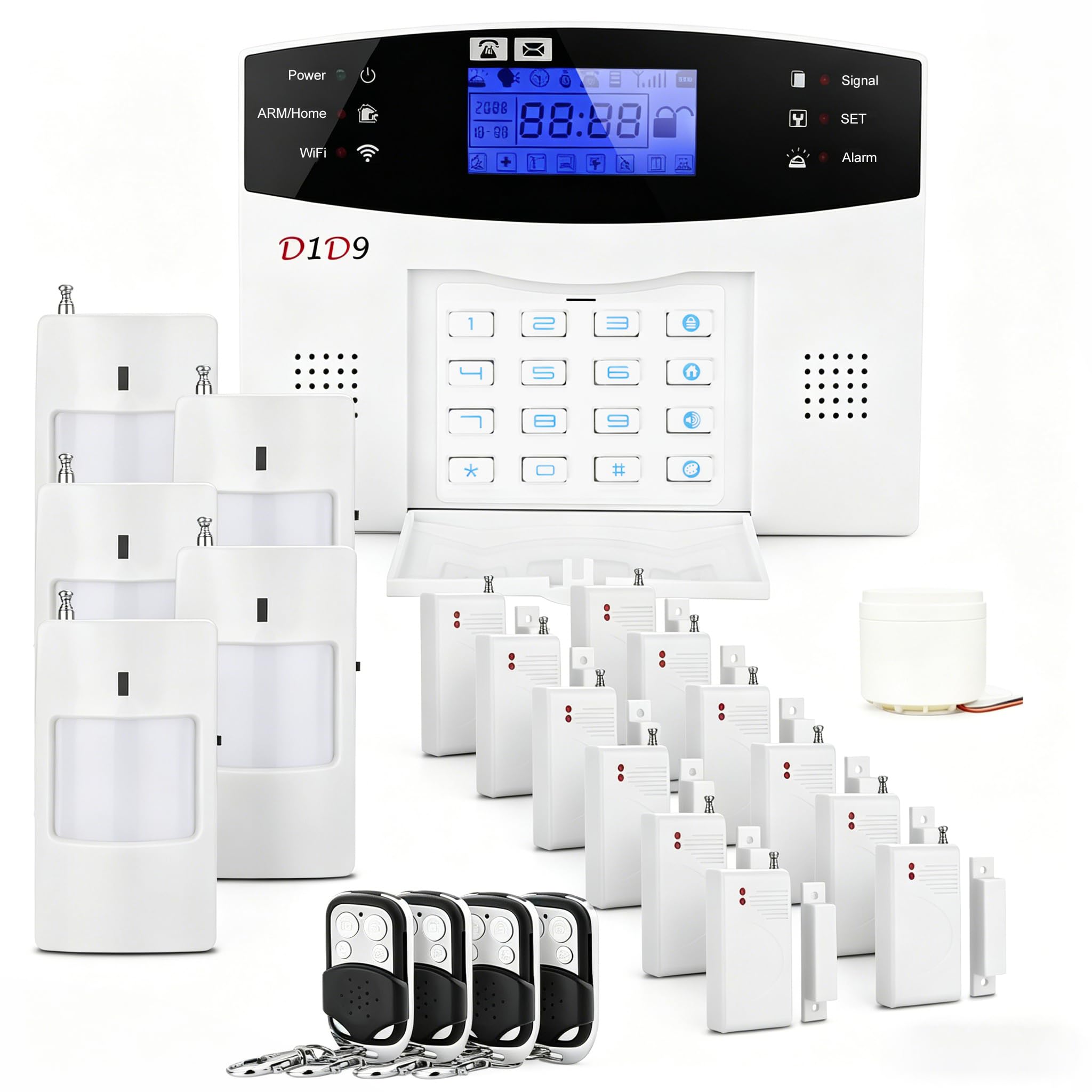
Where the smaller kits leave you budgeting for add-ons, this one arrives loaded. The 24 pieces wrap door and window sensors, motion detectors, a remote control and a siren around nearly every key area of a home or small business, and it runs on either 4G or Wi-Fi for real-time alerts to your phone. Installation is peel-and-stick with no drilling, and the kit goes up in about 30 minutes if you place the sensors where they clearly reach the main unit.
The range is the quiet advantage. It reaches up to 80 meters, and owners mention sensors connecting from 100 feet away, so a detached garage or back-of-lot shed stays in the loop. There is a built-in battery backup, an emergency call feature, timer on/off scheduling and sensor bypass, so you can leave one door live for the dog while the rest of the house stays armed. No monthly fee applies on the self-monitoring side.
The trade-off to weigh is the siren. A few owners have had a remote siren that fires intermittently, and because the built-in siren sits in the main unit, it can be muffled if a door is not actually open. Motion sensors near a busy shop doorway have also tripped on smaller movement than expected, so mount them high and away from traffic. Get the placement right and this buys you more physical coverage than anything else near its tier — 24 pieces versus the 15 and 14-piece kits above.
Coverage for the money: at 24 pieces with an 80-meter operating range, this is the pick when one remote building or a large shop floor is part of the picture.
The honest snag: the remote siren is the weak link some owners hit — test it in the first week, and place motion sensors high so passing movement does not trip them.
Suits you if: you have a home, office, vacation property, or elderly parent’s space that needs sensors on nearly every opening.
Not ideal if: you want a single loud central siren you can hear from any room — the remote siren is the part to test early.
6. XUK WiFi Wireless Alarm System 4.3-Inch Touchscreen

A color touchscreen panel that shows your home’s status at a glance, even for the kids.
XUK carved out a niche with one feature nobody else here matches: a 4.3-inch color touchscreen interface instead of a basic keypad. It displays your alarm status, the time, and alerts in real time, with a multilingual menu designed to be simple enough for children and the elderly to use. The full 24-piece kit includes that central unit, five PIR motion detectors, ten door and window alarms, a 120dB siren, an SOS emergency button, three remote controls and three RFID keychains.
On connectivity, this system runs on 2.4GHz Wi-Fi plus 2G/4G, with SMS and voice-call alerts when a SIM card is installed — so a network outage on your home internet does not silence it. It works with Alexa and Google Assistant for voice control. The kit scales to 100 sensors and 10 RFID keychains, so a large or multi-storey home can grow into it without swapping the hub, and the 500-meter range covers a big property.
Two things to know up front. The installation experience splits buyers — some find it faster than expected, others hit snags, so budget a patient first session. And the factory default passwords are the classic 1234 and 6666, with settings that can leave the system arm-able without a password after a power cycle, so change those codes the day you set it up. Get past that and customers note a filled-out kit with fast, immediate sensor response and phone control that covers the whole house.
The touchscreen edge: a 4.3-inch color display showing live status is easier to read at a glance than a three-light keypad, which matters when someone unfamiliar — a pet-sitter, a grandparent — needs to arm it.
Change these first: swap the default 1234 and 6666 passwords and set a disarm code, because the stock settings will let the system disarm too easily.
Reach for it if: you want a screen-based panel a whole family can read, with cellular alerts as a safety net against internet outages.
skip it if: you want a zero-fuss install — the setup experience is genuinely hit or miss here.
7. Arlo Home Security System SS1501 with 8-in-1 Sensors

Five sensors, each doing the job of eight, in a system that rents as easily as it owns.
Arlo takes a different route. Instead of a fistful of single-purpose parts, the SS1501 ships with a keypad sensor hub and five all-in-one sensors, each of which handles eight sensing functions — motion, door alarm and more — so one small device can cover several needs. You manage everything through the Arlo Secure App, setting the system to Arm Away, Arm Home or Standby with a tap, and the hub packs an integrated siren plus motion detection and smoke and CO alarm listening.
The connectivity trick is Arlo’s SecureLink technology, which the company says extends range, secures the connection, and stretches battery life for paired devices. That is a meaningful difference in a large home, where a weaker signal is often what makes a sensor drop. The kit pairs with the wider Arlo camera ecosystem, and buyers have pressed the 8-in-1 sensors into service for motion, open/close, water leaks and temperature — one owner set the whole system up purely for basement leak detection after a plumbing job.
The genuine gotcha is alignment. All-in-one sensors need the sensor and its magnet to line up, and doors with decorative trim or uneven frames can leave them unable to sit flush — one longtime Arlo user returned the system when the pieces would not align on trimmed doors, and there is no simple fix for that. Wi-Fi connectivity also drew mixed feedback, with some setups failing to connect cleanly. It is best suited to clean, flat door frames and apartments rather than ornate older homes.
Where it shines: the 8-in-1 sensors do far more per device than a plain contact sensor, covering leaks and temperature as well as doors and motion.
The alignment catch: if your doors wear trim or sit uneven, the sensor and magnet may not sit flush — measure before you commit.
Ideal for: renters and small apartment dwellers who want multi-purpose sensors and already own Arlo devices.
A poor match if: your doors have decorative trim or won’t sit flush, which trips the alignment problem these sensors depend on.
8. 15-Piece WiFi Home Security System, DIY Wireless Alarm Kit

A fifteen-piece starter kit that gets an apartment online in under an hour.
For a first alarm on a tight budget, this kit does the basics well. Fifteen pieces ship in the box: one Wi-Fi alarm base station, one keypad, one motion sensor, ten door sensors, two remote controls, a user manual, and backup battery power. That 120dB siren is loud enough to make an intruder think twice, and the ten door sensors mean you can put one on nearly every opening rather than picking favorites. The whole thing installs in under an hour with no professional help.
The clear draw is the missing monthly cost. There is no subscription at all — alerts arrive through the app, and the system works with Alexa for hands-free control. It expands up to 20 sensors and five remote controls or keypads, so an apartment or small house can grow into it. Just know the one hard limit: it connects only to a 2.4GHz Wi-Fi network and does not support 5GHz, so if your router runs a 5GHz-only band you will need to split it or add an extender.
The recurring snag is physical, not electronic. The door sensors use adhesive and are designed for flush frames, so doors with trim or an uneven edge can leave the pieces misaligned — a small level or a shim usually solves it. There is no professional monitoring on this one, so if no one is watching the app, the alarm is doing the work alone. For a renter or a small home that wants self-monitoring without a fee, that is a fair trade.
The value read: fifteen pieces with a 120dB siren and no monthly fee is the most coverage you will find in the budget tier.
Plan the Wi-Fi: it needs a 2.4GHz band, so check your router settings before you buy — a 5GHz-only network will leave it unable to connect.
Buy it if: you want a low-cost, subscription-free system for an apartment or small home and don’t mind self-monitoring.
Keep looking if: you want a call center watching your home — this kit relies on you checking the app yourself.
9. AGSHOME Security Alarm System, 99+7 Zone GSM Auto Dial

A cellular alarm that calls your phone without needing Wi-Fi at all.
If your home is off-grid, out in the country, or simply has unreliable internet, this is the one to think about. It runs purely on a GSM SIM card (which you supply) across the 850/900/1800/1900MHz bands, and it does not need Wi-Fi to work. When a sensor trips, the panel places a call and sends a message to the numbers you set — up to six calling numbers and two SMS numbers. No monthly fee goes to a security company; you only pay your cell provider for the SIM.
Coverage is where this kit is unusually generous. It supports up to 99 wireless defense zones plus 7 wired zones, with five groups of scheduled arm and disarm times and room for two wired sirens on larger houses. A 10-second manual recording lets you leave a spoken message, and an emergency button on the remote triggers all alarms and calls out to your saved contacts — handy for a senior at home alone. Setup is self-adhesive and tool-free, and it works worldwide on those GSM bands.
The buy-in caveat is real: you must source and insert your own SIM card, and the system lives in the world of GSM, not Wi-Fi cameras and apps. Motion detectors sit at a 20-meter range, and the manual is thin, with no companion app — so if you want to tweak settings from your phone in bed, this is not that system. For a location without internet that needs dial-out alerts and a loud siren, it earns its spot.
Strong points
- Runs entirely on a GSM SIM card — no Wi-Fi and no security contract needed
- Supports 99 wireless and 7 wired zones with two wired sirens
- Auto-dials and texts up to six phone numbers when a sensor triggers
- Emergency remote button calls saved contacts for a senior at home
Watch-outs
- You must buy and insert your own GSM SIM card, sold separately
- No companion app, and the manual is on the thin side
- Motion detectors sit at a 20-meter range
Right for you if: your home has no reliable internet and you want dial-out alerts with a real siren and no security contract.
Wrong for you if: you want an app to tinker with settings — there is no companion app and no Wi-Fi control here.
Understanding the Specs
Pieces and sensor coverage
The piece count tells you how many separate devices arrive in the box, but what matters is the split between contact sensors (the two-piece units that sit on a door or window and trigger when it opens) and motion detectors. A 14-piece kit might give you eight contact sensors and two motion detectors, while a 24-piece kit spreads sensors across nearly every opening. Match the count to the number of ground-floor doors and windows you actually have to watch, and pick a system that lets you add more sensors later.
Connectivity and signal backup
Your system needs a path to reach you when something triggers. Wi-Fi is the most common, but it fails when your internet or power drops. A Wi-Fi 6 router built into the base station strengthens the network and covers a wide area. A cellular SIM, using 4G or GSM bands, is the safety net — it calls or texts you over the cell network even when everything at home is dark. Hardwired sensor inputs add another layer for rooms far from the hub.
Siren loudness and range
Siren volume is measured in decibels (dB), which is how loud the alarm is at close range. A 95dB and a 120dB siren will both get attention, but the louder one carries further and is harder to ignore. Range matters too: sensors communicate back to the base station over a set distance, so a sensor placed too far or behind thick walls can drop offline. Shorter ranges are fine for apartments; larger detached buildings need the longer ranges.
Self-monitoring versus pro monitoring
Self-monitoring means the system alerts your phone and you decide what to do — free on most kits here. Professional monitoring routes the alert to a call center that can dispatch police, fire or medical responders, usually for a monthly fee you can cancel. Some systems let you start free and add the paid plan later, which keeps your options open rather than locking you in on day one.
FAQ
Do automatic security alarms need Wi-Fi to work?
How many sensors do I need for a three-bedroom house?
Will a security alarm still work if my power goes out?
Which alarm connects through a wall more reliably, Wi-Fi or wired?
Does the Ring Alarm work with Alexa?
Can I self-monitor these alarms without paying a monthly fee?
Why do my door sensors keep showing offline?
Do these kits work in a rental apartment?
What is the difference between professional monitoring and self-monitoring?
Final Thoughts: The Verdict
For most people, the automatic security alarms winner is the Ring Alarm 14-Piece Kit because it covers a two-to-four bedroom home from the start with eight contact sensors and two motion detectors, and it lets you start free and add professional monitoring later. If you want the alarm and a Wi-Fi 6 router in one box, grab the Ring Alarm Pro 14-Piece Kit. And for a home with no reliable internet, the AGSHOME 99+7 Zone system is the one to reach for, because it calls out over a GSM SIM card without any Wi-Fi at all.
How We Picked
We do not accept paid placement. Every pick is matched to a real buyer and a real use-case; we do not hands-on test units.
Sources & Methodology
Specifications: manufacturer listings and product documentation. Review insights: verified customer reviews, as of September 2026. Pricing: not shown on this page (it changes often); check the current price via the retailer link.
As an Amazon Associate, KitchPrep earns from qualifying purchases. This does not affect which products we feature.
Related Guides
