
Specs are compiled from manufacturer listings and verified buyer reviews and can change over time — please confirm the key details on the product page before buying.
You want the light, the fan, or the coffee maker to come on without you walking over to the wall. An automatic light switch flipper is a small battery-powered robot that sticks next to your existing switch and physically presses or flips it for you — no wiring, no electrician, no new smart switch to install. That is the whole appeal: you keep the switch you already own and add remote or scheduled control on top of it.
I’m Mohammad Maruf — the founder and writer behind KitchPrep. This guide is built by comparing the manufacturers’ published specifications and the patterns across verified customer reviews, so you get each pick’s real strengths and trade-offs instead of marketing spin.
The differences that actually matter here are all mechanical and connective: which switch types the arm can physically move, if you need a separate hub for scheduling or voice, and how much room the bot needs next to your switch plate. This guide breaks down the best automatic light switch flipper picks by those real-world traits.
Our Picks at a Glance

How To Choose The Best Automatic Light Switch Flipper
A light switch flipper only has one job: to move the switch you already have. Everything that goes wrong with these devices traces back to that one mechanical act, so the first thing to check is not the app or the voice assistant — it is whether the arm can physically reach and move your switch without the whole unit lifting off the wall.
Match the arm to the switch you actually have
Most fingerbots list rocker switches and one-way push buttons as the safe targets. The listing language is specific for a reason. Several of these devices explicitly state they do not work with toggle switches, mini switches, touch panels, or stiff and aged buttons.
A coated rocker switch that snaps cleanly is the easy case. A stiff old button that takes real force is where units fail. The unit also has to stay put while it pushes — an arm that presses hard on a light plastic housing will try to lift the housing instead of the button.
Decide up front if you need a hub
Bluetooth is built in on nearly all of these. Bluetooth control means you need to be within roughly 50 to 100 feet for the connection to hold, so a bot on the far side of the house is out of reach.
Scheduling is the piece buyers miss. On some models timers run inside the app and keep working without your phone nearby or a hub once set. On others, timing functions require a Bluetooth gateway before they will run at all, and remote or voice control always needs that gateway.
Plan for the battery and the mounting surface
These bots run on small replaceable batteries, and a discharged cell is the quiet failure mode — the bot does not announce itself, it just stops pressing. An app low-battery alert is the difference between noticing in time and discovering the problem a week later.
Mounting is adhesive in almost every case. Smooth, clean, dry surfaces hold best, and letting the adhesive bond fully before you run the arm hard is what keeps the unit from creeping off the plate. Rough or textured switch plates are the weak point.
Quick Comparison
| Model | Best For | Connectivity | Switch Mounting | Power Source | Amazon |
|---|---|---|---|---|---|
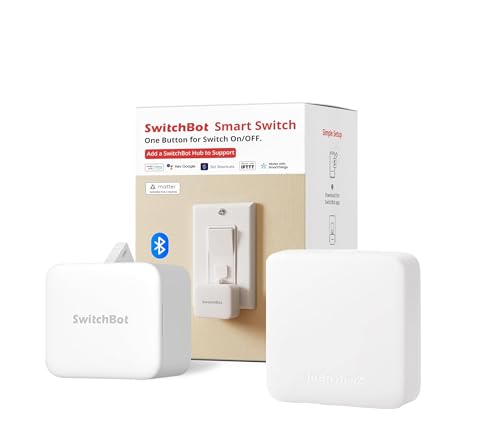
| SwitchBot Bot White & Hub Mini Kit★ Best Overall | Whole-room automation bundle | Wi-Fi (hub included) | Wall mount, 3M tape | Bot battery | Amazon |
| Switchbot Smart Switch Button PusherBest Value | Everyday rocker switch automation | Bluetooth | Crimp connector, adhesive | Battery powered | Amazon |
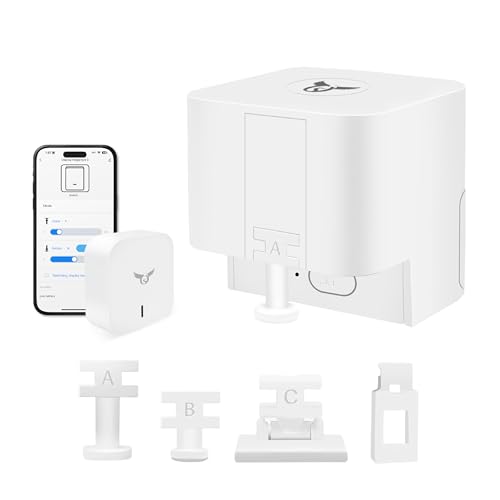
| Osprey.Life Smart FingerbotPremium Pick | Remote control without range limits | Bluetooth, 2.4GHz Wi-Fi gateway included | 3M adhesive sticker | Replaceable battery | Amazon |
| Sesame Bot 2 | Rental property button pressing | Bluetooth | Adhesive, button pusher | 1 Lithium Metal battery (included) | Amazon |
| Switchbot Bluetooth Fingerbot Button Pusher | Rocker switches and coffee makers | Bluetooth, Matter, Wi-Fi | Clamp connector, adhesive | CR2 battery (included) | Amazon |
| MOES Fingerbot Plus | Touch control on the bot itself | Bluetooth | Crimp connector, add-on sticker | Replaceable CR2 battery (included) | Amazon |
| MoesGo 2nd Generation Fingerbot Plus | Modular arm setups | Bluetooth | Wireless, tape | CR2 batteries | Amazon |
| SENCKIT Smart Switch Button Pusher | Garage doors and doorbells | Bluetooth | 3M sticker | Replaceable battery (included) | Amazon |
| THIRDREALITY Zigbee Smart Switch (2 Pack) | Renters and multi-switch setups | ZigBee | Snaps on top of switch | 2 AAA batteries | Amazon |
In‑Depth Reviews
1. SwitchBot Bot White & Hub Mini Kit: Automate IR Devices & Physical Switches
Our pick — over 4★ from 200+ verified ratings; the strongest balance of quality and price.
The bundle that turns a plain wall switch and an old air conditioner into one app-driven routine
If you want the widest amount of control from a single purchase, this is the one to look at first. You get two pieces: the Bot, which is the mechanical arm that presses your light switch, and the Hub Mini, which is a small infrared blaster that learns your air conditioner and TV remotes. The reason that pairing matters is that the Hub gives the Bot cloud access, so you can run schedules and voice commands rather than only pressing things from Bluetooth range.
Setup is genuinely quick. The Hub learns a remote in about 5 seconds and the Bot sticks to the switch plate with 3M tape, so you can run routines the same afternoon with no wiring. Voice control works through Alexa, Google Assistant, and Siri, and the app lets you build scenes — a single “Goodnight” command that kills the lights and the AC at once — or simple timers so an appliance warms up before you get downstairs. Owners do the same with an espresso machine, flipping it on so it is hot by the time they reach the kitchen.
What most often goes right is the everyday function. The recurring hiccup is connection stability: the Bot occasionally drops its link and needs a reset, and a couple of units have shipped with a battery already flat from sitting on the shelf, so it is worth checking the cell before you mount anything. The app itself does the job but the interface could use a cleaner layout.
Where this bundle earns its place
- The included Hub Mini adds infrared control for AC and TV alongside physical switch pressing, so one app covers both
- Hub learns a remote in about 5 seconds and the Bot mounts with 3M tape — no wiring, no tools
- Scenes and timers let you group devices, so “Goodnight” turns off everything at once
- Voice control through Alexa, Google Assistant, and Siri covers whichever assistant you already run
What to weigh before buying
- The Bot can lose its connection and need an occasional reset
- Cloud and voice features depend on the Hub being connected, not on the Bot alone
- Sharing control with family members is easier through Alexa than through the app itself
Buy this one if: you are setting up your first bit of home automation and want switch control and infrared remote control handled by one app.
Think twice if: you only need a single light switch pressed and would rather not manage a hub at all — a standalone Bluetooth bot does that job with less to configure.
2. Switchbot Smart Switch Button Pusher (Bluetooth)
The one that keeps its own schedule, no hub required
Here is the detail that decides it for most people: the timers run inside the app, so once you set a schedule it keeps firing even when your phone is nowhere near the house and no hub is in the picture. Set the bedroom light for 7 a.m. or the nightly shutoff for 11 p.m., and it just happens. That is the feature this bot is built around, and it is the reason it stands out from the cheaper Bluetooth-only fingerbots that stall when your phone walks away.
Installation is tool-free and fast — the unit sticks on with the included adhesive and the instructions walk you through calibrating the arm. Press Mode handles ordinary buttons while Switch Mode handles pushing and pulling a rocker switch, though Switch Mode needs an add-on part. Owners also automate an infrared sauna’s power button and turn a dumb PTAC unit into a smart-thermostat-like setup through Google Home routines. If you add a SwitchBot Hub, you also pick up remote access, voice control through Alexa, Google Assistant, and Siri, and IFTTT support.
The honest catch is the arm’s swing. On a rocker switch it can travel too far and pull itself away from the plate, and there is no setting to limit the swing, so a few buyers have had to build their own workaround with a shim. Calibration on flat membrane panels also takes patience. A second thing to plan around: replacing the battery can mean pulling the whole unit off the wall and remounting it. Against that, the one-year warranty covers quality failures with a free replacement.
The strongest reason to pick it: independent timers that keep running without your phone nearby or a hub attached, which is what makes a switch flipper useful for daily routines rather than toys.
What to prepare for: give the arm room on a rocker switch and expect to shim it if the swing over-travels the plate.
Reach for this if: you want scheduled light control that survives you leaving the house, and you are comfortable spending ten minutes calibrating an arm.
Look elsewhere if: your switch is a stiff or aged button the arm cannot move reliably, or you want voice control from day one without buying a hub.
3. Osprey.Life Smart Fingerbot (WiFi Gateway Included)
Ships with the gateway, so there is no range limit from the first day
Other Bluetooth fingerbots put remote control behind an extra purchase. This one includes the Wi-Fi gateway in the box, which is the whole point — plug the gateway into your 2.4GHz router and the fingerbot becomes reachable from anywhere, so you can flip a switch at home from another country. Voice control through Alexa, Google, Siri, and IFTTT is available from the start too, without adding hardware later.
The maker rates the replaceable cell at up to 600 days with twice-daily use, and the app’s low-battery alert tells you when to swap it. Installation is the familiar stick-on routine, and the app lets you adjust the arm’s range so you can dial in how far it travels on your particular switch. Owners value the flexibility most — one notes that it is the cleanest solution for old-style rocker switches, and the way it handles an older home with no ground wire available, where a wired smart switch simply is not an option. Note that it blocks the switch from manual use once mounted.
The trade-off worth knowing: this is a small, lightly built unit with an IP00 rating, meaning it carries no water or dust protection at all — keep it away from damp spots. A rare report describes a unit failing after a couple of uses, and the tap force is modest enough that a genuinely stiff button may not move. Hard, aged, or touch-sensitive buttons are off the table by the manufacturer’s own note.
Best suited to: anyone who wants remote and voice control without shopping for a separate hub afterwards, especially if their switch lacks the wiring a smart switch needs.
Not the pick for: damp locations or stiff button-type switches — the IP00 body and the lighter tap force make both poor fits.
4. THIRDREALITY Zigbee Smart Switch (2 Pack)

Snaps over the switch you have and runs on two AAA batteries
This one takes a different approach from the sticking-on-the-plate fingerbots: it snaps on top of an existing toggle or rocker switch and mechanically moves the switch underneath. Two units come in the pack, which makes it the sensible buy if you have more than one light to handle rather than a single switch. It works with any voltage — 12v, 24v, 110v, and 220v — and needs no neutral wire, which is what makes it usable on low-voltage fireplace switches where wired smart switches often will not work.
It is ZigBee, not Bluetooth or Wi-Fi, so it pairs to a compatible Zigbee hub. The list is long and specific: Echo (4th Generation), Echo Plus (1st and 2nd Generation), Echo Studio, Eero 6, Eero Pro 6, Home Assistant, SmartThings 2015/2018, Aeotec, Homey, Hubitat, Homey Bridge, Homey Pro, and the Third Reality Hub. Compatibility is stated for those exact devices and unconfirmed for anything else, so check yours first. The design is narrow enough to fit 2-gang switch plates, and the slim look suits a wall. For renters, that combination of no wiring plus no neutral requirement is the appeal, since everything comes back off at move-out.
Two things to weigh. First, the actuator is audible — it is a small motor physically flipping a toggle, and the sound carries. Second, connectivity is the mixed part: the setup works well for many owners, but others report drops that required repositioning the hub before the link settled. Pairing is quick for some and fiddly for others, and it is not Tuya-compatible at all, so do not plan to run it through a Tuya setup.
What buyers like about it
- No wiring and no neutral wire, so it comes off cleanly when a lease ends
- Works with any voltage, including 12v and 24v low-voltage fireplace switches
- Two switches in the pack covers a pair of lights instead of just one
- Narrow enough to sit on a 2-gang plate without crowding the second switch
What will bug some owners
- The motor is audible on every press — handfuls of toggles at once get noisy
- You need a compatible Zigbee hub already, and it is not Tuya-compatible
- Initial pairing and connectivity can take a reposition or a reset before it holds
The match for: renters and Home Assistant or Echo owners with Zigbee already in the house who want two switches covered without touching the wiring.
Skip this if: you have no Zigbee hub on the compatibility list, or the switch sits somewhere the motor noise would be noticeable.
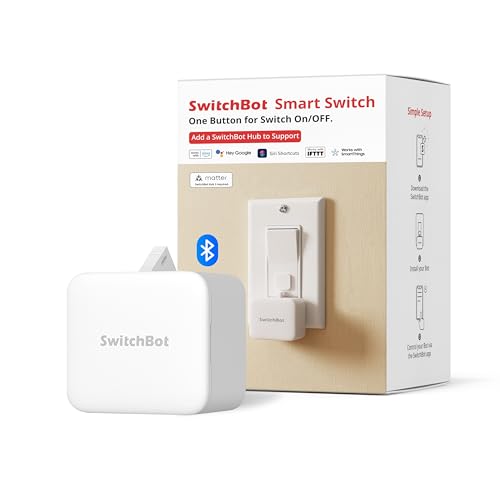
5. Switchbot Bluetooth Fingerbot Button Pusher for Rocker Switches
A fingerbot that lists three connection types instead of one
On paper this is the most future-proof of the SwitchBot fingerbots: the spec sheet lists Bluetooth, Matter, and Wi-Fi together, alongside a 1 A current rating and a CR2 battery that comes in the box. It shares the standard SwitchBot formula — stick it beside a rocker switch or push button, press to turn the light or the coffee maker on, set timers in the app, and add a SwitchBot Hub if you want voice or away-from-home control over 2.4GHz Wi-Fi.
What owners actually put it to work on tells you how flexible the format is. The standout use is a dryer on a “free nights” plan: the bot sits over the start button on an 11 p.m. schedule and presses it only when the timer is already running. Others have used it to rescue old garage door openers, mounting a bracket over the existing wall button and choosing Door 1 or Door 2 from the app instead of replacing a failed control board. Kitchen lights on a hardwired switch are another common one, which is the core light-switch case for a device like this.
The catch is the same arm-travel problem that shows up across this whole category. On some rocker switches the arm dips a few millimeters below the base and tries to tear itself off the wall rather than flip the switch, and this unit does not offer an adjustable swing range to fix that. One buyer spent hours trying to get a pull direction working and never did. Range is the other limit — Bluetooth control means you need to be within 50 to 100 feet, and anything beyond that is hub territory.
The selling point in one line: Matter, Bluetooth, and Wi-Fi all listed on one fingerbot makes it the easiest of the bunch to fold into an existing smart home later.
The part to think about: no swing adjustment means an awkwardly shaped rocker may need a homemade shim, which is the recurring friction on this unit.
Worth it for: the buyer who wants a fingerbot that will still talk to their system after they upgrade hubs, and who has a clean rocker or button to press.
Consider another option if: your switch is one of the odd geometry ones — a model with an adjustable arm range will save you a fight with the mounting tape.
6. MOES Fingerbot Plus Smart Button Pusher

Press the bot itself to trigger your switch — no phone in hand
The Fingerbot Plus adds something the others do not: a built-in touch button on the device. Tap the bot directly and it presses the switch for you, so you are not pulling your phone out every time you walk past. It keeps the familiar setup — the arm sticks next to a rocker switch or button with an add-on sticker in about five seconds, no swapping, no tools — and the second-generation body runs on a replaceable CR2 battery that comes included.
Compatibility covers the usual territory: computers, TVs, floor robots, garage doors, and wall switches, with touch screen buttons explicitly excluded. Control runs through the Smart Life app over Bluetooth, and adding a Tuya Bluetooth Hub is what open up remote access, Alexa and Google Assistant voice control, and timing functions. The spec sheet lists a 15 A current rating. Owners use it beyond lights too — pressing a boiler reset, running a 3D printer filament dryer for hours, and pressing a Cricut machine for someone with back and knee trouble.
Connectivity is the weak point and it is worth being clear-eyed about. This bot only works over Bluetooth, so there is no remote control without the Tuya hub, and Alexa compatibility reports have been inconsistent. Several units have also arrived with a battery already drained. Bluetooth pairing ties to one phone at a time, so a second person in the household gets bumped off the app if they try to link at the same time — fine for one user, awkward for a couple sharing a garage door.
Pick this if: you want the physical touch button on the bot itself, and you are content with app-only Bluetooth control for a single user.
Better options exist if: more than one person needs to control the same switch, or you want remote access without buying a separate Tuya hub.
7. MoesGo 2nd Generation Smart Bluetooth Fingerbot Plus

Swappable arms and an IP54 body for the fiddly jobs
The defining trait here is the modular arm. The fingerbot’s arm can be replaced with different tool pack options to extend what it can do, which makes it the more adaptable choice when a standard straight-down press does not fit your appliance. It pairs point-to-point over Bluetooth with no hub needed to get started, and adding a Tuya Bluetooth Hub is what brings Alexa and Google Home plus remote control into play. The body carries an IP54 rating, which is meaningful in this group since most fingerbots here list IP00 and no moisture protection at all.
The strongest real-world case for it is a stubborn appliance button. One owner replaced a SwitchBot that hit a Jura Z10 coffee machine’s button only 10 to 15 percent of the time; this unit’s straight-down push hit it reliably. It also runs on schedule with or without a hub, which is a nice bit of insurance if you decide to skip the gateway. Battery is a replaceable CR2, and users report getting over a month out of a charge in programmed use.
Two caveats. The arm and general operation need the right setup — one owner only got a GFI outlet reset to work once, since it could not repeat the push. And this is a Bluetooth device, so schedule control and voice both depend on the Tuya hub for anything beyond direct pairing.
Why it stands out: an IP54 housing and a swappable arm let it handle places and switch shapes the fixed-arm bots here cannot reach.
The catch to accept: it is Bluetooth-first, so scheduling and voice need the Tuya hub — direct control is phone-in-hand only.
The one to grab if: you have a stubborn button or an appliance in a slightly damp spot and want the flexibility of a changeable arm.
skip it if: you want voice control and scheduling straight away with no gateway, or you are using a standard clean rocker and want the simplest possible setup.
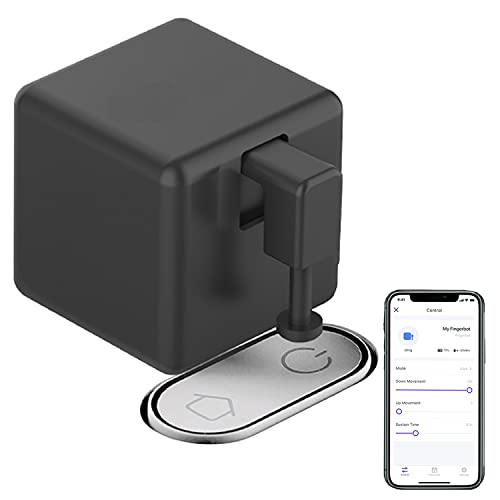
8. SENCKIT Smart Switch Button Pusher (Black)
Built to press the odd button — the doorbell, the garage, the laser
This is the fingerbot for the non-obvious targets. It lists light switches, doorbells, coffee makers, and fans as its targets, and it doubles up on the mechanics: click and press modes, plus both forward and reverse operation so the arm can rise or fall as your setup needs. The arm amplitude is adjustable, which is the fix for the over-travel problem that trips up fixed-arm units on rocker switches. It carries an IP65 rating, the only meaningful dust and water protection in this roundup.
Control runs through the Smart Life or Tuya app over Bluetooth, with schedules you set yourself so lights and appliances flip on and off when you are away. Adding a Bluetooth gateway open up Alexa and Google Home voice control plus automation triggers.
The honest reality of this unit is that it is very light, and lightness cuts both ways. A few owners found it lifting itself off the button as the lever pressed, so it needed to be secured down before it would work reliably. There is a practical floor too — one buyer wanted a click every couple of minutes and it would not do that, and another found it needs the Wi-Fi connection to function at all, not just for remote access. This is a niche tool for specific jobs, not a broad whole-house controller.
Built for: a specific awkward button — a garage door opener, a doorbell, a device power button — where the adjustable arm and IP65 housing pay off.
Not the fit if: you need a fast repeated press, or you are chasing a single light switch and want the simplest install without securing the base down.
9. Sesame Bot 2, Smart Button Pusher (White)

The scripting-heavy little arm that lets you build out a routine
If you like the idea of writing your own routines, the Sesame Bot 2 is the pick to look at. It supports up to 10 scripts, and each script can carry up to 20 actions, so you can chain a sequence instead of firing one press. It pairs over Bluetooth with a maximum range of 5 meters, comes with a Lithium Metal battery included, and integrates with the wider Sesame ecosystem — the Touch, Touch Pro, Remote, Remote nano, and Open Sensor. Scripts cover clockwise rotate, counterclockwise rotate, a sleep state where the arm can be moved by hand, and a stop state where it cannot.
The intended setting is practical: this is aimed at Airbnbs and vacation rentals, where you want a dumb appliance button pressed on a schedule between guests without installing anything permanent. The arm works in a single direction, and it can only manage a couple of supported devices at a time, so plan one bot per trouble spot. It mounts with a sticker, and the whole thing is small and light — the listing’s own spec sheet calls it lightweight.
Fair warning on reliability, because this is the weakest link in the roundup and it matters before you commit. Some owners have seen pairing drop out unexpectedly, with one unit losing its connection to the point where the reset button no longer responded. It can also under-press a stiff button, and one buyer swapping out a more established brand’s fingerbot found the strength and stability short of what was needed. It is Apple HomeKit-compatible.
The niche it fills: multi-step scripts — up to 10 scripts of 20 actions each — for rental or appliance sequencing where one press is not enough.
What you are accepting: it is a Bluetooth-only, single-direction arm with a short 5-meter range, so keep it within reach of your phone.
Consider this if: you want to build multi-action routines, are already in the Sesame ecosystem, or are kitting out a rental where scripting beats simplicity.
Look at another bot if: your priority is rock-solid daily reliability on one stubborn light switch — the stronger-arm options above will serve that better.
Understanding the Specs
Switch compatibility: rocker, toggle, and button
A rocker switch is the flat paddle that clicks up and down. A toggle is the old protruding lever. A push button is what you find on doorbells and appliance panels. Fingerbots handle these differently — rocker and one-way button are the standard targets, but toggle and mini switches often need a specific attachment or are off-limits entirely. The listing will say which it accepts, so check this against your switch before buying.
Bluetooth vs gateway: what each buys you
Bluetooth is built into nearly every fingerbot and gives you local control from your phone, usually within 50 to 100 feet. A gateway — also called a hub — connects the bot to Wi-Fi and adds remote access, voice control, and, on some models, scheduled timing. If you only ever need to press a switch at close range, Bluetooth alone is enough.
Battery type and runtime
Most of these run on small replaceable cells — CR2 is the common one, some use AAA, and one uses an included Lithium Metal battery. A low-battery alert in the app is the practical safeguard against the bot going quiet without warning. Some units ship with a battery that has already drained in storage, so test the cell before you mount anything.
Mounting and arm travel
Every bot here mounts with adhesive rather than screws, so the surface matters — smooth, clean, and dry holds best, and letting the tape set fully before running the arm hard keeps the unit in place. Arm travel is the second factor: an arm that swings too far on a rocker switch can pull the bot off the wall, and only some models let you adjust the range.
FAQ
Will an automatic light switch flipper work on my toggle switch?
Do I need a hub to use a fingerbot?
How far away can I control a Bluetooth fingerbot?
What kind of battery do these fingerbots use, and how long does it last?
Will the adhesive hold the fingerbot on my switch plate?
Can a fingerbot press a rocker switch in both directions?
Do fingerbots work with Alexa or Google Home?
Can I use one fingerbot for two people to control the same switch?
Will a fingerbot work on a switch with no neutral wire?
Is a fingerbot loud when it presses a switch?
Final Thoughts: The Verdict
For most people, the automatic light switch flipper winner is the SwitchBot Bot White & Hub Mini Kit because it is the only pick here that presses your light switch and controls your air conditioner and TV from one app, with the hub already in the box so voice and remote control work from day one. If you want switch control that keeps its own schedule without a hub, the Switchbot Smart Switch Button Pusher is the one to reach for. And for flipping a switch on a renter’s wall with no wiring at all, the THIRDREALITY Zigbee Smart Switch is the cleanest option.
How We Picked
We do not accept paid placement. Every pick is matched to a real buyer and a real use-case; we do not hands-on test units.
Sources & Methodology
Specifications: manufacturer listings and product documentation. Review insights: verified customer reviews, as of September 2026. Pricing: not shown on this page (it changes often); check the current price via the retailer link.
As an Amazon Associate, KitchPrep earns from qualifying purchases. This does not affect which products we feature.
Related Guides
