
Specs are compiled from manufacturer listings and verified buyer reviews and can change over time — please confirm the key details on the product page before buying.
You can stop turning the car around to check whether the garage door actually closed. A smart auto-closer does the remembering for you: it shuts the door on a timer or on command from your phone, and it tells you the door’s status instead of leaving you guessing at the end of the driveway. The three picks below split by one question: a bolt-on hub that works with almost any opener, or a control panel wired into a LiftMaster system?
I’m Mohammad Maruf — the founder and writer behind KitchPrep. This guide is built by comparing the manufacturers’ published specifications and the patterns across verified customer reviews, so you get each pick’s real strengths and trade-offs instead of marketing spin.
Each pick below is framed around the openers it actually works with.
Our Picks at a Glance

How To Choose The Best Automatic Garage Door Closer
A closer is not the same thing as a garage door opener. The opener is the big motor unit hanging from your ceiling that lifts the door. The closer is the small brain you add to it — a box that sends the open and close command, watches whether the door actually moved, and runs the countdown that shuts everything down when you forget. Get the pairing wrong and none of it works, so work through these four points before you buy anything.
Start with your opener’s learn button, not the price
Every opener made in the last few decades has a small colored learn button (the button you press to teach it a new remote). That color tells you which wireless language your opener speaks, and it is the single fastest way to rule a closer in or out. Purple and yellow buttons belong to older Chamberlain and LiftMaster systems, and a LiftMaster MyQ panel speaks to those directly. If your opener is a Genie, a Craftsman, or a no-name unit from the 1990s, you are far better served by a universal hub that learns your existing remote instead of replacing anything. Read the spec sheet’s compatibility line first: if your model number is not named, treat it as a maybe until you confirm.
Decide if you want a timer or just remote control
The feature that separates these devices is auto-close. A plain smart hub only lets you open and shut the door from your phone — useful, but you still have to remember. An auto-close timer arms a countdown and drops the door on its own after a set number of minutes, which is the actual “automatic” part. Every unit that closes by itself is required to sound a warning beep and flash a light before the door moves, because a garage door coming down on a person or a pet is a serious hazard. Expect that noise. It is not a defect, and it is the reason these devices are safe to leave armed.
Plan for the sensor and the Wi-Fi
The unit cannot know the door is open unless something tells it, which is the job of the tilt sensor (a small battery puck that mounts on the door panel and changes angle as the door moves). If that sensor is loose or mis-mounted, the app lies to you — you will see “closed” on a door that is wide open. A few minutes spent getting the sensor level and secure on the door frame saves a lot of frustration later. On the network side, most hubs run on the 2.4 gigahertz Wi-Fi band (the slower, longer-range band your router broadcasts alongside the faster 5 gigahertz one), while Z-Wave units skip Wi-Fi entirely and join a smart-home hub instead. Check which band your router broadcasts before you buy.
Quick Comparison
| Model | Best For | Control Type | Item Weight | Auto-Close Timer | Amazon |
|---|---|---|---|---|---|
| LiftMaster 888LM+828LM MyQ Retrofit Package★ Best Overall | Older LiftMaster and Chamberlain openers | Wired control panel plus internet gateway | — | Yes (1/5/10 min) | Amazon |
| CHAMBERLAIN Smart Garage Control | Most opener brands made after 1993 | Wi-Fi and Bluetooth hub | 13.1 ounces | Yes (close schedule) | Amazon |
| GD00Z-8-GC Z-Wave Plus S2 Security | SmartThings, alarm.com and ADT setups | Z-Wave Plus S2 controller | 16 ounces | Yes (fixed delay) | Amazon |
In‑Depth Reviews
1. LiftMaster 888LM+828LM MyQ Retrofit Package
Our pick — over 4★ from 900+ verified ratings; the strongest balance of quality and price.
The retrofit kit that teaches a fifteen-year-old LiftMaster to shut itself and text your phone.
If your opener already says LiftMaster or Chamberlain on the housing, this is the pairing that feels native rather than bolted on. The package is two pieces: the 888LM control panel (the wall-mounted pad that replaces your current button) and the 828LM internet gateway (the bridge that puts that panel online, with a maximum range of 10 meters). Buyers report the panel side is genuinely quick work — as owners put it: “MyQ works with Chamberlain Security+ (purple button). Easy install <10 min.” That is a real-world figure from someone who did it, not a manufacturer round number.
What wins people over is how little drama the install causes on a compatible opener. You wire the panel in place of the old wall button, press the learn button, and the door is talking. From there the 828LM gateway gives you open and close from your phone, door-status alerts, and the auto-close timer that drops the door after 1, 5, or 10 minutes. The timer plus the beep is the actual automatic function you came for, and you can switch it off entirely if you only want remote control. Note the connectivity quirk: the gateway runs on ethernet, not Wi-Fi, so the unit needs a network cable reachable from where you mount it. That is a genuine constraint for a lot of garages, and it is worth walking your cable route before you order.
This pick loses ground on flexibility. It is built for LiftMaster and Chamberlain openers and is not compatible with operators already equipped with MyQ technology (a smart-phone control system built into some openers) — so if your opener is a Genie, a Linear, or a newer MyQ-native unit, this is not your product. The auto-close timing is also locked to three choices rather than a free-form schedule, and one complaint keeps resurfacing: the beeping before the door closes is loud. It is loud by safety requirement, not by accident. Older remotes keep working after the swap, which matters if you have four of them kicking around the car.
What the retrofit gets right
- Panel and gateway in one box — no separate bridge to buy
- Auto-close runs on a 1, 5, or 10-minute timer you can turn off
- Push alerts whenever the door opens or closes
- Existing remotes stay paired after installation
- Motion sensor can be disabled if it misbehaves
Where it asks you to compromise
- Gateway needs an ethernet cable, not Wi-Fi
- Only works with LiftMaster and Chamberlain openers
- The pre-close beep is genuinely loud
- No free choice on the timer — three presets only
Buy it if: you own a Chamberlain or LiftMaster opener and want the cleanest, most factory-feeling auto-close available.
Walk past it if: your opener is a different brand, or you have no easy route for a network cable to the garage.
2. CHAMBERLAIN Smart Garage Control – Wireless Garage Hub and Sensor with Wifi & Bluetooth
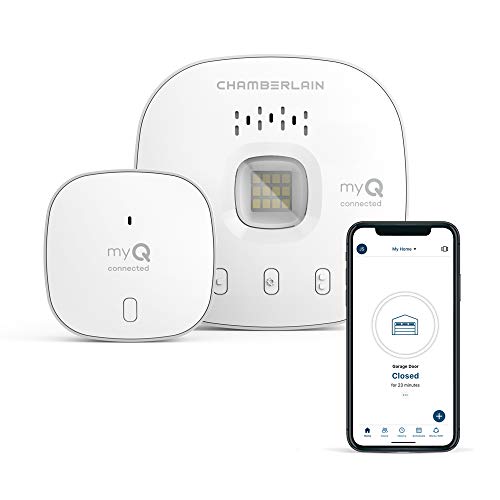
One small hub, almost any opener, and a door that finally closes on a schedule you set.
This is the pick for the person whose opener is old, off-brand, or otherwise a mystery. The hub works with most brands of garage door openers manufactured after 1993 that use photoelectric sensors which do not shut off, and it needs no Wi-Fi opener to function — it talks to your existing remote frequency. The sensor puck mounts to the door and reports position, and Bluetooth handles the initial pairing so you are not fighting a Wi-Fi handshake just to get started. Owners mention success on genuinely ancient hardware, including a Craftsman unit over twenty years old and a Genie 4024, so an old opener is not a reason to walk away.
The naming caveat is worth knowing before you unbox. During setup the app may ask you to choose between “garage door openers” and “hub” — pick the wrong one and pairing fails. Owners who hit that snag describe it as a five-minute detour, not a dead end; the fix is picking the hub option and re-pairing. The bigger recurring gripe is the sensor mount. The supplied hook-and-loop fastener can let the sensor slip and fall, and a sensor lying on the floor over your tire track is a real problem. Swap that hook-and-loop fastener for a sturdier mount before the sensor slips onto the floor.
This hub beats the LiftMaster package on reach. The LiftMaster kit is locked to that brand’s openers, while this one covers the field. Weigh the hardware and the difference is small but real: at 13.1 ounces this hub is lighter than the GD00Z-8-GC at 16 ounces — a 22% gap in the other direction on the Z-Wave unit, which is the heavier of the two. The hub also carries a 7-foot sensing distance for the sensor, which is the working gap between puck and door position it is built around. On the soft side, expect a bright strobe and a loud beep when the door closes, and keep in mind that each kit pairs to one opener only — two doors means two kits, which is cheaper than buying the standalone second sensor.
The compatibility play: if you cannot name your opener’s model, this is the safest bet on the page — it learns what you already have instead of demanding a specific brand.
One caveat to size honestly: the app carries non-dismissible ads, which is an annoyance some users find grating enough to dock it in reviews. It does not affect whether the door closes.
Reach for this if: your opener is a brand the other picks do not support, or you want the smartest dollar-to-coverage ratio here.
Look elsewhere if: you specifically need Z-Wave integration with an alarm panel, which is what the next pick is built for.
3. GD00Z-8-GC: Z-Wave Plus S2 Security, Black, Small

The alarm-panel native, for homes already running SmartThings, alarm.com, or ADT Control.
Skip this one unless you have a Z-Wave smart home hub (a wireless system that lets your devices talk to each other). If you do, it slots in better than either Wi-Fi device here, because it speaks the same language as the rest of your system and shows up as a garage door on your panel instead of a separate app you have to remember to open. The box ships complete — controller, a 120v 50/60Hz power supply, a tilt sensor, the mounting bracket and the hardware — so there is no scavenging for parts mid-install. Enthusiasts on enthusiast forums have paired it with panels outside its official support list, including a QOLSYS IQ2, and it drives Genie Intellicode II openers directly.
What wins people over is the integration, when the integration holds. On alarm.com-based systems the connection is clean, and Alexa can report door status out loud. What it will not do is open or close the door through Alexa — status only. That distinction catches people out. The pairing itself has a trick worth knowing: press the link button five times to reset it, wait for the beeps, then press again to pair, and do that pairing within range of your panel before you carry the unit out to the garage. Doing it in the wrong order is the single most common reason this thing appears broken on day one.
Now the honest part, because this unit is the most temperamental of the three. It will not work with Chamberlain or LiftMaster openers, and customers note it failing on newer openers that the manufacturer’s own website claimed would work — a garage door closer that opens nothing is a real risk here, so confirm your opener’s compatibility directly before ordering rather than trusting a product-page filter. The closing beep runs about five seconds ahead of the door and is not configurable, and its 4.1-star rating sits below the other two picks. What it does deliver is a platform that people already invested in will find hard to match — and one unit the maker covers with a one-year warranty against manufacturer defect.
What earns its place
- Pairs cleanly with SmartThings, alarm.com, ADT Control and QOLSYS panels
- Everything in the box: controller, power supply, tilt sensor, bracket, hardware
- Drives Genie Intellicode II openers directly
- Reports door status to Alexa hands-free
- One-year warranty against manufacturer defect
The friction to plan around
- Will not work with Chamberlain or LiftMaster openers
- Alexa reports status but cannot operate the door
- Pairing sequence is fussy — wrong order means a false failure
- Fixed pre-close beep delay cannot be changed
This is your unit if: your home already runs a Z-Wave hub and you want the garage to live inside that system, not beside it.
Leave it on the shelf if: you have a Chamberlain or LiftMaster opener, or you want a hub that works from the start without a smart-home controller already in place.
Understanding the Specs
Two specifications decide more of your buying decision than everything else on the box combined. Here is what they actually mean when you are standing in your garage with a screwdriver.
Compatibility and your learn button
Compatibility is not a marketing line — it is a hard yes or no, and it hinges on the small colored learn button on your existing opener. Z-Wave units like the GD00Z-8-GC will not work with Chamberlain or LiftMaster openers at all, while the LiftMaster retrofit kit only works with that family of openers. The universal hubs cast the widest net, reaching most brands built after 1993 that use photoelectric sensors which stay powered rather than switching off. Before you order anything, find your opener’s model number and read the manufacturer’s own compatibility list. If your model is not named on that list, assume it will not work until you confirm otherwise.
Auto-close timing and the warning beep
The auto-close timer is the feature that makes this device automatic rather than just remote-controlled. It arms a countdown — commonly 1, 5, or 10 minutes on a wired panel, or a schedule you set in an app on a hub — and shuts the door when the clock runs out. Every one of these units sounds a loud beep and often flashes a light before the door moves, and that noise is a legal safety requirement, not a flaw. It is what stops a closing door from catching someone walking through. If the beep bothers you more than the convenience helps, remember that the auto-close timer can usually be switched off while you keep remote open and close from your phone.
FAQ
Will an automatic garage door closer work with my existing opener?
Do I need to replace my garage door opener to add one of these?
How long does it take to install one of these?
Why do all of these beep so loudly before the door closes?
Can I control more than one garage door with a single kit?
What happens if the tilt sensor falls off the door?
Do these work through the app when my Wi-Fi or internet is down?
Is MyQ the same thing as Z-Wave?
Can I still use my original wall button and remotes after installing one?
What is the biggest mistake buyers make with these?
Final Thoughts: The Verdict
For most garages, the automatic garage door closer winner is the CHAMBERLAIN Smart Garage Control because it reaches the widest range of openers, needs no smart-home hub, and gets the door closed on a schedule without you thinking about it. If you already own a Chamberlain or LiftMaster opener and want a factory-quality panel, the LiftMaster 888LM+828LM retrofit is the one to grab. And if your house runs on SmartThings, alarm.com, or a security panel, the GD00Z-8-GC is the pick to reach for — just confirm your opener’s brand first. Whichever you choose, the win is the same: no more circling the block to check the door.
How We Picked
We do not accept paid placement. Every pick is matched to a real buyer and a real use-case; we do not hands-on test units.
Sources & Methodology
Specifications: manufacturer listings and product documentation. Review insights: verified customer reviews, as of September 2026. Pricing: not shown on this page (it changes often); check the current price via the retailer link.
As an Amazon Associate, KitchPrep earns from qualifying purchases. This does not affect which products we feature.
Related Guides
