
Specs are compiled from manufacturer listings and verified buyer reviews and can change over time — please confirm the key details on the product page before buying.
Feeding pages one at a time into a flatbed scanner is the biggest time-waster in any home office. An ADF scanner ends that — you stack a pile, press one button, and it pulls every sheet through automatically, often capturing both sides in the same pass. This guide cuts through the specs to tell you which auto-feeding scanners are genuinely worth your desk space, ranked by real owner experience and the numbers that actually matter: feeder capacity, duplex speed, and daily reliability.
I’m Mohammad Maruf — the founder and writer behind KitchPrep. This guide is built by comparing the manufacturers’ published specifications and the patterns across verified customer reviews, so you get each pick’s real strengths and trade-offs instead of marketing spin.
You can clear a backlog of paperwork or a 100-page contract stack in about two minutes with the right adf scanner. It turns a dreaded chore into a quick job, keeping your desk clear.
Our Picks at a Glance


How To Choose The Best ADF Scanner
ADF stands for Automatic Document Feeder — the mechanism that grabs a stack of paper and pulls each page through the sensor by itself. That feature separates a true workhorse from a flatbed, and it is the first thing to lock down. Even entry-level models in this guide handle whole stacks, but feeder size, speed, and software decide if you finish in ten minutes or fight the machine all afternoon.
Match the feeder to your typical stack
Feeder capacity is measured in sheets, and it tells you how many pages you can load before the machine stops. A 20-sheet feeder works fine for a handful of receipts or a short contract. A 50-sheet or 100-sheet feeder lets you load a full document batch and walk away — the difference between standing there refilling and actually clearing your desk. If you regularly scan reports, loan packets, or archives, prioritize a bigger tray over a slightly faster engine.
Duplex is the speed multiplier
Duplex scanning means the machine flips the paper internally and captures both sides in one pass. Without it, you flip every sheet manually or scan the back sides as a separate job — cutting your speed in half. Every pick in this guide scans duplex automatically, so confirm this box is ticked before you look anywhere else. It is the single biggest productivity leap in this category.
Speed numbers, decoded
Speed is quoted two ways: pages per minute (ppm) for one-sided sheets, and images per minute (ipm) for duplex, where each side counts as one image. A scanner rated 30 ppm/60 ipm captures both sides of 30 sheets in that minute — that is the number that matters for double-sided work. Higher numbers cost more, but you only need flagship speed if you scan hundreds of pages daily. A 25 to 40 ppm machine handles most office and home jobs comfortably.
Quick Comparison
| Model | Best For | Feeder Capacity | Max Speed | Duplex | Amazon |
|---|---|---|---|---|---|
| Doxie Pro★ Best Overall | Compact personal use | Direct feed slot | — | Automatic | Amazon |
| Canon imageFORMULA R30No-Driver Pick | No-driver setup | 60 sheets | 25 ppm | Yes | Amazon |
| Visioneer Xerox Duplex ComboFlatbed Combo | Long documents & photos | ADF flatbed combo | 25 ppm / 50 ipm | Yes | Amazon |
| Epson ES-500W II | Wireless flexibility | 50 sheets | 35 ppm / 70 ipm | Yes | Amazon |
| Brother ADS-4300N | Networked offices | 80 pages | 40 ppm | Yes | Amazon |
| Epson DS-530X | High-volume daily use | 100 pages | 45 ppm / 90 ipm | Yes | Amazon |
| ScanSnap iX2500 | Touchscreen convenience | 100 sheets | 45 ppm | Yes | Amazon |
| Brother ADS-2200 | Multi-destination workflow | 50 sheets | 35 ppm | Yes | Amazon |
In‑Depth Reviews
1. Doxie Pro
Our pick — over 4.5★ from 650+ verified ratings; the strongest balance of quality and price.
A compact duplex scanner that fits your desk and your routine.
The Doxie Pro wins the top spot because it nails the core promise — crisp two-sided scans with no driver headaches. It measures a compact 11.75 by 4 by 3 inches and weighs just over 3 pounds, so it tucks into a drawer or rides along on a trip. The collapsible feeder and a direct feed slot handle thick or delicate paper that a standard tray might chew up, and the 24-bit color depth keeps receipts and business cards readable.
Buyers report years of faithful service here — one long-time user calls it fast, with jams running about one in every 300 pages. The software handles the heavy lifting: text recognition, automatic cropping, rotation, and contrast boost all happen without a manual. Sending scans to Dropbox, Evernote, OneNote, or iCloud takes a couple of clicks, and there is no subscription fee. What wins people over is the build quality — it is the most-praised trait by a wide margin, followed closely by how easy it is to use.
The trade-offs are honest and few: it is wired only, so you will plug in via USB rather than roam wireless. There is no SD card slot and no battery, and Linux users get no official software. Compared to the bulkier Canon R30 at 6.6 pounds, this one is the featherweight that still does duplex work in one pass — perfect for anyone who scans occasionally but wants it done right.
What owners love
- Genuinely compact — slips into a drawer or carry-on
- True duplex, one pass for both sides
- No driver installs; software just works
Know before you buy
- Wired only — no Wi-Fi or battery
- Jams if you overfill or mix paper sizes
- No official Linux or Chromebook app
Reach for it when: you want a portable, reliable duplex scanner for a home office or frequent travel.
Look elsewhere if: you need network or wireless scanning for a shared office environment.
2. Canon imageFORMULA R30
Plug it in, skip driver installs, and feed a 1,000-page diary through.
The Canon R30 is built around a single radical idea: no software installation required. Plug in the supplied USB cable and the scanning software is already on board, updating itself automatically. For anyone who has fought a driver CD at 11 p.m., that is a genuine relief. One owner scanned a 1,022-page diary in about 3 hours, running ~60-92 page batches that auto-appended into a single PDF — exactly the large-project workflow this machine targets.
Duplex scanning captures both sides at once at up to 25 pages-per-minute, and the 60-sheet automatic feeder takes mixed batches of documents, invoices, contracts, and business cards. At 6.6 pounds and 9.88″D x 11.54″W x 9.65″H, it is a bigger footprint than the Doxie, but that size buys a more substantial feeder. The 8-bit greyscale depth and 600 dpi resolution keep text sharp for searchable PDFs, and blank-page skip means you do not babysit the output tray.
The catch is software ecosystem. Windows may see it as a disk drive rather than a standard TWAIN scanner, which locks you into the bundled tool and frustrates anyone who wants their own scanning app. Speed feedback is mixed — some find it fast, others slow — and a few units reportedly stop working after about a year. One owner who has spent 40 years in imaging calls it the best cost-effective scanner they have used, so the praise is real; just know the driver limitation before you buy.
The strong suits
- Zero-install setup, updates automatically
- 60-sheet feeder for big batches
- Duplex with blank-page skip in one pass
Watch these
- Not TWAIN — Windows treats it as a drive
- Speed reports are genuinely mixed
- Reliability varies; some units fail early
Choose it for: a big one-off digitizing project where plug-and-play trumps customization.
skip it if: you rely on third-party scanning software or need consistent multi-user reliability.
3. Visioneer Xerox Duplex Combo Flatbed Scanner
The only pick that scans long-format paper, photos, and books on one desktop.
Most ADF scanners are sheet-fed only, so a book or a fragile photo never touches the glass. The Visioneer Xerox combo changes that with a flatbed plus an ADF, and it stretches to a remarkable maximum ADF paper size of 8.5″ x 118″ — nearly ten feet of continuous feed for banners or long reports. It scans up to 25 ppm/50 ipm at 300 dpi, and the 15.8″ x 13″ x 5″ footprint is surprisingly compact for a combo unit at 5.94 pounds.
Owners describe it as having the feel of a commercial scanner. The ADF handles crumpled or torn paper that would jam lesser machines, recovery happens without a restart, and the software reliably runs OCR even on skewed text. You can merge or split PDFs, auto-orient pages, detect blank sheets, and export to PDF, TIFF, JPG, BMP, or straight to Google Drive. For photos, one owner scanned about 50 in an afternoon at good 600 dpi quality.
The recurring gripe is software installation — the bundled CD is finicky, and on Windows 10 you may need to enable.NET Framework WCF Services to fix MSI errors. Mac users get drivers, but there is no Windows 11 driver, so check compatibility first. One unit shipped with EU/UK power clips instead of a US plug, which is a frustrating edge case. If you need both a feeder and a flatbed for varied media, this combo is a versatile workhorse; just budget time for setup.
What stands out
- Feeds documents up to 118″ long
- Handles crumpled and torn paper
- Flatbed included for books and photos
What to know
- Software installation can be a fight
- No Windows 11 driver support
- Occasional shipping power-clip mix-ups
Grab it if: you scan varied media — long documents, photos, and bound pages — in one device.
Pass it by if: you want a pure sheet-fed simple setup with no driver fiddling.
4. Epson Workforce ES-500W II

Scan straight to your phone, tablet, or cloud without ever touching a cable.
The ES-500W II cuts the cord. Its built-in Wi-Fi lets you scan to smartphones, tablets, computers, and cloud storage accounts directly from the Epson Smart Panel mobile app — no USB tether in sight. It runs at 35 ppm/70 ipm with Single-Step Technology for one-pass duplex, and the sturdy 50-sheet Auto Document Feeder takes multiple paper types and sizes in a single batch. One owner used it to digitize a lifetime of family photos, making 100,000+ images manageable as a digital backup.
The image quality is the most-praised trait here, with owners calling scans sharp and noting the ScanSmart software is genuinely intuitive. It handles extra-long pages up to 240″, business and ID cards, and contracts, while Ultrasonic Double Feed Detection prevents missing pages and protects against staple damage. The included TWAIN driver means it slots into most document management software, and OCR turns scans into searchable PDFs or editable Word and Excel files.
The weak spot is the initial Wi-Fi setup, which multiple owners call slightly tricky, and one notes the install can be a nightmare when moving between computers. A few report the Wi-Fi install “blocks” USB switching, so pick your connection and commit. At 8.1 pounds, it is heavier than the compact Epson ES-C220 above, but that weight buys a 50-sheet feeder and full wireless freedom — a fair trade for a team sharing one machine.
Why it wins fans
- True Wi-Fi scanning to devices and cloud
- Scans extra-long pages up to 240″
- Auto-crop, blank skip, and skew correction
The hurdles
- Initial wireless setup can frustrate
- Wi-Fi install may block USB switching
- Heavier than the ES-C220 at 8.1 lb
Pick this if: you want to scan from your phone or share one machine across a small team.
pass on it if: you prefer a dead-simple wired connection and never use mobile apps.
5. Brother ADS-4300N

Built for workgroups, it scans 40 pages a minute and dumps straight to your network share.
The ADS-4300N is a professional-grade sheet-fed scanner engineered for busy offices and workgroups. Its defining feature is the built-in Ethernet network interface, so multiple people can share one machine without passing a USB cable around. It scans single and double-sided materials in a single pass, in color or black and white, at up to 40 ppm — fast enough that one owner reports feeling like they got three days of work done in 20 minutes. The 80-page capacity Auto Document Feeder handles large stacks, and continuous scanning mode lets you add more sheets without stopping.
Driver support is the broadest in this lineup: TWAIN, WIA, ISIS, and SANE, which means it plays nicely with Windows, Mac, and Linux alike. One owner runs it on a Linux desktop via Ethernet and scans directly to a network share without issue. Scan-to destinations include email, cloud services, SharePoint, SFTP, and USB memory stick. The 48-bit color depth and CCD sensor deliver crisp output, and one reviewer who upgraded from a slow, jam-prone HP all-in-one calls the scans fast and OCR-accurate. It also offers Triple Layer Security to safeguard sensitive documents on the network.
The honest caveats: reliability feedback is mixed — while many call it a workhorse that has scanned 500+ double-sided sheets without issues, a few report units that will not scan at all, which points to some quality variance. The browser-based control interface is clunky but stable, and occasional jams happen depending on how you load the tray. For a networked office that needs speed and shared access, this is a serious contender.
Its best traits
- Ethernet sharing for multiple users
- 80-page feeder plus continuous mode
- Wide OS and driver support
Consider these
- Mixed reliability reports from owners
- Browser UI is clunky
- Heavier at 6.1 lb
Best for: a workgroup that wants one shared, high-speed scanner on the network.
Not for: solo users who want a compact personal device and never touch a server.
6. Epson DS-530X
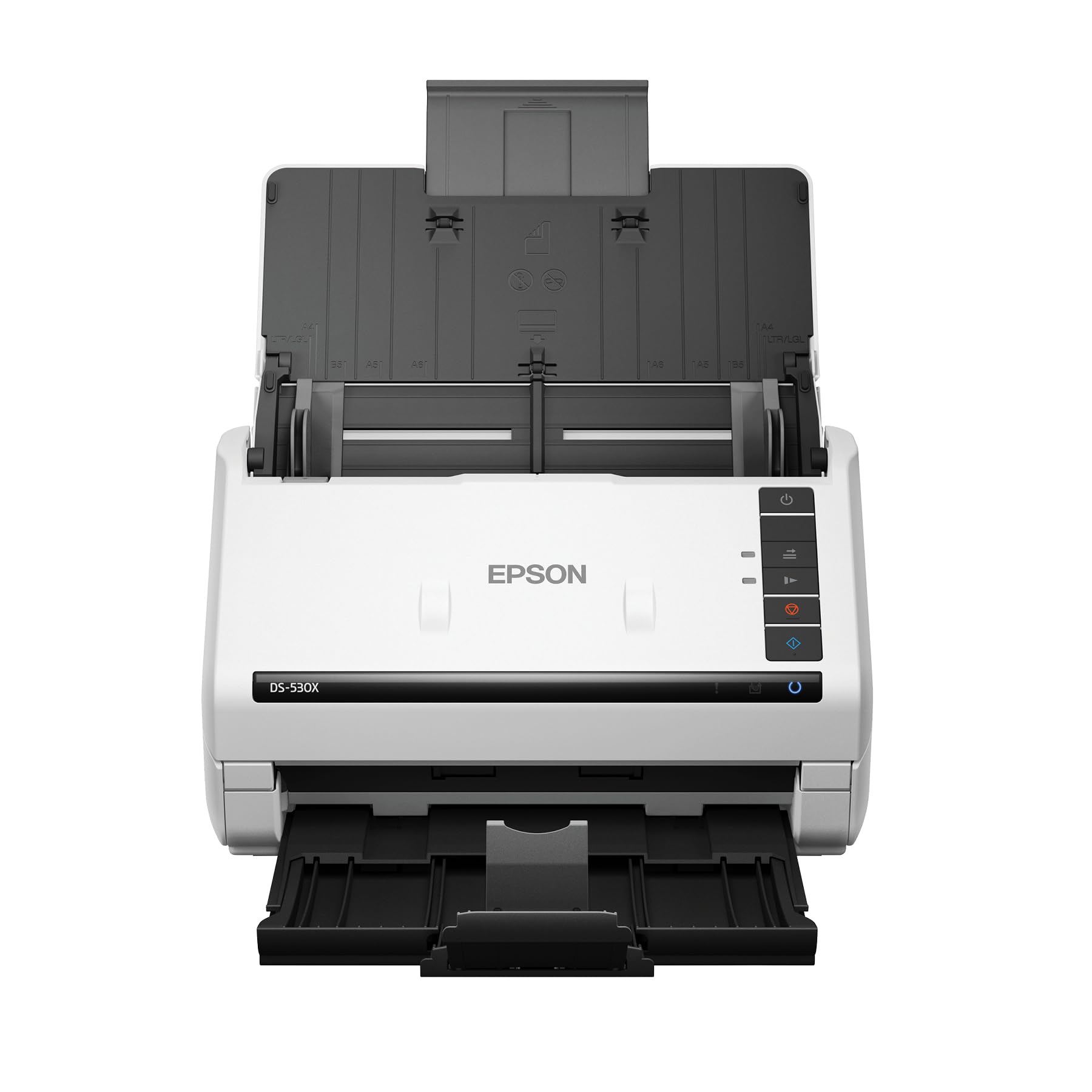
A 100-page feeder and 45 ppm speed make this the daily-driver for heavy loads.
The DS-530X is built for people who scan all day, every day. It pushes fastest-in-class speeds at up to 45 ppm/90 ipm with single-pass duplex, and the 100-page Automatic Document Feeder has the highest capacity in its class among TWAIN-enabled scanners. Its 7,000-sheet daily duty cycle is built for all-day scanning., which is a number that tells you exactly what this machine is meant to chew through. Owners confirm the reality: one workplace bought five of them so each staff person could scan all day long without issues.
Scan quality leads the praise here, with owners highlighting its ability to detect and omit blank pages automatically and capture images as perfect PDFs. It includes TWAIN and ISIS drivers for smooth integration with document management systems, and handles extra-long pages up to 240″, folded papers up to 11″ x 17″, and ID cards. The ultrasonic double-feed detection protects your originals, and at 8.2 pounds with dimensions of 6.7″D x 11.6″W x 6.9″H, it folds small when not in use.
The trade-off is that it is USB-only — no Wi-Fi — so you will plug in a cable when you need it. And some owners feel it is pricey for a single-function device, suggesting it should cost less. But if your job involves scanning stacks that never seem to end, the 100-page tray and 45 ppm engine are the numbers that save your afternoon. Compared to the Epson ES-C220 at 20 pages, this is four times the feeder capacity in one sitting.
What makes it great
- 100-page feeder, 7,000-sheet daily duty
- 45 ppm / 90 ipm duplex speed
- Blank page removal and double-feed detection
Keep in mind
- USB cable required — no wireless
- Some owners call it overpriced
- Folds compact but not light at 8.2 lb
Choose it for: high-volume daily scanning where a 100-page tray saves you from constant refills.
Look elsewhere if: you want wireless freedom or scan only a few pages a week.
7. ScanSnap iX2500

A large touchscreen and Wi-Fi 6 make this the most modern scanner in the lineup.
The ScanSnap iX2500 is the upgraded replacement for the discontinued iX1600, and it brings a large touchscreen to the desktop. You select personalized profiles right on the display and send scans to your PC, Mac, mobile devices, or cloud services without touching a computer. It hits 45 ppm double-sided scanning with a 100-sheet document feeder, and built-in Wi-Fi 6 delivers the fastest, most secure wireless connection in this guide. USB-C is there too if you prefer a wired link.
Owners rave about the speed — one calls it “so fast it scared me,” scanning 188 duplex pages into a searchable PDF in minutes via USB to Windows 11. The QUICK MENU lets you scan-drag-drop to your favorite computer apps, and the software automatically tune, names, and sorts files. It avoids paper jams with a brake roller system, a multi-feed sensor that detects stuck-together pages, and skew detection to prevent damage. The review pages sum it up: One office staple paid for itself within two months of daily use..
The honest downsides: the wireless connection can be unreliable for some, with one owner stuck on a “connect to iPhone” screen and scans never completing until a restart. Mixed paper sizes in one batch increase jam frequency, so keep bundles uniform. iOS users report the app disconnects mid-scan if you multitask. When it works — which is most of the time — it is excellent; just consider whether you will lean on Wi-Fi or stick to the flawless USB path.
Why buyers choose it
- Touchscreen profiles for one-touch jobs
- Wi-Fi 6 plus USB-C flexibility
- 100-sheet feeder at 45 ppm
Be aware
- Wireless can be finicky for some
- Mixed paper sizes raise jam odds
- iOS app may drop mid-scan
Pick this for: a modern office that wants touchscreen convenience and the fastest wireless standard.
Pass if: you want the most rock-solid wired connection and never need profiles.
8. Brother ADS-2200

A seasoned sheet-fed performer that sends scans to email, OCR, and USB sticks in one go.
The ADS-2200 is the veteran of this list, a high-speed duplex desktop scanner that scans single or two-sided documents in a single pass at up to 35 ppm. The 50-sheet-capacity Auto Document Feeder handles large-volume jobs with page-continuous scanning, so you can top up the tray mid-run. A notary working 300+ page loan packets reports it reads everything fast and reliably — the exact multi-page workflow this machine was built for.
what separates it is the range of scan destinations: email, OCR, file, image, and USB flash memory drive, all selectable per job. Image-optimization features include multi-feed detection, background removal, and blank page removal. It supports Windows, Mac, and Linux with TWAIN, WIA for PC, ICA for Mac, and SANE drivers. At 5.5 pounds with a folding output tray, it stays compact on a desk while handling business cards, embossed cards, glossy paper, ID cards, photos, plastic cards, postcards, receipts, recycled paper, and thick or thin media.
The caveats are mixed. One owner who scanned 500+ photos in 3 hours at 300 DPI notes it slows down noticeably up to 1200 DPI, and another points out the actual max resolution may be 600×600 rather than the advertised 1200×1200 — satisfactory, but not what the box promises. A rare defective unit developed a dark black line on all scans within a month, with poor post-return-window service. For most buyers, this is a fast, reliable duplex workhorse; just verify your resolution needs before relying on that top spec.
What owners like
- Scan to USB stick, email, or OCR directly
- 50-sheet feeder with continuous mode
- Handles a huge range of media types
Before you commit
- Effective resolution may cap at 600×600
- Slow at the top 1200 DPI setting
- Rare quality-control failures reported
Get it if: you want a versatile duplex feeder with USB-stick output for quick transfers.
it’s not for you if: maximum resolution is your make-or-break spec, or you need wireless.
Understanding the Specs
Feeder Capacity
This is the number of sheets the ADF tray holds before you must refill. A 20-sheet feeder means you stand at the machine for small batches; a 100-sheet feeder lets you load a full project and walk away. Match it to your typical stack — if you regularly scan loan packets or archives, buy the bigger tray even if the engine is a touch slower.
Duplex Scanning
Duplex means the scanner captures both sides of the paper in one pass, internally flipping the sheet. Without it, you manually flip every page or run a separate back-side job — which halves your effective speed. Every pick in this guide is duplex, so confirm this box is ticked before you consider anything else in this category.
PPM vs IPM
Pages per minute (ppm) counts one-sided sheets. Images per minute (ipm) counts each side as an image, so a scanner rated 30 ppm/60 ipm captures both sides of 30 sheets in that minute. For double-sided work, ipm is the number that reveals your true throughput — always compare ipm when speed matters to you.
Drivers and Software
The scanning software and driver support decide how the machine fits your workflow. TWAIN and ISIS drivers integrate with document management systems, while WIA, ICA, and SANE cover Windows, Mac, and Linux. Some models, like the Canon R30, skip drivers entirely and run built-in software. Check that your operating system appears on the supported list before you buy.
FAQ
Will an ADF scanner feed crumpled or folded paper?
What does duplex scanning actually mean for my workflow?
How many sheets can an ADF feeder hold before I refill?
Is 600 dpi enough for scanning documents and receipts?
Can I scan a 10-foot-long document with an ADF scanner?
Will an ADF scanner work with my Mac or Linux computer?
Do I need a wireless ADF scanner, or is USB fine?
How fast should my ADF scanner be for heavy daily use?
Will an ADF scanner damage staples or thick cards?
What is the difference between a flatbed and a sheet-fed ADF scanner?
Final Thoughts: The Verdict
For most people, the adf scanner winner is the Doxie Pro because it delivers reliable duplex scanning with zero driver fuss in a genuinely portable 3-pound body. If you want wireless freedom and cloud scanning, grab the Epson ES-500W II. And for high-volume daily work where the 100-page feeder saves your afternoon, the Epson DS-530X is the one to reach for.
How We Picked
We do not accept paid placement. Every pick is matched to a real buyer and a real use-case; we do not hands-on test units.
Sources & Methodology
Specifications: manufacturer listings and product documentation. Review insights: verified customer reviews, as of September 2026. Pricing: not shown on this page (it changes often); check the current price via the retailer link.
As an Amazon Associate, KitchPrep earns from qualifying purchases. This does not affect which products we feature.
Related Guides
