
Specs are compiled from manufacturer listings and verified buyer reviews and can change over time — please confirm the key details on the product page before buying.
If your street never got a wired line, a 5G router turns a SIM card into normal Wi-Fi for every device in your house. The catch most buyers hit is band compatibility: a router can only pull in the cellular bands your carrier actually broadcasts. So the same box that flies in one town can crawl in another. This guide sorts the picks by what each one is genuinely good at: raw 5G speed, rural reach with external antennas, battery backup, or an outdoor housing that survives weather.
I’m Mohammad Maruf — the founder and writer behind KitchPrep. This guide is built by comparing the manufacturers’ published specifications and the patterns across verified customer reviews, so you get each pick’s real strengths and trade-offs instead of marketing spin.
The picks below run from budget-friendly gateways to premium multi-SIM rigs, and each entry names the exact buyer it fits. What separates a frustrating unit from a keeper is simple: real band support, stable failover, and honest firmware — the three things this guide on the best 5g router checks before anything else gets a recommendation.
Our Picks at a Glance
How To Choose The Best 5G Router
Two routers with the same 3.4 Gbps headline can behave completely differently at your address, because the cellular bands your carrier uses decide everything. Before you compare speed figures, confirm the box lists your carrier and the band class it runs on.
Check carrier certification before anything else
A router marked as certified for T-Mobile, AT&T, or Verizon has been tested against that network’s SIM and band set. An uncertified box can still work, but you are the test lab, and some carriers reject an unregistered IMEI (the device identity number the network reads) outright.
Decide between SIM failover and true dual SIM
Two SIM slots sound identical on paper but are not. Failover means the router switches to the second SIM only when the first dies; simultaneous dual SIM keeps both links live at once. If your work depends on an unbroken connection, read the listing carefully — it will say which one you are getting.
Match the housing to where the router lives
An indoor unit on a windowsill is fine in a city. For a farm, yard, or roof mount, you want an IP67 enclosure (a rating meaning dust-tight and able to survive water immersion) plus Power over Ethernet, which sends both data and power down one cable so you do not need an outlet at the antenna.
Quick Comparison
| Model | Best For | Rated Speed | SIM Setup | Antennas | Amazon |
|---|---|---|---|---|---|
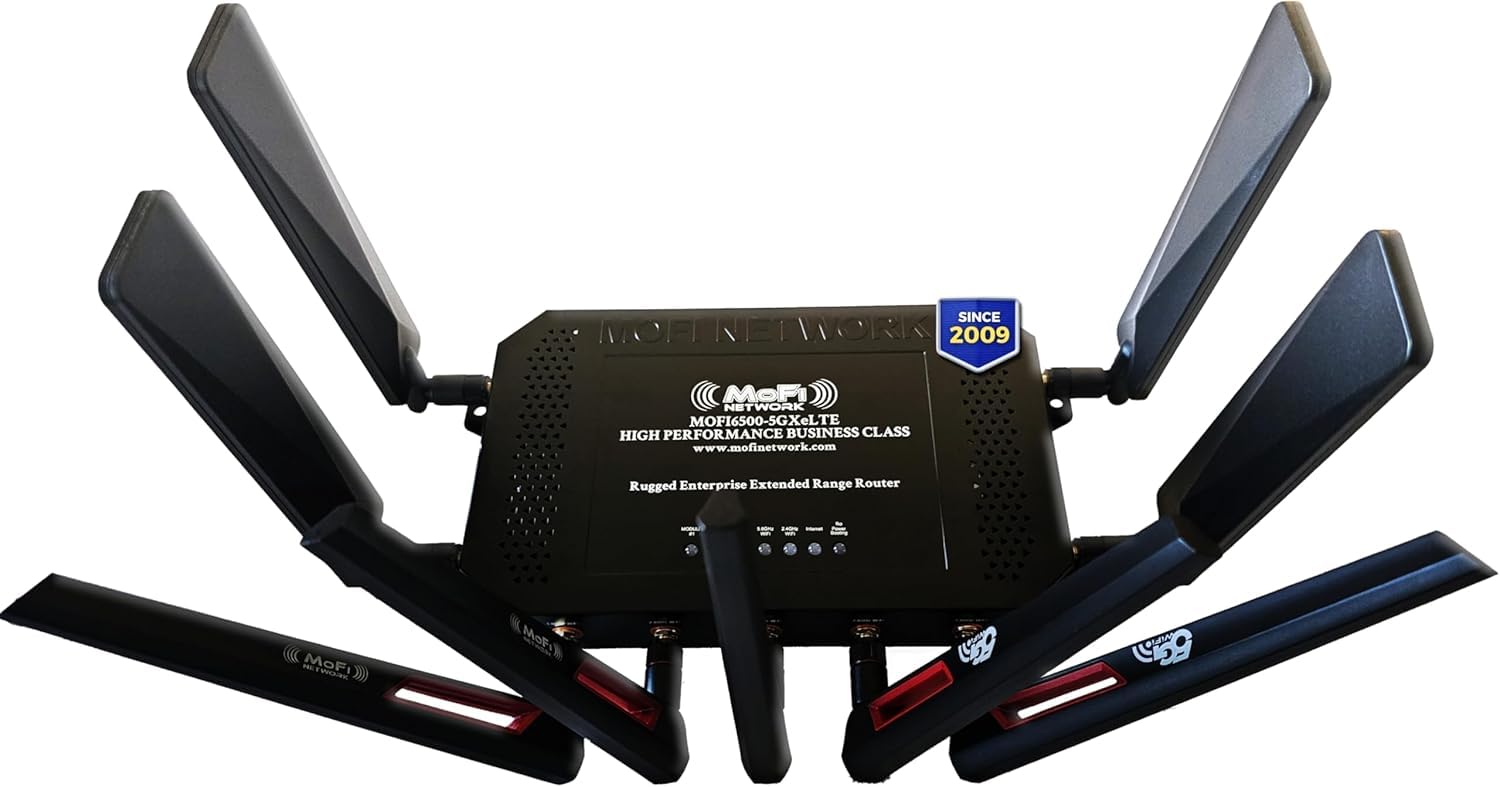
| MOFINETWORK MOFI6500-5GXeLTE-RM520-HP★ Best Overall | Replacing satellite in a rural home | 3.4 Gbps | Dual SIM with auto failover | 4 cellular + 5 Wi-Fi, detachable | Amazon |
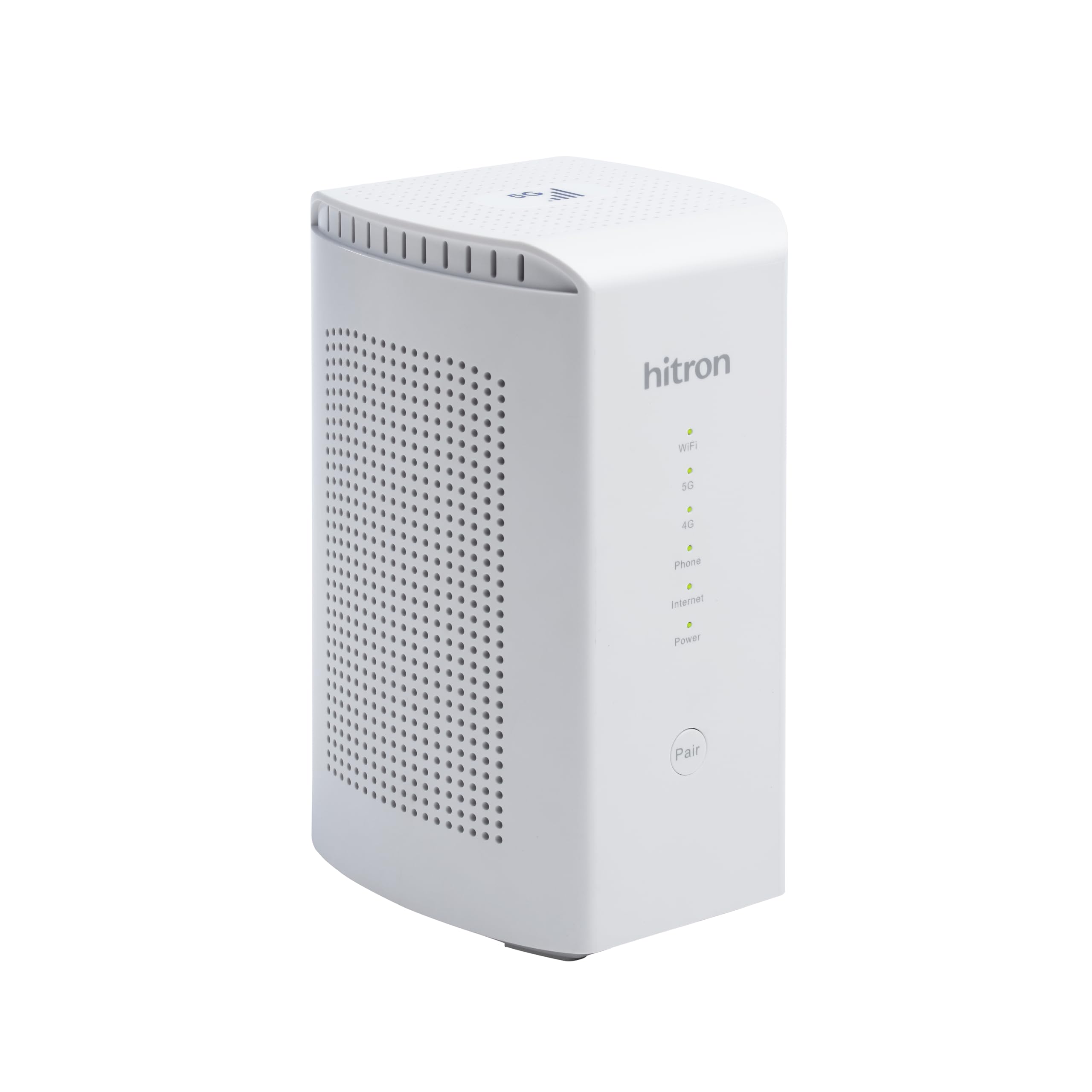
| Hitron D60 5GBest Value | Plug-and-play 5G in one spot | 3.4 Gbps (5G NSA) | Nano SIM and eSIM failover | Internal | Amazon |
| RM520N AX3000Best for Weak Signal | Weak-signal spots needing many antennas | 3.4 Gbps | Single SIM slot | 9 detachable high-gain | Amazon |
| UOTEK 5G CPE | Home internet on a phone SIM | 1800 Mbps | SIM card slot | 8 external (4x4G + 4x5G) | Amazon |
| D-Link G530 | Families wanting app controls | 3000 Mbps | SIM slot, ships with test SIM | 4 internal high-gain | Amazon |
| GL.iNet GL-X3000 Spitz AX | RV and mobile LAN setups | 3000 Mbps | Dual SIM, single standby | 6 detachable | Amazon |
| Cudy P5 | Business continuity with triple failover | 2976 Mbps | Dual Nano SIM | 4 detachable SMA | Amazon |
| GL.iNet GL-XE3000 Puli AX | Events and outages needing battery backup | 3000 Mbps | Dual SIM, single standby | Detachable | Amazon |
| TravlFi XTR Pro | RV travel with no-contract plans | 3600 Mbps | No SIM needed, multi-network | Fixed | Amazon |
| Winegard Gateway 5G GW-5G01 | RVs already running an Air 360+ dome | 2000 Mbps | FreedomGo SIM included | Fixed | Amazon |
| Yeacomm NR610 | Rooftop mounting in harsh weather | 4.67 Gbps | Dual Nano SIM slot | 6 internal high-gain | Amazon |
In‑Depth Reviews
1. MOFINETWORK MOFI6500-5GXeLTE-RM520-HP 4G LTE 5G Dual SIM Cellular Router
Our pick — over 4★ from 850+ verified ratings; the strongest balance of quality and price.
The rural workhorse that pulls a rated 3.4 Gbps over 5G with nine detachable antennas
If your address is one the cable companies skipped, this is the box that ends your satellite contract. It pulls a rated 3.4 Gbps over 5G and runs Wi-Fi 6, the current wireless standard that handles many devices at once without choking. That combination is why it sits at the top of this list: it delivers the fastest rated throughput of the group while keeping the most serious hardware on the shelf.
What wins people over is the amplification. The metal case holds four 5G cellular high-gain antennas and five 2.4/5GHz Wi-Fi antennas, all detachable, so you can add a directional antenna when the tower is far off. Buyers report a rural setup where a Verizon hotspot was replaced with this router plus a Yagi antenna and the signal climbed from 1 bar to 4 bars, holding strong Wi-Fi across two buildings for two weeks straight. A full-time RV owner running one nationwide described it working even in motion and under tree cover, failing only where no cell tower exists at all.
The honest catch is in the SIM slots. Dual SIM here means automatic failover — the router switches to the second card when the first drops — not two live connections at once; anyone needing simultaneous dual SIM has to step up to the DUAL model. Programmable periodic reboots also help long-term stability, which a Fort Worth owner running AT&T 5G set up and was online in two minutes with the setup wizard. Compare that to the Hitron D60 below, which runs on a 2.4 GHz frequency band against this unit’s 5 GHz — a 2.1x gap.
The reach argument
- Rated 3.4 Gbps on 5G with Wi-Fi 6 across the whole house
- Nine detachable antennas including four cellular — real upgrade headroom
- Failover, band lock, IP pass-through and Zerotier for business use
The fine print
- Dual SIM is failover only — simultaneous use needs the DUAL model
- Built for rural and RV duty more than a starter city apartment
- Setup wizard handles most of it, but the Linux side rewards a patient tinkerer
Worth it if: you are replacing satellite or a hotspot in a low-signal home and want the strongest antenna situation from the start.
Think twice if: you expected two SIMs to run side by side — this one fails over, it does not double up.
2. Hitron D60 5G Cellular Router with Sim Card Slot | AX3000 WiFi 6 Router
The budget pick that turns a T-Mobile, AT&T or US Cellular SIM into rated 3.4 Gbps home internet
Budget-friendly 5G usually means compromising somewhere, and the Hitron D60 does it by keeping the hardware simple: internal antennas, a white plastic shell, and carrier certification for T-Mobile, AT&T and US Cellular. Pop in a Nano SIM from one of those three and it is rated up to 3.4 Gbps on 5G NSA, with backward compatibility to 4G LTE so you are not stranded outside a 5G pocket.
Owners mention this thing moves: broad LTE/5G/5G SA band coverage pulling 300 Mbps in a basement on a T-Mobile SIM, and reviewers compare it favorably to GL.iNet gear on latency despite the much smaller footprint. The 5 GHz radio uses 4X4 MIMO (four antenna streams working together), which the maker rates for Wi-Fi speeds up to 5.4 Gigabits. Cellular failover is built in for residential and small-office use, and a 3 Month Limited Warranty backs it.
The trade-off is support. There is no firmware update path and no real help line, and the documentation looks photocopied. A minority of units apparently need only the first boot after a factory reset to behave, with one owner seeing crashes after extended runtimes and quietly moving to a different modem. None of that changes the math for a plug-and-play buyer — this is one of the cheapest ways to test whether 5G home internet works at your address before committing to a premium rig.
Where the value lands: a certified 5G modem with a 4X4 MIMO 5 GHz radio at an entry price, no antenna shopping required.
The catch to know: plan on treating it as a sealed appliance with no firmware or support ladder behind it.
Reach for this if: you are on T-Mobile, AT&T or US Cellular, want plug-and-play, and are fine with internal antennas.
Look elsewhere if: you need firmware updates, documentation, or a support number to call.
3. RM520N AX3000 WiFi 6 Modem 5G Router with Sim Card Slot
Nine detachable 5dBi antennas with SMA connectors for swapping in an outdoor cellular antenna
Signal hunting is the whole point of the RM520N, which ships with nine detachable high-gain antennas — four 5dBi cellular and five 5dBi Wi-Fi — plus SMA connectors so you can swap in an outdoor cellular antenna later. That is the most antennas on any pick here, and it is the reason this box earns a slot for metal buildings, storage units, and anywhere the cell tower feels fictional.
The Qualcomm SDX62 modem inside handles 5G NR in both SA and NSA modes, rated up to 3.4 Gbps, with Wi-Fi 6 splitting into 574 Mbps on 2.4GHz and 2402 Mbps on 5GHz. It supports up to 128 Wi-Fi users at once and runs a 10 Gbps LAN port. Customers note the payoff directly: one setup inside a metal storage unit, where a T-Mobile phone dropped from 250-300 Mbps outside to near nothing indoors, held 80-100 Mbps with the door closed and needed no cellular configuration.
Software is where you should set expectations. Firmware quirks are real — band lock went missing until a few factory resets for one owner, and the 5G SA setting would not persist for another — and there is no obvious company support channel. A separate unit arrived with a dead power supply and a bent antenna. What saves it is raw capability at the price: speeds climbing from 10 Mbps down and 1 Mbps up on a carrier device to 150 Mbps down and 50 Mbps up, plus VPN clients including WireGuard and Zerotier for anyone tunneling traffic.
Where it delivers
- Nine detachable 5dBi antennas with SMA connectors for external upgrades
- Rated 3.4 Gbps and 128 simultaneous Wi-Fi users
- Multi-WAN load balancing with configurable failover priorities
Where it stumbles
- Firmware quirks around band lock and 5G SA persistence
- No real support chain if a unit arrives faulty
- VPN clients are pre-installed but the interface expects a patient owner
Built for: the buyer who will happily fight a rough interface in exchange for nine antennas and a 10 Gbps LAN port.
Not for: anyone who wants a helpline on standby or settings that stay exactly where they were saved.
4. UOTEK 5G SIM Card Router CPE, WiFi 6 5G Cellular Modem Dual Band NSA SA

Eight external antennas — four for 4G, four for 5G — on a box owners describe as sturdy and reliable
Reliability is the number that matters most on this one, and it is where the UOTEK separates itself from the noisier picks. Owners consistently describe it as sturdy and reliable, with one running it beside T-Mobile Home Internet and noting it holds a stronger signal than the carrier’s own gateway. The X62 chipset sits at its heart, paired with Wi-Fi 6 and eight external antennas — four for 4G and four for 5G — for a rated 1800 Mbps and dual-band coverage.
The hardware list rounds out well for a home setup: two RJ45 LAN ports, a touch-based interface, and support for both NSA and SA 5G standards. A buyer using it in a weak-signal area reported consistent 200Mbps, and direct side-by-side testing against a Sagemcom gateway showed the UOTEK pulling better reception — RSRP -84dBm versus -97dBm — with ping dropping from 29-37ms to 15-25ms after switching from NSA to SA. Speeds in that comparison ran 20-30Mbps faster on download.
Two things deserve a heads-up. The documentation is genuinely poor — no IP address or admin password printed, and setup assumes you already know how to reach the interface. And the mesh claim is soft: the router mentions wired and wireless backhaul, but the firmware shows no mesh settings or node brand information, so treat mesh as unconfirmed. Firmware 2.2.2 also arrives a generation behind on the chipset in some batches.
Why it holds up: stability is the feature buyers keep coming back to, and the RF numbers back it up against a carrier gateway.
What to plan around: budget twenty minutes to hunt down the admin address before your first login.
Pick this when: you want a set-and-stay home gateway with real Ethernet ports and antenna upgrades built in.
Skip if: you were counting on mesh expansion — that capability is advertised but not visible in the firmware.
5. D-Link G530 5G NR AX3000 WiFi 6 Router with SIM Card Slot

The mainstream pick with FALCON app profiles, schedules and parental controls for the whole household
D-Link brings something most of this list does not: a mainstream app. The G530 handles setup and management through the FALCON app, which is where you build profiles for the kids, set schedules, block specific domains, and pause the internet — all from a phone. The router is rated up to 3000 Mbps and runs Wi-Fi 6 with MU-MIMO and OFDMA, the technologies that keep multiple devices streaming without stepping on each other.
The cellular side is well specified on paper. It supports both 5G NSA and SA, drops back to 4G LTE and 3G, and is certified with PTCRB, AT&T, T-Mobile and Verizon. Four high-gain internal antennas sit pre-positioned inside the shell, and a Dual-WAN auto-failover switches between wired and 5G when one drops. A 1GB SIM card ships in the box for testing, and security covers WPA3 encryption plus DNS over TLS and HTTPS.
Here is the honest read: this is the lowest-rated pick in the guide, and the pattern behind that is carrier friction rather than hardware failure. One T-Mobile home internet customer was told flatly the network does not support it; another buyer’s unit never connected at all. Where the plan lines up, reviewers point out speeds climbing from about 10 Mbps to over 100 Mbps with better signal distribution than a hotspot. If your carrier blocks third-party gateways, this is the one to skip.
What the household gets
- FALCON app with parental controls, schedules and guest network
- Certified across AT&T, T-Mobile and Verizon with a test SIM included
- Dual-WAN auto-failover plus WPA3 and DNS over TLS/HTTPS
What to verify first
- Carrier acceptance varies — some home internet plans refuse it outright
- Internal antennas only, so no external-antenna upgrade path
- Occasional restarts are expected, and reboots run slow
Matches well with: a family on a carrier plan that permits the device, who wants app-based kid controls and doesn’t want to touch a command line.
Wrong tool for: a rural buyer chasing maximum signal, since there is no antenna connector to upgrade.
6. GL.iNet GL-X3000 (Spitz AX) Cellular Gateway 5G Router for House & RV

A real modem and router in one, so attached devices see each other on a genuine LAN
The Spitz AX exists for people who want a genuine home network on wheels, and the architecture proves it: devices attached to it see each other on a real LAN, which a mobile hotspot cannot do. Six detachable antennas and dual SIM slots with single standby make it a natural fit for RVs and travel setups, and it runs OpenWrt v21.02 with over 5,000 plug-ins for anyone who wants to tune the network themselves.
What wins people over is the software polish coupled with the hardware. Owners describe beginner-friendly setup sitting on top of pro-level functionality — pre-installed OpenVPN and WireGuard, with max VPN speeds rated at 150 Mbps on OpenVPN and 300 Mbps on WireGuard. It runs 5G in both NSA and SA modes, carries AT&T and T-Mobile IoT certification, and the Wi-Fi 6 radios split 574 Mbps on 2.4GHz and 2402 Mbps on 5GHz.
The recurring gripe is long-haul reliability. Reports of the unit slowing after extended uptime — latency climbing to around 100ms, speeds collapsing, reboot as the only cure — show up more than once. The router side also runs only 2-band carrier aggregation, which some owners find limiting for large smart-home networks, and 2.4GHz and 5GHz Wi-Fi stay separate rather than merging into one name. Also worth noting: no battery, so it powers on and off with whatever it is plugged into.
What it does best: six detachable antennas plus a real LAN environment make this the pick for moving networks that host more than phones.
Where to watch: plan periodic reboots for long stays, and expect the two Wi-Fi bands to appear as separate networks.
Fits you if: you want OpenWrt flexibility, VPN tunneling by default, and antennas you can reposition or swap.
Pass if: you need a battery inside, or you expect the router to stay at peak speed for weeks without a restart.
7. Cudy 5G NR AX3000 Wi-Fi 6 Router, 4X GE, Dual SIM, SA/NSA, P5

Built to stay online with triple failover across WAN, Cellular1 and Cellular2
Triple failover is the phrase that sells this one. Where most dual-SIM routers switch between two cellular cards, the Cudy P5 tracks three paths — WAN, Cellular1 and Cellular2 — and hands off automatically, which is the difference between a home router and a business-continuity box. The Qualcomm X62 modem is rated up to 3.4 Gbps, and the AX3000 radios split 2402 Mbps on 5 GHz and 574 Mbps on 2.4 GHz.
The physical package matches the intent: four Gigabit Ethernet ports (one WAN/LAN configurable plus three LAN), a desktop or wall-mount design, and a power switch for easy cycling. Four detachable SMA antennas allow high-gain externals in weak areas. VPN coverage runs wide — WireGuard, OpenVPN, IPsec, Zerotier, PPTP and L2TP as both server and client — alongside Cudy Mesh, the Cudy App with cloud management, parental controls, WPA3 and band lock.
Shoppers say the wired side is exceptional, with speeds up to 300 Mbits/s on cellular alone. Stability in the field is the strongest signal here: one T-Mobile business user running port forwarding reported no dropouts over roughly nine months, running the full feature set. The recurring caveats are warmth during operation and dependence on carrier band compatibility. A static IP configuration caused real friction for one buyer before working, and support runs Asia-based with roughly a 24-hour response window.
The reliability case
- Triple failover across WAN plus two Cellular links
- Four Gigabit ports plus wall-mount flexibility
- Wide VPN menu with band lock, TTL adjustment and WPA3
What to be ready for
- Runs warm under sustained load
- Support sits in Asia with slower turnarounds
- Static IP setups need extra care to configure cleanly
Best suited to: small offices and remote sites where a dropped connection costs money, and you want the failover logic already built in.
Less ideal if: you only need a single home connection and would rather not pay for failover hardware you’ll never trip.
8. GL.iNet GL-XE3000 Puli AX 5G Router with Dual SIM and 6400mAh Battery

The only pick here with a built-in 6400mAh battery rated for up to 8 hours of connectivity
A built-in 6400mAh battery is the feature that defines this router, and it is the reason it earns its slot. The maker rates it for up to 8 hours of uninterrupted connectivity, which turns a rolling blackout or a jobsite with a broken outlet from a dead network into a minor inconvenience. Buyers report the battery backup running for several hours during an actual power outage, with the router still broadcasting Wi-Fi.
The rest of the package tracks the Spitz AX closely. Wi-Fi 6 radios split 574 Mbps on 2.4GHz and 2402 Mbps on 5GHz, 5G runs in NSA and SA modes with dual SIM and single standby, and detachable antennas support long-range coverage. OpenWrt gives you over 5,000 plug-ins, and pre-installed OpenVPN and WireGuard run at max speeds of 150 Mbps and 300 Mbps respectively. AT&T and T-Mobile IoT certification covers the network side, and it takes a physical eSIM card for operator switching while traveling.
The frustrations center on setup rather than performance. Owners describe fast solutions once running — insert a SIM, auto-connect, both networks live in minutes, with 5GHz showing excellent range — but one buyer took six hours to connect and lost internet again after a PC reboot. There is also only one IMEI across the two SIM slots, which complicates configuration. The unit is hefty, and owners mention it is heavier than expected even though it travels fine in a backpack with the antennas removed.
The standout: that 6400mAh cell rated for up to 8 hours keeps a jobsite or event online through an outage — no other pick in this guide can do that.
The friction point: budget setup time and be ready for the two SIM slots to share one device identity.
Buy this for: offices, events and job sites where losing power should not mean losing the internet.
Look past it if: the router will sit on mains power forever, since you’d be paying for a battery you’ll never use.
9. TravlFi XTR Pro 5G Router | RV Internet with Multiple Networks

The RV router that skips SIM cards entirely and hops networks for you
Skip the SIM-shopping step entirely. The TravlFi XTR Pro arrives with no SIM required — it uses multiple networks on its own — and runs on prepaid data plans you buy a month at a time, with no contract. Pause the plan when the RV is parked on the driveway and pick it back up when you roll out. That flexibility is the whole pitch, and it is why this pick lines up best with seasonal travelers.
The hardware supports it well: 5G plus 4G LTE and Wi-Fi, a rated 3600 Mbps, and a fixed antenna set from the factory. Coverage extends virtually anywhere in the U.S., and control runs through the app and remote interface. Customers note solid numbers — 200 Mbps down and 30 Mbps up in one case, and an RV owner moving off Starlink due to obstruction issues seeing 90-120 Mbps down and 15-30 Mbps up while running multiple SIMs. That same buyer described the unlimited 5G plan as pausable.
Value is where opinions split. Several buyers find the recurring plan cost steep for what they get, and one motorhome owner reported weak reception even near a city and switched to Starlink instead. Treat that as the fit question this pick asks: if you travel enough to make the monthly plan worthwhile, the network-hopping convenience is the payoff. If the RV spends most of the year parked, the math works against you.
Why travelers like the model
- No SIM card to source, no contract to sign
- Prepaid month-by-month plans you can pause seasonally
- Multi-network switching with app and remote control
Where it costs you
- Recurring plan pricing is the most-complained-about part
- Reception depends heavily on local tower coverage
- Fixed antennas, no external upgrade path
Made for: the full-season RVer who wants internet solved without a SIM errand or a two-year commitment.
Not the answer if: the rig sits more than it rolls — a paid monthly plan rarely pencils out for occasional trips.
10. Winegard Gateway 5G GW-5G01 Ceiling WiFi Router for Air 360+

The ceiling-mounted gateway that finishes off an existing Winegard setup
This is a specialist, not a generalist. The Gateway 5G is designed to integrate with the Winegard Air 360+ 5G dome antenna already on your RV roof, turning that dome into a working internet connection. It runs a 5G modem, ships with a FreedomGo SIM card, and supports Ethernet WAN so you can add Starlink or another satellite network into a hybrid setup.
Inside, it serves dual-band 802.11ac Wi-Fi on both 2.4 GHz and 5 GHz, which is fine for phones, laptops, smart TVs and consoles in an RV. Data plan options cover Winegard FreedomGO no-contract 30-day plans plus T-Mobile, Verizon and AT&T, and it works with the new T-Mobile 5G Unlimited plan. The rated throughput sits at 2000 Mbps with 1/3 mile of coverage, and Winegard leans on U.S.-based servers for privacy.
What owners actually report is mixed on installation — easy for some, fiddly for others; one buyer described needing a paper clip trick visible only in a YouTube video, and another wished for an on/off switch to stop idle drain. Compatibility is the sharper issue: at least one owner was told their T-Mobile home internet SIM would not work, and another could not connect to cellular data or campsite Wi-Fi despite a pre-installed SIM. Where the plan lines up, reviewers who moved up from the 4G unit describe the 5G performance as a clear step forward against phone hotspots.
Right tool for: the Air 360+ owner who wants the roof dome they already own to become real internet, with hybrid Ethernet WAN for satellite backup.
Before you buy: confirm your exact data plan is on Winegard’s supported list — some home internet SIMs simply will not provision here.
Worth the ceiling space if: you already run Winegard’s Air 360+ 5G dome and want the matching gateway without a second rooftop install.
Start somewhere else if: you are building from scratch — this is a completion piece, not a standalone kit.
11. Yeacomm NR610 Outdoor 5G Router with SIM Card Slot, IP67 Waterproof

A rooftop box built to pull signal down from a distant tower
Rooftop mounting is the entire argument for this one, and the numbers behind it are unusual: a rated 4.67 Gbps throughput, IP67 waterproof and dustproof construction, and an operating range of -30 to +55 degrees Celsius. Six internal high-gain cellular antennas sit sealed inside the housing, and 802.3af Power over Ethernet (a standard that sends electricity down the network cable) lets you mount it up high with a single cable run of up to 300ft Cat6.
The setup is genuinely different from an indoor unit — Gateway, Bridge and Router modes, VPN client support for PPTP, L2TP, IPSEC and Wireguard, plus WEB, TR069 and SNMP device management. Reviewers point out the payoff is real: one owner mounted the NR610 on the roof and consistently saw 3-5 bars where the home office window managed 1-2, calling it a super easy install and a highly recommended upgrade. Another mounted it 2,000ft from a tower line-of-sight and recorded peak speeds above 500Mbps down and 100Mbps up, with latency between 19 and 67ms.
The known risk is carrier provisioning. One buyer’s unit arrived, and the T-Mobile IMEI check showed it as LOCKED, sending it back. The internal Wi-Fi is 2.4G only and the maker says plainly it is for configuration, not speed testing — plan to run a LAN cable to a separate Wi-Fi 6 router for actual throughput. TTL adjustment is needed during setup, and weather sealing should be checked before mounting.
The roof-mount wins
- IP67 enclosure rated for -30 to +55 degrees Celsius
- 802.3af PoE with cable runs up to 300ft Cat6
- Six internal high-gain cellular antennas, dual Nano SIM
The setup realities
- Internal Wi-Fi is 2.4G only and not meant for speed testing
- TTL adjustment is part of the install process
- Carrier IMEI registration must clear before the SIM will work
Designed for: farms, yards and remote sites where the strongest signal lives on the roof, not in the living room.
Skip if: you want Wi-Fi speed straight from the start — this one expects a separate wireless router behind it.
Understanding the Specs
Data Transfer Rate
This is the fastest cellular speed the router is rated to move, written in gigabits or megabits per second. Higher numbers mean more headroom when the network can supply it, but the figure on the box describes the router’s ceiling, not what you will see at your address. Real-world throughput depends on the tower, the band your carrier runs, and how much traffic is sharing that tower — which is why two buyers on the same router can report very different numbers.
Dual SIM: Failover vs Simultaneous
Two SIM slots can mean two very different things. Failover keeps one connection live and switches to the second only when the first drops, which protects against an outage but never uses both at once. Simultaneous dual SIM maintains both links together for combined bandwidth. They look the same on a product page, so read the wording precisely — it is among the most common sources of buyer disappointment in this category.
IP Rating and PoE
An IP rating describes how well a housing resists dust and water, with higher numbers meaning better sealing — useful for any router mounted outdoors. Power over Ethernet (PoE) sends both data and electricity down one network cable, so an outdoor unit can sit on a roof orpole without an outlet beside it. Together they decide whether you can mount a router outside at all.
Antennas: Internal vs Detachable
Internal antennas keep the box clean but lock your reception to whatever the factory built in. Detachable antennas on SMA connectors let you swap in high-gain or directional models, which is the single biggest lever in weak-signal areas. If the tower is far away or there are walls between you and it, detachable antennas are worth having on the shopping list.
FAQ
Will a 5G router work with my carrier’s SIM card?
Do I need an outdoor router or will an indoor one be enough?
What does dual SIM failover actually mean?
Can I use an external antenna to boost reception?
How many devices can a 5G router handle at once?
Does a 5G router need a separate modem or gateway?
What does Wi-Fi 6 add over older Wi-Fi standards?
Why do some routers ship with a temporary SIM card?
Is an outdoor 5G router harder to set up than an indoor one?
Can I use a 5G router as a backup to my wired internet?
Final Thoughts: The Verdict
If you want one dependable pick, the 5g router winner is the MOFINETWORK MOFI6500-5GXeLTE-RM520-HP because it pairs a rated 3.4 Gbps on Wi-Fi 6 with nine detachable antennas and true failover, and the rural reports back it up. If you want the strongest antenna count and a 10 Gbps LAN port on a budget, grab the RM520N AX3000. And for rooftop mounting where the signal actually lives, the Yeacomm NR610 is the one to reach for.
Whatever you pick, verify your carrier permits the device before you buy — that single check saves more returns in this category than any spec sheet can.
How We Picked
We do not accept paid placement. Every pick is matched to a real buyer and a real use-case; we do not hands-on test units.
Sources & Methodology
Specifications: manufacturer listings and product documentation. Review insights: verified customer reviews, as of September 2026. Pricing: not shown on this page (it changes often); check the current price via the retailer link.
As an Amazon Associate, KitchPrep earns from qualifying purchases. This does not affect which products we feature.
Related Guides
