
Specs are compiled from manufacturer listings and verified buyer reviews and can change over time — please confirm the key details on the product page before buying.
A five-port switch is the cheapest fix for the most annoying home-network problem there is: not enough sockets on your router. You plug one cable from the router into the switch, and suddenly four more devices get a wired connection. The catch is that you have to pick between two very different speed classes, and most buyers do not realise the gap until after they have paid.
I’m Mohammad Maruf — the founder and writer behind KitchPrep. This guide is built by comparing the manufacturers’ published specifications and the patterns across verified customer reviews, so you get each pick’s real strengths and trade-offs instead of marketing spin.
Before you pay extra for faster ports, check whether your devices can even use them. The best 5 Port Switch for your setup matches the speed class of the hardware you already own, and this breakdown separates the plain gigabit workhorses from the multi-gig upgrades so you can choose in one pass.
Our Picks at a Glance


How To Choose The Best 5 Port Switch
Every switch on this list does the same basic job, so the real decision depends on three things: the speed of your ports, the material of the case, and if you want any management control at all. Get those three right and the rest is detail.
Match the port speed to the devices you actually own
Gigabit ports run at 10/100/1000 Mbps, which is plenty for streaming, video calls, and most gaming. Multi-gig ports run at 2.5G and only pay off if your router, network storage, or PC network card can also hit that speed. Plug a 2.5G switch into gigabit-only gear and it will simply run slower — the auto-negotiation drops it down to the slower link.
Count your devices before you count ports
A five-port switch leaves you four usable sockets, because one port feeds in from your router. If you have a PC, a console, a TV, and a NAS, that is exactly four. Add a fifth device and you are already shopping again, so think one port ahead of your current setup.
Decide if you need smart features
An unmanaged switch works the moment you plug it in and has nothing to configure. A smart managed switch adds QoS (traffic priority), VLANs (separate virtual networks), and IGMP snooping (cleaner multicast video) through a web interface. If you are running a homelab or separating work and home traffic, those tools are worth the extra login. If you just want more sockets, you will never open the page.
Think about where it will live
Fanless metal switches run quiet and handle heat well, which matters if the unit sits on a desk or in a cabinet. Most of these support wall mounting too, so you can tuck one behind a TV stand or under a shelf and never look at it again.
Quick Comparison
| Model | Best For | Port Speed | Case Material | Management | Amazon |
|---|---|---|---|---|---|
| TP-Link TL-SG105E★ Best Overall | Homelab and VLAN users | 10/100/1000 Mbps | Alloy steel | Easy Smart managed | Amazon |
| TP-Link TL-SG105SCompact Pick | Cluttered desks and wall mounting | 10/100/1000 Mbps | Metal | Unmanaged | Amazon |
| NETGEAR GS305Best Value | Quiet spaces and shared rooms | 10/100/1000 Mbps | Metal | Unmanaged | Amazon |
| UGREEN 2.5Gb Switch | Budget multi-gig starters | 2.5 Gbps per port | Plastic | Unmanaged | Amazon |
| TRENDnet TEG-S351 | Government and compliance buyers | 2.5 Gbps per port | Metal | Unmanaged | Amazon |
| Cisco CBS110-5T-D | Buyers who want a known badge | 10/100/1000 Mbps | Plastic | Unmanaged | Amazon |
| D-Link DMS-105 | Wi-Fi 6 and Wi-Fi 7 mesh backbones | 2.5 Gbps per port | Metal | Unmanaged | Amazon |
| NETGEAR MS305 | Rack-adjacent mini labs | 2.5 Gbps per port | Metal | Unmanaged | Amazon |
In‑Depth Reviews
1. TP-Link 5-Port Gigabit Ethernet Easy Smart Switch (TL-SG105E)
Our pick — over 4.5★ from 13,000+ verified ratings; the strongest balance of quality and price.
Five gigabit ports that behave like a plain switch until you want them to behave like a managed one.
This is the pick for the person who wants four more sockets today but suspects they will want VLANs next year. from the start it is a standard plug-and-play switch — you connect the router and your devices, and it starts passing traffic within about a minute with nothing to configure. What separates it from every other gigabit unit here is the web interface hiding behind that easy start.
Open that interface and you get QoS (priority rules so video calls and games jump the queue), VLAN support, IGMP snooping (cleaner handling of multicast video streams), port mirroring, loop protection, a cable test, and bandwidth control. Those are the tools a homelab or a small office actually uses, and they are rare on a unit in this class. The all-steel casing runs cool and shrugs off the kind of knock that dents a plastic shell.
The honest caveat is where it sits in a managed world: its VLANs are numbered 1 through 5, which is fine for a simple home network but clashes with setups that name their networks by letters. The config utility also logs you out after roughly a minute of inactivity, so slow typers will re-enter credentials more than they would like. Neither issue touches the plug-and-play mode, which is what most owners never leave.
What earns it first place
- Runs as a simple plug-and-play switch or a managed one, your choice
- Full traffic-control toolkit: QoS, VLANs, IGMP snooping, port mirroring, cable test
- Alloy steel body dissipates heat and takes a hit
- Covered by a limited lifetime replacement policy
Where it asks for patience
- VLAN numbering stops at 5, so letter-named network setups will not match
- The web interface logs out after about a minute idle
- Overkill if you never plan to open a settings page
Reach for this if: you split work and home traffic, run a test lab, or want one box that starts simple and grows with you.
Look elsewhere if: you want a zero-thought splitter and will never touch a settings screen — a plain unmanaged unit saves you the fiddling.
2. TP-Link TL-SG105S, 5 Port Gigabit Ethernet Switch, Desktop/Wall Mount
The one you forget exists, because it hides on a wall and never makes a sound.
At 0.22 kg this is the lightest switch in this lineup — for context, it weighs in at roughly half of the steel TL-SG105E above, which makes it the easier one to stick to a wall with the included mounting slots. Its footprint is tiny: 3.94″L x 3.86″W x 0.98″H, close to the TL-SG105E’s 3.9″L x 3.9″W x 1″H on every side, so neither one is going to claim much desk real estate. Where it pulls ahead is the combination of small size, a fanless build, and a metal casing that stays cool.
It is unmanaged, but not bare — port-based 802.1p/DSCP QoS lets you push 4K video and gaming traffic to the front of the queue, and IGMP snooping keeps multicast streams tidy. Reviewers describe the build as solid, the setup as instant, and the connection as rock steady, with PCs connecting to the internet the moment a cable clicks in. It also carries a 3-year manufacturer warranty and is rated for operation down to 4 °F.
Durability is the one split note in the feedback: most describe a switch that feels built to outlast the router, while a handful mention needing to reboot it about once a week to keep it happy. That is a small share of a large, well-liked pool, but worth knowing if you cannot reach the unit easily.
Size to value: For a wall-mounted or shelf-tucked expansion, 0.22 kg of metal with QoS and a 3-year warranty is a lot of switch for an entry-tier outlay.
One thing to plan for: If an occasional reboot would mean dragging a cabinet out, spend a little more and choose a unit you can reach.
Best fit: anyone expanding a home office, TV stand, or desk corner where a small, silent, mountable box matters more than configuration tools.
Think twice if: you want managed features like VLANs — this one has no management interface at all.
3. NETGEAR GS305, 5 Port Gigabit Ethernet Network Switch
Built for the corner of a room where nothing is allowed to buzz, blink loudly, or demand attention.
The fanless design here means zero added noise, which is exactly what a bedroom studio, a man cave, or a shared living space needs from a network box. Five gigabit ports, no software to install, no configuration to learn — you plug everything in and it is ready. The metal case supports desktop or wall placement, and the power draw is designed to drop in line with IEEE 802.3az Energy Efficient Ethernet, a standard that dials power down when ports sit idle.
Buyers describe adding a couple of ports to a tight space and losing no network speed at all, and the phrase that keeps coming back is simply that it works the second you plug it in. A 3-year limited hardware warranty covers the unit, and the markup over a bare splitter buys the steel shell and that warranty rather than extra features.
Two things to know before buying. It ships in regional variants, and the wrong power cord has reached at least one buyer who then had to source a replacement. And it is strictly unmanaged — no QoS, no VLANs, nothing to log into — so if you need traffic priority, the TL-SG105S above is the better-matched pick.
The quiet-room case: A fanless metal gigabit switch with a 3-year warranty is the right answer for anyone who prioritises silence and zero maintenance over settings pages.
Worth checking: Confirm the cord in the box matches your region’s outlet before you plan the install.
Pick this when: you want four extra wired sockets, no noise, and no setup, full stop.
skip it if: you need VLANs, QoS priority, or PoE to power cameras and access points.
4. UGREEN 2.5Gb Switch, 5-Port Ethernet Switch
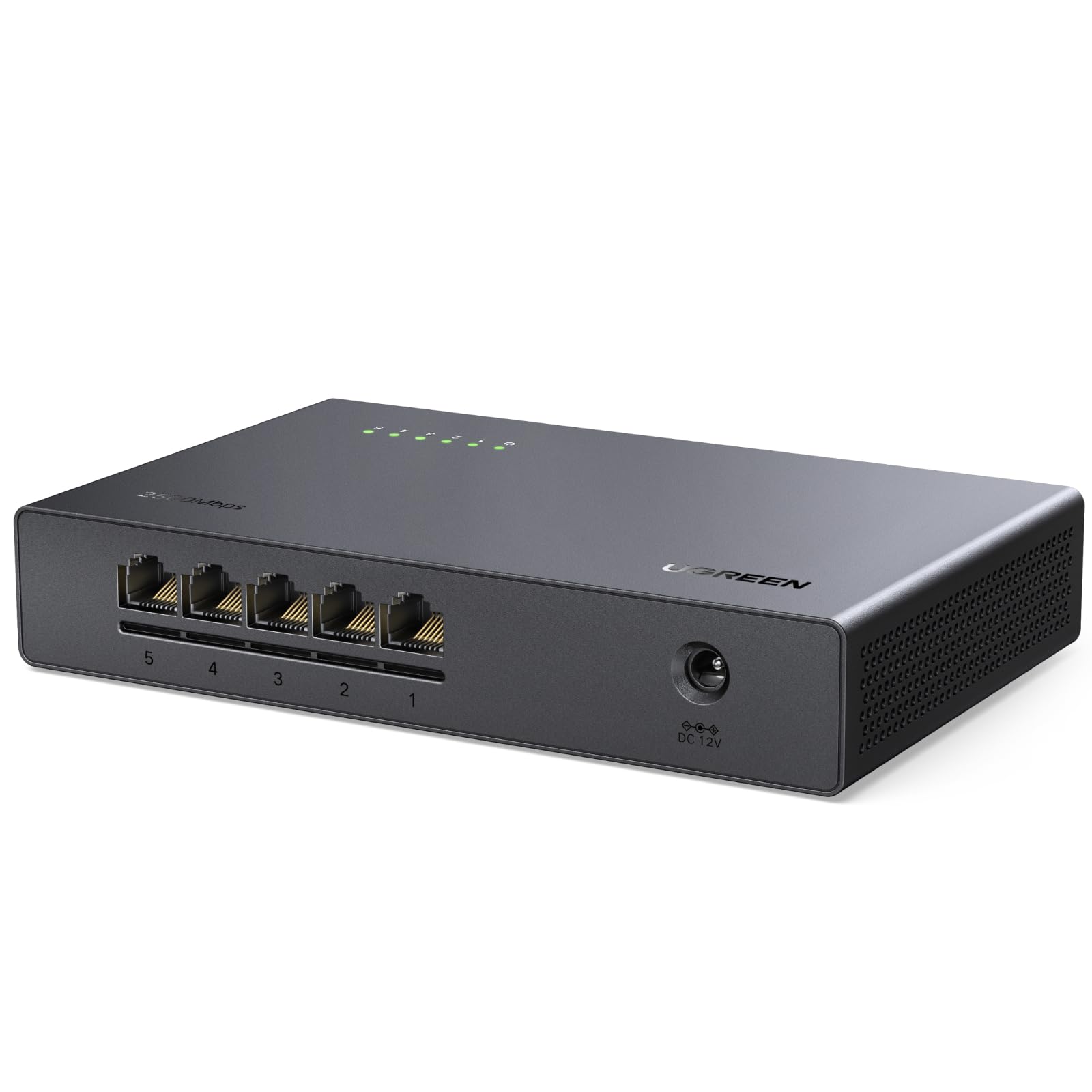
The light, low-cost way into 2.5G — if you can accept a plastic shell.
Five 2.5Gb ports here deliver up to 25Gbps of non-blocking switching, and auto-negotiation makes it fully backward compatible with 1000Mbps and 100M devices, so nothing on your network has to be retired. Setup is the same instant plug-and-play story as everything else here: no drivers, no software, just cables. Venting on the bottom and sides keeps it cool under load, the design is fanless, and it can sit on a desk or on a wall.
Where it earns its place is price-to-speed for a first multi-gig setup. Buyers running it for months report zero reboots and no dropped packets, and one notes PC-to-NAS transfers jumping from 110Mbps to 280Mbps after the swap. It also handles a mixed household well, connecting a modem to a Raspberry Pi, NAS, and mesh router without a hitch.
Be honest about the material: this is a plastic-bodied switch, and the feedback divides on exactly that. Some find it rock-solid and forget it exists; others say it feels cheap in the hand and is noticeably larger than expected. Functionally it delivers, but if you want a metal case, spend a bit more and look at the D-Link or TRENDnet picks below.
Getting in cheap: All five ports run at 2.5G for less than most multi-gig rivals charge, which makes it the sensible entry point for a first speed bump.
The honest catch: Plastic housing and a bulkier footprint than the photos suggest — fine tucked on a shelf, less fine if appearance matters.
This suits you if: budget drives the decision and you want real 2.5G throughput without a metal case premium.
Choose differently if: the switch will be handled, moved, or mounted somewhere visible — metal holds up better here.
5. TRENDnet 5-Port 2.5Gb Switch, TEG-S351
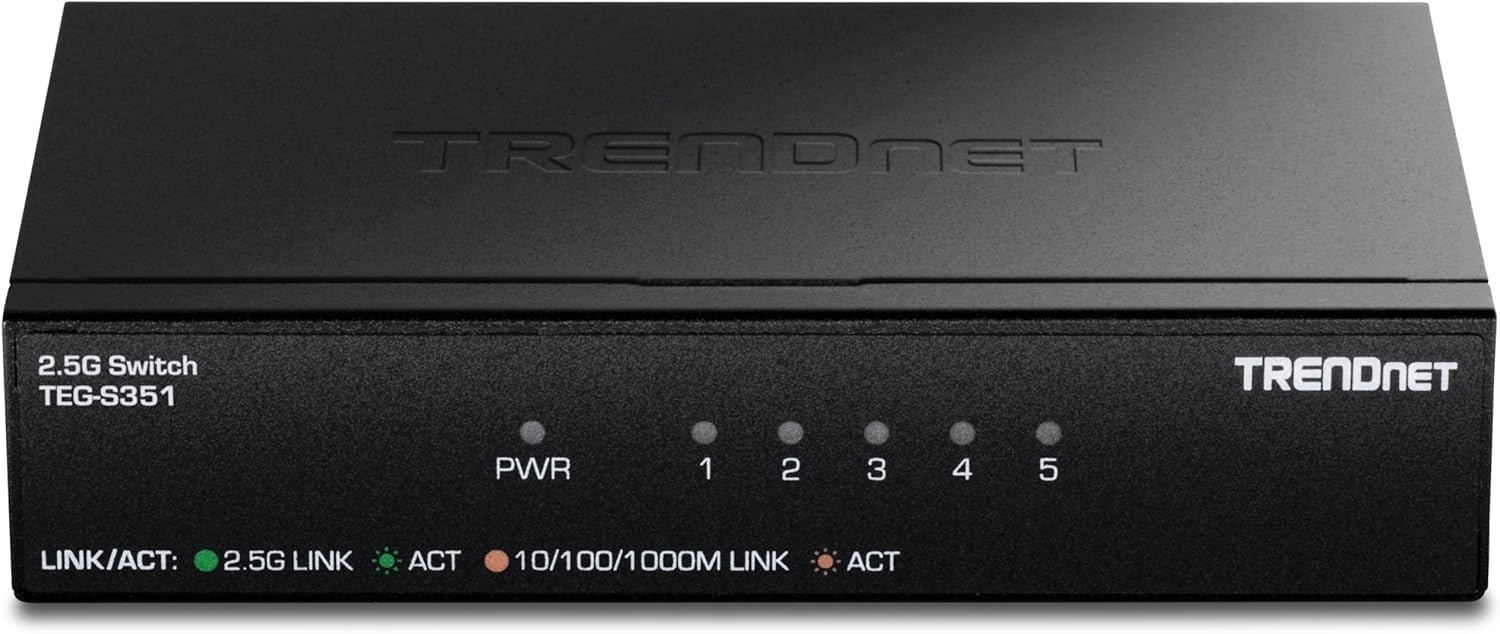
A 2.5G switch that arrives with the paperwork some buyers legally need.
Five 2.5GBASE-T RJ45 ports, 25Gbps of switching capacity, and a fanless metal housing you can wall mount — the networking side reads like the other multi-gig units here. The distinction is off the spec sheet: this switch is NDAA and TAA compliant, which is the compliance language government and public-sector buyers in the U.S. and Canada need when they plan an install. It carries Lifetime Manufacturer Protection plus English-speaking tech support during business hours.
Performance holds up under scrutiny. Buyers report it matching advertised numbers, running full speed without getting hot, and working cleanly as an unmanaged switch with no setup at all. At 4.5 watts of maximum power it is a light load to run continuously, and the small 4.76″L x 2.95″W x 1″H frame slots neatly onto a shelf.
The detail worth flagging is the LED behaviour: the port lights distinguish 2.5G from 10/100/1000, but there is no separate 10Mb/s indicator, so a very old device negotiating down will not announce itself. For a home user that rarely matters; for someone troubleshooting a mixed cabinet, it is a small blind spot.
For regulated spaces: NDAA and TAA compliance plus lifetime protection is a combination the other 2.5G picks here simply do not offer.
Small blind spot: No dedicated 10Mb/s light makes slow-link diagnosis a manual job.
Made for: government, education, and compliance-driven installs in the U.S. and Canada that need multi-gig speed and the right certifications.
Likely overkill for: a two-device bedroom setup that never needs the compliance angle or the 2.5G headroom.
6. Cisco Business CBS110-5T-D Unmanaged Switch

You are paying for the name on the case — and for a unit that never breaks a sweat.
Five 10/100/1000 ports, plug-and-play with no IT knowledge required, and integrated QoS intelligence that prioritises delay-sensitive traffic across the network. The compact plastic body is designed to live outside a wiring closet — on a retail counter, in an open-plan office, or in a classroom — and the fanless build keeps it quiet in all configurations. Power use is optimised in line with IEEE 802.3az, and it carries a limited-lifetime warranty with return-to-factory replacement plus one year of technical support.
Where this switch stands apart is staying cool. Buyers who moved up from cheaper units after their old ones ran warm and eventually failed describe this one as never running warm or hot at all, with one account reporting over a year of service with no reboots or factory resets. Consoles and TVs connect without stealing router LAN ports, and full speeds hold steady with four ports in use.
Two expectations to set. The power adapter port sits on the opposite side from the interface ports, which makes reading the port lights slightly awkward depending on how you position it. And this is unmanaged — no VLAN support, and no PoE to power cameras or access points, so plan for separate power on those devices.
The cool-runner argument: Long-term stability is the whole product here, and the feedback consistently backs a box that stays steady year over year.
Two real limits: No VLANs and no PoE — if either is on your list, this is the wrong class of switch.
Worth it for: gamers, home media server owners, and small offices that value a proven badge and rock-steady uptime over flashy features.
Not the match for: anyone who needs managed VLANs or PoE-powered devices — look at the port count and feature set first here.
7. D-Link 5-Port 2.5G Unmanaged Ethernet Switch (DMS-105)

Five 2.5G ports with features the other unmanaged boxes leave out.
Most unmanaged switches in this class pass traffic and nothing more. This one adds QoS with eight priority levels, flow control to keep dropped packets down, and IGMP snooping to tidy up multicast streams — a real set of tools for anyone pushing bandwidth-intensive traffic. The five 2.5 Gigabit ports provide up to 25Gbps of switching capacity and auto-negotiate between 100Mb, 1G, and 2.5G, and the unit runs quiet on a fanless metal case with IEEE 802.3az energy efficiency built in.
The performance evidence here is the strongest kind: sustained use. Owners mention running two of these for about a year and a half on a 2.5G network with zero issues, hitting full speeds and clearing buffer quirks between 2.5G network cards and adapters. File server transfers land in the 250 to 300MB/s range, and one owner used the speed indicator lights to spot a bad cable that was quietly holding a link below 2.5G.
The one pattern to note is heat. These run warm to the touch — one account measures the case at 95 to 100°F — which is normal for a fanless unmanaged switch in this class, but it does mean you should not bury it in a closed cabinet or sit it in direct sun. A couple of buyers also feel the premium is steep next to older gigabit models, which is fair given how quickly the multi-gig market is moving.
Feature depth: QoS, flow control, IGMP snooping, and per-port LED speed indicators put this a step above the bare 2.5G competition.
Give it air: Warm-to-touch cases need ventilation, so leave a gap around it and avoid stacking it on other heat sources.
Best for: Wi-Fi 6 and Wi-Fi 7 mesh backbones and home or small-office networks where 2.5G throughput and traffic priority both matter.
Consider the alternative if: you only need a couple of ports upgraded and would rather not pay for eight priority levels you will never touch.
8. NETGEAR 5-Port 2.5G Multi-Gigabit Ethernet Unmanaged Switch (MS305)

Five 2.5Gbps ports, no software, and a metal case built to survive a power cut.
Each of the five ports runs at 2.5Gbps and auto-negotiates to the best speed the connected device supports, working over existing Cat5e or Cat6 cable so nothing behind the wall needs replacing. Setup is plug-and-play with no software or configuration, the compact metal case mounts on a desk or a wall, and the fanless design runs silent while draw is trimmed by IEEE 802.3az Energy Efficient Ethernet. One note for shoppers outside North America: this model is made for use in the U.S. and Canada only.
The reliability story is what keeps this in the premium tier. One buyer describes hardwired mesh units improving across the board once they ran through the switch, with a music studio PC pulling 1.5G instead of 800mb over a 65ft direct run to the router. Another came from a rival unit that turned into a brick after a single power cycle and has now run this one flawlessly for months through repeated power interruptions. At 2.5Gbps on every link, there is headroom whether or not your current plan uses it.
Heat is the familiar trade. It runs hot under load, so keep it out of direct sunlight and out of a sealed cabinet where warm air has nowhere to go. Signal quality notes are mixed, though most owners never hit an issue — the reliability record suggests the units simply keep working.
Built to stay up: Months of clean operation through power interruptions is the kind of proof a mini-lab or home studio actually cares about.
Give it airflow: Warm under load means ventilated placement, not a closed shelf.
Made for: mini-labs, studios, and home networks with multi-gig gear that need a rugged, no-frills 2.5G backbone.
Too much switch if: a basic four-device setup is all you run and a gigabit unit would serve you identically.
Understanding the Specs
Port speed and switching capacity
Port speed is the ceiling on how fast any single device can talk. Gigabit ports run at 10/100/1000 Mbps; multi-gig ports run at 2.5 Gbps and deliver up to 25 Gbps of switching capacity across all five. Your real-world speed will always be limited by the slowest link in the chain — the router, the cable, or the device itself. Buying 2.5G only makes sense if something on the other end can use it.
Managed versus unmanaged
Unmanaged switches work the moment they are plugged in and give you no settings to touch, which is what most homes need. Managed switches add a web interface where you can set QoS to prioritise traffic, split the network into VLANs, and switch on IGMP snooping for cleaner multicast. If you never plan to open a settings page, unmanaged is the simpler and cheaper choice; pick managed only when separating or prioritising traffic is a real requirement.
FAQ
Will a 5 port switch slow down my internet speed?
Do I need a 2.5G switch or is gigabit enough?
Will a -Port switch work with my existing Ethernet cables?
Can I plug a 5 port switch into my router and use all five ports?
What is the difference between managed and unmanaged switches?
Do these switches get hot and is that a problem?
Can I use a 5 port switch for gaming to lower ping?
Does a switch provide power to devices like cameras?
Can I wall mount a 5 port switch?
How long should a 5 port switch last?
Final Thoughts: The Verdict
For most people, the 5 port switch winner is the TP-Link TL-SG105E because it does both jobs — it works as a plain plug-and-play splitter today and turns into a managed switch with QoS, VLANs, and a cable test the moment you need those tools. If raw 2.5G speed is the goal, the TP-Link TL-SG105S-M2 delivers five multi-gig ports without forcing you to rewire, and for Wi-Fi 6 or Wi-Fi 7 mesh backbones the D-Link DMS-105 adds priority levels the bare multi-gig boxes skip. If your setup is small and simple, the compact TP-Link TL-SG105S hides on a wall and never asks for attention — and with the top pick holding form through years of owner use, it is the one to default to when you are not sure.
How We Picked
We do not accept paid placement. Every pick is matched to a real buyer and a real use-case; we do not hands-on test units.
Sources & Methodology
Specifications: manufacturer listings and product documentation. Review insights: verified customer reviews, as of September 2026. Pricing: not shown on this page (it changes often); check the current price via the retailer link.
As an Amazon Associate, KitchPrep earns from qualifying purchases. This does not affect which products we feature.
Related Guides
