
Specs are compiled from manufacturer listings and verified buyer reviews and can change over time — please confirm the key details on the product page before buying.
You want a camera that watches your door, your pets, or your kids without turning into a second mortgage of monthly fees. That is the whole point of a basic security camera — it should be simple, cheap to run, and actually show you what happened. The good news: several of these run fine on local storage with no subscription at all, and a couple even pan around the whole room so one unit covers more space. The trick is knowing which one fits your wall, your Wi-Fi, and your wiring situation — because a wired plug-in cam and a battery cam solve two very different problems.
I’m Mohammad Maruf — the founder and writer behind KitchPrep. This guide is built by comparing the manufacturers’ published specifications and the patterns across verified customer reviews, so you get each pick’s real strengths and trade-offs instead of marketing spin.
From wireless battery kits to pan-and-tilt plug-ins, here is what to know before you pick a basic security camera.
Our Picks at a Glance



How To Choose The Best Basic Security Camera
A basic security camera is really four decisions stacked on top of each other: how it gets power, how it sees in the dark, how much of the room it covers, and where your footage lives. Get those four right and almost any camera on this list will do the job. Get them wrong and you will be climbing a ladder or paying a monthly bill you did not plan for.
Power: plug-in, battery, or both
Plug-in cameras stay on 24/7 and never ask you to recharge, but they need an outlet within reach of the cord. Battery cameras go anywhere — a fence post, a tree, a garage wall with no wiring — but you trade constant recording for motion-triggered clips and a recharge every so often. The hybrid approach is the smartest for most homes: battery cams for the far corners, plug-in cams for the busy entryway. Wyze, for example, needs a separate outdoor power adapter for outdoor use, so factor that into your plan.
Resolution and night vision
1080p is the baseline — enough to recognize a face at your door in good light. 2K steps up the detail so a license plate or a package label stays readable when you zoom in. For night, look at what kind of night vision the camera uses: plain infrared gives you black-and-white footage, while a camera with spotlights or a starlight sensor can show color after dark. Tapo’s C120 pairs a starlight sensor with two spotlights, and the GMK kit relies on a color-night-vision mode plus infrared for total darkness.
Coverage: fixed vs pan and tilt
A fixed lens points one way forever, so you aim it carefully and leave it. A pan-and-tilt camera rotates to follow motion, which is why the Roku 360 and the aosu cover far more ground per unit. The trade-off is a pan-and-tilt cam physically moves, so some owners notice the motor sound and occasional tracking lag when a subject stands still.
Where the footage goes
Local microSD storage means no monthly bill — just drop a card in and let it overwrite the oldest clips. The Tapo C120 takes a card up to 512GB, and the Techage kit supports up to 128GB. Cloud subscriptions add extras like longer clip history and smarter AI tagging, but they are optional on most of these. If avoiding a monthly fee matters to you, check the local-storage limit before you buy.
Quick Comparison
| Model | Best For | Resolution | Field of View | Power | Amazon |
|---|---|---|---|---|---|
| Ring Indoor Cam★ Best Overall | All-round indoor pick | 1080p HD | — | Plug-in | Amazon |
| Roku Indoor Camera 360°Most Versatile | Whole-room pan & tilt | 1080p HD | 360° horizontal | Plug-in (USB) | Amazon |
| TP-Link Tapo C200Top Performer | Baby & pet monitoring | 1080p | 114° vertical | Plug-in | Amazon |
| WYZE Cam OG | Indoor/outdoor value | 1080p | — | Plug-in | Amazon |
| aosu 2K Indoor Camera | Kids & pets, 2K detail | 2K QHD | 360° horizontal / 155° tilt | Plug-in (USB-C) | Amazon |
| Tapo C120 | Indoor/outdoor flexibility | 2K QHD 4MP | 120° | Wired | Amazon |
| Techage 2K 4-Pack | Multi-room coverage on a budget | 2K | — | Plug-in | Amazon |
| Ring Outdoor Cam (Stick Up Cam) | Wire-free outdoor coverage | HD | — | Rechargeable battery | Amazon |
| GMK 4 Pack System | Wire-free 4-camera property kit | 2K 3MP | 110° | Battery / plug-in hybrid | Amazon |
In‑Depth Reviews
1. Ring Indoor Cam (newest model) — Home or business security in 1080p HD video, White
Our pick — over 4.5★ from 45,500+ verified ratings; the strongest balance of quality and price.
The plug-in camera that turns a spare outlet into round-the-clock coverage
If you want one camera that just works in a hallway, a nursery, or a home office, start here. This Ring shoots 1080p HD with Live View, so you can pull up a live feed on your phone any time of day or night. It adds Color Night Vision, which means you still get recognizable colors after dark instead of the flat black-and-white of plain infrared. The manual Privacy Cover is the detail most people do not expect at this level — you swivel a physical shutter over the lens and the mic, so the camera is genuinely off when you are home.
Setup is the other reason this sits at number one. Buyers report the whole thing lands in under five minutes, and the Wi-Fi handshake is handled inside the Ring app rather than through a fiddly pairing dance. Advanced Pre-Roll records a few seconds before each motion event triggers, which closes the gap that makes most motion clips feel like they start too late. It runs on a plug-in cord, so plan for an outlet; that also means it never needs recharging, unlike a battery cam.
What wins the crowd is the reliability combined with the app. If you already have Ring outdoor cameras or an Echo Show, this drops straight into that same ecosystem — you can hear your cameras on an Echo and use voice control for the security features. The obvious catch is the paywall: motion history and AI-powered alerts need a Ring Protect subscription, sold separately. Without it you still get live view and motion notifications, but you lose the ability to scroll back through recorded events.
What makes it the top pick
- 1080p HD with Color Night Vision for usable color detail after dark
- Manual Privacy Cover physically blocks the lens and mic
- Advanced Pre-Roll captures the seconds before a motion trigger
- Drops into the Ring app and works with Alexa for audio announcements
Where it asks more of you
- Plug-in only — needs an outlet where you want it
- AI alerts and video history require a Ring Protect subscription
Buy it if: you want a dependable indoor camera with a physical privacy shutter and you can spare an outlet and a subscription for full history.
Think twice if: you need battery freedom or subscription-free recorded playback from the start.
2. Roku Indoor Camera 360° for Home Security – Security Camera with 1080p HD Color Night Vision, Compatible with Alexa & Google, Motion Detection & Tracking – Pan & Tilt (Renewed)
One camera that turns its head so you can watch a whole room
This is the coverage play. The Roku 360 pans a full 360 degrees horizontally and 93 degrees vertically, so a single unit sweeps an entire room instead of staring at one corner. Compare that to the TP-Link Tapo C200, which tilts through a 114-degree vertical range — the Roku’s horizontal sweep is a decisive 3.2x wider, and that difference is exactly why you buy it. It auto-tracks motion in real time, tagging and following whatever moves, and it captures 2MP video at 1080p HD with a low-light amplifier for color night vision.
There is a genuinely useful bonus here: a built-in 80dB siren to scare off an intruder, plus smoke and CO alarm detection that pings your phone. If you have a Roku TV or Player, you can pull the camera feed straight onto the big screen with a click of the remote. The complimentary subscription offer gets you 3 months of a Roku Smart Home plan, which adds 14-day cloud storage and person/pet/package detection — worth trying, then deciding if you want to keep it.
Where it earns a cautious word: this listing is a Renewed unit, and owners regularly flag connectivity as the weak spot — Wi-Fi pairing is the recurring frustration, not the picture. Reliability draws a few complaints too, so give it a strong signal and a spot near your router. One owner with nine cameras had two units with network trouble and swapped them via Amazon the next day, which is the sort of thing that happens with any brand at scale. The pan motor is also audible when it rotates, so it is not the one for a silent nursery.
The coverage math: 360 degrees of horizontal pan from a single outlet is the most ground any one camera here covers, and the auto-tracking follows the action rather than waiting for it.
The honest caveat: it is renewed hardware with a known connectivity streak — set it up near your router and budget for a possible exchange.
Reach for this if: you want maximum room coverage per camera and a Roku TV you can stream to.
Look elsewhere if: you need rock-solid Wi-Fi pairing on the first try or full specs on brand-new hardware.
3. TP-Link Tapo Pan/Tilt Security Camera for Baby Monitor, Pet Camera w/Motion Detection, 1080P, 2-Way Audio, Night Vision, Cloud & SD Card Storage, Works with Alexa & Google Home (Tapo C200)
The pan-and-tilt workhorse that skips the subscription entirely
For a nursery or a pet corner, this is the camera that gets out of the way. It pans 360 degrees horizontally and 114 degrees vertically, records in 1080p, and adds two-way audio so you can talk to a kid or quiet a barking dog from your phone. Infrared night vision reaches up to 30 ft. in low light, and a sound-and-light alarm fires to scare off an unwanted visitor. The pull for most buyers is the storage story: recordings go onto a microSD card up to 512GB, which means no monthly cloud bill at all.
You get a lot of features for the money. Owners with four of these report excellent picture and reliable pan and tilt, and one reviewer who owned both says it beats Ring cameras on picture clarity and infrared night vision. Solo install runs about ten minutes. The app also auto-synced a reviewer’s Kasa devices, which is a nice touch if you are already inside TP-Link’s smart-home world. Keep in mind the microSD card is not included, so budget for one.
The honest friction points: setup can be quirky. One owner described pairing the phone to the camera’s Wi-Fi first and then to the 2.4GHz router, with a retry or two along the way. It wants a specific class of microSD card, so buying a cheap knock-off card is asking for trouble — format it in the Tapo app, not on your computer. Custom detection zones also break when follow mode is active, so pick one approach or the other.
Subscription-free pick: local microSD storage up to 512GB means a one-time card cost instead of a monthly fee, and the 1080p feed stays clear day and night.
Expect a finicky setup: 2.4GHz-only pairing and a picky microSD card mean a few extra minutes on install day, but they settle once configured.
Suits you if: you want pan-and-tilt coverage and no recurring storage bill.
skip it if: you want a single-app setup with zero pairing hiccups and a card already in the box.
4. WYZE Cam OG Indoor/Outdoor Security Camera with Color Night Vision

A tiny cube that shrugs off rain and skips the subscription for local recording
This is the pick for a front door or a side yard where you want weatherproofing without a big spend. The Wyze Cam OG is IP65-rated, which means it stands up to rain and dust, and it streams 1080p HD with Color Night Vision so your footage stays vivid after dark. It throws light, too: a built-in 40-lumen spotlight and a user-activated 90-decibel siren, both controlled from the app. And for indoor use, it costs nothing in monthly fees because local recording to a compatible microSD card up to 256GB needs no subscription.
What owners rave about most is how easy this is to live with. It supports picture-in-picture so two Wyze feeds show side by side on one screen, and it listens for an existing smoke or carbon monoxide alarm and alerts you when it hears one. Upgrading from an older Wyze cam is painless — an existing card can carry over without reformatting, which tells you Wyze kept the ecosystem compatible on purpose. For a puppy cam or a nanny cam, it is a lot of capability for the money.
Two things to know before you buy. It connects on 2.4GHz Wi-Fi only, so a 5GHz-only network will not work, and outdoor use needs a separate Wyze Outdoor Power Adapter. On the software side, the optional Cam Plus plan is the recurring gripe: motion tracking can miss the middle of a long event during its cooldown, and SD-card playback has no speed control. The camera hardware itself earns praise — it is the service tier that frustrates a few owners, so read up on Cam Plus before you decide if you need it.
Reasons buyers keep these
- IP65 weatherproofing for both indoor and outdoor mounting
- 1080p with Color Night Vision plus a 40-lumen spotlight
- microSD recording up to 256GB with no subscription for local storage
- Picture-in-picture view for two feeds at once
Worth knowing first
- 2.4GHz Wi-Fi only — no 5GHz support
- Outdoor use needs a separate Wyze Outdoor Power Adapter
- Optional Cam Plus cooldown can clip mid-event motion
Best for: budget-conscious buyers who want an outdoor-ready camera without paying for cloud storage.
Not the one for: 5GHz-only networks or anyone who wants rich event playback without card-management effort.
5. aosu 2K Indoor Camera,Baby Monitor for Home Security with 2.4GHz WiFi only

Step up to 2K clarity without giving up the full-room sweep
When 1080p starts to feel thin, this is where you upgrade. The aosu shoots 2K QHD, so you can pick out finer details — a baby’s expression, a pet’s collar, a package label — from the same live feed. It pairs that resolution with a 360-degree horizontal rotation and a 155-degree vertical tilt, giving you full-room coverage from one unit. There is a one-touch talk button for quick two-way audio, which is genuinely handy for kids or an elderly parent who needs to reach you fast. Motion tracking follows family, friends, or pets across the room automatically.
Owners consistently praise this one for its quality and how painless the setup is. It includes a ceiling mount or tabletop base, so you can sit it on a shelf or mount it high. A particularly clever detail: the status LED can be switched off without affecting night vision, so it does not glow in a sleeping baby’s room. It supports microSD storage for local recording, and one owner noted it works well with no required subscription, which keeps the running cost at zero.
What to watch: it runs on 2.4GHz Wi-Fi only, so give it a matching network, and it is USB-C powered rather than wireless — no battery here, so it needs to be near an outlet. Motion tracking can wander if the movement stays in one spot, occasionally losing the subject when it stops moving. Buyers who returned it initially for not being wireless rebought it after trying other cameras, which is a fair sign the picture quality and range won them back.
The 2K advantage: finer detail from the same wide 360-degree sweep means less guessing when you zoom in on a face or a package.
Keep it plugged in: USB-C power means no battery freedom, and 2.4GHz-only Wi-Fi rules out a 5GHz network.
6. Tapo 2K+ Indoor/Outdoor Wired Security Camera, Baby Monitoring, C120

A weatherproof fixed-lens cam that tags people, pets, and cars for free
If your goal is one camera that can sit indoors on a windowsill or mount outside by the door, the Tapo C120 was built for exactly that. It carries an IP66 rating, which means it withstands rain, dust, and rugged conditions, and it records in 2K QHD 4MP with a 120-degree field of view. The magnetic base is the star of the mounting story — it sticks to any metal surface, so a railing, a fridge, or a metal frame becomes a mount point in seconds. Its Starlight sensor plus two spotlights keep night footage colorful, and an invisible IR mode hides the red glow when you want discreet monitoring.
What makes this genuinely stand out is the free on-device AI. It detects people, pets, and vehicles without a subscription — no monthly fee for the smart part — and it can also flag glass breaking, baby crying, and sound. Local storage runs on a microSD card up to 512GB, so recordings stay on your card, not a cloud plan. Owners call out the value repeatedly, and it fits both indoor and outdoor use with the same unit.
The honest limits: it is a wired, fixed-lens camera, so unlike the pan-and-tilt picks above it does not rotate to follow anyone. Night vision struggles through glass because the IR reflects back, so an indoor-through-a-window setup looks worse than an outdoor mount. And continuous recording requires a microSD card per camera, with no cloud option that records nonstop — the app records motion clips to the cloud but needs the card for real round-the-clock coverage. Owners mention the price-to-feature math still comes out well ahead of the older brands.
Why it punches above its class
- 2K QHD 4MP with IP66 weatherproofing for indoor or outdoor use
- Free on-device AI for person, pet, and vehicle detection
- Magnetic base mounts to any metal surface instantly
- Starlight color night vision plus two spotlights
Set your expectations here
- Fixed lens — no pan or tilt to follow movement
- Night vision reflects off glass, so window mounting is not ideal
- Continuous recording needs one microSD card per camera
Ideal for: a single do-it-all camera for a covered outdoor spot or a shelf, especially if you want free AI detection.
Look past it if: you need pan-and-tilt tracking or plan to shoot through a windowpane at night.
7. 2K Security Cameras 4 Pack, Home Cameras Indoor/Outdoor for Baby/Pet
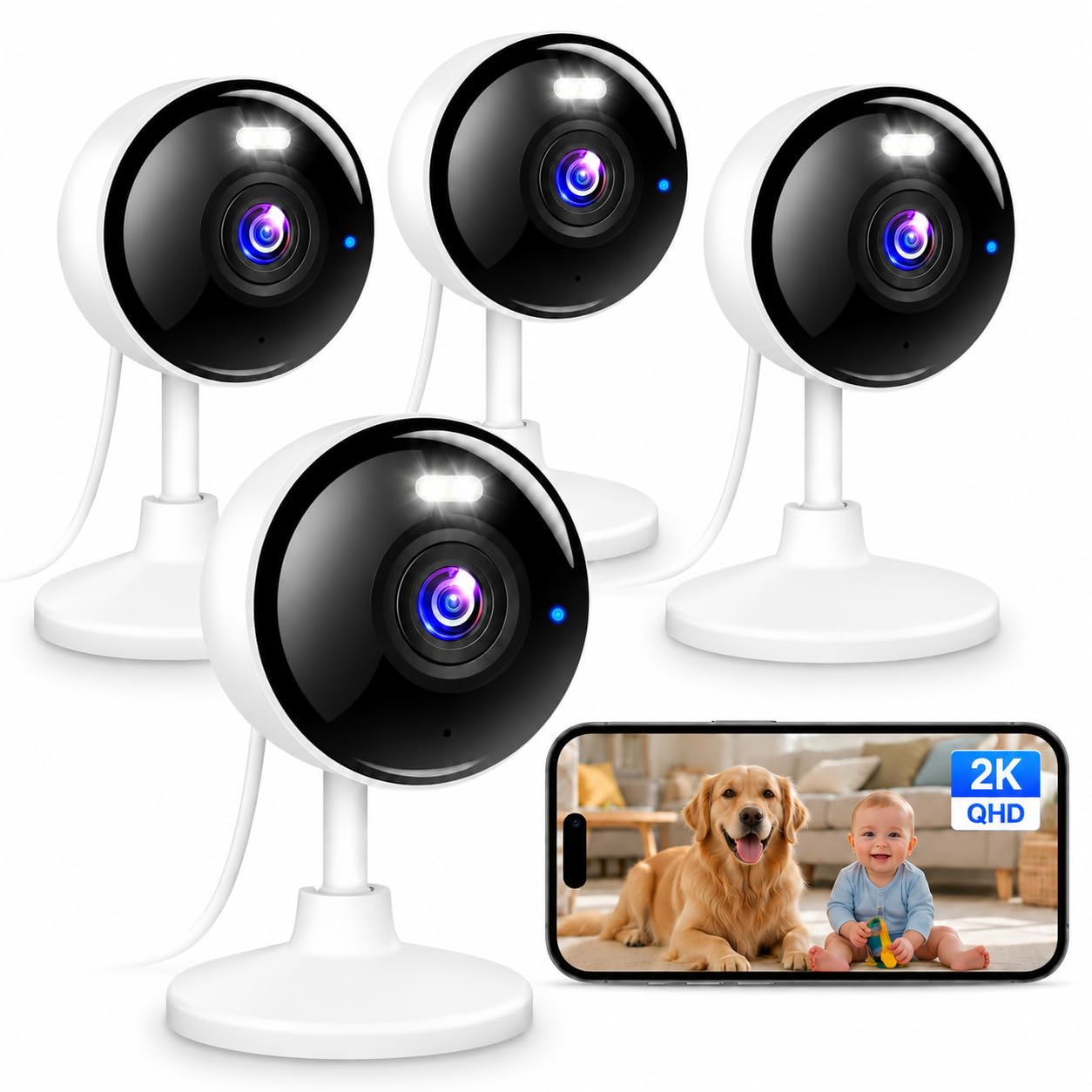
Four 2K cameras for the price of one premium unit
Covering a whole house normally means buying camera after camera, and this Techage kit flips that math. You get four cameras, each recording 2K at 2304 x 1296 — twice the resolution of 1080p — with a color night vision mode and a pair of built-in white LEDs. Compared with 1080p pan/tilt cameras that only do infrared night vision, these lean on color after dark so footage stays readable. The best part for setup: unlike single-band cameras that force you onto one frequency, this kit supports both 5GHz and 2.4GHz Wi-Fi plus Bluetooth pairing, so getting four cameras online is quick.
Owners with open floor plans use the four-pack to place a camera in the living room, bedrooms, the nursery, and a garage at the same time, and the two-way talk lets you check in from anywhere. AI-based motion detection fires alerts to your phone, and it can trigger an audible alarm, with a detection range from 33 to 66 feet depending on how you aim it.
Two truths to weigh first. There is no battery here — every camera is wired and needs to be plugged in all the time, so each needs an outlet. In practice that limits where you can put them, though owners who plan outlets ahead get along fine. And full 24/7 continuous recording needs a microSD card up to 128GB, which is not included, and does not match the larger 512GB ceilings you will find on some premium picks. A cloud plan with AI features is optional, with a 30-day free trial to test the waters.
Best per-camera value: four 2K cameras with color night vision and dual-band Wi-Fi from one kit is a sensible way to blanket a house.
Plan your outlets: every camera is wired, so this is not a scatter-it-anywhere system — and continuous recording needs a card you supply.
8. Ring Outdoor Cam (Stick Up Cam), Weather-Resistant Home or Business HD Security Camera, Live View, Color Night Vision, Two-Way Talk, Motion Alerts, Works with Alexa, White
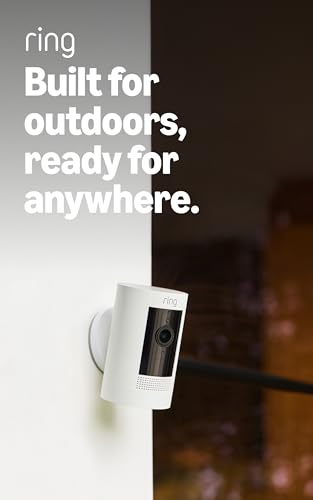
No wires, no outlet, no ladder drama once it is mounted
This is the one for a spot with no power nearby. The Ring Outdoor Cam (Stick Up Cam) Battery is rechargeable and built for outside, but it works just as well indoors — you insert the battery pack, connect to Wi-Fi, and place it on a flat surface or mount it on a wall. It streams Live View with Color Night Vision and does Two-Way Talk, so you can see, hear, and speak to whoever is at the door straight from the Ring app. Connecting multiple of these into the same app covers the whole property from one screen.
The battery itself is the whole reason to choose it. One owner reports six to twelve months per charge in light use, so a quiet yard needs only one or two recharges a year. Heavy use drops that to around 45+ days per charge, and the battery pack swaps out easily, so a spare keeps the camera running while one recharges. Motion zones and sensitivity tuning help stretch each charge further if you dial them in.
Where owners get honest: battery life swings hard with traffic and motion sensitivity, so a busy street drains it faster than a quiet yard. Some owners find the motion detection less responsive than Ring’s wired cameras, and it records on motion rather than 24/7. There is also a recurring note about sun exposure making the battery stick in the housing on a few units, needing a little persuasion to come out. Plan your mount for shade if you can, and budget for a Ring Protect subscription if you want saved video history.
Freedom to mount anywhere: rechargeable power plus a versatile bracket means no outlet, no cord, no electrician — and a single charge can carry the camera for months.
Remember the trade: it records on motion rather than continuously, and saved history lives behind the Ring Protect subscription.
Right for you if: you need wireless outdoor coverage and want a charge that lasts months.
Not for everyone: skip continuous 24/7 recording expectations and mounting where battery heat traps it in direct sun.
9. GMK 4 Pack Cameras System, Security Cameras Wireless Outdoor, 2K Video

Four wire-free 2K cameras that run on a battery or plug in for busy spots
For watching a whole plot without running cables, this four-camera GMK system does the heavy lifting. Each camera shoots 2K 3MP video with a 110-degree field of view and a 3.3mm focal length lens for wide angles over a driveway, backyard, or garage, with full-color night vision plus infrared for total darkness. The real draw is power flexibility: it runs cord-free on a rechargeable battery that the maker states 1-6 months of standby and up to 3,000+ motion triggers per charge, yet it also supports constant plug-in power for high-traffic zones. That hybrid setup suits cold climates and areas you do not want to keep recharging.
Setup is refreshingly quick — under three minutes, no wiring — and it packs features you would not expect: two-way talk, an alarm with flashing white lights and a siren, and a smart privacy sleep mode so the camera hibernates when you are home. It uses the VicoHome app, which owners describe as intuitive, and you can invite family members with view-only access while you keep admin control. There is a 7-day free trial of the advanced AI and cloud features for new users.
Two limitations to note. It connects on 2.4GHz Wi-Fi only, which is common for outdoor cams but means no 5GHz. And cloud playback carries a per-camera cost that adds up across four cameras, so if long-term storage matters, lean on the free local microSD route and skip the rolling cloud fee. It is IP65 weatherproof, so it handles rain, snow, and heat, but pointing it where Wi-Fi is weak costs you reliability on individual units. Plan the mounting with signal in mind.
What the kit gets right
- Four 2K 3MP cameras with 110-degree view and color night vision
- Hybrid power — cord-free battery or constant plug-in per camera
- Privacy sleep mode and customizable sleep schedules to stretch battery
- Family sharing with admin and view-only access roles
Where it asks patience
- 2.4GHz Wi-Fi only — no 5GHz band
- Cloud playback is charged per camera across the four-cam set
- Weak Wi-Fi spots compromise individual units
Suits you if: you want a complete wire-free 4-camera setup with the option to plug in where traffic is heaviest.
Think twice if: you need 5GHz networking or plan to store long-term footage in the cloud across all four.
Understanding the Specs
Resolution: 1080p vs 2K
Resolution is the size of the picture your camera captures. 1080p is the standard baseline and it is plenty to tell a friend from a stranger at your door in good light. 2K packs in more pixels, so when you zoom into a face or a package label the detail holds up instead of turning to mush. On this list, the Ring Indoor Cam, Roku 360, Tapo C200, and Wyze Cam OG all record at 1080p, while the aosu, Tapo C120, Techage kit, and GMK kit step up to 2K for sharper detail. Higher resolution means bigger files, so a card or cloud plan fills faster.
Field of view and pan range
Field of view is how wide the lens sees without moving. A wider angle covers more of a room but makes distant objects smaller and less detailed. Pan and tilt changes the game: a camera that rotates can sweep an entire room from one spot. The Roku 360 and aosu both rotate a full 360 degrees horizontally, while the Tapo C200 tilts through a 114-degree vertical range and the Tapo C120’s fixed lens covers a 120-degree angle. If you have one camera to cover a whole room, pan and tilt beats a wider fixed lens every time.
Night vision types
Infrared night vision gives you black-and-white footage in darkness — it works, but you lose the color that helps identify a car or a jacket. Color night vision uses either spotlights or a light-amplifying sensor to keep hues visible after dark. The Tapo C120 pairs a Starlight sensor with two spotlights, and the Techage and GMK kits both offer a color mode alongside their infrared. Keep in mind that night vision reflects off glass, so cameras pointed through a window perform worse than ones mounted outside.
Local storage vs subscription
Local storage writes clips to a microSD card inside the camera, and when the card fills up the oldest footage is overwritten. That model runs without any monthly fee. The Tapo C120 supports a card up to 512GB and the Techage kit up to 128GB, while cloud plans add longer history and extra AI tagging but bill you monthly. If avoiding recurring cost is your priority, check the card limit and whether the camera records continuously to it — some, like the Tapo C120, need the card for any real 24/7 recording.
FAQ
Do I need a monthly subscription to use a basic security camera?
Will these cameras work on a 5GHz Wi-Fi network?
How does night vision actually work on these cameras?
Is 2K better than 1080p for a front door camera?
Can I use an indoor camera outside?
What size microSD card should I put in a basic security camera?
Is a pan-and-tilt camera better than a fixed camera?
How long does a battery security camera last between charges?
Can two people in the same house view the camera feed?
Will these basic cameras work with Alexa or Google?
Final Thoughts: The Verdict
For most people, the basic security camera winner is the Ring Indoor Cam because it pairs 1080p HD video with a manual Privacy Cover, Color Night Vision, and a setup that owners say lands in under five minutes. If you want one camera that sweeps an entire room, grab the Roku Indoor Camera 360° — its 360-degree horizontal pan covers more ground per unit than any fixed lens here. And for a weatherproof camera that tags people, pets, and cars without a subscription, the Tapo C120 is the one to reach for.
If your priority is avoiding monthly fees entirely, lean toward the local-storage picks — the Tapo C200, Wyze Cam OG, and the multipack kits all record to a microSD card and let you skip cloud billing. If you have no outlet where you need a camera, the Ring Outdoor Cam (Stick Up Cam) runs on a rechargeable battery that can last months per charge. Work backward from your power situation first: that single decision narrows this list faster than any spec.
How We Picked
We do not accept paid placement. Every pick is matched to a real buyer and a real use-case; we do not hands-on test units.
Sources & Methodology
Specifications: manufacturer listings and product documentation. Review insights: verified customer reviews, as of September 2026. Pricing: not shown on this page (it changes often); check the current price via the retailer link.
As an Amazon Associate, KitchPrep earns from qualifying purchases. This does not affect which products we feature.
Related Guides
