
Specs are compiled from manufacturer listings and verified buyer reviews and can change over time — please confirm the key details on the product page before buying.
Buying an embroidery machine is really a choice between three very different lives: a home hobby, a side hustle that suddenly gets busy, or a full shop floor. Match it right and you are stitching logos and gifts within days. Match it wrong and you spend more time re-threading than creating. This guide walks through eleven computerized machines — the ones that change colors and trim thread on their own — so you can see exactly which hoop size, needle count, and speed fits what you actually plan to make.
I’m Mohammad Maruf — the founder and writer behind KitchPrep. This guide is built by comparing the manufacturers’ published specifications and the patterns across verified customer reviews, so you get each pick’s real strengths and trade-offs instead of marketing spin.
The shorthand: single-needle home machines teach the craft, multi-needle machines let you sell it. Every pick below earns its place for a specific buyer, so match your hoop size and needle count to your actual workload. That single decision drives nearly every trade-off in this best automatic embroidery machine roundup.
Our Picks at a Glance

How To Choose The Best Automatic Embroidery Machine
An automatic embroidery machine is one that handles the tedious parts for you: it changes thread colors on its own, trims the jump threads between color blocks, and follows a digital file rather than a hand-guided pattern. The single biggest fork in the road is needle count, because it decides how your working day feels.
Single-Needle vs Multi-Needle
A single-needle machine holds one thread at a time, so every color in a design means stopping, swapping the spool, and restarting. That is perfectly fine for one-off gifts and learning the craft. A multi-needle machine loads several threads at once and simply moves to the next needle when the design calls for a new color — which is why shops that run hats and uniforms lean that way.
The Hoop Size Decision
Your hoop (the frame that holds the fabric flat while the needle stitches) sets the ceiling on what you can make. A small frame handles monograms and small patches; a larger field opens up shirt backs, jacket panels, and big logo work. Buyers who choose a 4″ x 4″ hoop routinely discover their favorite design will not fit.
How You Move Designs Onto The Machine
Transfer method is the quiet daily-workflow factor. Plugging in a USB stick works everywhere, Wi-Fi and app transfer saves walking back and forth to a computer, and a built-in design library means you can stitch something the day the machine arrives without opening design software at all.
Training and Support Worth Factoring In
These are heavy, high-consideration purchases, and the difference between a smooth start and a frustrating one is usually the support behind the machine — setup videos, a user community, and a responsive technical team. Budget time for the learning curve, whichever model you pick.
Quick Comparison
| Model | Best For | Embroidery Area | Needles | Max Speed | Amazon |
|---|---|---|---|---|---|
| BAI The Mirror★ Best Overall | Shops ready for real production | 20″ x 14″ | 15 | 1200 SPM flat / 850 SPM hats | Amazon |
| BAI The VisionPremium Pick | Production floor, built to last | 20″ x 16″ | 15 | 1200 SPM / 950 SPM caps | Amazon |
| Smartstitch S-1501Best for Hats | 3D cap and production work | 14″ x 20″ | 15 | 1200 SPM | Amazon |
| SINGER SE9180 | Sewing and embroidery in one | 170 x 100 mm hoop | 1 | 800 SPM sewing / 450 SPM embroidery | Amazon |
| Poolin EOC05 | First-time home beginners | 4″ x 9.25″ | 1 | — | Amazon |
| Brother PE900 | Design-library embroidery at home | 5″ x 7″ | 1 | — | Amazon |
| Poolin EOC06 | Big home hoops for less | 11″ x 7.9″ | 1 | — | Amazon |
| Brother SE2000 | Best combo for space savers | 5″ x 7″ | 1 | — | Amazon |
| FUJA FJ-1001 | First commercial machine | 9.5″ x 14.2″ | 10 | 1200 SPM | Amazon |
| Smartstitch S-1201 Plus | Largest area under 15 needles | 12″ x 16″ | 12 | 1200 SPM | Amazon |
In‑Depth Reviews
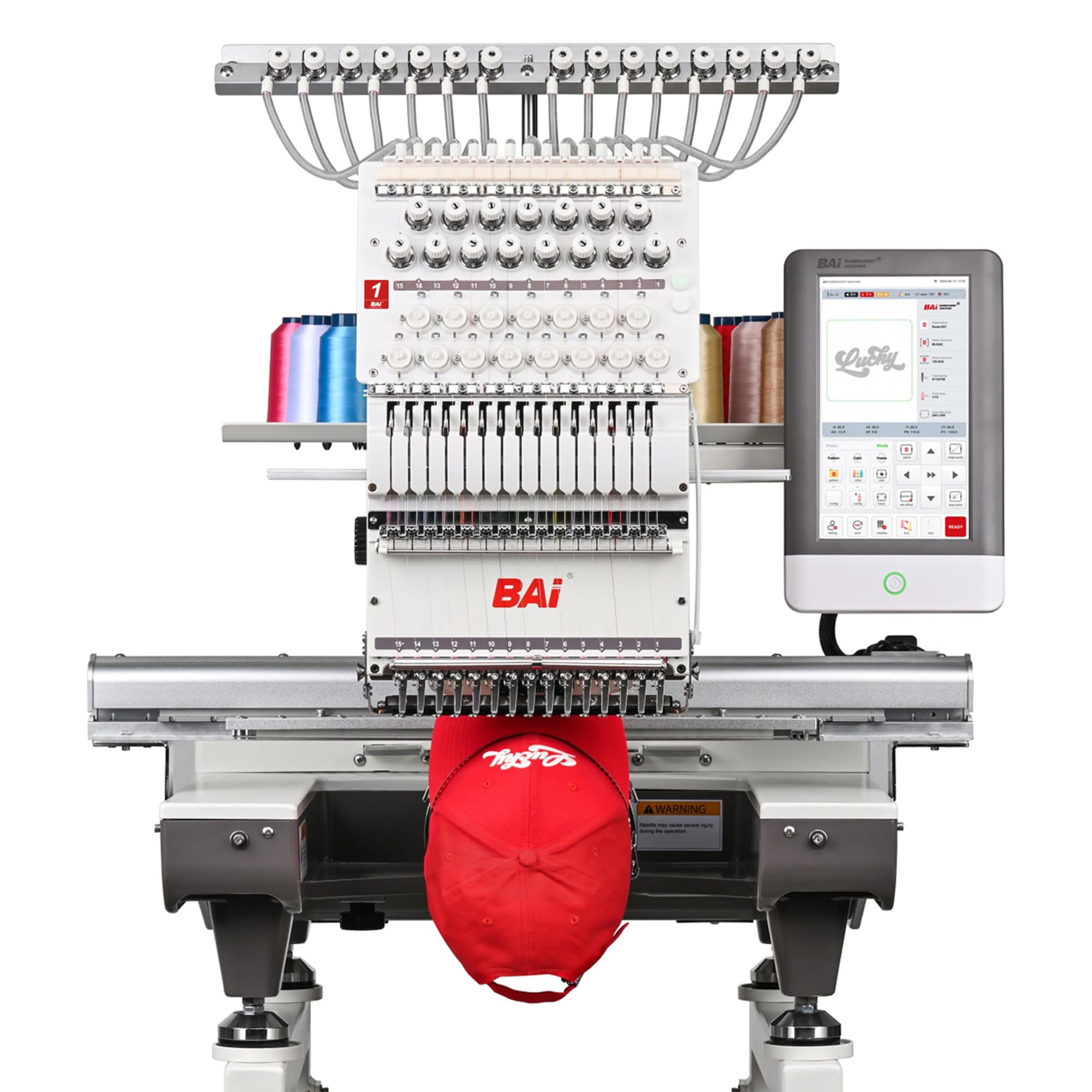
1. BAI The Mirror 15 Needle 20″x14″ Commercial Embroidery Machine
Our pick — over 4.5★ from 300+ verified ratings; the strongest balance of quality and price.
Fifteen needles and a 20″ x 14″ field — the machine that turns a side hustle into a production line.
The Mirror is aimed at the buyer who has outgrown hobby work: Etsy sellers, custom apparel shops, and small businesses taking on hats, shirts, jackets, uniforms, and patches as steady orders rather than one-offs. Its 15-needle head carries a color palette loaded at once, so a multi-color logo or uniform run stitches without the operator hand-swapping spools between every color block. The 20″ x 14″ embroidery area is the payoff in real terms — shirt backs, jacket panels, and larger logos fit without splitting the design into pieces.
Speed splits by what you are stitching. Flat embroidery runs up to 1200 stitches per minute, a rate built for churning through apparel and patch work. Structured caps hold a stable 850 stitches per minute, which matters because hats are the orders that punish a machine that cannot stay accurate at speed. The Institch OS5 touchscreen walks you through setup, design editing, hoop selection, and output in a one-to-three-step flow, so you are not buried in menus while a customer waits.
What wins people over is durability paired with a support ecosystem that actually answers. Owners describe a machine that keeps performing once it is running, backed by local technical support and free training that helps with tension, troubleshooting, and keeping production moving. The buyer community is large and active — video walkthroughs and a dedicated user group make the early learning curve far less lonely. The honest trade-off is that this is an industrial single-head machine: it is heavy, the learning curve is real, and thread breaks or “bird nests” show up along the way, as they do on every brand. Patience in the first weeks is the price of entry, and it is a genuinely patient, reliable machine underneath. When production is on the line, that support network matters more than any single spec. On the numbers buyers care most about, this pick carries the highest score in the roundup at 4.8 stars — the crowd favorite.
Where it earns its keep
- 15 needles slash the thread changes on multi-color logos, uniforms, and hat runs
- 20″ x 14″ embroidery area fits shirt backs and large panels without splitting designs
- 1200 SPM flat and 850 SPM on structured caps balance raw output with hat accuracy
- Institch OS5 touchscreen gives a guided 1–3 step workflow for setup and output control
- Brand-name components and preset accessories reduce what you need to buy separately
Where to set expectations
- It is a heavy industrial machine with a genuine learning curve before it feels easy
- Expect occasional thread breaks and bird nests early on, as with any commercial unit
- Setup and tension tuning reward patience and a willingness to follow the training videos
Buy it if: you are moving from occasional projects to steady commercial production and want 15 needles doing the color changes for you.
Think twice if: you want a machine you can master in an afternoon — this is one to grow into with the support team behind you.
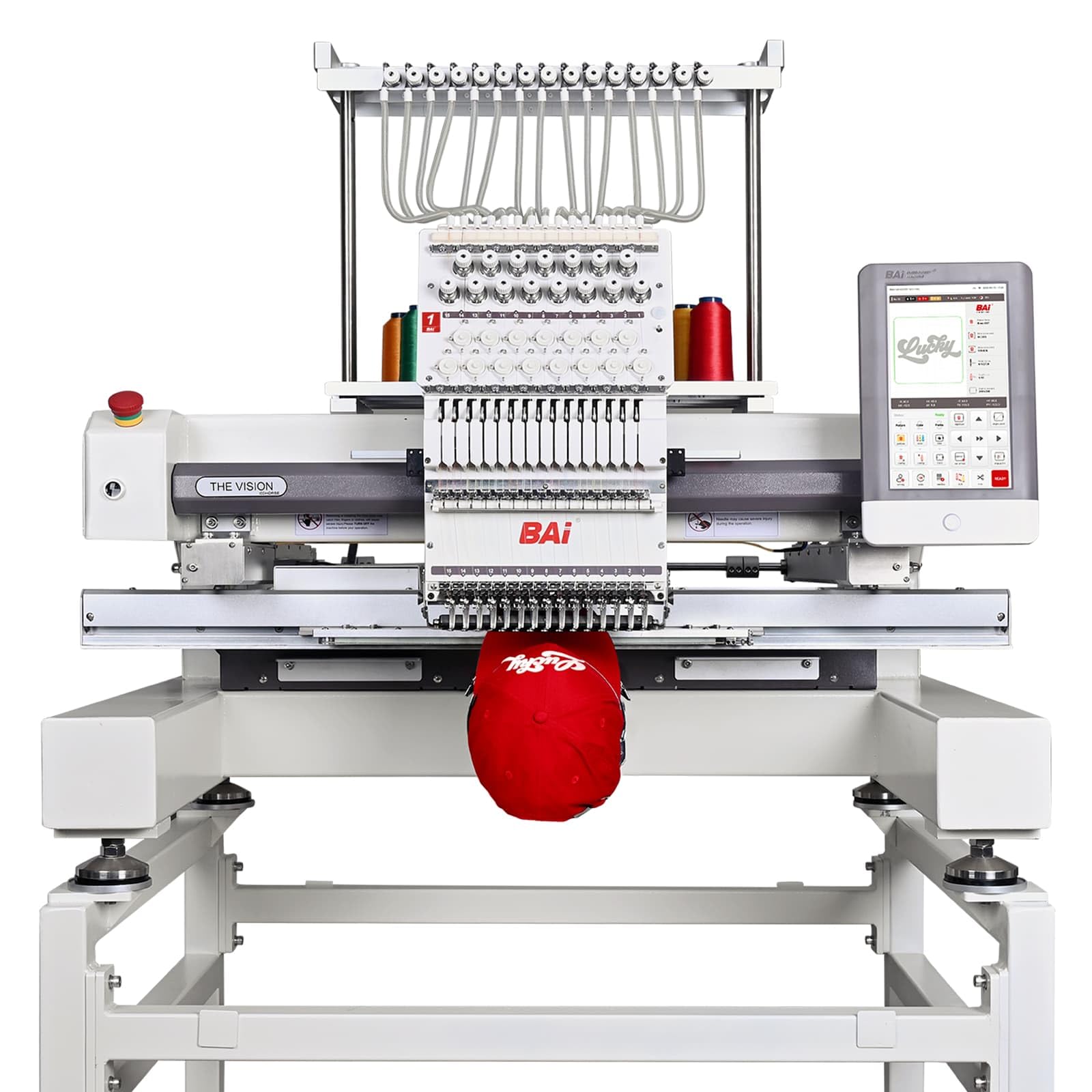
2. BAI The Vision 15-Needle Commercial Embroidery Machine
A welded-frame production machine that calculates what a job costs while it stitches.
If you buy equipment to make money rather than to save on custom gifts, The Vision is the pick aimed straight at you. Its 15 needles and 20″ x 16″ embroidery area mean batch runs with fewer stops — load your color set once and let the machine move through a multi-color design without breaking rhythm. BAI markets it as a true production machine built around output, stability, and revenue, and the construction backs that ambition: a fully welded frame that cuts vibration for cleaner stitches, German belts, and Swedish bearings for smoother motion and reduced wear.
The software layer is where it separates from the machines above. The Institch system runs on a 10-inch touchscreen with large memory that holds up to 100 million stitches or 1,000 designs, and its cloud platform transfers designs over Wi-Fi while tracking files centrally. The built-in cost tools are the standout — they tally labor, rent, and materials to help you price a design before you commit to stitching it. For a shop owner who loses money on underpriced custom orders, a cost calculator beats raw speed.
Speed is claimed as true 1200 SPM with stable stitching and even tension, plus up to 950 SPM on structured caps. On the review pages, buyers describe a machine that runs smoothly and was worth the money, with support held in genuinely high regard — though it is a large, very heavy piece of equipment that will not fit through a standard door and needs a garage or shop entrance. If portability or a spare bedroom is your setup, size is the real constraint here.
Stands apart on: the business math built into the system — labor, rent, and material presets help you price jobs, and 100 million stitches of memory or 1,000 designs means you are not constantly clearing storage between runs.
The catch to know: this is a full production footprint that needs serious floor space and a way to get it inside, and buyers describe the machine as very heavy.
Reach for this if: you run a real embroidery business and want output, a cost calculator, and Wi-Fi design management in one machine.
Look elsewhere if: your space is a home studio — its sheer size and weight make it a shop-floor machine.
3. Smartstitch S-1501 Commercial Embroidery Machine
A 270-degree cap system and a 14″ x 20″ field for shops living on hat orders.
Hat embroidery is the harder discipline — the fabric curves, the frame grips differently, and mistakes show. The S-1501 is built for it: 15 needles, a 14″ x 20″ embroidery area, and a 270-degree wide-angle cap system, with 3D caps, cap sides, flats, and shirts all listed as supported jobs. Its 12-inch touchscreen is one of the largest in this group, which makes working through a design and machine controls noticeably easier than pecking at a small display.
It runs to a max speed of 1200 SPM and carries the same engineering checklist as its siblings: automatic color change, laser positioning, a self-lubrication system, thread break detection, and up to 100 million stitches of memory. Files arrive via USB or Wi-Fi in DST or DSB format, and it stitches across denim, canvas, leather, vinyl, shoes, and bags. The starter pack includes threads, stabilizers, and bobbin threads so a first job can happen without a separate supply order.
The pattern across buyers is that output is professional and repeatable, and the training and support are what smooth the on-ramp. One-on-one sessions and a well-populated support group show up again and again as the reason people got comfortable quickly. One buyer completed hat project after hat project for a small custom business and speaks highly of both stitch quality and the responsiveness of the technical team. It is heavy — around 209 pounds — so plan for a dedicated bench and a helper on delivery day. For a shop whose revenue is concentrated in headwear, the wide-angle cap system is the specific thing that separates this from the S-1001 below it.
What buyers keep coming back to: reliability on repeated jobs and training that gets a beginner producing professional results without a months-long struggle.
The right call for: hat-focused shops and small embroidery businesses that need professional, repeatable cap work.
Not the one if: hat embroidery is not your core business — the S-1001 covers flat work for the same outlay.
4. Smartstitch S-1201 Plus Embroidery Machine
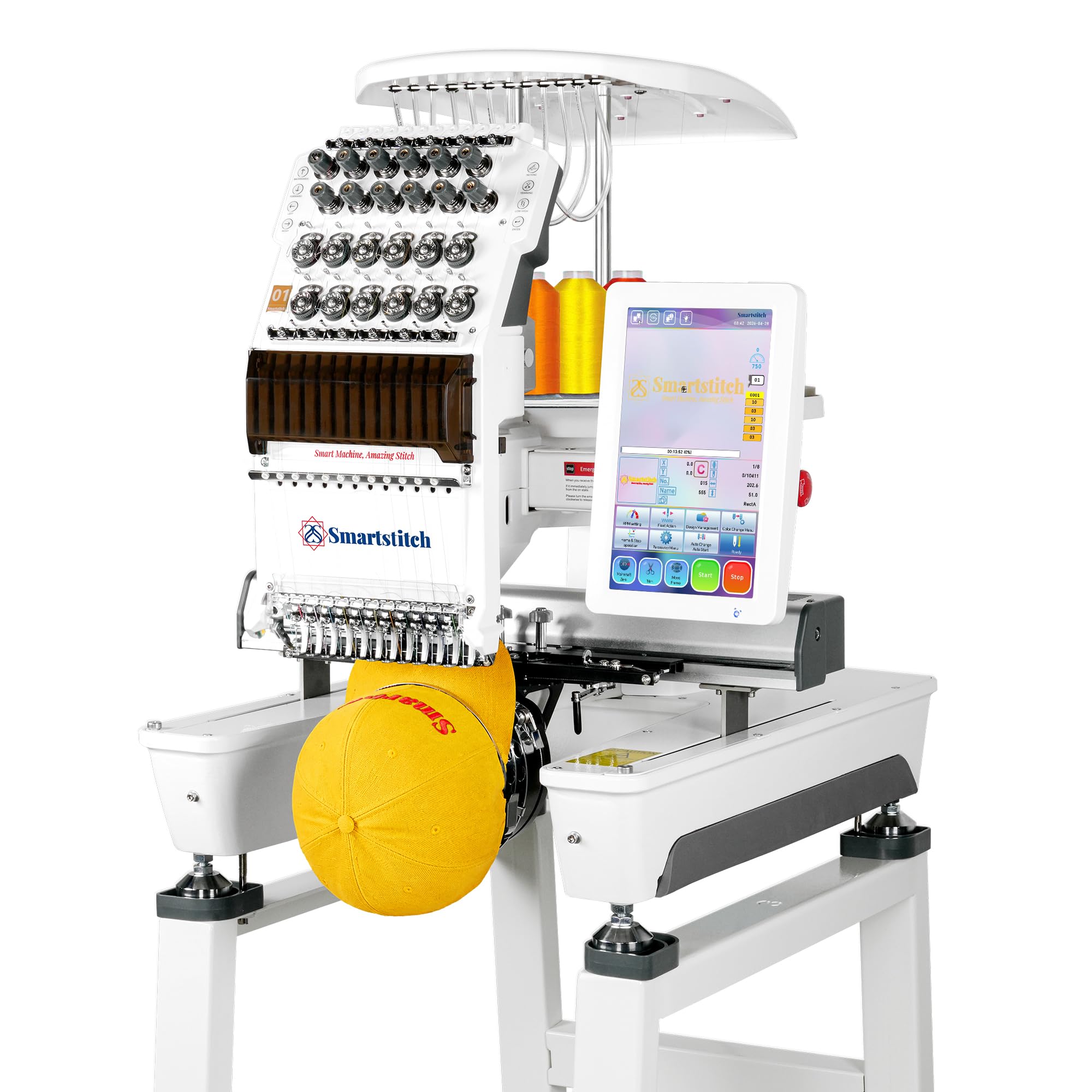
The largest embroidery field you can get with fewer than 15 needles, and the quietest claim in the group.
Space for big designs and a machine you can run in a shared room rarely arrive together. The S-1201 Plus targets exactly that buyer: 12 needles, a 12″ x 16″ embroidery area that the maker describes as the largest working space among machines with fewer than 15 needles, and a direct vertical guiding system aimed at stable, low-noise operation. If you stitch in a shop with customers nearby or a home where noise carries, that engineering choice is the one to weigh first.
The feature list covers the commercial basics: automatic thread trimming, automatic color changing, a self-lubrication system, thread break detection, laser embroidery positioning, and physical buttons for the actions you trigger constantly. The smart control system V7 carries up to 100 million stitches of memory, and the compact frame keeps floor space tighter than the bigger 15-needle units. It stitches denim, canvas, leather, vinyl, caps, shoes, and bags from DST or DSB files over USB, with a starter pack of threads, stabilizers, and bobbin threads included.
Where buyers land is on the ramp-up. Setup videos are concise, the community is deep with step-by-step tutorials, and the twelve needles arrive pre-threaded so you can run a test without dressing the head yourself. The recurring practical tips are worth repeating: dial in your tension with a proper test, and digitize clean files, because the machine rewards good input and exposes sloppy files. The stand needs assembling with two people, and it is a two-week wait in some cases. If your workload is mostly flats and shirts rather than hat-heavy production, this is a smarter fit than stepping up to 15 needles.
Reasons to shortlist it
- 12″ x 16″ embroidery area gives more room than most machines at this needle count
- Direct vertical guiding system is aimed at stable, low-noise running
- Auto trimming, auto color change, self-lubrication, thread break detection, and laser positioning all in
- Twelve needles arrive pre-threaded, and a starter pack of threads and stabilizers is included
Points to plan around
- The stand requires assembly with two people
- Results lean on careful tension setup and well-digitized files
Best matched to: buyers who need big-design capacity and quieter operation and are fine with fewer needles than a full 15-head machine.
Skip if hats rule your business: the 15-needle S-1501 above is built around cap work.
5. Brother SE2000 Sewing and Embroidery Machine

Two machines in one frame — 241 sewing stitches and 193 embroidery designs that share a single footprint.
For a home studio short on bench space, the SE2000 answers the obvious question: why buy two machines when one does both? It is a genuine combo, carrying 241 sewing stitches alongside 193 built-in embroidery designs and 50 downloadable ones, with 13 embroidery fonts. The 5″ x 7″ embroidery field is the balance for larger home projects — buyers choosing between hoops consistently favor this over a 4″ x 4″ frame because it is far less limiting on design size. A 3.7-inch LCD touchscreen handles letter editing, zoom, resizing, rotation, and design combining on-screen.
The convenience features are where a combo machine earns its keep day to day. An automatic needle threader, a built-in thread cutter, and a top drop-in bobbin make the setup quick; the tie-off button and reverse sewing lock stitches in place; and Advanced Color Sort adjusts the stitching order of multi-color designs to reduce color changes, while Jump Stitch Trimming removes the excess thread jumps within each color. Wireless LAN lets you send files from a PC through Design Database Transfer, or you can use the USB port.
Honest read on this one: the sewing side is where the praise sits, and the embroidery side is more of a solid entry point than a commercial engine — it carries a single needle, so color changes are manual. The review pages are mixed on the finer stitch performance and value, with a strong minority loving it for home projects and backup work while others hit thread and threading trouble. Owners describe quick conversion between sewing and embroidery and note the machine runs quietly and handles multiple denim layers with ease. It is also heavy at 38 pounds, so it wants a dedicated spot rather than being shoved on and off a shelf.
Sharpest advantage: you get 241 sewing stitches and 193 embroidery designs in one machine, so a small business doing both — like one owner running a small embroidery business who uses it as backup — covers two jobs with one footprint.
Be realistic about: single-needle embroidery means manual color changes, and the review pages reflect that the sewing side gets the stronger write-ups than the embroidery side.
Pick it for: home sewists who want both sewing and embroidery, especially those saving bench space.
Look to a multi-needle machine instead if: you are chasing production volume — the single needle will slow you down.
6. Poolin EOC06 Large Hoop Embroidery Machine
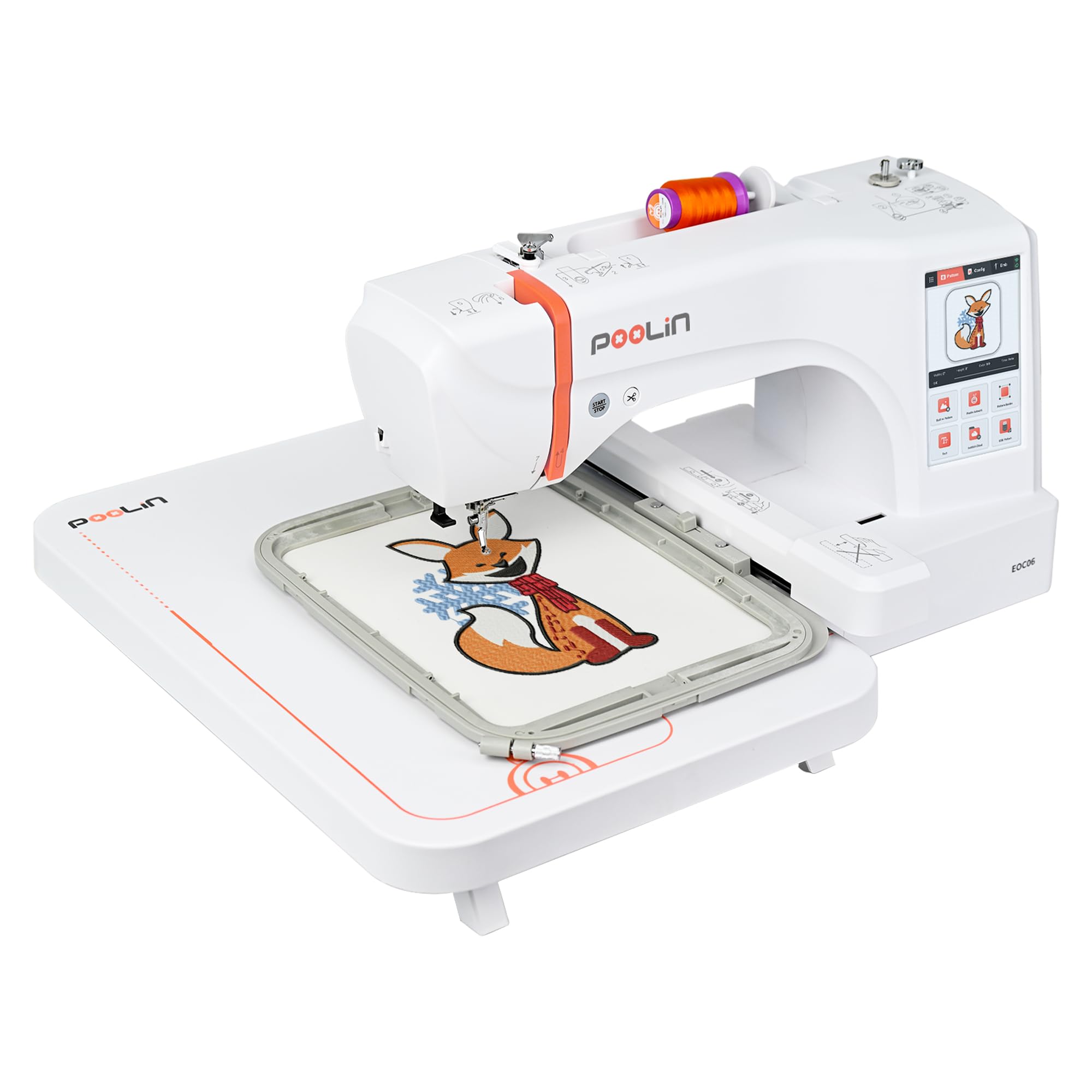
A single-needle machine with the big-hoop appetite of a much larger unit.
Beginners usually pay for hoop size twice: once when they buy small and again when they upgrade. The EOC06 is the shortcut. It is a single-needle home machine, but its 11″ x 7.9″ embroidery area covers shirts, T-shirts, bedding, towels, pillowcases, bags, wallets, scarves, table runners, sweatshirts, hoodies, sleeves, and pant legs — the exact list that sends a small-hoop buyer back to the store. Four hoops ship in the box (two 5.5″ x 5.5″, one 7.9″ x 7.9″, and one 7.9″ x 11″), alongside 200 built-in patterns, 8 fonts, and 10 languages of interface.
The control side is built to be easy. A 7-inch color touchscreen lets you drag, edit, and adjust designs much like a phone screen, and the InStitch i3 system handles pattern selection, editing, combining, and multi-color lettering. The InStitch Doodle Digitizing software opens, views, and edits embroidery files, and designs transfer over USB flash drive or Wireless LAN in DST or DSB format. An automatic needle threader, bobbin winding, and automatic thread trimming when a color block finishes remove the fiddly steps beginners worry about most.
What owners keep mentioning is that the machine does the work while you learn. Reviews describe creating a project right from the start following the instructions, and support responding via messaging quickly when questions came up. The accompanying bundle is generous — 6 rolls of polyester thread, multicolor pre-wound bobbins, 100 pieces of backing paper, and stabilizers — so a first project can start immediately. The fair caveat is that the bundled software feels clunky to some, and a few buyers reached for separate digitizing software to export DST files. Coming in around 35 pounds, it is movable but not a machine to relocate casually. If you want a big hoop without 15 needles and don’t need hats, this is the value play in the mid-range.
What stands out
- 11″ x 7.9″ embroidery area pairs with four included hoops for serious home coverage
- 200 built-in designs, 8 fonts, and 10 interface languages get you stitching from the start
- 7-inch color touchscreen for drag-and-edit design control
- Automatic needle threader, bobbin winding, and thread trimming cut the hands-on fuss
- Generous supply bundle: 6 rolls of thread, pre-wound bobbins, 100 pieces of backing paper, stabilizers
What to weigh
- Bundled software feels clunky to some owners, who used separate digitizing software for DST files
- It is embroidery-only — no sewing functions
The smart pick for: home crafters who want a big embroidery area without multi-needle complexity.
Not for you if: you also want to sew — this machine does embroidery only.
7. Brother PE900 Wireless Embroidery Machine

193 built-in designs and a 5″ x 7″ field — the plug-and-play embroidery-only machine with Wi-Fi.
The PE900 is the pick for someone who wants to open a box, pick a design from the screen, and stitch. It arrives with 193 built-in embroidery designs — scrollwork, florals, and quilt patterns — plus 13 lettering fonts split across 9 English, 3 Japanese, and 1 Cyrillic option. The 5″ x 7″ maximum embroidery area and 7.4 inches of space from needle to arm give you room for larger designs than a compact frame allows. It is embroidery-only, so there is no confusion about sewing duty. The 3.7-inch LCD touchscreen handles letter editing, zoom, resizing, rotation, repositioning, and design combining right on the display.
what separates it from the Poolin EOC06 above is the wireless workflow. Wireless LAN lets you send embroidery files from your PC via the free Design Database Transfer software or over the built-in USB port, and the Artspira mobile app adds 50 free designs, lets you draw custom patterns on your phone, and transfers them wirelessly to the machine — a useful feature for craft-fair sellers who want to design on the go. Advanced Color Sort reorders multi-color stitches to reduce color changes, and Jump Stitch Trimming cleans up the excess thread jumps within each color.
The buyer verdict on this one is warmth. Owners describe it as a great first model with plug-and-play setup, and machine quality and ease of use dominate the reasons. Experienced embroiderers also upgrade into it — one long-time Brother owner reported running it from the start without tension adjustments, alongside years of other Brothers still working. Smart thread and bobbin alerts stop a project before it is ruined. The honest catch is that only one hoop is included, so extra hoops are a purchase most owners make. Some note the machine runs slightly loud, though quieter than the older model it replaced. For an embroidery-only machine that is genuinely beginner-friendly, it is one of the safest bets.
Why owners stick with it: machine quality and ease of use lead the praise, and the Artspira app with wireless transfer keeps the design workflow phone-friendly.
Budget for this extra: extra hoops are needed beyond the single included frame if you want to stitch beyond the 5″ x 7″ field.
Choose this when: you want the simplest path from laptop or phone to stitched design with a big built-in design library.
Consider the SE2000 instead if: you also want to sew — the PE900 is embroidery only.
8. FUJA FJ-1001 10 Needle Commercial Embroidery Machine
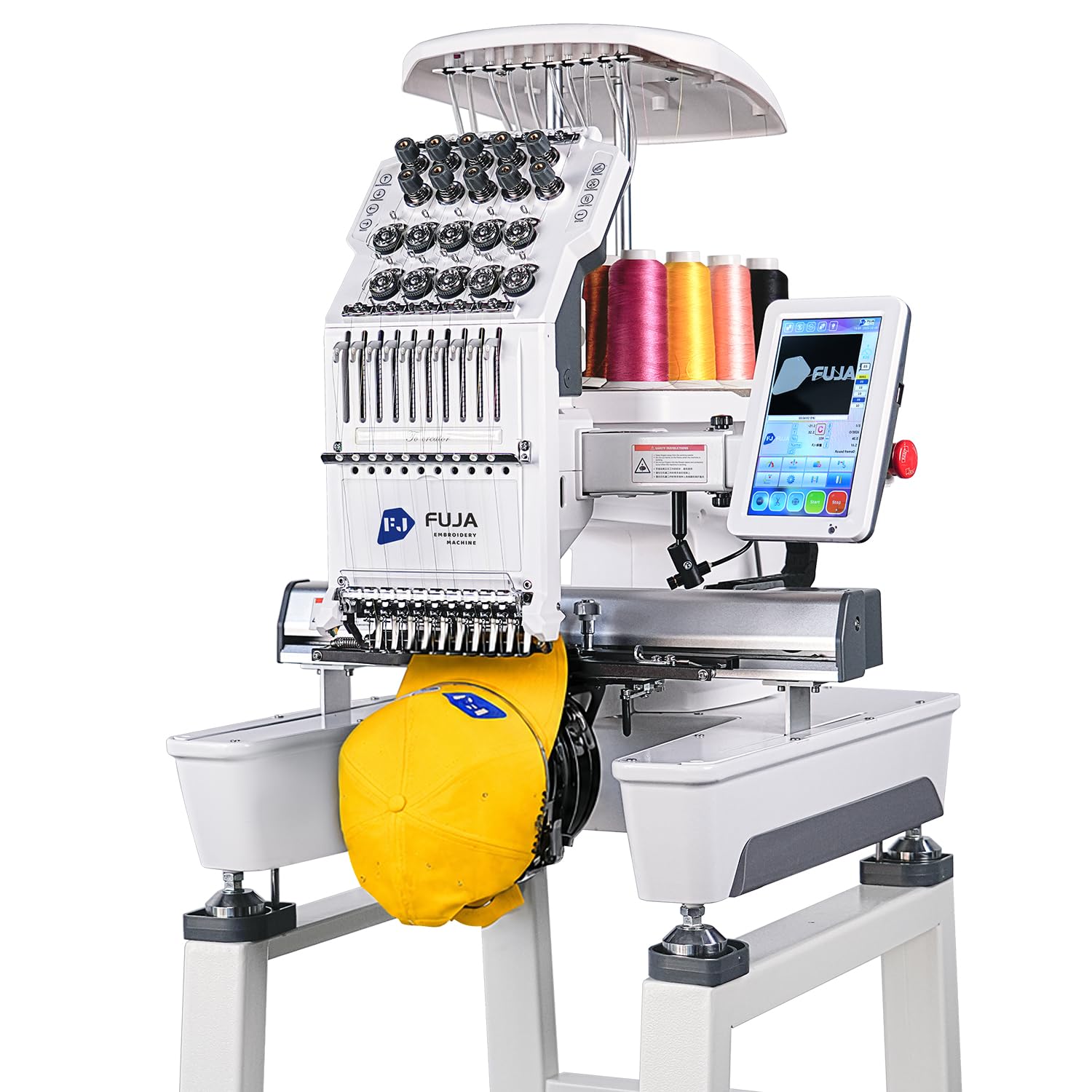
The cheapest route to ten needles — a first commercial machine for a small side business.
If you want to escape manual thread changes without jumping straight to a full-size commercial unit, the FJ-1001 is the entry. It runs 10 needles and a 9.5″ x 14.2″ embroidery area, and it is aimed squarely at someone upgrading from a single-needle machine to take on caps, T-shirts, patches, leather items, denim, shoes, bags, uniforms, flats, 3D puff, and custom logo orders from DST or DSB files over USB or Wi-Fi. The workflow features read like a commercial checklist: auto thread trimming, auto color change, thread break detection, laser positioning, physical buttons, self-lubrication, and a low-noise structure, plus up to 100 million stitches of memory.
Speed runs to a max of 1200 SPM, and the practical touches are thoughtful for a first commercial machine. Manuals, setup videos, and online support are included, with FUJA able to guide unpacking, threading, tension adjustment, first-stitch testing, file transfer, and cap setup through Amazon order messages after delivery. You send DST or DSB files over USB or Wi-Fi, line them up with the laser tracer, and can run a first test stitch the day you set it up. The starter kit bundles cap embroidery accessories, flat hoops, embroidery threads, bobbin threads, stabilizer, and basic tools.
Set expectations before you buy: this is a 289-pound machine that ships freight on a wooden pallet, so plan for two people to move it. The buyer experience is more uneven than the machines above — some owners got stitching within hours of setup and praise the fast WhatsApp support, while a small minority hit thread compatibility trouble or a screen freeze. The tips that recur are worth knowing: not all threads work, bold projects use speed 400 or less, and designs should sit roughly 5mm under your hoop size to avoid errors. Lean on their support team early rather than troubleshooting alone — more than one owner says that made the difference.
Where it wins: getting to ten needles and a 9.5″ x 14.2″ area at the lowest commitment, with a complete starter kit so you can run a job immediately.
Where it asks patience: not all threads work, and bold projects want speed dialed well back — plan on leaning on support early rather than troubleshooting solo.
Suits you if: you are a small business upgrading from a single needle and want ten needles with as little upfront commit as possible.
Jump higher if: you want a quieter, more forgiving ramp-up — the machines above deliver that for more money.
9. Poolin EOC05 Embroidery Machine for Beginners

A beginner-focused machine that arrives with enough kit to stitch on day one.
The EOC05 is built for the person who has never touched an embroidery machine and does not want to solve that problem on their own. It is a single-needle, embroidery-only machine with a 4″ x 9.25″ embroidery area — enough for shirts, hoodies, bags, and gifts without overwhelming a home setup. A 7-inch color touchscreen carries clear guidance and simple navigation, and the InStitch OS2 control system is tuned for intuitive operation and a smooth learning curve for those starting at home.
The bundle is deliberately complete for a first machine: one 4″ x 9.25″ hoop, one 4″ x 4″ hoop, 6 rolls of thread, 30 pieces of stabilizer, 25 rolls of bobbins, a thread stand, 9 needles, a USB stick, 1 tool kit, and the instruction and operation guides. Free design software lets you create and edit designs, and logging into the InStitch website enables various Wi-Fi transfer methods plus machine interconnection. Personalized one-on-one training is included, and the official user group plus YouTube tutorials fill in the rest.
The beginner experience is where this machine shines. Reviews describe setting it up simply and getting impressive results on patches, and several owners credit the responsive support team and the Facebook group with getting them past the early friction. Firmware needs updating via USB before the Wi-Fi and computer transfer features open up, which is a one-time step worth doing first. It is a home machine — 22 pounds and intended for personal projects and handmade gifts, not commercial mass production. If you have a small business in mind, the EOC06 above is the better-hardware match; if you want the gentlest possible start, this is it.
Blunt summary: an easy-to-learn embroidery-only machine with everything you need to make patches and small projects right away, plus hands-on support.
Pick it up for: your first embroidery machine and personal gift-making at home.
skip it if: you plan to sell — its design focus is personal projects, not commercial production.
10. SINGER SE9180 Sewing and Embroidery Machine with Accessory Kit

A feature-packed combo with a 7-inch touchscreen — and a personality that rewards reading the manual.
Singer packs a lot into the SE9180 for a home machine: 250 sewing stitches delivering 401 stitch applications, 150 embroidery designs, and 10 fonts, with mirror imaging and endless hoop capability for continuous borders on home décor, quilts, and garments. The 7-inch color touchscreen is one of the larger displays on any home machine here, and the accessory kit is comprehensive — all-purpose, decorative, zipper, blind hem, and buttonhole feet, an embroidery/darning foot, a 170x100mm hoop, three transparent Class 15 bobbins, and a full tool set including a seam ripper, brush, and quilting guide.
The time-saving features are what make it usable day to day. An automatic needle threader, a built-in thread cutter, and an easy-to-see top drop-in bobbin shorten setup, while the tie-off button locks seams and the machine hits up to 800 stitches per minute for sewing and 450 per minute for embroidery. mySewnet Wi-Fi connectivity transfers designs wirelessly and tracks progress through app notifications, which is a genuinely convenient touch for keeping projects moving. For a home sewist doing both sewing and embroidery, that feature set is a lot in one footprint.
Be an informed buyer here, because the owner experience genuinely divides. Many love it — one small embroidery business owner described how it made their life easier within a week — and the large touchscreen and range of options earn real praise. Others hit a rougher road: thread and needle breaks, bobbin tangles, misalignment after re-threading, and automatic threaders that stop workingafter a few uses. The fair read is that this machine suits a patient setup who reads the manual, tests on scrap fabric first, and treats the automatic threader as a helper rather than a guarantee. It is a sewing machine that also embroiders, not an embroidery machine that also sews — so if embroidery is the main event, the picks above are worth a look.
What it gets right: 250 sewing stitches, 150 embroidery designs, a 7-inch color touchscreen, and mySewnet Wi-Fi transfer cover both sewing and embroidery in one machine for home users.
Where the reviews divide: stitch performance and value draw a mixed read, with reports of thread breaks and an automatic threader that can stop working — test on scrap fabric first.
Worth it for: home sewists who want one machine for both sewing and embroidery and will read the manual and test first.
Better served elsewhere if: embroidery is your only goal — the beginner machines above are more focused and easier to learn on.
Understanding the Specs
Embroidery Area
The embroidery area is the largest design the machine’s frame can hold, and it is the spec that most often disappoints buyers after purchase. A 4″ x 4″ frame limits you to small monograms and patches; a 5″ x 7″ field opens up larger shirt-front and jacket designs; and a 20″ x 14″ or 20″ x 16″ area on the commercial machines handles full shirt backs and large logo panels without splitting a design. Match this number to your biggest planned project before anything else — it is far harder to change later than a thread choice.
Needles And Color Changes
Needle count decides how many colors you can stitch without stopping. A single-needle machine holds one thread at a time, so every color in a design means stopping to re-thread. A ten-needle machine carries ten threads loaded at once; a fifteen-needle machine carries fifteen. When a design calls for a new color, the multi-needle head simply moves to the next pre-loaded needle and keeps running — which is why shops with steady multi-color logo work gravitate toward higher needle counts.
SPM And Real-World Speed
SPM stands for stitches per minute, the raw pace the machine can run. A number like 1200 SPM matters most on flat embroidery and large runs, where the machine’s speed compounds over a big job. On structured caps, machines often run slower for accuracy — some hold 850 SPM on hats and others reach 950 SPM — because the curved fabric demands more precision. High SPM is worth it when you are fighting a deadline, and far less important when you are stitching a single gift.
How Designs Reach The Machine
Design transfer is the everyday workflow factor. USB transfer works on essentially every computerized machine here and is the reliable common denominator; WiFi or app transfer saves walking to a computer and is useful when your design software lives on a laptop in another room. Built-in design libraries are the fastest path to stitching on day one, since you can pick a pattern from the screen without digitizing anything at all. Consider how you actually work before deciding how much that convenience is worth.
FAQ
How many needles do I actually need to start an embroidery business?
What size embroidery area do I need for shirts and hats?
Will an embroidery-only machine also sew regular stitches?
Is 1200 SPM worth it if I only do small orders?
Can I transfer my own designs to these machines?
How heavy are these machines, and how much space do they need?
Do I need design software separate from the machine?
What does an automatic thread trimmer do?
Is a combo sewing and embroidery machine good for a small business?
What support and training comes with these embroidery machines?
Final Thoughts: The Verdict
Choosing the best automatic embroidery machine depends on matching needle count and hoop size to the work you actually plan to take on. For most buyers ready to move from hobby projects to steady production, the BAI The Mirror is the pick — its 15 needles and 20″ x 14″ area cover hats, shirts, uniforms, and logos while its support network makes the learning curve survivable, and its 4.8-star rating leads the roundup. If you want a production floor machine with built-in cost calculation and a 10-inch touchscreen, the BAI The Vision is the one to reach for. And if you are starting at home with no embroidery experience, the Poolin EOC05 gets you stitching on day one with the gentlest possible ramp-up. If you plan to sell from home and want the most hoop size for your money, the Poolin EOC06 rewards a closer look.
How We Picked
We do not accept paid placement. Every pick is matched to a real buyer and a real use-case; we do not hands-on test units.
Sources & Methodology
Specifications: manufacturer listings and product documentation. Review insights: verified customer reviews, as of September 2026. Pricing: not shown on this page (it changes often); check the current price via the retailer link.
As an Amazon Associate, KitchPrep earns from qualifying purchases. This does not affect which products we feature.
Related Guides
