
Specs are compiled from manufacturer listings and verified buyer reviews and can change over time — please confirm the key details on the product page before buying.
Mounting a cable box behind your TV is the fastest way to kill a tangle of dangling wires and free up shelf space — but only if the bracket actually fits your box. The three measurements that decide everything are the height, length, and depth of the device you’re hiding. Get those wrong and you’ll be drilling holes for a mount your box won’t sit in.
I’m Mohammad Maruf — the founder and writer behind KitchPrep. This guide is built by comparing the manufacturers’ published specifications and the patterns across verified customer reviews, so you get each pick’s real strengths and trade-offs instead of marketing spin.
Below you’ll find nine brackets built for exactly this job, sorted so the best all-rounder sits on top — keep reading for the full breakdown of the behind tv mount cable box options.
Our Picks at a Glance


How To Choose The Best Behind TV Mount Cable Box
Your cable box either sits snug behind the TV or it wobbles, slides, and pokes out the back — and that fit is almost the whole decision. A behind-TV bracket is just a piece of steel, so material, mounting style, and hardware all follow from whether your box fits.
Measure Your Box Before Anything Else
To fit, your device has to land inside all three size ranges every bracket here quotes: height, length, and depth. Depth is the one buyers skip, and it’s the one that fails — the depth ranges here run from 1.5 inches up to almost 3 inches, so a thin streaming stick and a thick cable box need different mounts.
A mount that clamps a device from both sides needs the box at least as tall as the clamp span. A mount with a shelf or strap holds the device from underneath instead, which suits a box that’s wider than it is tall.
Wall Screws Or VESA Holes
You have two ways to hang the bracket. Wall screws put it on the drywall or into a stud behind the TV, which is the most solid option and works with any TV mount. VESA holes are the standard four-screw pattern on the back of a TV, and using them means the bracket rides with the TV and leaves no new holes in your wall.
If you rent, or you swap TVs often, VESA mounting keeps everything reversible. If you have a heavy box, wall screws give you more headroom on weight.
Signals And Airflow
Infrared, RF, and Bluetooth signals travel through the back of a TV, so a hidden box keeps working with your remote. Many mounts also leave open frames, side holes, or bottom gaps so the signal passes through and heat escapes — worth checking if your box runs warm.
Quick Comparison
| Model | Best For | Mounting Type | Material | Device Fit Range | Amazon |
|---|---|---|---|---|---|
| HIDEit Uni-S (Black) Adjustable Small Device Wall Mount★ Best Overall | Hiding a cable box behind a wall-mounted TV | Wall Mount | Alloy Steel | Height 3–9″ / Length 4–10″ / Depth 1–1.75″ | Amazon |
| Beiyier Cable Box Mount and Adjustable Wall Mount for Small Wide DevicesBest Value | Routers and cable boxes on a wall or VESA pattern | Wall Mount | Alloy Steel | Length 3.5–10″ / Height max 10″ / Depth 1.73–2.95″ | Amazon |
| Cable Box Mount, Adjustable Wall Mount for Small and Wide DevicesTop Performer | Set-top boxes, PS4, Xbox One S, Dish DVRs | Wall Mount | Alloy Steel | Length 3.5–10″ / Height max 10″ / Depth 1.85–2.99″ | Amazon |
| Adjustable Wall Mount Shelf for Mini pc, WiFi Router | Under-desk and behind-TV shelving for routers | Wall Mount or behind TV | Acrylonitrile Butadiene Styrene | Devices up to 65 mm thick | Amazon |
| VideoSecu Adjustable Small Device Wall-Mounted Bracket | Heavier gear up to 33 lbs behind the TV | Wall Mount | Alloy Steel | Devices 1″ to 2″ wide | Amazon |
| Cable Box Mount Modem Wall Mount Adjustable Wall Mount Holder | Very thin devices like Apple TV and Roku | Wall Mount | Stainless Steel | Height max 4″ / Width 4.6″ / Depth 0.8–1.6″ | Amazon |
| HumanCentric Universal Wall Mount Adjustable Mount | Oversized cable boxes and receivers up to 30 lb | Wall Mount | Metal | Devices 12″–32″ perimeter | Amazon |
| Universal Streaming Device Mount Holds Media Devices Up to 3lbs | Streaming players and power bricks on a TV back | Wall Mount | Alloy Steel | Devices up to 3 lbs | Amazon |
| Monzlteck Adjustable Small Device Wall Mount Holder | Apple TV, Roku, and routers in tight gaps | Wall Mount | Metal | Devices less than 1.77″ thick | Amazon |
In‑Depth Reviews
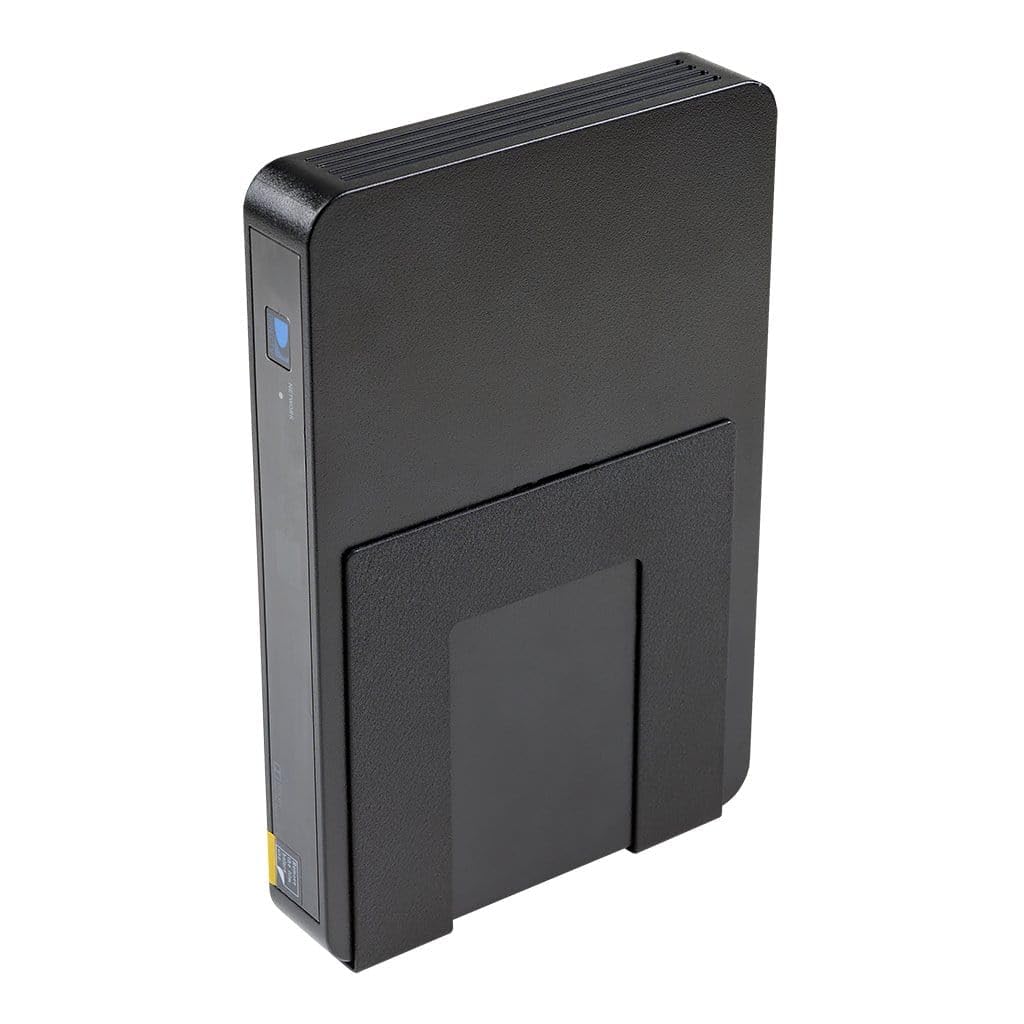
1. HIDEit Uni-S (Black) Adjustable Small Device Wall Mount
Our pick — over 4.5★ from 800+ verified ratings; the strongest balance of quality and price.
A 16-gauge steel bracket that clamps a cable box behind a wall-mounted TV
This is the safest first pick because it swallows the widest spread of box sizes: anything from 3 to 9 inches tall, 4 to 10 inches long, and 1 to 1.75 inches deep fits inside the adjustable frame. That depth range is the tightest on this list, so measure your box’s thickness first — a chunky cable box deeper than 1.75 inches will not squeeze in.
What makes it the crowd favorite is how little work the install is. The 16-gauge, cold-rolled steel body arrives with a powder-coat finish that resists rust and chipping, and the whole thing goes up in three steps with no template and no drill required — stud mounting is optional. Because it carries 75mm and 100mm VESA holes, you can bolt it straight to the back of your TV instead of the wall, and infrared, RF, and Bluetooth remotes still reach the box through the screen.
At 0.36 kg it is noticeably heavier than the Beiyier bracket at 0.28 kg, and that extra steel is exactly why it feels so solid once mounted. The one honest catch is the depth ceiling of 1.75 inches, which rules out thicker set-top boxes; owners of very slim streamers also find the clamp a touch wide. Everything else about it lands exactly where it should.
Where it earns its keep
- Fits boxes from 3–9″ tall, 4–10″ long, 1–1.75″ deep
- 75mm and 100mm VESA holes let it hang off the TV itself
- Three-step install, no drill or template needed
- Powder-coat steel resists rust and scratches your box
- Remote signals pass right through the mounted screen
What to weigh first
- Depth tops out at 1.75″ — thicker boxes won’t fit
- At 0.36 kg it’s the heavier pick versus the 0.28 kg Beiyier
- The clamp runs wide for unusually slim streamers
Best for: anyone hiding a standard cable box or satellite receiver behind a wall-mounted TV.
Think twice if: your device is deeper than 1.75 inches or you need a mount that swallows an oversized receiver.
2. Beiyier Cable Box Mount and Adjustable Wall Mount for Small Wide Devices
A lighter steel bracket that widens to grab routers and wide media boxes
Where the HIDEit above stays slim and tight, this one opens up to take boxes up to 10 inches tall and 10 inches long — a range that comfortably swallows routers, modems, and wide media players. Its depth window of 1.73 to 2.95 inches also accepts chunkier set-top boxes the HIDEit can’t. At 0.28 kg it’s the lighter of the two, which matters if you’re mounting onto a thin TV back or an arm.
It installs two ways: straight onto the wall, or behind your TV using the 75 or 100 mm VESA pattern. The big holes cut into the bottom and sides do double duty — they let infrared remote signals through and let heat escape, and they give you a place to thread cables from underneath. Setup is just tightening the bracket with the included nuts, and the screws and anchors come in the box.
The recurring gripe here is the base plate coming up small for very wide devices, so if your box is on the big end of the range, check the dimensions carefully before you commit. For routers and standard cable boxes it is a tidy, affordable way to get hardware off the floor.
Why routers love it: the wide adjustable frame and open side holes suit networking gear that never wanted a wall in the first place, and buyers report it “worked well to support a router.”
One thing to check: the base is small for the widest devices, so oversized boxes can feel like a stretch.
Reach for this if: you’re hiding a router, modem, or wide media box and want a lighter bracket on a VESA or wall mount.
Look elsewhere if: your device is unusually wide or shallow — the small base plate is the weak spot.
3. Cable Box Mount, Adjustable Wall Mount for Small and Wide Devices- 1 PCS
A steel bracket that widens to grab set-top boxes, DVRs, and consoles
This one leans on its steel body and a wide compatibility list — it names Apple TV, PS3, PS4, Xbox One S, Comcast Xfinity set-top boxes, Dish DVRs, and several Roku and Blu-Ray players as suitable passengers. The adjustable frame runs 3.5 to 10 inches long, up to 10 inches tall, and 1.85 to 2.99 inches deep, so a thick cable box sits comfortably where a slim streamer would rattle.
Installation is a matter of tightening the bracket with the included nuts, and it can hang on the wall or behind the TV. The recessed screw locations are a small but real win — they sit flush so they don’t snag on cables or scratch the box. Reviewers repeatedly call the build sturdy and the fit tidy for tight spaces, and it handles a small cable box behind the TV without complaint.
The honest catch is sizing in both directions: a few devices arrive too thin for the clamp, and the bracket can run wide for compact mini-PCs. Measure your box’s height and depth, and this is a rock-solid, no-fuss holder.
The recessed-screw detail: flush screw points are the kind of thing you only appreciate after a snagged cable, and they make the mount easier to live with long-term.
The fit caveat: thin mini-PCs and very small boxes can sit loosely, so check depth against the 1.85–2.99-inch window.
Pick this for: a set-top box, DVR, or console that needs a wide steel cradle behind the screen.
Skip if: your device is unusually thin — the clamp needs some bulk to grip.
4. Adjustable Wall Mount Shelf for Mini pc, WiFi Router, Black

A shelf-style holder that supports a box from underneath instead of clamping its sides
Most mounts here grip a device from opposite sides, which is why thin boxes slide around. This NOTMBESTM shelf flips that: it sits device on top, adjusts its width from 23 to 65 mm when the push plate faces outward, and drops to 0 to 27 mm when it faces inward. It holds any device up to 65 mm thick, and the whole shelf carries less than 3 kg.
Because it’s a shelf, it suits routers, modems, mini PCs, docking stations, and TV boxes that other clamps struggle with. It mounts on the wall, under a desk, behind the TV, or on the back of a monitor, with adhesive pads or screws — short screws for wood, long screws and expansion tubes for tile, marble, or concrete. If you go the adhesive route, wait 24–48 hours before loading it.
The shelf design also solves the fixed-size problem: it doesn’t care that your next router will be a different shape. The catch is that adhesive installs need a clean, flat surface to hold, and one buyer notes the pads grab so firmly they can pull plaster off a wall — so choose your spot carefully before you press.
Where it pulls ahead
- Shelf style holds devices up to 65 mm thick
- Width adjusts from 23–65 mm or 0–27 mm by flipping the plate
- Mounts on wall, under desk, behind TV, or on a monitor
- Adhesive or screw installation, hardware included
Before you press it on
- Adhesive needs a clean flat surface and 24–48 hours to cure
- The pads can strip plaster if you reposition after sticking
- Shelf holds under 3 kg, so heavy set-top boxes need screws
Best for: concealing a router or modem under a desk or behind the TV where a clamp never fit.
Consider the weight limit if: your box is heavy — fall back to the screw install rather than adhesive.
5. VideoSecu Adjustable Small Device Wall-Mounted Bracket for Cable Box Digital TV Media Players Game Consoles MTC02B 1QJ

A stout silver bracket with a wingnut clamp that grips devices 1 to 2 inches wide
The two-piece steel bracket clamps devices from 1 to 2 inches wide and is rated to hold up to 33 lbs — far beyond the box it’s designed for. It attaches to a wall, pole, track, or surface, and its open frame keeps your device accessible and lets heat out.
The VESA interface fits any mount with a 100 or 75 mm hole pattern, so it rides alongside an existing TV mount, and the rubber bumpers stop the steel from marking your hardware. Owners fit everything from a DirecTV Genie Mini and HDMI switcher to a Mac Mini and even a Reolink NVR using the nonslip clamp.
One caveat: the included screws are the weak link — a couple of buyers found them fragile enough to snap, so have a few stronger ones on hand before you install. The bracket itself is the sturdy part, and the wide clamp handles a roomy spread of devices.
The strength story: the 33 lb rating and nonslip rubber grip mean this bracket will out-carry every box-and-streamer combination you can stack on it.
The screw swap: a few users found the bundled screws soft, so bringing your own sturdy ones avoids a mid-install mishap.
Reach for this if: you need a heavy-duty clamp that holds a receiver, NVR, or a stack of gear behind the TV.
Bring your own screws if: you’re mounting into solid material — the included ones can be brittle.
6. Cable Box Mount Modem Wall Mount Adjustable Wall Mount Holder for Apple TV, Roku, Mac mini, Xiaomi TV Box

A white stainless holder sized for thin streamers like Apple TV and Roku
Streaming pucks and slim boxes need a different bracket than a full-size cable box, and this SKLK-SEL model is aimed straight at them. It holds devices up to 4 inches tall, 4.6 inches wide, and 0.8 to 1.6 inches deep — an intentionally snug window for Apple TV, Roku, Mac Mini, Xiaomi TV Box, Fire TV, and even a Nintendo Switch. The stainless steel body comes powder-coated so it resists rust and chipping.
Two things set it apart. It ships with six soft adhesive rubber pads you stick inside the bracket to protect the device’s finish, and its moderate thickness helps heat dissipate so a warm player isn’t cooked behind the screen. It mounts either on the wall or on a monitor’s VESA pattern, using drywall screws and anchors, with bottom screws to lock the device stable.
The size is genuinely a catch here, not a flaw: owners mention it works beautifully for a Beelink SER5 or a Mac Mini, but a few found it “bit small” for their project. If your device is thicker than 1.6 inches, look at one of the wider mounts instead.
The slim-device fit: with a 0.8–1.6-inch depth window and grippy rubber pads, it’s built for the Apple TV and Roku crowd, not chunky set-top boxes.
The narrow ceiling: if your box is thick or tall, this mount is the wrong shelf — check the 4.6-inch width limit before buying.
Best for: hiding a thin streamer, Apple TV, or Mac Mini on a tight gap behind the screen.
Look elsewhere if: your device is thick or broad — the 1.6-inch depth window simply won’t take it.
7. HumanCentric Universal Wall Mount Adjustable Mount

A strap-and-bracket mount that wraps around oversized receivers instead of clamping
Most mounts on this list grip a device at its edges; this one wraps straps around the whole thing. It fits devices with a 12- to 32-inch perimeter — measure around the sides your straps will circle — and holds up to 30 lb. That makes it the answer for a large cable box, soundbar, DVR, or DVD player that a clamp can’t get around.
It’s also the simplest hardware to live with: the bracket mounts to the wall with the included drywall anchors and screws, then short or long straps secure the device depending on its size. HumanCentric angles the install at under 10 minutes, and only the straps stay visible once it’s up.
The trade-off buyers flag most is material feel — the design draws mixed reactions, and the brackets can flex under a heavier accessory. That said, customers note it held a “rather large Dish Cable Box” and even a Dell Micro PC firmly against a TV back, so for the right-sized load it’s a tidy, low-cost fix.
Why it’s the big-box pick: the perimeter strap design takes on receivers and soundbars that are too large or oddly shaped for a side clamp.
The honest caveat: it’s built to a light price point, so the straps can bow under very heavy gear — stay within the 30 lb rating.
Pick this for: a large cable box or soundbar that no clamp-style bracket can hold.
Weigh the load if: your device is near the top of the size range — the strap mount can bend under heavy weight.
8. Universal Streaming Device Mount Holds Media Devices Up to 3lbs Securely Behind Flat Screen TVs

A simple panel that holds a streaming box and its power brick behind the TV
ECHOGEAR’s panel is built for the streaming player that has no business being a wall mount: it holds up to 3 lbs, which is plenty for a Roku, Apple TV, Fire TV, or a small TiVo Mini plus their power bricks. Two included hook-and-loop straps (the reusable fabric straps that press together to stick) pin the device to the panel, and the whole thing attaches to a TV or TV mount with the included hardware — no brand lock-in.
The best-case part is how little it disturbs your setup. Tabs can hook onto existing holes in a TV frame mount, so there’s no drilling or disassembly. Users mounted Apple TVs, Roku players, a Sony power brick, and even a Samsung One Connect box, and report nothing but tidy results. Heat has somewhere to go too, since the device sits off the back of the TV rather than pressed against it.
The caveat is the panel’s footprint — on some full-motion and X-bracket mounts, a horizontal beam steals usable space, so a smaller device fits better than a bulky one. Directions can also be vague for non-vertical mounts, though most figure it out. If your kit is light and slim, this is an easy, reversible upgrade.
The removable option: nothing about this mount is permanent, so it’s the pick for renters or a TV that travels between rooms.
The space caveat: on full-motion mounts, an X-bracket beam can block part of the panel, so keep the device small.
Reach for this if: you want a reversible, drill-free way to tuck a slim Roku or Apple TV behind the screen.
Think of another bracket if: your device is larger than a streaming puck and a power brick.
9. Monzlteck Adjustable Small Device Wall Mount Holder for Apple TV, ROKU, Router, Modem and Other Media Players

A metal holder that swallows every Apple TV generation and slides into tight gaps
Monzlteck’s holder is built around the Apple TV shape but reaches wider: it fits anything less than 1.77 inches thick, including all Apple TV generations, Roku players, routers, and modems. The solid metal body is light, carries a built-in anti-skid pad, and adjusts by moving the face plate closer to or farther from the back plate so a range of box types sit steady.
You get two mounting routes. Adhesive tapes let you stick it to the back of the TV for a zero-hole install; included screws let you fasten it to a wall, under a table, or anywhere else you want the box tucked away. Owners tucked Google Chromecast setups, outdoor-TV plug-in boxes, and even an HP EliteDesk 800 G4 Mini into it without trouble.
The honest limit is the adhesive (the sticky backing that holds it on): it can let go under a heavier device within a day or so. Reviewers point out the bundled mounting strips are the weak point, and several swap in their own hook-and-loop strips to make it stay put. The steel and the screws are solid — it’s the tape that gives first.
what separates it
- Fits any device under 1.77″ thick, including every Apple TV generation
- Adhesive for a no-hole install or screws for a wall mount
- Adjustable face plate and anti-skid pad grip the device
- Solid metal build at a light weight
The tape is the weak link
- Adhesive can fail under weight in a day or so
- Bundled strips are the part users tend to replace
- Over 1.77″ thick and the clamp won’t close properly
Best for: Apple TV and Roku owners who want a small, adjustable metal holder with a screw or tape option.
Use the screws if: your box has any real weight — the adhesive tape is the part that lets go first.
Understanding the Specs
Fit Range (Height, Length, Depth)
This is the make-or-break number set. Each bracket lists a height, a length, and a depth your device must fall inside. Depth is the gap between the clamp faces — the thinnest mounts here start around 0.8 inches, and the deepest take devices up to nearly 3 inches. Measure your box with a ruler before you buy, because a bracket that’s an inch too shallow simply won’t close.
Mounting Method (Wall vs VESA)
Wall mounting drills the bracket into drywall or a stud and holds the most weight. VESA mounting uses the 75mm or 100mm screw pattern on the back of your TV, so the bracket hangs with the screen and leaves no new holes in your wall. If you rent or swap TVs often, VESA is the reversible choice; for a heavy box, wall screws give more headroom.
Material and Weight Capacity
Steel brackets resist flex and hold their shape, while one shelf-style option here uses a plastic body with a lower weight limit. Capacity ranges from a few pounds for a streaming puck all the way to 33 lbs on the heavy-duty VideoSecu. Match the capacity to your device — there’s no need to over-buy, but you don’t want to run at the ceiling either.
Signal and Airflow
Infrared, RF, and Bluetooth remotes pass through the back of a TV, so a hidden box keeps working — many mounts add open frames, side holes, or bottom gaps to help. Those same gaps let heat escape, which matters if your box runs warm. A mount that holds the device away from the TV back, rather than pressed against it, gives heat more room to leave.
FAQ
Will my cable box still receive the remote signal when it is hidden behind the TV?
How do I know which mount will fit the box I already own?
Can I mount the bracket onto the TV instead of drilling into the wall?
What is the difference between a clamp mount and a shelf mount?
How much weight can these behind-TV brackets safely hold?
Do these mounts block the heat that my box needs to escape?
Will a bracket for a cable box also hold a router or modem?
Is adhesive mounting strong enough to trust behind a TV?
Can I install one of these mounts without a drill?
What devices besides a cable box can I hide with these mounts?
Final Thoughts: The Verdict
For most people, the behind tv mount cable box winner is the HIDEit Uni-S because it covers the widest spread of box sizes, installs in three steps without a drill, and carries the VESA holes (the standard screw pattern on the back of your TV) to hang straight off your TV. If you’re hiding a router or a wider media box, grab the Beiyier for its lighter steel and open signal holes. And for a heavy receiver that no clamp can hold, the HumanCentric strap mount is the one to reach for. Whichever you pick, measure your box first — depth is the number that decides whether it fits.
How We Picked
We do not accept paid placement. Every pick is matched to a real buyer and a real use-case; we do not hands-on test units.
Sources & Methodology
Specifications: manufacturer listings and product documentation. Review insights: verified customer reviews, as of September 2026. Pricing: not shown on this page (it changes often); check the current price via the retailer link.
As an Amazon Associate, KitchPrep earns from qualifying purchases. This does not affect which products we feature.
Related Guides
