
Specs are compiled from manufacturer listings and verified buyer reviews and can change over time — please confirm the key details on the product page before buying.
If your home lacks a C-wire (the extra power line most smart thermostats need), your options used to feel painfully limited. A battery powered smart thermostat solves that exact problem—it runs on standard batteries, so you can upgrade an older heating system without calling an electrician or fishing wires through your walls. The trade-off is choosing which features matter most to you, since battery operation changes how each model connects and what it can do.
I’m Mohammad Maruf — the founder and writer behind KitchPrep. This guide is built by comparing the manufacturers’ published specifications and the patterns across verified customer reviews, so you get each pick’s real strengths and trade-offs instead of marketing spin.
You want a smart thermostat that runs on batteries, but the jargon around wiring and smart home hubs can be confusing. This roundup of the best battery powered smart thermostat models explains each option in plain English, so you can match one to your actual wiring and smart home setup.
Our Picks at a Glance


How To Choose The Best Battery Powered Smart Thermostat
Before you fall for a sleek display, you need to understand one thing: not all “smart” thermostats talk to your phone the same way. Some use your home Wi-Fi directly, some need a separate hub, and some are built for a specific smart home ecosystem like Z-Wave or HomeKit. Your choice here decides everything else.
Check Your HVAC System First, Not Last
The biggest mistake buyers make is picking a thermostat before confirming their heating and cooling setup works with it. A heat pump system needs different control logic than a simple gas furnace. Most brands offer an online compatibility checker—use it before you order. Some models here handle up to 3H/2C (three heating stages, two cooling) while others top out at basic single-stage setups.
Batteries vs. the C-Wire: What You’re Really Giving Up
Battery operation frees you from wiring constraints, but it changes the feature set. Without a C-wire, a thermostat can’t power a bright, always-on touchscreen or maintain a constant Wi-Fi connection as easily. Expect either a simpler display, frequent battery changes, or a design that sips power by keeping the screen off until you approach it. Decide which trade-off you can live with.
Hub Dependency Is a Real Commitment
Some of the most reliable battery-powered thermostats—like the Honeywell Z-Wave models—don’t connect directly to your router. They need a Z-Wave hub (like Hubitat or Home Assistant) to talk to your phone. That’s great for privacy and offline reliability, but it’s an extra device to buy and set up. Others, like the YoLink, use a proprietary hub that also powers its ecosystem of sensors. Only the Wi-Fi models work straight from the start with just your router.
Quick Comparison
| Model | Best For | Power Source | Connectivity | System Stages | Amazon |
|---|---|---|---|---|---|
| Google Nest Learning Thermostat (4th gen)★ Best Overall | Learning features and premium design | No C-wire (most homes) | Wi-Fi, Matter | Most 24V systems | Amazon |
| YoLink Smart ThermostatEcosystem Star | YoLink ecosystem + remote sensors | Lithium battery | YoLink LoRa (hub required) | Heat pump capable | Amazon |
| Google Nest ThermostatBudget Champion | Budget-friendly Google Home setup | No C-wire (most homes) | Wi-Fi | 85% of systems | Amazon |
| ecobee Smart Thermostat Essential | Ecosystem flexibility and DIY install | No C-wire (PEK sold separately) | Wi-Fi | 2H/1C or 1H/2C | Amazon |
| Sensi Smart Thermostat | Simple app and fast install | 2 AA batteries | Wi-Fi | C-wire for heat pump | Amazon |
| Honeywell T6 Pro Z-Wave (TH6320ZW2003) | Battery-only RV and remote setups | 3 AA batteries | Z-Wave | Multi-stage capable | Amazon |
| Honeywell Wireless FocusPro | Multi-zone systems via RedLink | Battery (1-year life) | RedLink wireless (module required) | Dual fuel capable | Amazon |
In-Depth Reviews
1. Google Nest Learning Thermostat (4th gen) + Nest Temperature Sensor (2nd gen)
Our pick — over 4★ from 2,500+ verified ratings; the strongest balance of quality and price.
The premium pick that learns your schedule, shows the temperature from across the room, and includes a sensor to fix hot spots.
This is Nest’s most advanced model yet, and the headline feature is pure convenience: it studies how outside weather changes your indoor temperature—like sun streaming through windows warming a room naturally—and pauses your system to save energy. The display is 60% larger than before, with a Dynamic Farsight mode that shows the temperature or a clock from across the room and auto-adjusts its brightness so you can read it in any light.
The included Nest Temperature Sensor (2nd gen) tackles the classic problem of a hallway thermostat reading fine while your bedroom swelters. You place the sensor in any room and tell the app what temperature it should hit at certain times of day. It’s also Matter compatible, meaning it slots into a broader smart home ecosystem alongside Alexa, Siri, or Google Assistant for voice control.
The hardware is genuinely well-built—quality is the thing owners praise most, with the polished obsidian finish and responsive touchscreen drawing consistent compliments. Installation earns nearly as much positive feedback, with the included trim plate and wiring labels smoothing the process. The recurring gripe is honest and important: without a C-wire, some buyers report the setup falsely claims “no power” even when the screen is lit, and the 4th gen doesn’t share the 3rd gen’s mount or wiring. It’s the smartest thermostat here, but verify your system on the Nest Compatibility Checker first if you’re skipping the C-wire.
What Wins People Over
- Learning features plus Adaptive Eco that returns to comfort within an hour of you getting home
- Includes a 2nd gen room sensor for targeting hot and cold spots
- Natural heating and cooling pauses the system when the sun does the work for free
Watch Out For
- Recurring reports of false “no power” errors in homes without a C-wire
- 4th gen mount and wiring are not compatible with 3rd gen setups
- A few owners find temperature readings run a couple of degrees off the actual house temp
Reach for this if: you want the most intelligent, feature-rich battery-friendly thermostat and have a relatively modern system.
Look elsewhere if: you’re replacing a 3rd gen Nest and hoped to reuse the existing mount or wiring—backward compatibility isn’t there.
2. YoLink Smart Thermostat
The hub-based pick that integrates with YoLink leak sensors, locks, and water valves for whole-home automation.
If you already own YoLink sensors, this thermostat is the missing piece that ties your whole safety net together. Functionality is what owners praise most here—and it’s easy to see why. The thermostat can shut off your HVAC if a leak condenser sensor triggers, which is a level of home protection you won’t find in the Wi-Fi models on this list.
It’s built around the YoLink ecosystem, which uses LoRa technology (a low-power, long-range wireless standard) and requires the included YoLink Hub or a SpeakerHub connected via wired Ethernet or 2.4GHz Wi-Fi. The package ships with the hub and a lithium battery, so you’re ready to go from the start. Remote operation and scheduling through the YoLink app draw repeated praise for being genuinely simple.
The dual heat/cool auto mode with a 4°+ window is a standout for variable southern weather, letting the system switch between heating and cooling as conditions shift. The honest caveat is that it supports external YoLink temperature sensors as a master control source, but only one source at a time. Connectivity is a mixed bag for some, and it’s note this model is physically larger than several competitors—at 5.12″ wide and 3.58″ tall, the Nest’s footprint is a fraction of that size.
Why owners stay: “Because of YoLink, I know everything that is going on in my house. This thermostat is the icing on the cake as it will shut off if I ever have a leak condenser sensor trigger.”
The honest catch: you’re committing to the YoLink hub and app ecosystem, which is powerful but proprietary—it won’t talk to Alexa or Google Assistant directly.
3. Google Nest Thermostat (Fog)
The budget Google option that turns itself down when you leave and runs without a C-wire in most homes.
This is the thermostat that makes “smart” approachable for budget-minded buyers. It’s ENERGY STAR certified, turns itself down when you leave so you don’t heat an empty home, and works without a C-wire in most houses. The 85% system compatibility figure is the stat to remember—it’s a genuinely wide net that covers most standard setups.
What sets this apart from the pricier 4th gen is simplicity. You build an energy-efficient schedule in the Google Home app on your Android or iPhone, and the Savings Finder suggests tweaks to that schedule over time. HVAC monitoring looks out for your heating and cooling systems, sending an alert if something seems off, along with maintenance reminders.
You get a smaller 3.31″ x 3.31″ face with a matte fog finish, but some owners mention a slight mirror glare. Voice control works through Google Assistant or Alexa, yet you’ll need a separate smart speaker to use it. The install is genuinely fast for most—typically 30 minutes or less—but a minority of customers note setup instructions fall short, with one needing a pro to fix a fan-only issue and another hitting an E294 error only resolved through a YouTube reset. If you have a heat-only, cool-only, or zone-controlled system, you’ll likely need a C-wire (a common wire that supplies constant power) or a power accessory despite the “no C-wire” headline.
Editor’s take: the cleanest path into Google’s ecosystem at the lowest entry cost, with the energy-saving smarts intact—just budget time for patience if your wiring is unusual.
4. ecobee Smart Thermostat Essential

The color-screen all-rounder that promises 23% yearly savings and supports Apple HomeKit, Google Assistant, and Alexa.
The ecobee Essential works with Apple HomeKit, Google Assistant, and Alexa from the start. It works with Apple HomeKit, Google Assistant, and Alexa from the start—a flexibility few competitors match. The color touchscreen is bright and responsive, and you can tap it directly or change the temperature from the ecobee app anywhere you have a signal.
For homes without a C-wire, ecobee’s answer is the Power Extender Kit (PEK), sold separately, which solves the power problem without sacrificing the vivid display. The eco+ smart features go beyond basic scheduling: indoor humidity detection, a schedule assistant, and time-of-use that preheats or precools your home when energy is less expensive, reducing use during peak hours.
Owners consistently call the install straightforward, with the app-guided setup including a built-in level and photo-based customer support that one DIYer called a “relationship saver.” The quality is praised, but there’s a real reliability caveat in the mix—a small number of reviewers point out units failing after a few months, with output relays causing heat pump contactor chatter (a rapid clicking sound from the contactor switch). The temperature control also gets mixed feedback: it helps even out temps across the house, yet some find it doesn’t always hold the exact requested number. It’s a strong mid-range pick, but the occasional early failure means keeping your receipt handy.
Smartest scheduling: eco+ preheats and precools around peak energy pricing, which is a level of automation the basic Nest doesn’t touch.
Know before you buy: the PEK and trim kit are sold separately, and adding a SmartSensor for room-level readings is another separate purchase.
5. Sensi Smart Thermostat (1F87U-42WF)
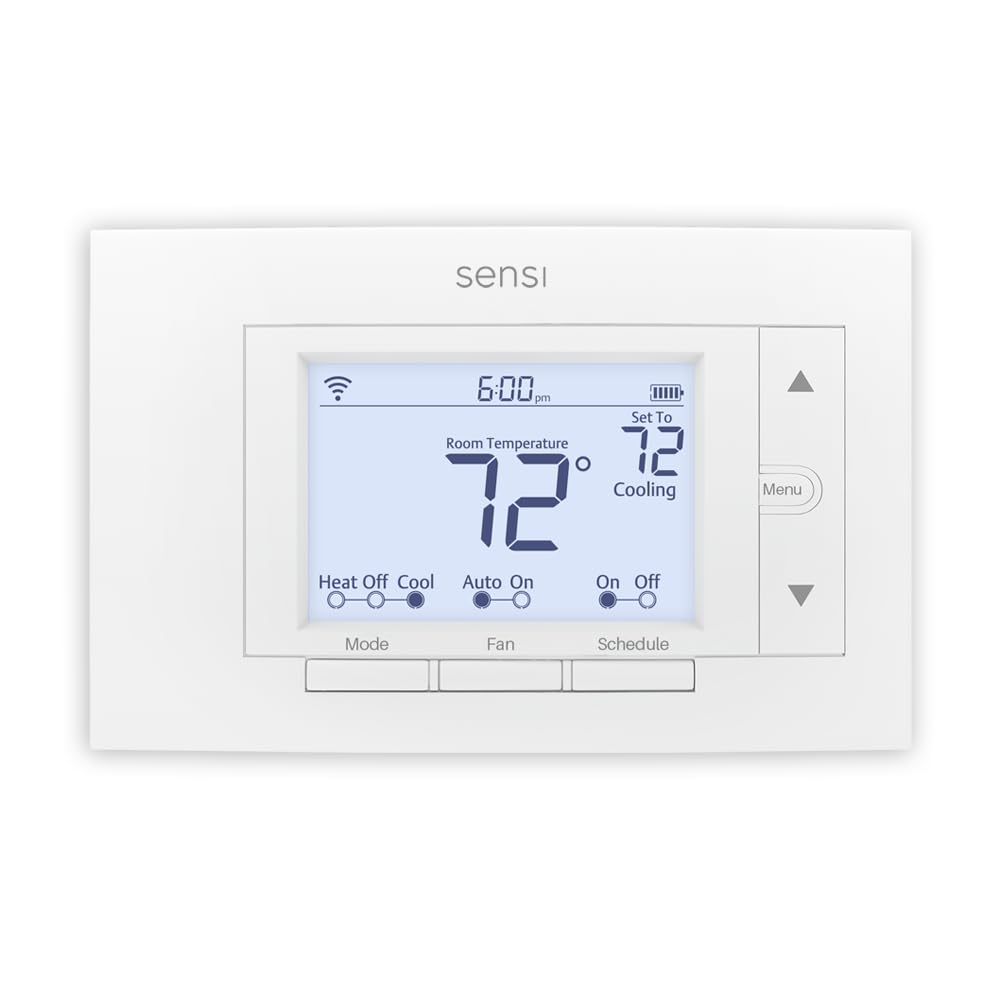
The no-fuss 2-AA-battery Wi-Fi thermostat that reviewers call best value and owners find easy to install.
This Sensi model is the rare thermostat that runs happily on 2 AA batteries and still connects directly to your Wi-Fi—no hub, no C-wire gymnastics for basic setups. It’s ENERGY STAR certified with a claimed 23% savings on HVAC energy, using geofencing (which detects when your phone leaves the house), 7-day flexible scheduling, remote access, and energy usage reports to get there.
Installation is the core strength. Shoppers say most installs finishing in 30 minutes or less, helped by step-by-step instructions and video tutorials right inside the free Sensi mobile app. The built-in level and wire stickers remove the two biggest sources of DIY frustration. It works with Amazon Alexa, Google Assistant, Apple HomeKit (C-wire required for HomeKit), Samsung SmartThings, and Wink—a genuinely broad compatibility list.
The smart alerts are a differentiator: Sensi flags extreme temperature and humidity levels in your home, which is useful for catching an AC drain clog or a failing system early. The honest trade-offs are modest—usage reports lack fine detail like daily runtimes, and the 2-wire heat-only install needs a plug-in transformer for the C-wire, which takes research. It’s also note the “backlit display” is digital rather than a vivid touchscreen, which keeps the battery happy but feels more utilitarian than the premium options here.
Why it wins: for a straightforward battery-powered Wi-Fi install, the Sensi pairs the fewest headaches with the most mainstream voice-assistant support.
6. Honeywell Home T6 Pro Z-Wave (TH6320ZW2007/U)

The battery-only Z-Wave thermostat that RV owners use for gas furnaces and rooftop ACs.
This is the model that proves battery-powered smart control isn’t just for homes—it thrives in RVs. Buyers report it working flawlessly with a gas furnace on 2 wires and a rooftop AC on 4, with no ground or fan speed connections needed. The 3 AA batteries power everything, which is perfect for vehicles and remote cabins where a C-wire simply doesn’t exist.
The touchscreen is genuinely snappy, and the standalone programming works well even before you connect a hub. It learns your heating and cooling cycle, and you can set minimum cool and maximum heat temperatures to lock out extreme settings. For smart home users, it pairs with Hubitat and SmartThings, though setup can be tricky—wire placement, switches, and configuration settings are all critical to getting it right.
The honest quality control note here is real: a minority of owners mention units arriving with temperature readings 6°F off or screen defects. It’s also a Z-Wave device, so you need a hub for app control—there’s no direct Wi-Fi. For the right buyer—an RV owner or a no-C-wire home with a hub already in place—it’s a genuinely capable tool, but inspect your unit on arrival and be ready for a fiddly first-time setup.
Perfect for: RVs, cabins, and any off-grid space with no C-wire and a need for reliable Z-Wave smart control.
Be prepared for: a difficult first install and the occasional quality-control miss—check the temperature reading against a known-good thermometer early.
7. Honeywell Wireless FocusPro Thermostat (TH6320R1004)

The wireless zone controller built for serious multi-zone systems, with a 1-year battery and true no-wire installation.
This is a different beast entirely—it’s designed for homes with a TrueZONE system (like the HZ432 or HZ322 panel) where you need multiple thermostats talking to one central controller. Owners running 3 rooftops and 9 zones describe smooth control through an easy-to-use mobile interface. The wireless design means no running additional wiring to each zone, which is a massive install saver.
It’s powered by RedLink, Honeywell’s proprietary wireless protocol, and runs on battery with a stated 1-year life and a 2-month low battery warning so you’re never caught off guard. The horizontal mounting design is distinct from the square competitors here. It can display outdoor temperature and humidity, and it’s dual fuel enabled—though that requires the THM5320R1000 Equipment Interface Module and a wireless outdoor sensor, both sold separately.
The headline number to know is the 200-foot range, which owners confirm reaches the furthest thermostat in a large setup. The flip side is complexity: this is not a standalone Wi-Fi thermostat. It requires either a TrueZONE panel with a wireless adapter or an Equipment Interface Module to function, and the box famously ships with no instructions—owners rely on original manuals or online tutorials. If you don’t have a zoned system, this is the wrong tool entirely.
Built for: existing TrueZONE multi-zone setups where wireless battery-powered control saves a full rewire.
skip it if: you have a single-zone home—this needs a zone panel or interface module that you likely don’t have.
Understanding the Specs
Power Source and the C-Wire Reality
A C-wire (common wire) supplies continuous power to a thermostat, which lets it run a bright screen and constant Wi-Fi. Battery-powered models skip that wire, but they usually compensate with simpler displays or power-saving tricks. Some units here are “dual powered,” meaning they can use batteries OR a C-wire if you have one—giving you flexibility to upgrade your wiring later without replacing the thermostat.
Connectivity: Wi-Fi vs. Hub-Based Protocols
Wi-Fi thermostats connect directly to your router and work with apps like Google Home or Alexa from the start. Hub-based models use protocols like Z-Wave, LoRa, or RedLink that require a separate hub or module to bridge to your phone. Hub-based setups are often more reliable and private (no cloud dependency) but add cost and setup complexity. Match the protocol to the hub you already own, or choose Wi-Fi for the simplest path.
FAQ
What exactly is a C-wire and why do battery powered thermostats avoid needing one?
Which of these works with a heat pump system?
Will the YoLink thermostat work without its hub?
How long do the batteries actually last in these thermostats?
Can I control these thermostats from my phone when I’m away from home?
What does the “2H/1C” or “3H/2C” staging notation mean?
Is it worth paying more for the Nest 4th gen over the budget Nest Thermostat?
Which thermostat works best with Apple HomeKit?
What is the difference between a Z-Wave thermostat and a regular Wi-Fi smart thermostat?
Are there any thermostats here that can control a humidifier?
Final Thoughts: The Verdict
For most people, the best battery powered smart thermostat winner is the Google Nest Learning Thermostat (4th gen) because it delivers the most intelligence per dollar—learning schedules, Adaptive Eco, and a bundled room sensor that actually fixes hot and cold spots. If you want the simplest path into Google’s ecosystem on a budget, grab the Google Nest Thermostat. And if you’re already running a local smart home hub and value privacy over cloud features, the Honeywell T6 Pro Z-Wave is the one to reach for.
How We Picked
We do not accept paid placement. Every pick is matched to a real buyer and a real use-case; we do not hands-on test units.
Sources & Methodology
Specifications: manufacturer listings and product documentation. Review insights: verified customer reviews, as of September 2026. Pricing: not shown on this page (it changes often); check the current price via the retailer link.
As an Amazon Associate, KitchPrep earns from qualifying purchases. This does not affect which products we feature.
Related Guides
